WordPress Identity Security: Protecting User Access

WordPress identity security means making sure every person or bot trying to reach your dashboard is who they claim to be. You protect it with strong passwords, two-factor authentication, login limits and a hidden login URL, and LoginPress covers the login side of that stack.
Credential stuffing, where bots try passwords leaked from other sites, is a common way into WordPress sites. A firewall alone does not stop it, because the login looks legitimate.
This post explains what identity security covers, the main threats, and how to set up each layer with LoginPress.
Identity Management WordPress (TOC):
What is WordPress Identity Security?
WordPress identity security is a framework for managing and securing the “who” of your website: who a user is, what they can do and how they prove it.
While often used interchangeably, it’s important to distinguish between the three core pillars:
- Authentication: Verifying a user’s identity (e.g., “Are you really the Admin?”).
- Authorization: Defining what that user is allowed to do (e.g., “Can you edit posts or only view them?”).
- Identity Management: The ongoing lifecycle of a user, from onboarding to the revocation of access.
Core Threats to User Identity
The core threats to user identity are AI-assisted credential stuffing, user enumeration, session hijacking and vulnerable legacy plugins.
- AI-Enhanced Brute-Force and Credential Stuffing: Modern bots use AI to predict password patterns based on leaked data from other platforms.
- User Enumeration: Attackers use scripts to guess valid usernames by scanning your author archives, making the password the only remaining barrier.
- Session Hijacking: By stealing session cookies via Cross-Site Scripting (XSS), attackers can impersonate a logged-in admin without requiring a password.
- Vulnerable Legacy Plugins: Outdated tools often leak metadata that helps attackers map out your wordpress access security gaps.
Best Practices for Identity Management in WordPress
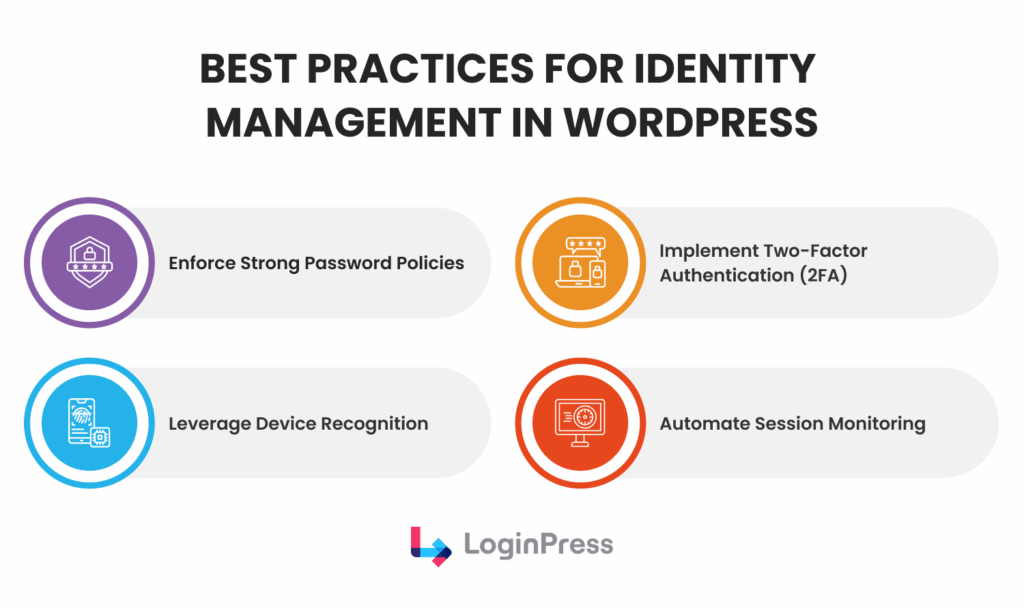
The best practice for identity management in WordPress is a layered defense. These practices cover passwords, authentication and access:
- Enforce Strong Password Policies: Move beyond 8 characters. In 2026, 12–16 character passphrases with mixed complexity are the baseline.
- Implement Two-Factor Authentication (2FA): This is non-negotiable. Even if a password is leaked, 2FA acts as a “second lock” that stops the majority of automated attacks.
- Use Device Recognition: Flagging logins from new or unusual locations adds a critical layer of user identity protection.
- Automate Session Monitoring: Set your site to automatically log out idle users. If an admin leaves a tab open at a coffee shop, the session should expire to prevent hijacking.
Secure Login Systems and LoginPress Implementation
A secure WordPress login system needs more than a username and password, because it has to block attacker tactics before they work.
By layering these specific features, you move from a reactive to a proactive security posture.
1. Advanced CAPTCHA and Bot Protection
Automated scripts are responsible for the vast majority of identity-related breaches.
By integrating Google reCAPTCHA (v2 or v3) or Cloudflare Turnstile via LoginPress, you implement a “proof-of-work” requirement.
To enable CAPTCHA, go to LoginPress >> Settings >> CAPTCHA.
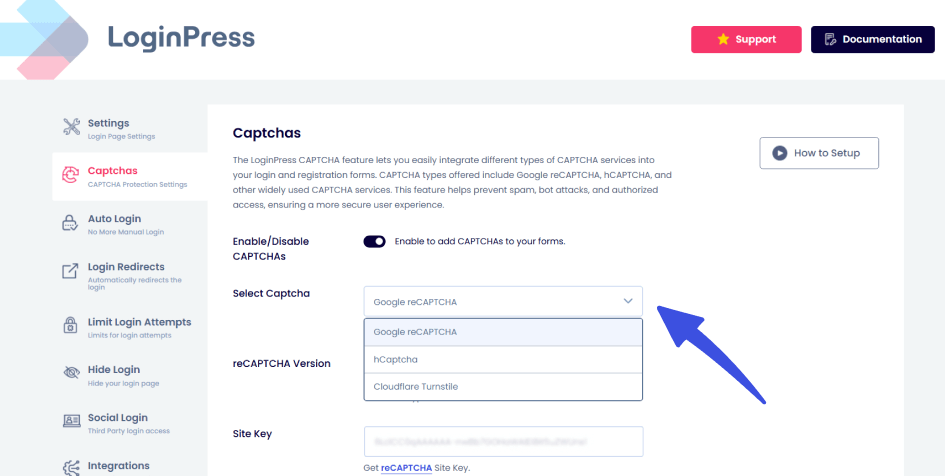
- How it protects identity: Bots must solve a cryptographic or interactive challenge before submitting a login request.
- The Benefit: This filters out most automated brute-force attacks, significantly reducing server CPU spikes and preventing bots from cycling through thousands of leaked credentials.
2. Intelligent Login Attempt Limits
One of the most effective ways to bolster identity security in WordPress is to deny attackers opportunities.
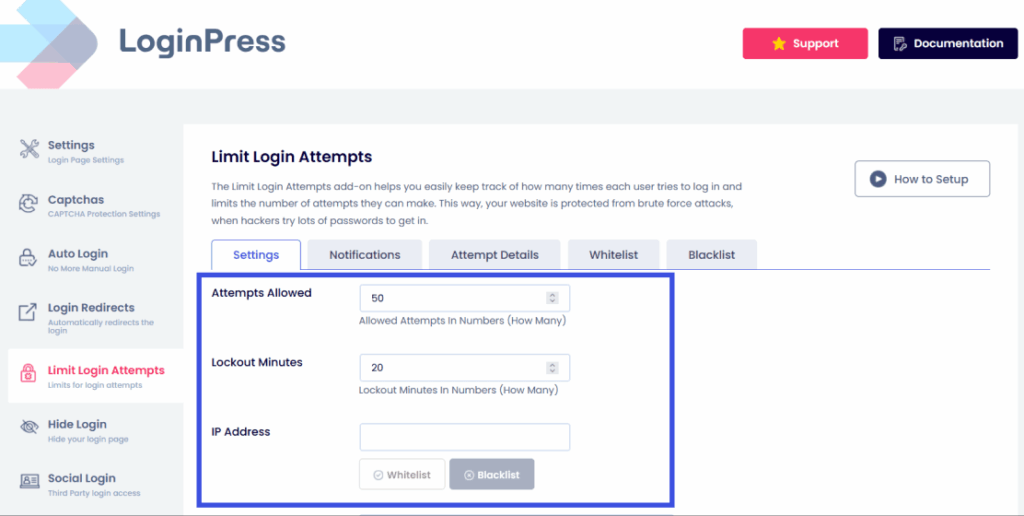
The LoginPress Limit Login Attempts feature allows you to set strict limits on authentication failures.
- Customizable Thresholds: You can set a specific number of allowed retries (e.g., 3 attempts) before an IP address is automatically throttled or blacklisted.
- Progressive Delays: By increasing the lockout duration after each subsequent failure, you make it computationally expensive and time-prohibitive for hackers to continue their attack, effectively neutralizing credential stuffing.
3. Login Form Customization and Obfuscation
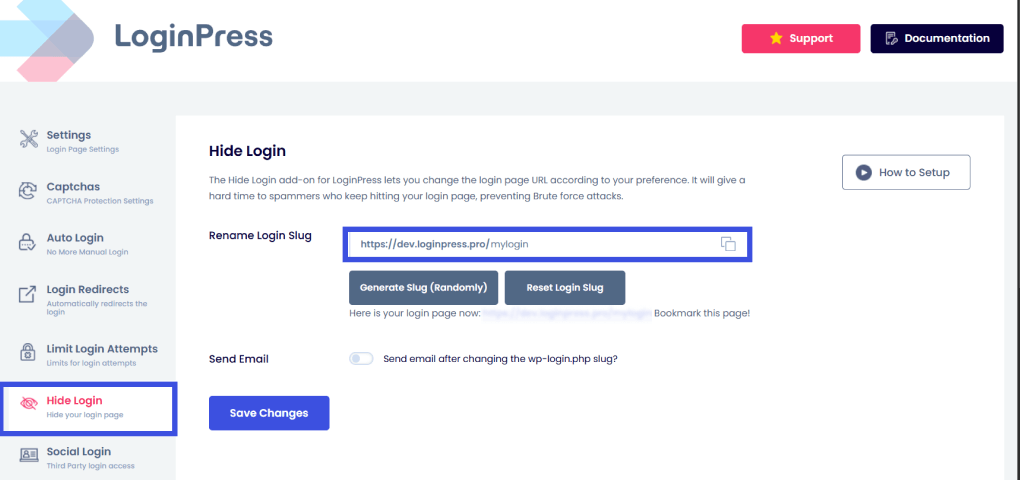
The default WordPress login page (/wp-login.php) is a beacon for hackers. LoginPress offers deep customization that serves two purposes: branding and digital identity protection.
- Custom Login URL: Changing your login path hides the front door from generic scanners that target standard WordPress configurations.
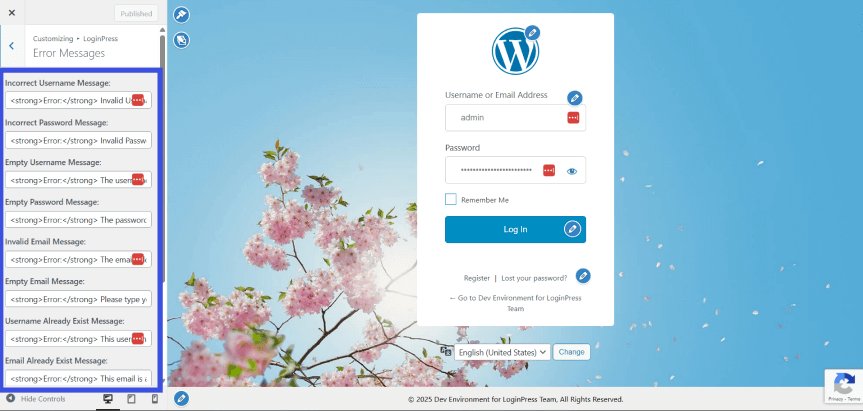
- Error Message Masking: Standard WordPress error messages often indicate whether a username exists, but not whether a password is incorrect. LoginPress allows you to replace these with generic messages (e.g., “Invalid login credentials”). This prevents user enumeration, ensuring attackers can’t verify which usernames are valid on your system.
4. Social Login and Secure Verification Flows
Password fatigue is a major security risk; users often reuse the same weak password across multiple sites. LoginPress simplifies identity management by integrating Social Login (Google, Facebook, LinkedIn, etc.).
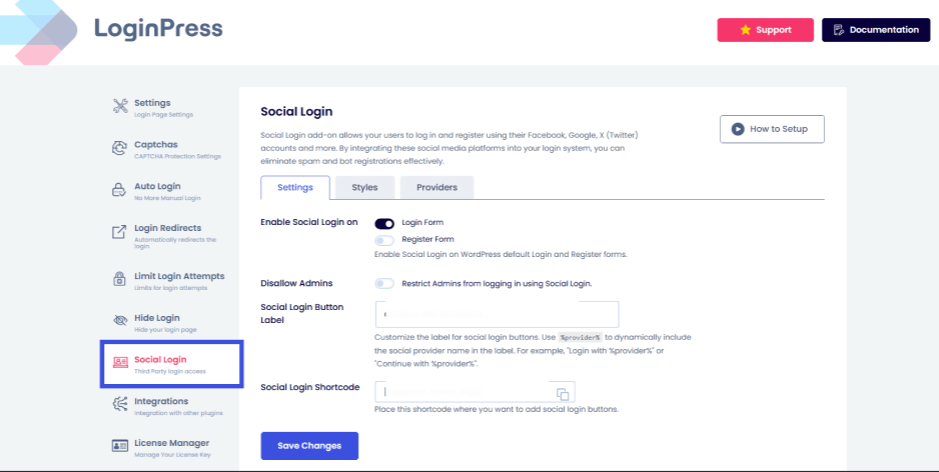
- Used Security: By allowing users to sign in via trusted providers, your site benefits from the multi-billion-dollar security infrastructures of those platforms (including their own 2FA and risk analysis).
- Reduced Attack Surface: Since your WordPress database no longer needs to store a local password for these users, there is one less “key” for a hacker to steal during a database leak.
Access Security Policies and Compliance
Effective WordPress access security depends on internal policies and external defenses together, built on a zero-trust mindset.
A Zero-Trust approach requires abandoning the “once logged in, always trusted” mindset.
Each access request, regardless of the user’s history, must be treated as a potential risk until verification is complete.
Identity Lifecycle Management
A secure site necessitates a comprehensive cradle-to-grave strategy for managing user accounts.
- Onboarding: Assign only the minimum privileges required. Avoid granting Administrator status when Editor or Author roles are sufficient.
- Role Changes: Audit user permissions promptly whenever a team member’s responsibilities change.
- Access Revocation: The absence of timely access revocation is a frequent security vulnerability. Implement a strict offboarding policy to revoke login credentials and API keys immediately upon departure.
Audit Trails and Ongoing Monitoring
You cannot secure what you do not track.
Implementing audit trails allows you to maintain a chronological record of who accessed your site, from which IP address, and what changes they made.
This is essential for identity management in WordPress, as it helps administrators spot “impossible travel” patterns (e.g., a user logging in from London and Tokyo within an hour).
Regulatory Compliance and Data Security
Compliance with regulations such as GDPR, CCPA, and PCI-DSS is mandatory for globally accessible websites.
- Consent Messaging: Implement tools such as LoginPress to provide clear links to the privacy policy and consent checkboxes on login and registration forms.
- Data Minimization: Only store the identity data you absolutely need.
- Secure Logging: Ensure that security logs do not inadvertently store plain-text passwords or sensitive personally identifiable information (PII).
Approaching digital identity protection as an ongoing lifecycle, rather than a one-time setup, ensures continued compliance and resilience against both internal and external threats.
Case Study: Deflecting a Credential Stuffing Attack
This case study shows how layered defenses stop a credential stuffing attack. Imagine “Sarah,” a site administrator whose email was part of a third-party data breach.
An attacker uses an automated bot to try her leaked password on her WordPress site. Here is how LoginPress coordinates the defense:
- The Entry Attempt: The bot targets the standard /wp-admin URL. Because Sarah used LoginPress to rename her login URL to a custom path, the bot hits a dead end (404 error) immediately.
- Verification Challenge: The attacker eventually finds the hidden URL, but is met with a Google reCAPTCHA requirement. The bot cannot bypass this manual verification step, halting the automated attack.
- The Lockdown: If a human attacker tries to “guess” the remaining details, LoginPress tracks the failed attempts. After three wrong guesses, the Login Attempt Limit triggers, and the attacker’s IP address is blacklocked for 24 hours.
- Session Control: LoginPress lets you customize how long user sessions remain active, helping reduce the risk of long-lived session hijacking by shortening session duration.
The Result: Sarah’s site remains secure, her user identity is protected, and she receives a clean security report the next morning.
Future Outlook: Passwordless and Identity-First Strategies
The future of WordPress identity security is passwordless login and identity-first strategies.
The industry is shifting to passwordless authentication and identity-first architectures, driven by the widespread adoption of Passkeys and the FIDO2 standard.
For enterprises and high-traffic sites, Federated Identity and Single Sign-On (SSO) are now standard to reduce identity sprawl and lower the risk of credential-based breaches.
WordPress site owners can prepare for this frictionless future by using LoginPress as their central security hub.
- Adopt Magic Links: LoginPress Pro offers an Auto Login add-on that lets administrators issue temporary password-less login URLs for specific users. Separately, WordPress offers dedicated Magic Link plugins for passwordless email links.
- Use Social Identity: Implementing Social Login offloads password management to trusted identity providers like Google or Apple, which already use biometric liveness detection.
- Prepare for SSO: Even for smaller sites, shifting to an identity-first mindset, where the login page is a gateway rather than just a form, ensures you are ready for federated trends in 2026 and beyond.
FAQs: WordPress Identity Security
What is WordPress identity security, and why does it matter?
WordPress identity security is the practice of protecting user credentials and access rights to ensure that only authorized individuals can enter your site. In 2026, it is critical because attackers use AI-driven tools to guess passwords and hijack sessions at scale. Without strong identity protection, your site is vulnerable to data breaches that can damage your reputation and lead to legal penalties.
What is WordPress identity security, and why does it matter?
WordPress identity security is the practice of protecting user credentials and access rights to ensure that only authorized individuals can enter your site. In 2026, it is critical because attackers use AI-driven tools to guess passwords and hijack sessions at scale. Without strong identity protection, your site is vulnerable to data breaches that can damage your reputation and lead to legal penalties.
How do I secure user identity on my WordPress site?
To secure user identities, you should implement multi-layered defenses:
Enforce strong password policies (12+ characters).
Enable Two-Factor Authentication (2FA).
Limit login attempts to block brute-force bots.
Use LoginPress to hide your login URL and customize error messages to prevent “user enumeration,” which is when hackers verify if a username exists.
Can a custom login page improve my site’s security?
Yes. By default, every WordPress site uses /wp-login.php, making it an easy target for automated scripts. Using LoginPress to rename your login URL acts as a “security through obscurity” layer, hiding your entry point from 99% of generic bot scans and significantly reducing the risk of unauthorized access.
What is the best way to handle “Zero Trust” on WordPress?
Zero Trust means “never trust, always verify.” You can implement this by:
Assigning the minimum necessary permissions (Least Privilege) to every user.
Monitoring audit trails to track login locations and times.
Automatically logging out inactive users via the LoginPress Session Expire feature to prevent session hijacking from abandoned devices.
Is social login more secure than traditional WordPress logins?
Generally, yes. Social Login (like signing in with Google or Facebook) allows users to use the enterprise-grade security of those platforms. It reduces “password fatigue” by preventing users from creating weak, reusable passwords on your site, and ensures their primary identity is protected by the provider’s 2FA and risk-analysis systems.
Conclusion: Identity Security in WordPress
WordPress identity security is not a “set and forget” setting. It is the foundation of trust on your site.
Moving beyond default settings and implementing a secure login system with LoginPress is not just about checking a compliance box. You are future-proofing your site against an increasingly automated threat landscape.
Don’t wait for a suspicious login notification to realize your gateway is vulnerable.
Take control of your site’s identity architecture today to ensure your data and your users remain safe.
For more information on WordPress security, check:
- Login Security for Community Websites: Forums, Groups, and Networks
- User Authentication Best Practices for WordPress Websites (2026)
- Login Security for Membership Sites: What You Must Protect in 2026
With AI-driven bot attacks on the rise, is your current login page doing enough to distinguish a loyal user from a sophisticated script?