WordPress Authentication Methods Explained: Pros, Cons & Use Cases

The five main WordPress authentication methods are password-based login, passwordless login, social login, multi-factor authentication (MFA) and CAPTCHA with anti-bot verification. A username and password alone is no longer enough, so most sites combine two or three of these methods based on their users and risk level.
This post shows you the pros, cons and use cases of each method, and how to manage them from one place with LoginPress.
WordPress Authentication Methods (TOC):
What is WordPress Authentication?
WordPress authentication is the process of verifying a user’s identity, while authorization decides what that user can do after gaining access.
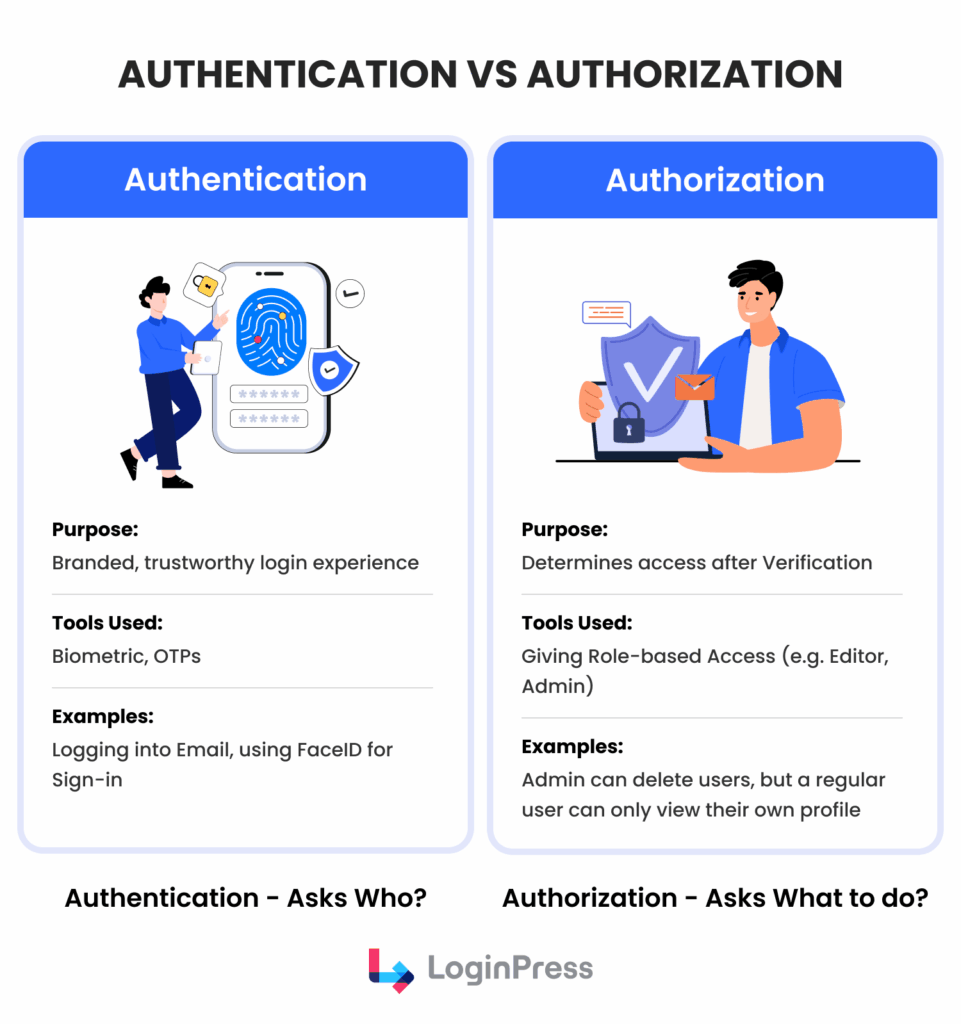
Although WordPress provides a native login system, it was not originally developed to address the complex security requirements of modern web environments.
A considerable challenge in modern WordPress authentication is managing login friction. Excessively strict security measures may discourage user engagement, while insufficient security increases vulnerability to automated attacks. Therefore, understanding the distinctions between password-based and passwordless login methods is essential for effective site administration.
A contemporary secure WordPress login method must address three crucial areas:
- Identity Verification: Ensuring the user truly owns the account.
- Bot Prevention: Stopping brute-force attacks before they reach your database.
- User Retention: Making the process fast enough that users don’t abandon their sessions.
By making use of the strong, flexible authentication methods in WordPress, you turn your login page from a technical need into a strategic advantage.
5 WordPress Authentication Methods (Explained)
The five WordPress authentication methods differ in security and speed, so choosing the wrong one can make your site a target for bots or frustrate users until they stop logging in.
Below are the five methods, their trade-offs and how to deploy each with LoginPress.
1. Password-Based Authentication
The traditional username and password combination remains the most widely recognized WordPress authentication method. Despite its age, it is the basis of almost every site due to its simplicity and universal support across all devices.
- Pros: Requires no additional hardware or third-party accounts; users are already trained on how to use it.
- Cons: Highly vulnerable to brute-force attacks and phishing. Users often choose weak passwords or reuse them across multiple sites, creating an effective security gap.
- Best Practices: Enforce WordPress login security best practices by requiring a minimum of 12 characters, including special symbols and numbers. Implementing inline validation lets users see whether their password meets requirements in real time.
- How LoginPress Helps: You can harden this method by enabling the LoginPress Password Strength option, which requires users to create complex credentials.
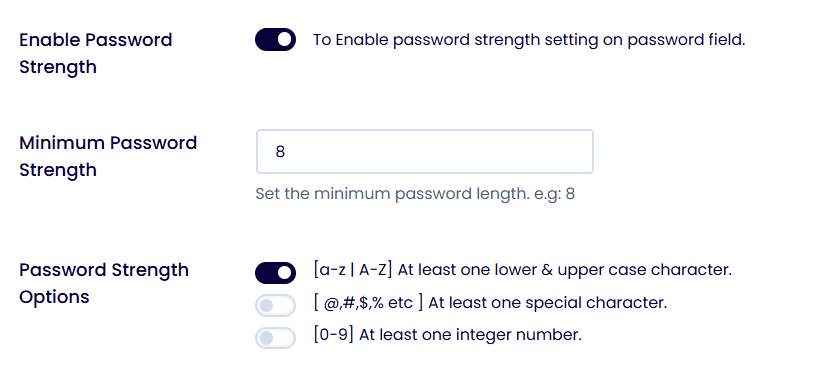
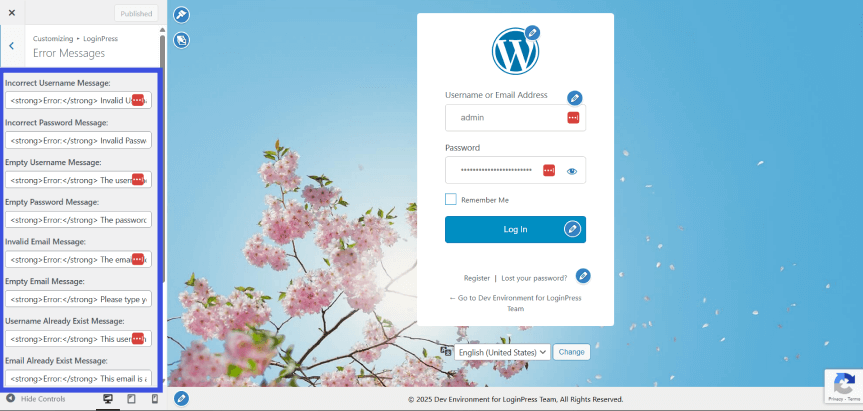
Additionally, the custom error messages feature ensures that if a login fails, you don’t reveal whether the username or the password was incorrect, which can prevent a username enumeration attack by hackers.
2. Passwordless Authentication
Passwordless login is a modern shift in secure WordPress login methods. Instead of a static password, users receive a unique, temporary Magic Link via email or a One-Time Password (OTP) via their mobile device.
- Pros: Drastically reduces password fatigue and eliminates the risk of stolen or leaked credentials. If there is no password to steal, the account is significantly harder to breach.
- Cons: Users are dependent on immediate access to their email or mobile device. If their mail server is delayed, it can hurt the login experience.
- Use Cases: Perfect for membership sites, high-end SaaS applications, and mobile-first users who want to avoid typing long strings on small screens.
- How LoginPress Helps: Through the Auto Login Add-on, LoginPress allows administrators to generate unique, secure login URLs for specific users. This enables a smooth transition in the password vs passwordless login debate by providing secure, one-click access without traditional credentials.
3. Social Login
This method allows visitors to bypass the standard registration form by using their existing profiles from Google, Facebook, Twitter, or LinkedIn.
- Pros: Provides near-instant onboarding, reducing form fatigue and increasing user registration rates.
- Cons: You rely on the uptime and privacy policies of third-party platforms. Some users may also have privacy concerns about sharing their social data.
- Use Cases: Essential for eCommerce stores and content portals where user retention and fast checkout are the top priorities.
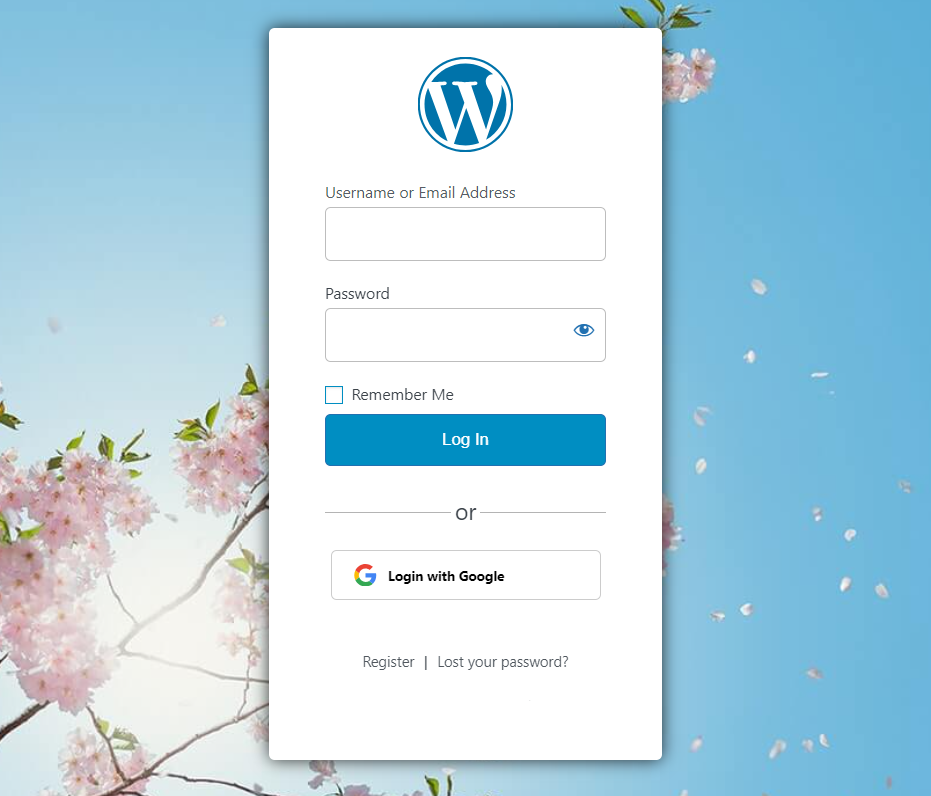
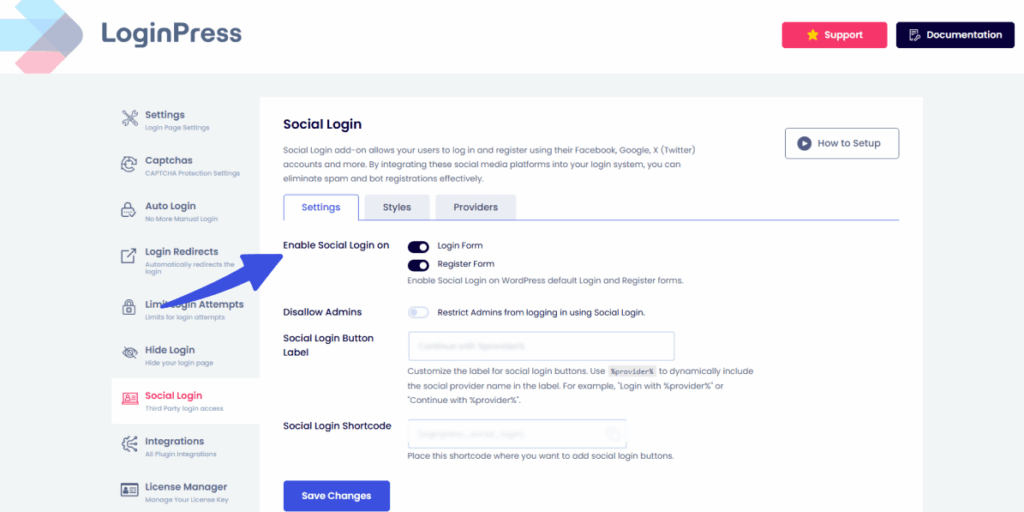
- LoginPress Use Case: The Social Login Add-on integrates these providers directly into your custom login form.
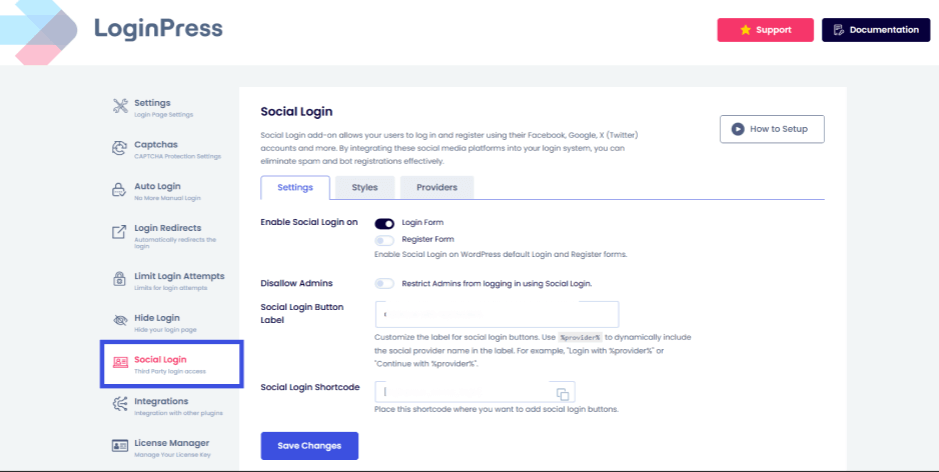
It provides a technical bridge that automatically syncs the social profile with a WordPress user account, making it one of the most efficient authentication methods in WordPress.
4. Multi-Factor Authentication (MFA / 2FA)
MFA is no longer an extra feature; it is a vital requirement for any site handling sensitive data. It requires a second form of verification, such as a code from an app like Google Authenticator or a hardware key.
- Pros: Adds a strong layer of security. Even with a stolen password, an attacker cannot gain access without the physical device.
- Cons: Adds a step to the login process, which can be seen as “friction” for casual users.
- Actionable Strategy: Apply WordPress login security best practices by making MFA mandatory for Administrators and Editors, while keeping it optional for standard Subscribers to maintain a balance of UX and safety.
- LoginPress Support: LoginPress is fully compatible with leading MFA plugins (like WP 2FA), allowing you to style the 2FA input screens to match your brand perfectly.
5. CAPTCHA & Anti-Bot Verification
While not a login method itself, CAPTCHA is a vital verification layer that helps the system distinguish between human users and automated scripts.
- Pros: Stops 99% of automated brute-force attacks and prevents spam registrations from bloating your database.
- Cons: Older puzzle-based CAPTCHA can frustrate users and present accessibility challenges.
- Use Cases: Non-negotiable for high-traffic sites, registration forms, and comment sections.
- How LoginPress helps: LoginPress integrates Google reCAPTCHA v2 and v3, as well as Cloudflare Turnstile. These tools enable Invisible verification, where legitimate users are never prompted to solve a puzzle, while bots are blocked instantly.

WordPress Authentication Methods: A Comparison Summary
The best WordPress authentication method balances strong protection with an easy login flow.
This table compares the key trade-offs between passwords, passwordless login and modern security layers:
| Method | Security Level | User Experience | Setup Complexity | Ideal Use Case | LoginPress Features |
| Password-Based | Moderate | Standard | Low | Simple Blogs & Personal Sites | Password strength meter |
| Passwordless | High | Excellent | Moderate | Membership Sites & SaaS | Auto Login Add-on |
| Social Login | High | Instant | Moderate | eCommerce & Content Portals | Social Login Add-on |
| MFA / 2FA | Critical | High Friction | Moderate | Admin Accounts & High-Risk Sites | Smooth Integration with MFA plugins |
| CAPTCHA | Defensive | Invisible | Low | Any site with public forms | CAPTCHAs |
The Unified Solution: Why LoginPress?
Managing five different secure WordPress login methods can quickly lead to plugin bloat and conflicting settings. This is where LoginPress excels as a unified authentication hub.
Rather than installing separate tools for social entry, custom password policies, and bot protection, LoginPress provides these authentication methods in WordPress under a single, navigable interface.
It allows you to:
- Enforce Strong Password Policies: Hardened password policies are mandatory for privileged users.
- Reduce Friction: Passwordless and social login options that keep conversion rates high by reducing friction in login and registration.
- Prevent Attacks: Integrated reCAPTCHA to stop spam bots in their tracks.
By consolidating your stack, you ensure that your site remains fast, your code remains clean, and your login page stays fully aligned with the highest WordPress login security best practices.
Choosing the Right Authentication Method for Your Site
You choose the right WordPress authentication method based on your user base, the sensitivity of your data and the devices your audience uses.
- User Base: Are your users tech-savvy developers or casual shoppers?
- Risk Level: Do you store credit card info or medical data, or just blog comments?
- UX Priorities: Is the goal to have the fastest checkout possible (Social Login) or the most secure dashboard (MFA)?
- Device Types: Are your users primarily on mobile? If so, passwordless login via magic links or biometrics is far superior to long, complex passwords.
Authentication Strategies by Site Type
I have also added authentication strategies by site type for easier understanding of which authentication type works best for which type of industry:
1. The eCommerce Store (WooCommerce)
In eCommerce, friction kills conversions. If a customer has to go through a complex 2FA process just to buy a t-shirt, they will leave.
- Recommendation: Use Social Login for instant account creation and CAPTCHA (invisible v3) to stop bot-generated fake orders. This ensures secure WordPress login methods that don’t hurt your revenue.
2. The Membership or SaaS Platform
When users log in daily to access a tool or premium content, password fatigue becomes a major issue.
- Recommendation: Prioritize the password vs passwordless login debate by offering Magic Links. It’s faster for the user and more secure for the platform, since there are no stored passwords to leak in a database breach.
3. The Corporate or Multi-Author Blog
Sites with multiple editors and administrators are high-value targets for hackers.
- Recommendation: Follow WordPress login security best practices by enforcing mandatory Multi-Factor Authentication (MFA) for all high-level roles (Admin/Editor). For regular subscribers, a strong password enforced by a strength meter is usually sufficient.
The Flexibility of LoginPress
With LoginPress, you don’t have to choose just one path. It provides a flexible framework for mixing and matching authentication methods in WordPress based on user roles. You can give a Login with Google button for your customers while simultaneously requiring a 16-character password for your internal team.
By using LoginPress as your central hub, you ensure that your site stays compliant with WordPress login security best practices without sacrificing the user experience that keeps your audience coming back.
FAQs on WordPress Authentication
Which authentication method is most secure for my WordPress site?
There is no single “perfect” method, but Multi-Factor Authentication (MFA) combined with a unique, encrypted password is widely considered the gold standard. For the highest level of security, follow WordPress login security best practices by requiring hardware keys (like YubiKey) or biometric verification for any user with administrative privileges.
Does social login improve my site’s user experience?
Yes, significantly. Social login reduces form fatigue by enabling users to register with a single click. Statistics show that implementing social authentication methods in WordPress can increase registration rates by up to 40%, making it essential for eCommerce and membership sites where fast onboarding is critical to retention.
Is passwordless login safer than traditional password-based login?
In many cases, yes. Because there is no static password stored in a database for a hacker to steal, passwordless login via magic links or OTPs eliminates the risk of credential-stuffing attacks. It resolves the password vs. passwordless login debate by shifting the security burden away from the user’s memory and onto their secure email or device.
Can I use multiple authentication methods at once?
Absolutely. In fact, using a tool like LoginPress allows you to offer a hybrid approach. You can provide Social Login for customers to keep things fast, while enforcing secure WordPress login methods, such as MFA and CAPTCHA, for your internal team. This ensures every user group has the right balance of security and speed.
Conclusion: Authentication Methods in WordPress
Your login page is a strategic asset, and how you verify users defines your site’s security and reputation.
The best security is the kind your users do not have to fight against, whether you choose the speed of social login or the strength of MFA.
LoginPress lets you manage these WordPress login methods from one interface. For more on login security, check these guides:
- How to Build Login Security for Headless WordPress
- WordPress Login Trust Psychology: What Makes Users Trust Your WordPress Site
- How To Customize WordPress Login Page For Clients (Detailed Guide)
Now that you’ve seen the options, which authentication method do you think would most improve your users’ login experience today?