WordPress Login Security Automation: Protect Sites Without Manual Monitoring

WordPress login security automation uses rules and tools to block bots, limit failed attempts and lock out suspicious logins without anyone watching the logs. You set it up once at the login layer, and it works around the clock.
This post explains what to automate and how LoginPress helps you do it.
Automated Login Security (TOC):
Why Manual Login Monitoring No Longer Works
Manual login monitoring no longer works because attacks are automated and run at a scale no person can match.
- The Brute Force Epidemic: Credential stuffing, where bots use billions of leaked username/password combos from other site breaches, is entirely automated. Manual intervention cannot keep pace with 10,000 attempts per minute.
- The Scaling Problem: As your site grows, adding members, authors, or customers, your attack surface expands exponentially. Every new user is a potential weak point.
- Reactive vs. Real-Time: Detecting breaches through retrospective log analysis does not constitute effective security; it is merely post-incident analysis. Real-time threat detection is essential for preventing data breaches before they occur.
Modern security emphasizes a proactive posture rather than reliance solely on plugins. Effective systems are designed to continuously monitor and autonomously defend against threats.
What is Automated Login Security in WordPress?
An automated login security system in WordPress is a logic-based system designed to distinguish between legitimate users and malicious scripts.
Instead of a static Username/Password field, smart login protection uses logic to challenge users. This workflow includes:
- Rule-based Protection: Denying access if certain conditions (like IP origin or time of day) aren’t met.
- Behavioral Restrictions: Blocking a user who types at superhuman speeds or tries three different passwords in four seconds.
- Detection and Response Logic: Automatically escalating security (like triggering a CAPTCHA) when suspicious patterns emerge.
Focused Login Automation vs. General Firewalls
While a general firewall (WAF) looks for bad code in your traffic, automated authentication security focuses specifically on the handshake.
It ensures the person entering the building is who they say they are, rather than just checking if they’re carrying a weapon.
Where Default WordPress Login Falls Short
The default WordPress login falls short because its built-in security features are intentionally minimal.
This design results in several notable security gaps, which are mentioned as follows:
- Predictable Endpoints: Automated threats frequently target the /wp-login.php endpoint, which serves as a universal entry point for WordPress sites.
- No Native Rate Limiting: By default, WordPress allows unlimited login attempts, which significantly increases the vulnerability to brute-force attacks.
- Role Ambiguity: The default configuration does not restrict user logins based on geographic location or time, regardless of user role.
- Weak Enforcement: It lacks the “smart” logic needed to force specific security behaviors based on user roles.
These limitations present significant challenges for individual site owners and are unacceptable for security teams.
Implementing WordPress security automation addresses these gaps by introducing intelligent controls to the login process.
Core Components of WordPress Security Automation at the Login Layer
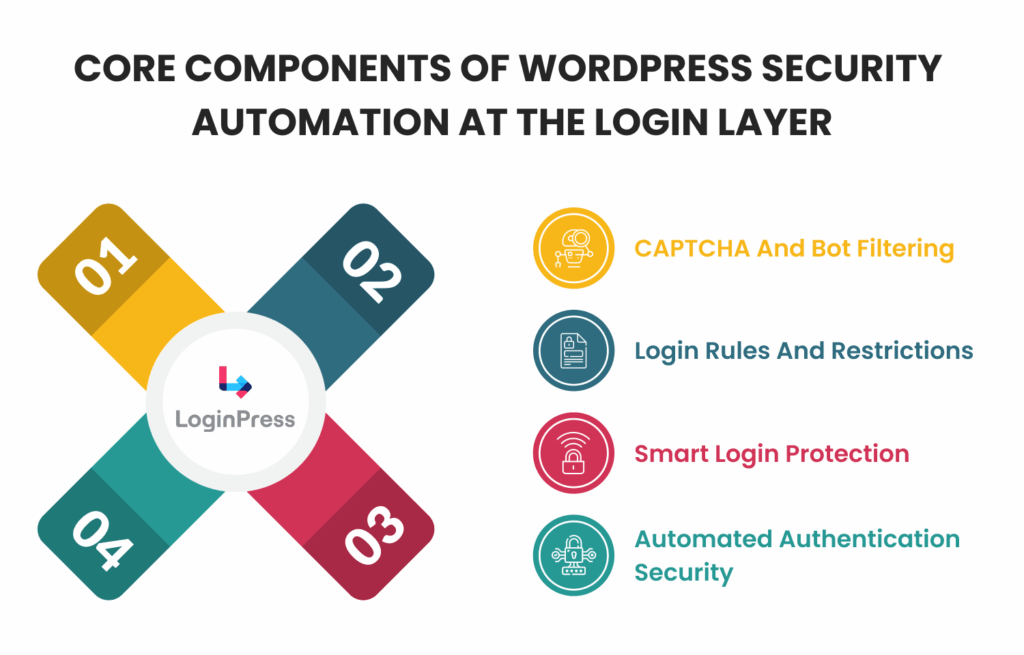
Login security automation works across four layers:
1. CAPTCHA and Bot Filtering
The goal is to stop the attack before it even hits your database.
By automating CAPTCHA challenges, you force bots to solve computationally intensive puzzles that are easy for humans to solve. This effectively cancels out the attacker’s efforts.
2. Login Rules and Restrictions
Automation enables the implementation of invisible guardrails around your system. These can look like:
- IP-Based Limits: Automatically blacklist IP addresses that exhibit repeated failed login patterns.
- Role-Based Restrictions: Restrict administrator access to specific IP ranges, while permitting subscribers to log in from any location.
- Time-Based Controls: Disable the login page for designated user roles outside of standard business hours.
3. Smart Login Protection
This layer incorporates adaptive blocking. When a specific username is targeted from multiple IP addresses, an intelligent system detects the pattern and locks the account, irrespective of the attack source.
4. Automated Authentication Security
This layer manages how the site processes the login. It can automate redirects, customize the login URL, and ensure the wp-admin area remains invisible to unauthorized users.
How LoginPress Enables Smart Login Protection
LoginPress enables smart login protection by focusing only on the authentication layer, so you get a dedicated login protection engine without the overhead of a full site scanner.
The Smart Lock Approach
Major security suites on the market today function as comprehensive perimeter defenses. While effective for general protection, these solutions frequently address authentication as a simple binary process.
LoginPress acts as the Smart Lock, strengthening your authentication layer.
It provides a dedicated logic system for the login page without including unnecessary features like a full malware scanner, keeping your site lean and fast.
1. CAPTCHA Integration: Early Bot Detection
Most brute force attacks fail only after they have already hit your database to check a password.
LoginPress stops this cycle earlier. Integrating Google reCAPTCHA or Turnstile creates a “Pre-Flight” check.
- The Automation Factor: If the visitor cannot prove they are human, the login request never even reaches your WordPress core. This saves CPU cycles and prevents your server from choking during a massive bot-net attack.
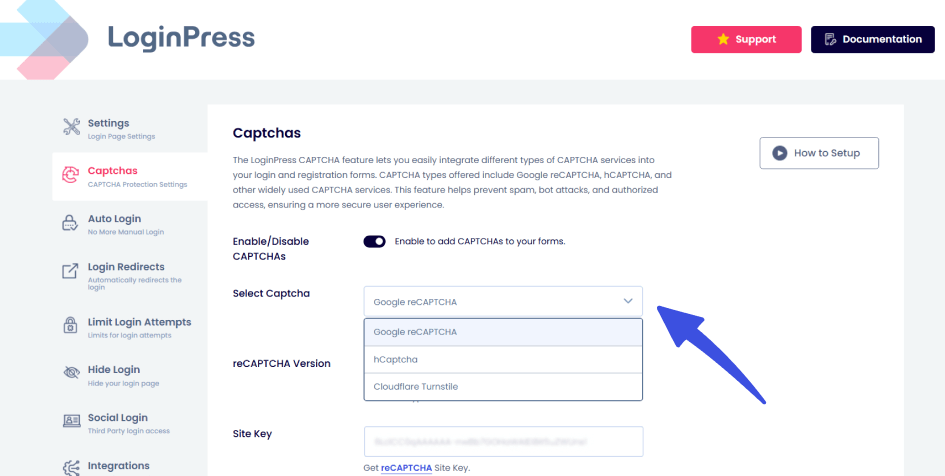
2. Advanced Login Restrictions: Conditional Access Controls
A significant advantage of WordPress security automation is the ability to define conditional “If/Then” parameters.
LoginPress offers a precise user interface for configuring these rules in the Limit Login Attempts Add-On:
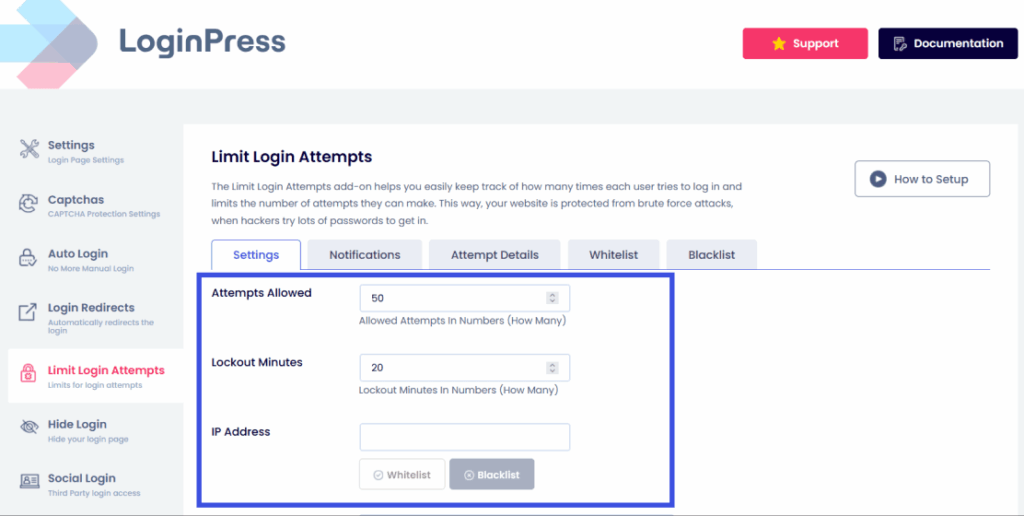
- IP Whitelisting and Blacklisting: Administrators can permit access from trusted office IP addresses while restricting access from high-risk regions.
- Attempt Limits: The system can automatically enforce a lockout period. For example, after three failed login attempts, the user is restricted from accessing the system for one hour without requiring manual intervention.
3. Controlled Login Rules: Role-Based Automation
Standard WordPress treats every login the same. LoginPress allows you to automate the post-login experience based on user roles.
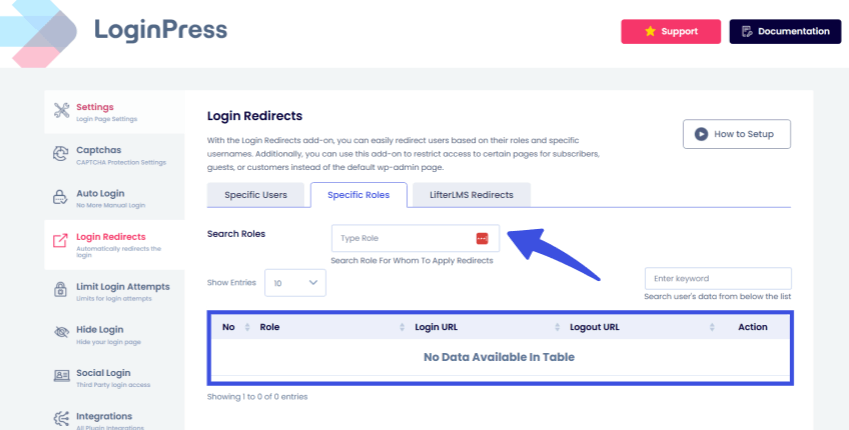
- Strategic Redirection: Administrators can configure rules to direct “Customers” to a designated WooCommerce dashboard, while “Editors” are redirected to the post list.
- Security Benefit: Automating these workflows ensures that users only access the /wp-admin/ dashboard when necessary, thereby reducing backend exposure for the majority of logged-in users.
4. Auto Login Flows: Mitigating Password Vulnerabilities
Passwords are the weakest link in automated authentication security. In trusted environments, such as when a developer accesses a staging site or a premium member accesses a specific tool, LoginPress can generate unique, encrypted Auto Login links.
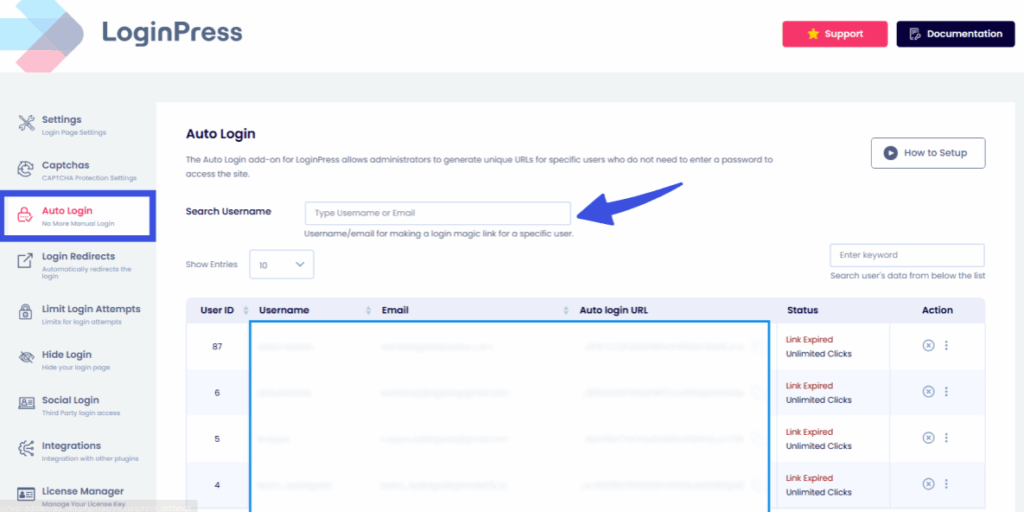
Benefit: These links remove the need for a traditional password field during the session, thereby eliminating the primary target for credential-stuffing attacks.
5. Session Management and Customization
LoginPress enables automated session expiration, preventing users from remaining logged in indefinitely and posing significant security risks if a device is compromised.
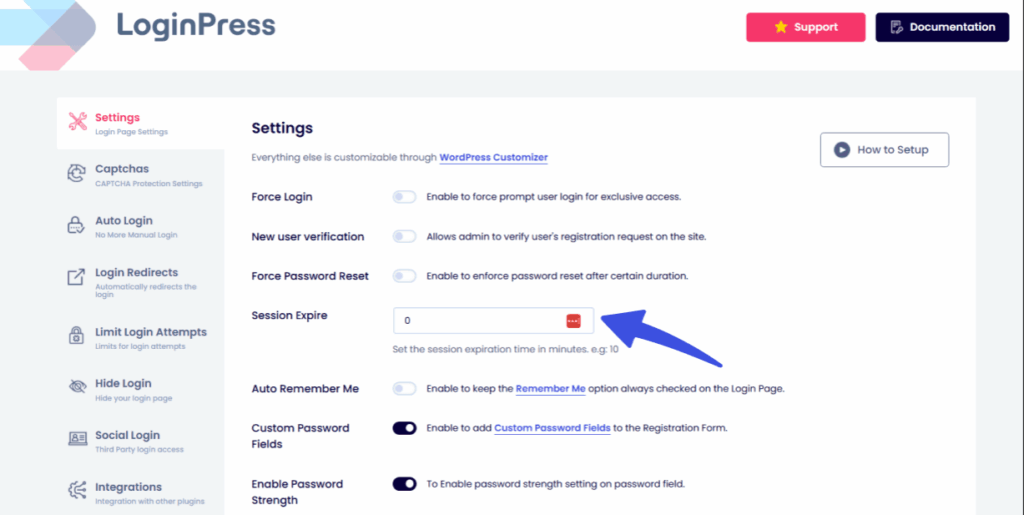
Additionally, administrators can customize the appearance and URL of the login page, using the principle of security through obscurity.
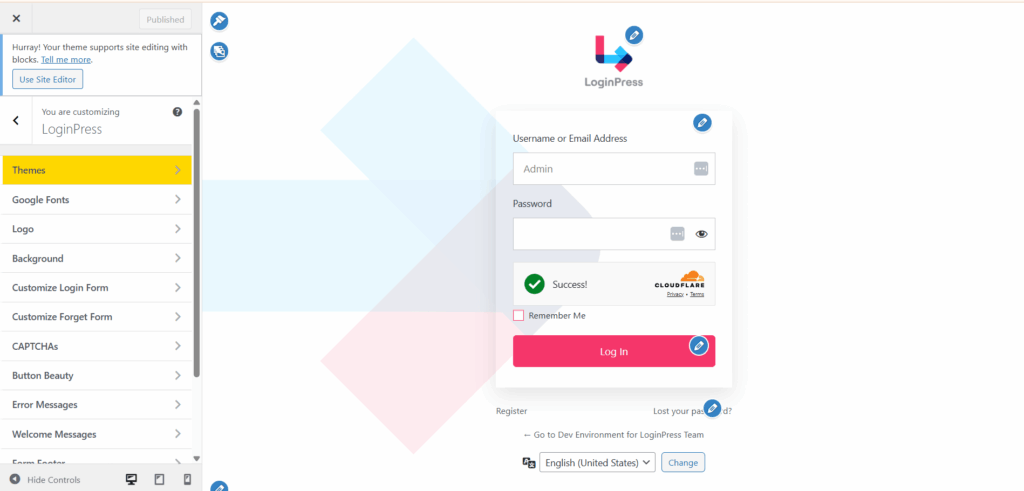
Bots searching for standard WordPress branding and URLs are more likely to bypass sites that do not match expected patterns.
| Feature | Legacy Approach (Manual) | LoginPress Approach (Automated) |
| Bot Defense | Checking logs for high traffic. | CAPTCHA stops bots before they hit the database. |
| Access Control | Manually banning IPs in .htaccess. | Login Restrictions UI handles bans dynamically. |
| User Navigation | Users land on the default dashboard. | Controlled Rules automate role-based redirects. |
| Login Security | Relying on strong user passwords. | Auto-Login links bypass the password fields for trust. |
Building a Strong Login Security Posture (Best Practices)
A strong login security posture comes from layering automated defenses, not from installing a single plugin.
This approach ensures that if one layer is breached, multiple automated barriers remain to protect your data.
By integrating WordPress security automation into your daily operations, you move from a “hope-based” security model to a proactive, hardened environment.
Here is the strategic layer for building a modern, automated defense:
1. Combine Login Automation with Firewall Rules
A firewall (WAF) acts as your perimeter fence, filtering out massive waves of bad traffic. However, login protection systems act as the intelligent gatekeeper.
By combining a firewall with LoginPress, you create a dual-layered defense. The firewall blocks known malicious IPs from reaching your site, while LoginPress manages the automated authentication security logic for those who do reach it, ensuring that only legitimate users proceed.
2. Enforce Strong Passwords through Automation
Humans are notoriously bad at picking passwords. You can mitigate this risk by using tools that automate password strength requirements.
- The Strategy: Use automation to force periodic password resets and block common, easily guessable strings.
- The Benefit: This reduces the success rate of brute force attacks that rely on “123456” or “Password01” to gain entry.
3. Limit Admin Role Exposure
The Admin account is the crown jewel for any attacker. A key best practice in real-time login control is the Principle of Least Privilege.
- Implementation: Use controlled login rules to restrict administrative access to specific IP addresses or internal networks.
- Result: Even if an attacker steals an Admin password, they cannot log in because the automated system recognizes they aren’t on a trusted network.
4. Monitor Login Attempt Patterns
While you want to move away from manual monitoring, you shouldn’t ignore your data. Modern WordPress login security automation tools provide logs that highlight patterns.
- What to look for: A sudden spike in failed attempts for a specific username often signals a targeted credential-stuffing attack.
- Automation Step: Set up your system to automatically escalate security (e.g., trigger a more challenging CAPTCHA or a 24-hour lockout) when these patterns are detected.
5. Reduce the Attack Surface
The Attack Surface is the sum of all points where an unauthorized user can attempt to enter or extract data.
- Hide the Front Door: Use smart login protection to rename your wp-login.php URL. This simple automated tweak hides the login page from 99% of basic bot scripts.
- Disable Unused Services: If you aren’t using XML-RPC or the REST API for external logins, disable or restrict them. These are often hidden doorways that bypass your standard login page.
By layering these best practices, you create a cohesive ecosystem where WordPress security automation handles the heavy lifting.
You aren’t just reacting to threats; you are anticipating them by reducing the areas where an attacker can even attempt a strike.
When Do You Need Login Automation?
You need login automation as soon as your site grows beyond what you can watch by hand.
If you fall into any of the following categories, WordPress login security automation is no longer optional; it’s a business requirement.
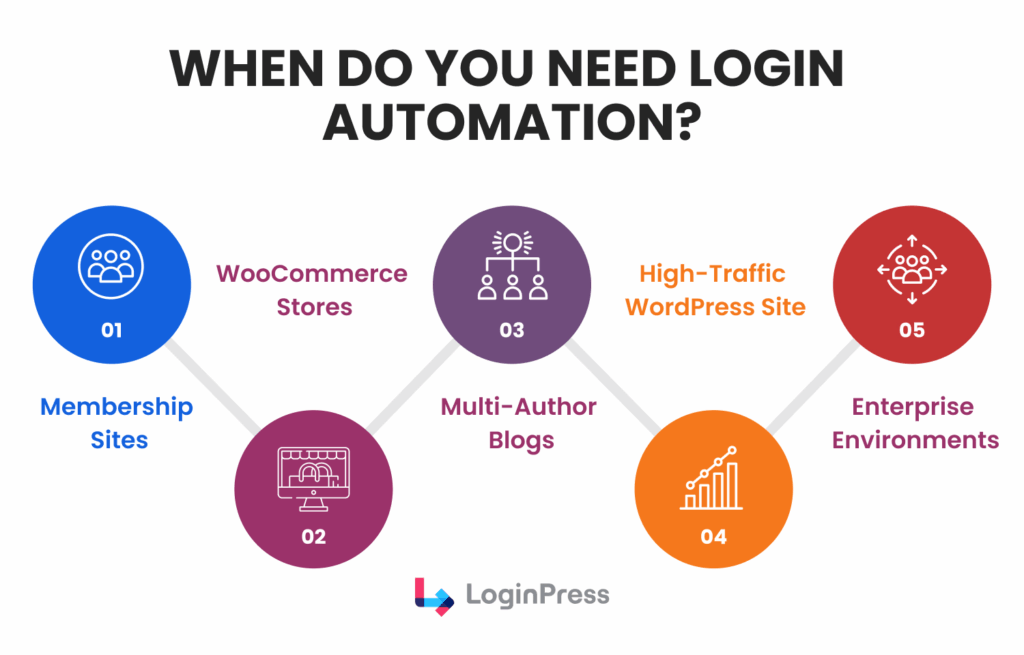
Key Use Cases for Automation
- Membership Sites: High user volume makes it impossible to manually distinguish between a forgetful member and a brute force attack. Automation handles challenges and lockouts instantly.
- WooCommerce Stores: Protecting customer data is a legal mandate. Automated authentication security ensures that customer accounts remain a “no-go” zone for credential stuffers.
- Multi-Author Blogs: You can’t control every writer’s password habits. Use controlled login rules to automate role-based access and restrict sensitive areas.
- High-Traffic Sites: Large sites attract massive botnets. Automation prevents these bots from draining server resources by blocking them before they hit the database.
- Enterprise Environments: For sites requiring strict compliance, real-time login control provides the consistent enforcement and audit trails that manual monitoring cannot match.
Frequently Asked Questions
Does adding login automation slow down my site’s performance?
Actually, it often improves it. By using login protection systems to block bots at the entry point, you prevent them from hitting your database. This reduces server load and keeps resources available for real users.
How does LoginPress differ from a standard firewall?
Think of a firewall as a perimeter fence and LoginPress as the Smart Lock on the door. While a firewall filters general traffic, LoginPress manages automated authentication security logic, deciding exactly who gets in and how based on their role and behavior.
Can I use LoginPress alongside other security plugins?
Absolutely. In a defense-in-depth strategy, LoginPress provides a specialized layer of real-time login control that complements broader security scanners such as Wordfence or Sucuri.
Is automation necessary for a small blog?
Yes. Bots don’t care about your traffic numbers; they target the /wp-login.php endpoint of every WordPress site. WordPress security automation ensures you’re protected even when you aren’t watching the logs.
Conclusion: Automate the Gateway, Not Just the Firewall
The digital landscape today has made one thing clear: hackers are no longer trying to break in; they are simply trying to log in.
Because most attacks target the login layer first, relying on a general firewall alone is like having a high-tech alarm system but leaving the front door key under the mat.
The era of manual monitoring is officially outdated. Human intervention is too slow to stop the millisecond-scale execution of credential-stuffing and brute-force scripts.
To maintain a modern security posture, you must pivot toward automated login security that strengthens your authentication workflows from the inside out.
LoginPress provides the focused, surgical control necessary to secure this gateway.
By automating the logic of who, when, and how someone accesses your site, you move beyond basic protection and into true wordpress security automation.
Don’t just monitor your site, harden it. By automating the gateway today, you ensure your WordPress site is ready for the threats of tomorrow.
That is all for this post.
For more posts, check out:
- WordPress Login Security: 13 Ways to Secure the Login Page
- How to Reduce Login Friction Without Compromising WordPress Security
- How to Reduce Login Friction Without Compromising WordPress Security
Is your login security automated? Which best practices do you follow for a smooth WordPress login?
Let us know in the comments below!