Akismet vs reCAPTCHA: Which Is Better for WordPress Spam Protection?

Use Akismet for comment and form content spam, and use reCAPTCHA for your login and registration forms. Akismet filters spam after submission using a global spam database, while Google reCAPTCHA blocks bots at the point of submission with a challenge or a background risk score.
In this post, you will find a side-by-side breakdown, the version differences and the spam surface most comparisons skip: your WordPress login and registration form.
Akismet vs reCAPTCHA (TOC):
Akismet vs reCAPTCHA: What’s the Difference for WordPress Spam Protection?
Akismet is a cloud-based spam filter that checks comments and form submissions against a global spam database and behavior analysis, while reCAPTCHA is Google’s bot-detection challenge that blocks spam at the point of submission on any form, including login and registration.
The difference is timing. Akismet cleans up after a submission lands. reCAPTCHA stops the submission from completing.
| Akismet | reCAPTCHA | |
|---|---|---|
| What it protects | Comments and form submissions | Any form, including login and registration |
| How it works | Spam database plus behavior analysis | Challenge, checkbox, or background score |
| Visitor experience | Silent, no user interaction | May show a checkbox or image challenge (v2) |
| Built for WordPress | Yes, maintained by Automattic | No, needs a plugin to integrate |
| Best for | Filtering spam content after submission | Blocking bots before submission completes |
That timing gap decides which tool fixes your problem. If 400 junk comments arrive every week, a content filter handles it. If bots hammer your login screen at 3 am, a content filter does nothing, because there is no content to filter.
So the reCAPTCHA vs Akismet for spam protection question really depends on which surface is under attack. Most WordPress anti spam tools comparisons stop at comments and never ask that.
What Is Akismet and How Does It Stop Spam?
Akismet is a cloud-based anti-spam service that checks every comment and form submission against a global spam database and flags suspicious behavior patterns automatically. Akismet runs on external servers, learns from spam reported across millions of WordPress sites, and moves flagged content into a spam folder instead of publishing it.
Among WordPress anti-spam tools, Akismet is the one most site owners already have. It ships preinstalled with most WordPress installations.
- Akismet processes checks in the cloud, so it adds no load to your hosting.
- Commenters never see a puzzle or a checkbox.
- Marking a comment as spam feeds the shared network, so the filtering sharpens over time.
The free Personal key does not cover commercial sites. Akismet’s own support docs list ad services, affiliate links, and business promotion as disqualifiers, so most business sites need a paid Akismet plan.
What Is Google reCAPTCHA and How Does It Stop Spam?
Google reCAPTCHA is a bot-detection tool that verifies a form submission is coming from a real human, either through a challenge the visitor completes or a background behavior score, before the submission goes through. Google reCAPTCHA reads how a visitor behaves on the page, then decides whether to let the submission pass.
reCAPTCHA is not a WordPress product. It works on any website, which means WordPress spam protection with reCAPTCHA always involves a CAPTCHA plugin.
Here is how the pieces fit. You register your domain in Google’s reCAPTCHA admin console and copy the two keys it gives you. Then you install a plugin that supports the form you want to protect.
- Contact form plugins cover contact forms.
- LoginPress covers the WordPress login and registration screens.
- WooCommerce checkout needs its own integration.
The reCAPTCHA service does the checking. The plugin decides which forms it shows up on.
Detailed Comparison Between reCAPTCHA and Akismet
Now that both tools are on the table, here is the full side-by-side. This comparison between reCAPTCHA and Akismet covers cost, setup effort, and, most importantly, which forms each one can actually reach.
| Akismet | Google reCAPTCHA | |
|---|---|---|
| Protection method | Cloud spam filter: a global spam database plus behavior analysis | A visible challenge or an invisible risk score |
| When it acts | After a submission is accepted | Before a submission completes |
| Comment spam | Yes, this is its core strength | Only if your comment form supports it |
| Login form | No | Yes, with a plugin such as LoginPress |
| Registration form | No | Yes, with a plugin such as LoginPress |
| Lost password form | No | Yes, with a plugin such as LoginPress |
| Contact and lead forms | Yes, through supported form plugins | Yes, through the form plugin’s own integration |
| Visitor friction | None, nothing to solve | None with v3; a checkbox or image challenge with v2 |
| Setup effort | Paste one API key | Register your domain with Google, then paste two keys into a plugin |
| Where checks run | Akismet’s servers, run by Automattic | Google’s servers |
| Free tier | Personal plan is pay what you want, and personal sites only | reCAPTCHA Essentials is free up to 10,000 assessments a month, counted per organization |
| Paid plans | Pro from $9.95 a month billed yearly for 1 commercial site; Business $49.95 a month for unlimited sites | Premium: $8 flat from 10,001 to 100,000 assessments, then $1 per 1,000 |
| Biggest limitation | Cannot protect a form with no content to inspect, such as the login screen | Needs a separate integration for every form type |
Two rows settle most decisions. Akismet cannot touch your login screen at all, and reCAPTCHA’s free tier now stops at 10,000 assessments a month across your whole organization rather than per site, so a busy site or a multisite network should budget for the paid tier.
reCAPTCHA v2 vs v3 vs Akismet: What’s the Difference?
reCAPTCHA v2 shows a visible checkbox or image challenge, reCAPTCHA v3 runs invisibly in the background and scores each visitor, and Akismet skips challenges entirely, filtering content after submission instead of blocking it beforehand.
| reCAPTCHA v2 | reCAPTCHA v3 | Akismet | |
|---|---|---|---|
| Visitor sees | Checkbox or image challenge | Nothing runs invisibly | Nothing, filters after submission |
| Blocks before or after submission | Before | Before, via a risk score | After |
| Best for | High-risk forms needing visible friction | Low-friction background protection | Comment sections and general form spam |
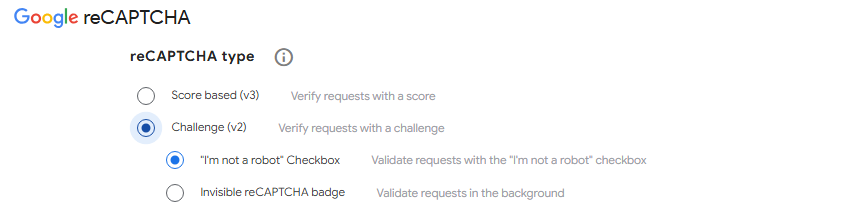
There is a middle option people forget. reCAPTCHA v2 has an invisible variant that only shows a challenge when a visitor looks suspicious, so the friction sits somewhere between the v2 checkbox and v3.
Which version should you pick? Use the v2 checkbox when you want a visible barrier, like a login screen already under attack. Use v3 when friction hurts conversions, and you are willing to tune a score threshold. Google’s reCAPTCHA documentation explains how each version scores requests. If you are weighing non-Google alternatives too, compare hCaptcha vs reCAPTCHA.
Most sites do not pick one of these three and stop. They choose a reCAPTCHA version for the forms bots attack, and keep Akismet running on the content bots publish.
Is Akismet Better Than reCAPTCHA for WordPress Spam Protection?
Neither tool is better overall. Akismet wins for comment and content spam because it needs no visitor interaction, while reCAPTCHA wins for stopping bots before they submit anything at all, including on login and registration forms.
In an Akismet vs reCAPTCHA decision, the useful question is which spam problem you have right now.
| Your situation | Recommended tool |
|---|---|
| Comment spam on blog posts | Akismet |
| Contact or lead-gen form spam | Akismet, or reCAPTCHA if forms are heavily targeted |
| Bot login attempts or fake account registrations | reCAPTCHA (via LoginPress) |
| All of the above | Both together |
Most WordPress sites land in that last row. I would not treat this as an either-or decision.
Akismet handles comments, where silent filtering keeps the reading experience clean. reCAPTCHA handles login and registration, where the bot has to be stopped before it reaches your database. The two run together fine, because they guard different doors.
Should You Use Akismet or reCAPTCHA for Comment Spam Protection?
Use Akismet for comment spam, since it filters silently without asking commenters to solve a challenge, which keeps the commenting experience frictionless.
Comment spam protection has one rule that beats everything else: do not punish real commenters. Every extra click costs you genuine comments.
- Readers type, submit, and move on, with nothing to solve.
- Known spam patterns get caught across millions of sites at once.
- Akismet ships with most WordPress installations, so setup means adding a key rather than building anything.
- Flagged comments land in the WordPress spam folder you already check.
Check that folder every week or two. Akismet does occasionally catch a real comment, and a genuine reader rarely bothers writing twice.
How Do You Protect a WordPress Login Form From Spam and Bots?
Protecting a WordPress login form means blocking automated bot login attempts and fake registrations before they reach your database, which requires a challenge-based tool like reCAPTCHA rather than a content filter like Akismet.
Login form spam protection is the surface most comparisons leave out, and it behaves nothing like comment spam.
Akismet does not help here. Akismet inspects content, and a login attempt carries no content to inspect. Akismet also reacts after a submission is accepted, which arrives too late for a credential attack.
A bot hitting your login screen wants access. If open registration is switched on, it wants thousands of junk accounts instead.
Here is the practical checklist for this surface:
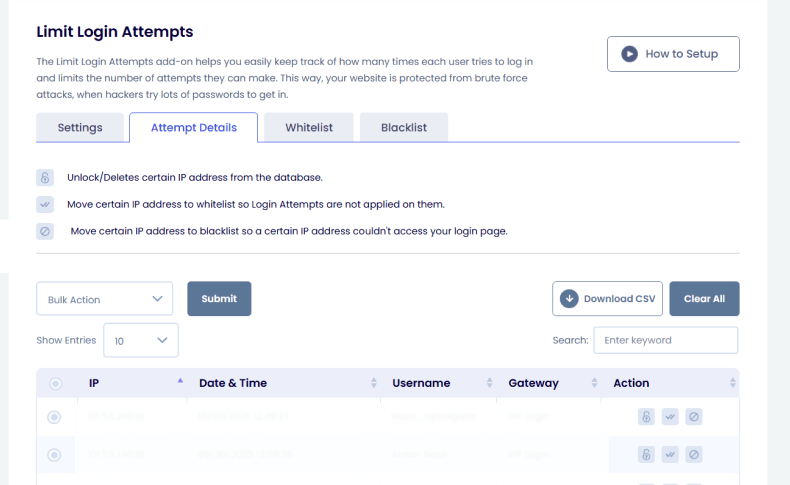
- Add reCAPTCHA to the WordPress login screen.
- Add reCAPTCHA to the registration screen if open registration is enabled.
- Add it to the lost password screen, which bots use for username enumeration.
- Monitor failed login patterns for repeat IPs and repeat usernames.
- Review new user accounts weekly and delete the obvious fakes.
If your site allows registration, this surface is already being probed, whether you have noticed it or not.
How Can You Add reCAPTCHA to a WordPress Login Page and Registration Form?
WordPress does not include a CAPTCHA of any kind by default, and a general contact-form plugin will not help either, since it only protects the forms it was built for, not your login screen. Setting up reCAPTCHA for WordPress login screens needs two things: a free site key and secret key from Google’s reCAPTCHA admin console, and a plugin built to hook into those specific screens.
At a high level:
- Register your domain in the Google reCAPTCHA admin console and choose a version: v2 checkbox, v2 invisible, or v3.
- Copy the site key and secret key it generates.
- Install a plugin that supports the login and registration screens specifically, and paste both keys into its settings.
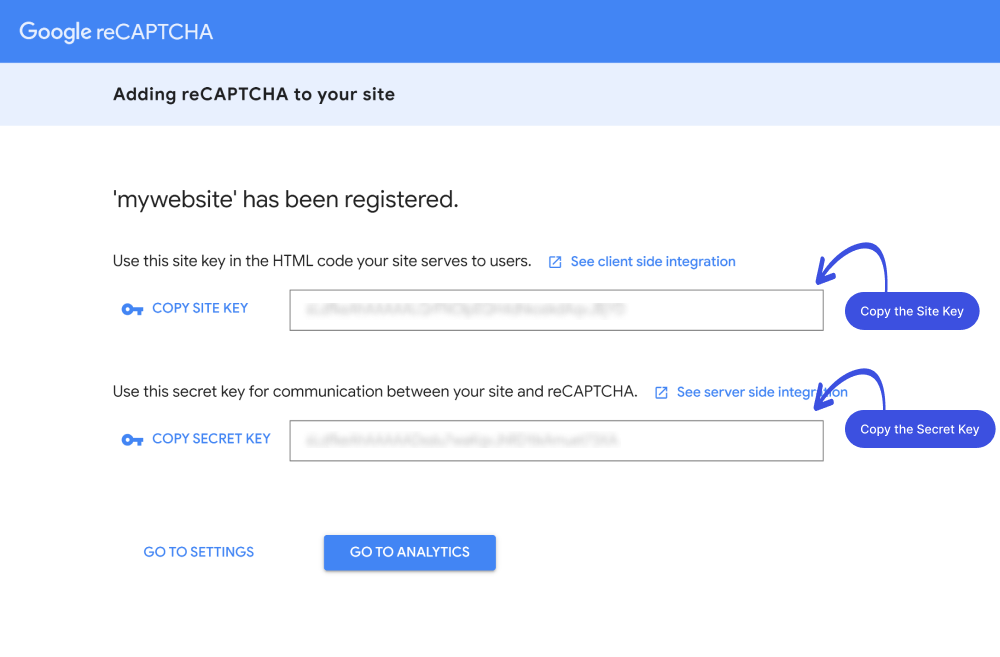
For the full walkthrough, which version to pick, where the settings live, and how to confirm it’s actually working. See how LoginPress handles this below.
How Does LoginPress Integrate reCAPTCHA to Protect Login and Registration From Bots?
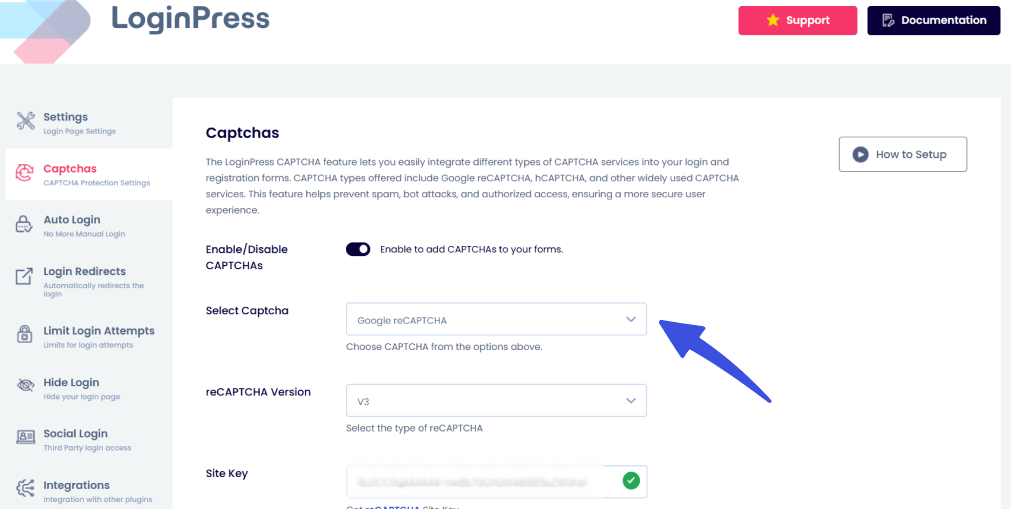
LoginPress adds a dedicated reCAPTCHA settings screen where you choose the version, paste in your Google site and secret keys, adjust the widget size, and customize the error message a blocked bot sees, all without touching code.
LoginPress applies that protection to the WordPress login screen, the registration screen, and the lost password screen from one settings panel.
Setting up LoginPress reCAPTCHA:
- Generate your site key and secret key pair in the Google reCAPTCHA admin console.
- Go to LoginPress > Captchas Settings in your WordPress dashboard.
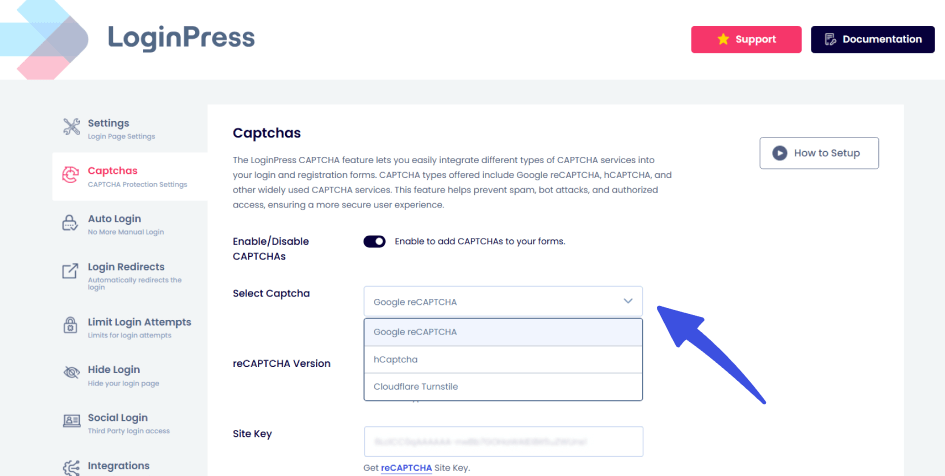
- Select your version: v2 checkbox, v2 invisible, or v3.
- Paste the site key and secret key into their matching fields. LoginPress then shows a validation section below it so you can confirm the connection works.
- Adjust the widget size and customize the error message shown to blocked bots.
- Save, then test both the login and registration screens while logged out.
LoginPress reCAPTCHA is a Pro feature. The free version of LoginPress covers login page customization. The reCAPTCHA integration, version selector, key fields, size control, and custom error message are all on the Pro plan.
If bots are hitting your login page and Akismet is doing nothing about it, LoginPress puts reCAPTCHA on that exact screen in about five minutes.
Trusted by 200,000+ WordPress sites. Stop bot login attempts before they reach your database.
Secure your login page with reCAPTCHA
Frequently Asked Questions
Akismet vs. reCAPTCHA: Which one is better for WordPress spam protection?
Neither is universally better, because they solve different problems. Akismet is stronger for comment and content spam, since it works silently after submission. reCAPTCHA is stronger for stopping bots before they submit anything, which matters most on login and registration forms.
What is the difference between reCAPTCHA and CAPTCHA?
CAPTCHA is the general term for any challenge that asks a visitor to prove they are human, usually by solving a puzzle or typing distorted text. reCAPTCHA is Google’s more advanced version. It uses behavior analysis and risk scoring in addition to, or instead of, a visible puzzle.
Is Akismet anti-spam safe?
Yes. Akismet is maintained by Automattic, the company behind WordPress.com, and runs on millions of sites without notable security issues. Akismet analyzes comment and form content to detect spam, and does not collect personal data beyond what that filtering requires.
How can I use Google reCAPTCHA on my WordPress login page and registration form?
Get a free site key and secret key pair from Google’s reCAPTCHA admin console, then install a WordPress plugin that adds reCAPTCHA to the login and registration screens specifically, since core WordPress does not include this. Paste both keys into the plugin settings and choose the reCAPTCHA version that fits your site. Test the result in a logged-out browser window.
How does LoginPress integrate reCAPTCHA to protect WordPress login and registration from bots?
LoginPress includes a dedicated reCAPTCHA settings screen where you select the version, enter your Google site and secret keys, adjust the widget size, and customize the error message shown to blocked bots. LoginPress applies this to the login, registration, and lost password screens. This reCAPTCHA feature set is available on the LoginPress Pro plan.
Why is reCAPTCHA not showing on my WordPress login page?
The most common cause is a caching or JavaScript optimization plugin blocking Google’s reCAPTCHA script before it loads. Clear all caches and temporarily switch off JavaScript minification to test. A version mismatch is the second common cause, since v2 keys pasted into a v3 setting fail silently. Administrators also see the login screen less often, so always check in a private browser window.
Final Verdict: Akismet, reCAPTCHA, or Both?
Akismet vs reCAPTCHA is the wrong frame. Run both, on different surfaces. Akismet handles comment and content spam. reCAPTCHA through LoginPress handles the login and registration form, the surface most comparisons skip entirely.
Once reCAPTCHA is active, Analytify can help you confirm bot or spam traffic is actually dropping, right inside your WordPress dashboard.
Here is what to do next:
- Keep Akismet running for comment and content spam. It costs little effort and works silently.
- Check whether your login or registration form has ever been hit by bot attempts. Most sites have.
- Add reCAPTCHA to your login and registration screens with LoginPress before your next bot wave hits.
Secure your login page with reCAPTCHA
Related Readings
That’s all for this post. If you want to go deeper on WordPress spam and login protection, start here: