Trust Based Authentication: Building Confidence in User Login Systems

Trust based authentication is a login approach that combines strong backend security with visible cues, such as a branded login page and clear error messages, so users feel safe before they enter a password. In WordPress, you build it by customizing the default login screen and securing the authentication layer.
In this post, I will cover what it is, how to design for it and how to set it up with LoginPress.
Trust Based Authentication (TOC):
Core Components of Trust-Based Authentication for Secure Login Systems
Trust based authentication is an authentication model that treats the user’s perception of safety as important as the technical reality.
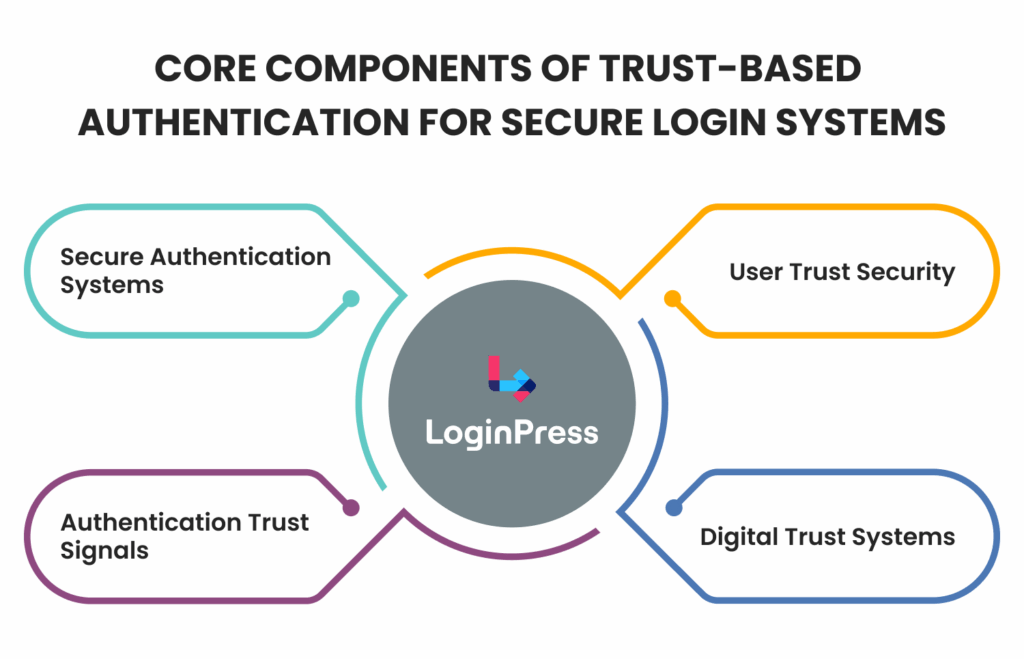
While traditional authentication focuses strictly on whether the credentials (username/password) match the database, a trust-focused system integrates security, usability, and transparency.
Trust-based authentication is the entire experience that improves the user experience, helping them feel confident entering your system for secure authentication systems.
Real-World Example: Consider how Google or Apple handles logins. They use familiar branding, clear “Verify it’s you” prompts, and immediate notifications on other devices. These are authentication trust signals that tell the user the system is actively looking out for them, transforming a potentially stressful event into a confident one.
How to Design Login Pages to Build User Confidence
You build user confidence by designing a login page that looks legitimate, professional and intentional.
A cluttered, default, or broken-looking login screen is the fastest way to trigger a user’s internal alarm bells.
To build secure login trust, your design must be as intentional as your code. Here are some design guidelines for your guidance:
1. Have Clarity and Guidance
Vague or ambiguous error messages are a major source of digital anxiety. When a login fails, the user needs to feel supported, not suspected.
- The Actionable Fix: Replace generic “Invalid Login” alerts with supportive workflows. For security best practices, never specify if the username or the password was the specific point of failure (to prevent username enumeration). Instead, provide a unified message: “We couldn’t find a match for those details. Would you like to [Reset your password] or [Contact Support]?”
- The Trust Result: This guides the user toward a solution rather than leaving them in a high-friction dead end.
2. Create Visual Indicators
Modern users look for specific safety markers before entering sensitive data. If these are missing, the perceived risk increases.
- The Actionable Fix: Explicitly incorporate recognizable security badges. This includes the Google reCAPTCHA badge, a “Secure Encryption Active” note, or even a small lock icon near the “Sign In” button.
- The Trust Result: These act as authentication trust signals, providing a psychological safety blanket that confirms your secure authentication systems are active and watching over the session.
3. Have Visual Consistency
A major red flag for savvy users is a visual disconnect.
If your main website is high-end, blue, and modern, but your login page is the default WordPress grey-and-white box, it looks like a malicious redirect or a phishing attempt.
- The Actionable Fix: Use a login customizer like LoginPress to mirror your site’s header, footer, brand colors, and typography on the login page. Ensure your logo is prominently placed where the WordPress logo usually sits.
- The Trust Result: Smooth branding reassures users they remain within your digital trust systems, reducing the “bounce rate” driven by security concerns.
How to Implement Trust Based Authentication with LoginPress
You implement trust based authentication with LoginPress by replacing the generic default login screen with a branded page and clear security cues.
To transition from a standard login to a trust-based authentication model, replace generic technical barriers with user-focused security indicators.
Let’s implement the best strategies for optimizing the defualt login page into a trust based authentication page using LoginPress:
1. By Addressing Automated Threats Through Security Measures
Many users feel uneasy when they don’t see active security on a site.
By integrating Google reCAPTCHA or Cloudflare Turnstile through LoginPress, you aren’t just stopping spam; you are providing a visible trust signal. It tells the user, “This site is actively being defended.”
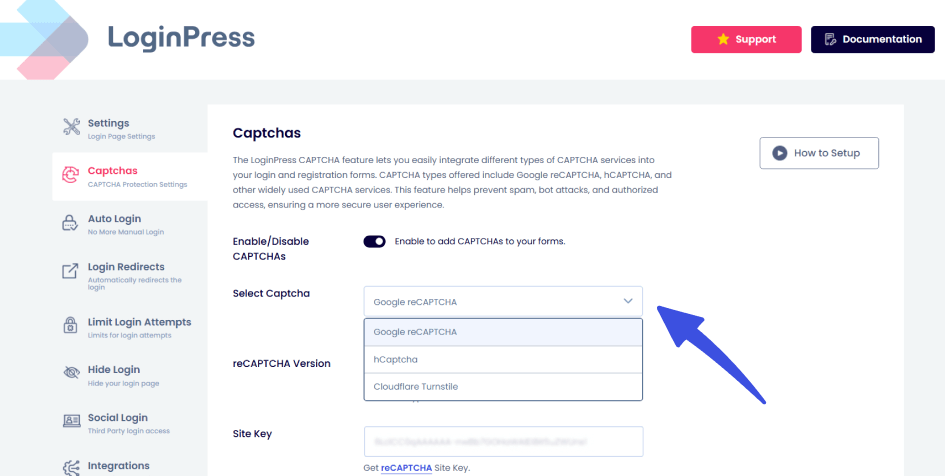
Expert Tip: Opt for “Invisible reCAPTCHA” or Turnstile to maintain a clean UI while keeping the “Protected by…” badge visible to reinforce secure login trust.
2. By Replacing Chaos with Transparency via Attempt Limits
Nothing kills user confidence faster than being locked out without explanation. Traditional secure authentication systems can feel like a black box.
LoginPress solves this by providing transparency during brute-force protection.
Instead of a hard crash or a vague error, users see a branded notification of their remaining attempts.
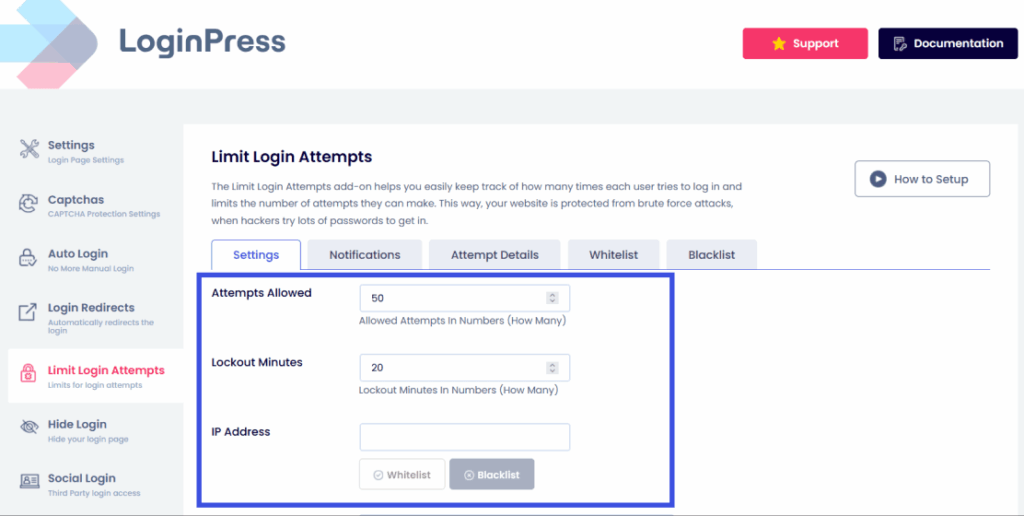
Expert Tip: Configure custom Limit Login messages that guide the user to a “Forgot Password” link before they reach their final attempt, turning a security restriction into a helpful workflow.
3. By Reducing Technical Friction with Human-Centric Messaging
Standard WordPress errors (e.g., “Invalid Username”) are cold and often mimic the appearance of a hijacked site.
LoginPress allows you to solve this by rewriting these prompts to match your brand’s voice.
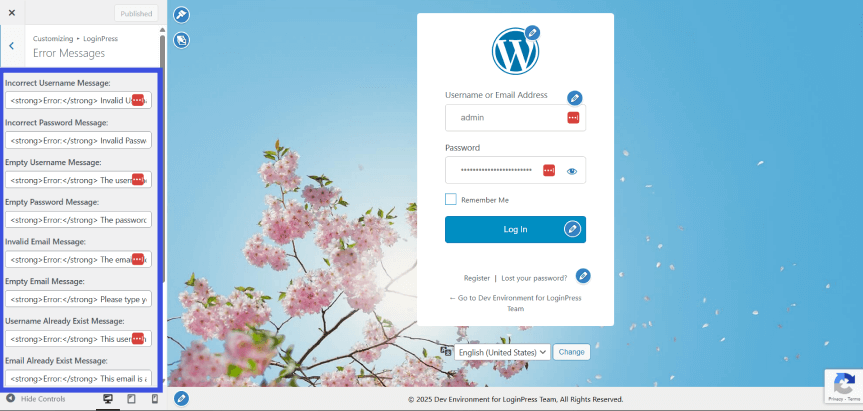
Expert Tip: Replace “ERROR: Invalid Login” with “We couldn’t find those details in our system. Need help getting back in?” This reduces the “fear factor” of an error and maintains user trust and security.
4. By Facilitating Credibility via Social Login
Users are often hesitant to hand over new passwords to a database they don’t yet fully understand.
By implementing Social Login, you use digital trust systems like Google or LinkedIn.
The user isn’t trusting you with their credentials; they are trusting a platform they already use, which you have simply vouched for by integrating it.
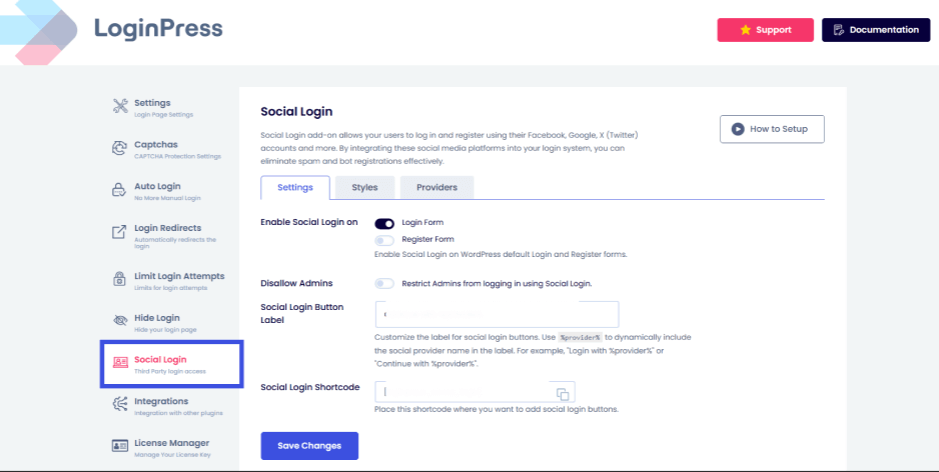
Expert Tip: Use the Social Login add-on to offer one-click access for your most common user demographics (e.g., LinkedIn for B2B sites), drastically lowering the barrier to entry while maintaining high security.
Measure and Maintain Authentication Trust
Trust should not be considered a static metric. It is essential to continuously monitor the performance of secure authentication systems from the user’s perspective.
- Assess error rates: A high frequency of Lost Password requests in system logs may indicate that the login user experience is excessively complex.
- Audit access events: Regularly reviewing LoginPress attempt details can reveal the effectiveness of trust signals, such as CAPTCHA, particularly when numerous bot attempts are blocked.
- Establish feedback loops: Administering user surveys regarding the onboarding experience can identify whether users experience hesitation during the login process.
- Update iterative cues. As digital threats evolve, cues should be revised accordingly. Regularly updating the login page design to reflect current branding demonstrates that the site is actively maintained.
Future Trends: AI and Passwordless Login for Trusted Authentication
Trusted authentication is shifting from passwords toward passkeys and device-based trust.
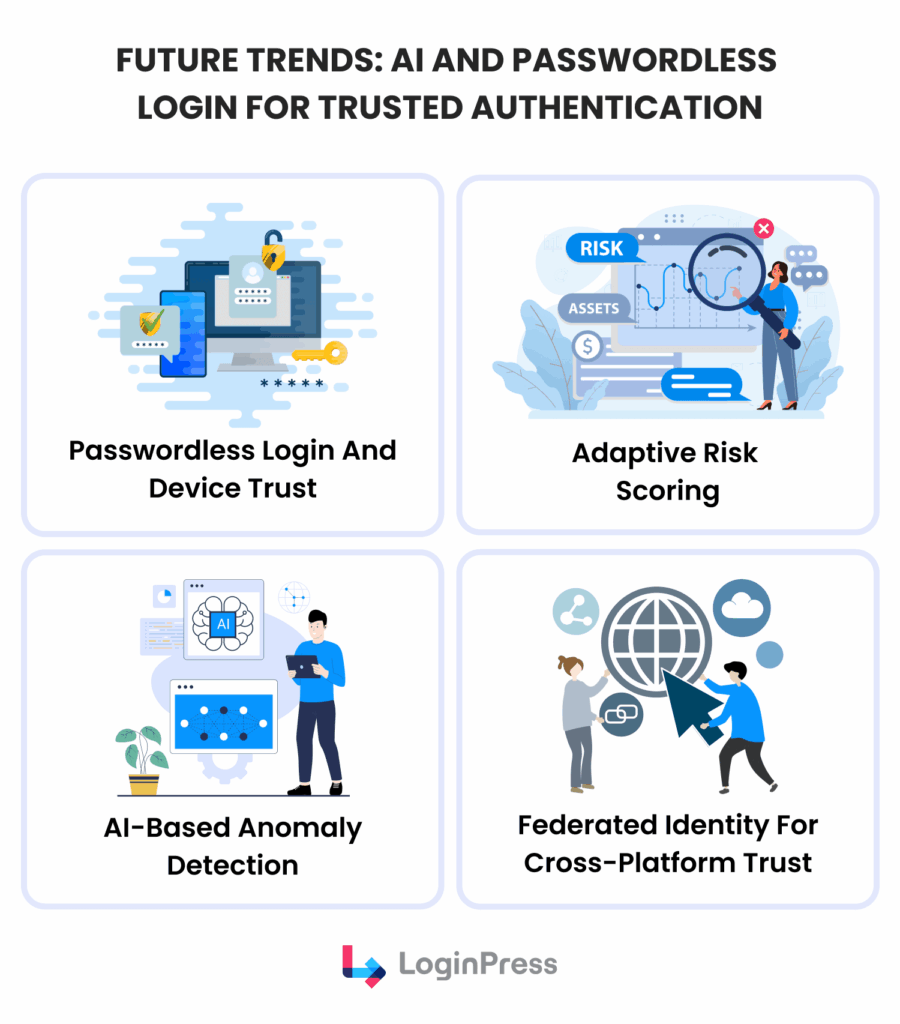
- Passwordless authentication and device trust technologies, including Passkeys and Magic Links, enable users to access systems without passwords. This approach addresses the primary source of user frustration: forgotten credentials.
- AI-based anomaly detection will soon enable login systems to assess the risk of authentication attempts in real time. When activity aligns with established patterns, the system remains unobtrusive. However, anomalous behavior triggers additional verification, a process referred to as ‘Invisible Trust.’
- Federated identity solutions are expected to facilitate cross-platform trust, allowing user identities to transition smoothly across services and potentially rendering traditional login pages obsolete.
FAQs: Secure Authentication Systems
How does trust-based authentication differ from standard login security?
Standard security is about the lock; trust-based authentication is about the experience. While standard security focuses on preventing unauthorized access, trust-based systems also aim to ensure authorized users feel safe and supported throughout the process.
What are the key trust signals on a WordPress login page?
The most effective signals include custom branding (logo and colors), HTTPS padlocks, visible CAPTCHA badges, and clear, non-threatening error messages.
Can LoginPress increase user confidence in login UX?
Absolutely. By allowing you to brand the page, limit brute-force attacks, and offer social login options, LoginPress transforms a generic technical requirement into a professional, brand-aligned experience.
How do visual cues improve secure login trust on WordPress?
Visual cues, such as your company logo, specific brand colors, and professional typography, act as vital authentication trust signals. When a login page looks exactly like the rest of your site, it eliminates the “phishing red flag” that occurs when users are suddenly redirected to a generic, unbranded page.
Can limiting login attempts actually increase the reliability of digital trust systems?
Surprisingly, yes. While it is a backend security measure, it also serves as a communication tool. By showing a user exactly how many attempts they have left through clear notifications, you are providing transparency into your secure authentication systems. This “proactive bouncer” approach signals to the user that the site is actively monitored and protected against brute-force attacks.
Conclusion: User Trust Security
Trust based authentication is a foundational requirement for any modern WordPress site.
By moving beyond basic login mechanics and prioritizing authentication trust signals, you transform the login experience from a moment of friction into a demonstration of professional reliability.
Integrating secure login trust through consistent branding, transparent error messaging, and digital trust systems ensures that your users feel protected before they even enter their credentials.
With tools like LoginPress, you can bridge the gap between high-level user trust security and a smooth user experience, turning your login page into a powerful asset for your brand’s authority.
That is all for this article. For more related posts, check:
- User Authentication Best Practices for WordPress Websites (2026)
- WordPress Authentication Methods Explained: Pros, Cons & Use Cases (2026)
- Enhancing User Trust with Secure Login UX in WordPress (2026 Guide)
Which trust signal, e.g., visual branding, the presence of MFA, or the use of familiar social logins, conveys the most trust, and which one do you prefer?
Let us know in the comments below!