Secure Access Journeys: How to Design End-to-End Login Experiences

Editorial Team
How to design secure access journeys and login flows?
In 2026, the typical login page looks very different from what it used to be. It is no longer just a simple screen for entering credentials.
Now, it acts as the first impression that shapes your brand’s relationship with users. With AI-powered phishing and automated credential attacks on the rise, making your login process secure is more important than ever.
Users today want strong protection for their personal data, but they also expect a fast and easy login experience.
If your login process feels complicated or like an afterthought, you risk not only security issues but also losing user trust. People are quick to switch to competitors that offer a smoother, safer sign-in experience.
Whether you run a busy online store or a private membership site, your aim should be to make the login process both easy to use and highly secure.
In this guide, I will show you how to move from a simple login form to a complete secure access process.
You’ll also learn how to design secure access journeys from the first login attempt to the final dashboard redirect.
Login Journey Design (TOC):
What is a Secure Access Journey?
A secure access journey is the detailed path a user takes from the moment they land on your login page to the second they successfully enter their dashboard.
Unlike a traditional login, which is often just a static form, an authentication journey considers the user’s context, security checkpoints, and system state.
It is a core pillar of the identity management system that ensures the right person gets the right access without having to jump through unnecessary hoops.
Why Login Journey Design Matters:
Poorly designed login flows are responsible for significant abandonment in authentication steps, especially on membership and SaaS platforms.
- User Trust: A polished, secure flow signals professionalism and care.
- Reduced Abandonment: Poorly designed login journeys are a leading cause of user drop-off during high-intent moments.
- Security Posture: Login experience mapping helps you identify blind spots where attackers might exploit unmonitored entry points.
Core Components of Secure Access Journeys
To build secure user flows, you must view the login process as a series of connected steps.
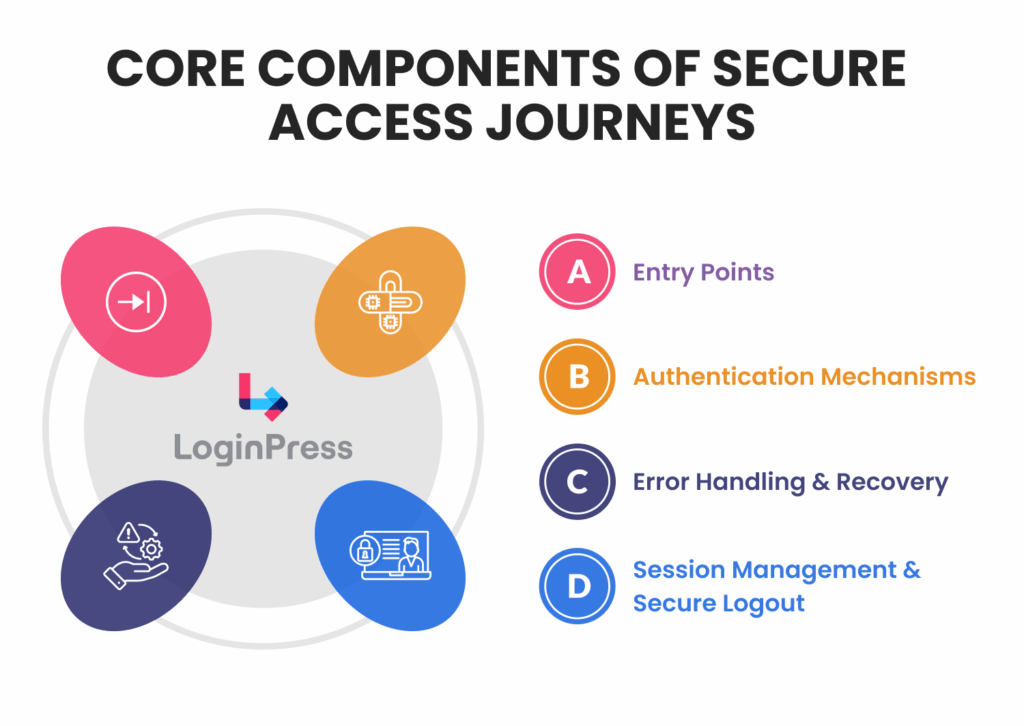
For WordPress websites, these components typically exist around the wp-login.php authentication flow:
- Entry Points: Whether it’s a standard form, Social Login, or Single Sign-On (SSO), this is the first brand touchpoint.
- Authentication Mechanisms: The logic layer, including passwords, Multi-Factor Authentication (MFA), and token-based validation.
- Error Handling and Recovery: How the system reacts when things go wrong (e.g., Forgot Password or account lockouts).
- Session Management and Secure Logout: Defining how long a user stays logged in and ensuring a clean exit to prevent session hijacking.
Principles of Secure Login Journey Design
Effective secure access journeys rely on a strategic intersection of technical hardening and psychological comfort. Here are some basic principles for secure user flows:
1. Security-First Design
Security is the structural foundation of the authentication journey, not an optional layer.
By adopting a defense-in-depth strategy, you ensure that if one control fails, others are in place to block the breach.
- MFA as a Baseline: In 2026, Multi-Factor Authentication is the minimum viable security standard. Implementing TOTP (Time-based One-Time Passwords), hardware keys, or biometric prompts ensures that stolen credentials alone are useless to an attacker.
- Input Validation and Attack Surface Minimization: Every field on your login form, including hidden fields and headers, must be validated and sanitized. This prevents common exploits like SQL injection and Cross-Site Scripting (XSS) from compromising your database.
- Principle of Least Privilege: Designing secure user flows means granting users only the permissions necessary for role-based access and session management. For example, a subscriber should never have access to the administrative login path, even if their credentials are valid.
2. Usability and Experience
Overly complex login journey designs often result in the emergence of shadow IT or user abandonment. Security mechanisms should provide strong protection while maintaining ease of use.
- Human-Centered Accessibility: All entry points must comply with Web Content Accessibility Guidelines (WCAG). Requirements include high-contrast text, clear focus indicators for keyboard navigation, and ARIA labels to enable screen-reader users to complete the authentication process independently.
- Balancing Friction and Security: Frequent CAPTCHA and repeated re-authentication can cause user fatigue. Progressive disclosure should be employed to request information only when necessary, and friction should be introduced selectively based on specific risk indicators rather than through uniform barriers.
3. Context-Aware Authentication
Modern authentication journey mapping uses real-time environmental data to determine the level of identity proof required.
- Adaptive Risk Signals: Your system should analyze signals including IP reputation, geolocation, device fingerprints, and behavioral patterns (e.g., typing speed).
- Low-Risk Responses: When a user logs in from a recognized device on a frequently used home network, the authentication process should remain seamless, potentially requiring only a single-tap biometric verification.
- High-Risk Step-Up Authentication: When a login attempt originates from a new country, a proxy, or an unrecognized browser, the system should trigger step-up authentication requirements. These may include hardware key prompts or email-based identity challenges prior to granting access.
Mapping Authentication Journeys
Login experience mapping is the process of visualizing all possible states and paths a user can encounter during the authentication process.
By creating flow diagrams and state maps, you can spot where users get frustrated or where security gaps exist.
Steps to Create a Journey Map
- List User Segments: Map different paths for Admins, Subscribers, and Contributors.
- Identify Access Points: What prompts the login? (e.g., a timed-out session vs. a direct link to a restricted page).
- Visualize States: Document Success, Failure, and Fallback.
- Document Security Checkpoints: Mark where MFA, CAPTCHA, or bot detection occurs.
- Include Exception Paths: Map out the “Forgot Password” and account lockout recovery loops.
Tools and Templates: Use platforms like Figma, Miro, or dedicated flowchart tools to create these visual flows before you ever touch your site settings.
Designing Secure User Flows
Designing authentication isn’t just about functionality; it’s about protecting user data without making them jump through unnecessary hoops.
- Opaque Error Messaging: Provide enough context for the user to fix the issue without exposing system-level details. Use generic responses like “Invalid email or password” to prevent account enumeration attacks.
- Sequential Authentication: Implement a multi-step login process. Validating the username before requesting a password enables custom security checks (such as MFA) and reduces cognitive load.
- Modern Auth Ecosystems: Reduce friction by integrating SSO/Social Login for trusted environments, or use Passwordless (Magic Links/Passkeys) to eliminate the risks associated with weak or reused passwords.
- Automated Defense Layers: Protect your endpoints with Rate Limiting and Geofencing. Throttling repeated IP-level attempts is your primary defense against automated brute-force and credential stuffing.
Summary Table
| Feature | Old Approach | Modern Standard |
| Feedback | Specific (“Wrong password”) | Generic (“Invalid credentials”) |
| Logic | All fields at once | Progressive disclosure |
| Entry | Password-only | SSO / Passkeys / Magic Links |
| Defense | Basic Captcha | Behavioral detection |
How Does LoginPress Help Secure Access Journeys?
LoginPress stands as a security and user experience customization platform engineered to manage the authentication layer of the secure access journey.
LoginPress serves as the essential link between your WordPress backend and the user’s front-end experience.
By unifying aesthetic control with basic authentication security logic, it transforms the login flow from a generic entry point into a cohesive extension of your brand identity.
Here are some ways you can design a secure login flow using LoginPress:
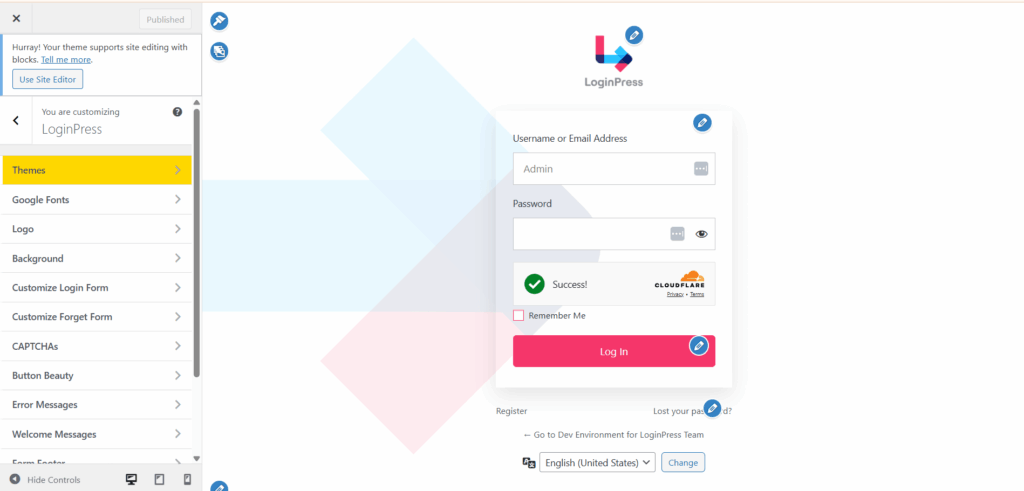
- Brand Integration (Login Customization): Enhances UX by creating a native look and feel, reducing “bounce” or hesitation during login.
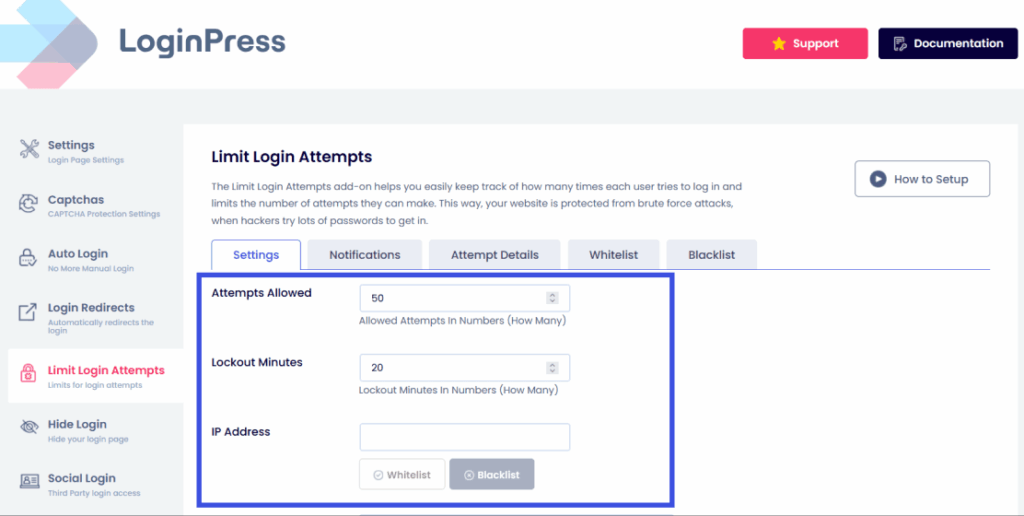
- Proactive Defense (Limit Login Attempts): Instantly hardens your security posture by limiting login attempts across the site, mitigating brute-force attacks.
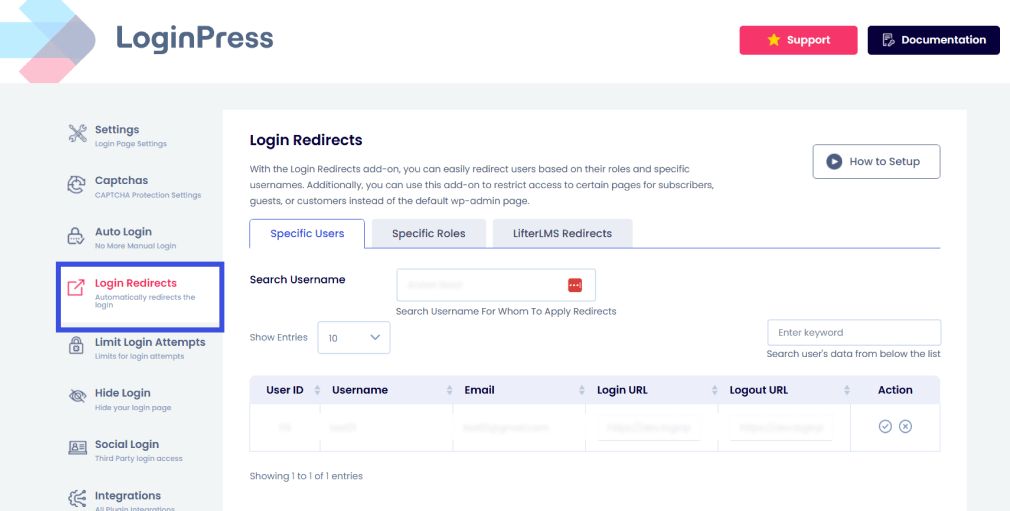
- Intelligent Navigation (Login Redirection): Frames redirections as journey checkpoints, ensuring users are guided precisely where they need to be after a successful entry.
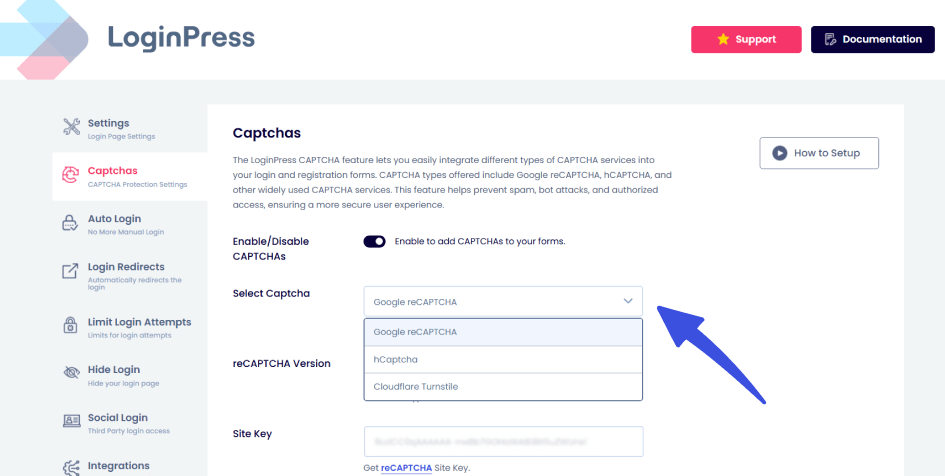
- Add CAPTCHA: LoginPress integrates CAPTCHA into the login form to block automated login attempts and credential-stuffing bots.
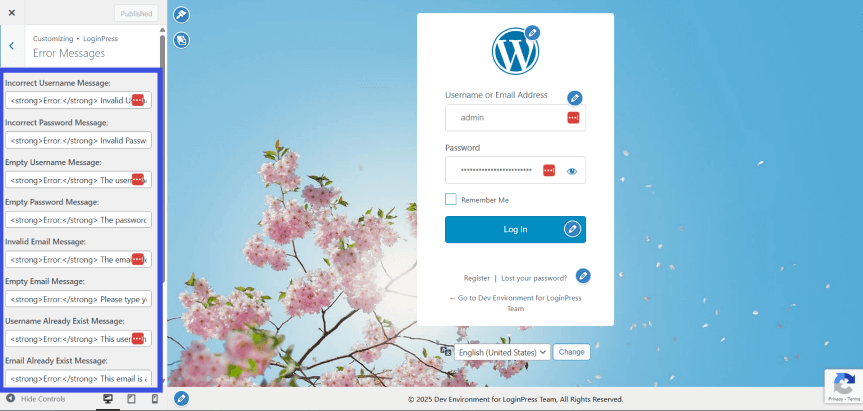
- Error Message Customization: Harden your site against account enumeration. Instead of revealing which part of the login failed, customize error messages to be generic (e.g., “Invalid credentials”) while maintaining a tone that fits your brand.
Measuring and Optimizing Login Experiences
To ensure your secure access journeys are performing at their peak, track these three critical Key Performance Indicators (KPIs):
1. Authentication Success Rate
- The Goal: Determine the percentage of users who successfully authenticate on their first attempt.
- Why it matters: High friction here often indicates confusing UI or overly aggressive security triggers.
2. Funnel and Drop-off Analysis
- The Goal: Identify specific friction points that cause users to abandon the process.
- Key Question: Are users quitting at the initial password entry, or is the MFA (Multi-Factor Authentication) screen the primary bottleneck?
3. Security Event Monitoring
- The Goal: Track the health of your perimeter using tools like LoginPress logs.
- Metrics to Watch:
- Total failed login attempts
- Volume of blocked threats and malicious IP addresses.
Quick Comparison: Performance vs. Security
| Metric | Focus Area | Primary Tool/Data Source |
| Success Rate | User Experience | Analytics / Session Logs |
| Drop-off Rate | Conversion | UX Funnel Mapping |
| Blocked Threats | Security | LoginPress / Firewall Logs |
Checklist: Build Your Secure Access Journey
Here is a quick checklist for you to utilize while designing a secure access journey for users:
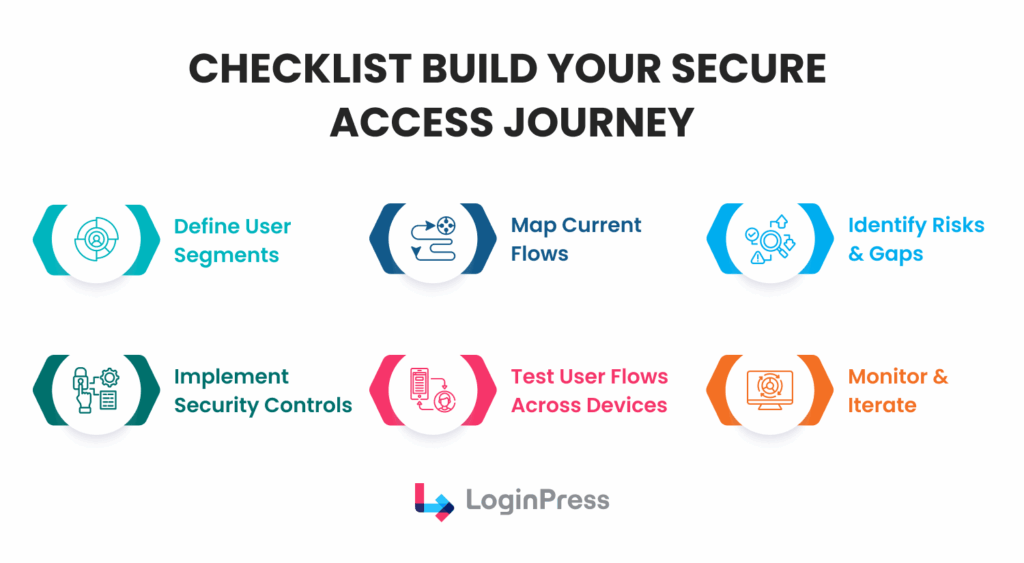
- Define User Segments: Know exactly who is accessing your site.
- Map Current Flows: Visualize the path from the entry point to the dashboard.
- Identify Risks and Gaps: Look for missing MFA or vague error messages.
- Implement Security Controls: Use LoginPress to enforce MFA and rate limiting.
- Test User Flows: Verify the experience on mobile, tablet, and desktop.
- Monitor and Iterate: Review security logs monthly to adapt to new threats.
FAQs: Secure Access Journeys
What is an access journey?
An access journey is the end-to-end process a user undergoes to verify their identity and gain entry to a digital environment. Unlike a simple login form, a secure access journey maps every touchpoint, from the initial entry and authentication journeys to session management and secure logout, ensuring a seamless balance between user experience and data protection.
How do I design secure login flows?
To design secure user flows, you must implement a defense-in-depth strategy. Start by securing the entry point with branded, phishing-resistant forms, enforcing MFA as a baseline, and using context-aware triggers. Finally, use login experience mapping to visualize and test every path, including “forgot password” and account recovery loops, to ensure there are no security gaps.
Why is login experience mapping important for security?
Login experience mapping allows administrators to identify “blind spots” in the authentication process. By documenting every state, success, failure, and exception paths, you can ensure that error messages don’t leak sensitive data and that high-risk actions (like changing a password) are protected by additional verification layers.
How does LoginPress facilitate secure user flows?
LoginPress is an experience and security platform that lets you customize the secure access journey without writing complex code. It facilitates secure user flows by providing tools to enforce MFA, manage session expirations, and create custom redirection logic to guide users to the correct dashboard based on their role and security clearance.
What is the difference between a traditional login and a secure access journey?
A traditional login is a single event, entering a username and password. A secure access journey is a complete, multi-state process that monitors the user’s intent and environment. It includes the design of the form, the strength of the authentication journeys, and the continuous monitoring of the session to prevent hijacking or unauthorized access.
Conclusion: Authentication Journeys
Secure access journeys combine security architecture with thoughtful login experience design.
By mapping your authentication journeys and focusing on secure user flows, you do more than just protect data; you provide a professional, seamless experience that keeps users coming back.
LoginPress allows site owners to customize login flows and ensures the basic authentication layer is seamlessly maintained for the best user experience and identity journeys.
That is all for this post. For more related articles, check out:
- WordPress Login Security Automation: Protect Sites Without Manual Monitoring
- Trust-Based Authentication: Building Confidence in User Login Systems
- WordPress Guest Login Security Without User Accounts (Explained)
Ready to transform your login experience? Try LoginPress Today and start designing secure, user-friendly access journeys that your users will trust.