
WordPress Authentication Flows Explained (2026)

Editorial Team
How strong is your WordPress authentication flow, and is it truly protecting your site’s most sensitive data?
With security threats always changing, it’s important to understand what happens from the moment a user enters their login details to when the server grants access.
This process acts as the main gatekeeper for your site. It determines how users are verified, how sessions are managed, and how to keep unwanted visitors out.
I’ll explain how cookie-based authentication works, what session tokens do, and how WordPress stays both scalable and secure.
Along with technical steps, I’ll cover common user authentication systems and share practical tips to improve your authentication process.
Whether you’re a developer or a site owner, this post will help you better understand WordPress security.
WordPress Authentication Flow (TOC):
What Is an Authentication Flow?
A login authentication process is the step-by-step process a system uses to verify a user’s identity before granting access to protected resources.
In web security, authentication serves as the primary checkpoint to ensure the person trying to access an account is the account owner. A good user authentication system has four main parts:
- Identity Input: First, the user enters a unique identifier, such as a username or email address.
- Credential Verification: The system checks the password or biometric data the user gave against its secure records.
- Session Creation: If the check is successful, the system creates a temporary session, usually with a cookie or token, to keep the user logged in.
- Access Control: Finally, the system determines the user’s role and grants them the appropriate permissions.
This authentication process usually follows a standard set of technical steps. It starts with the login form, verifies credentials, generates a token or cookie, and ends with managing the user’s session. Here’s a simple way to picture how this works:
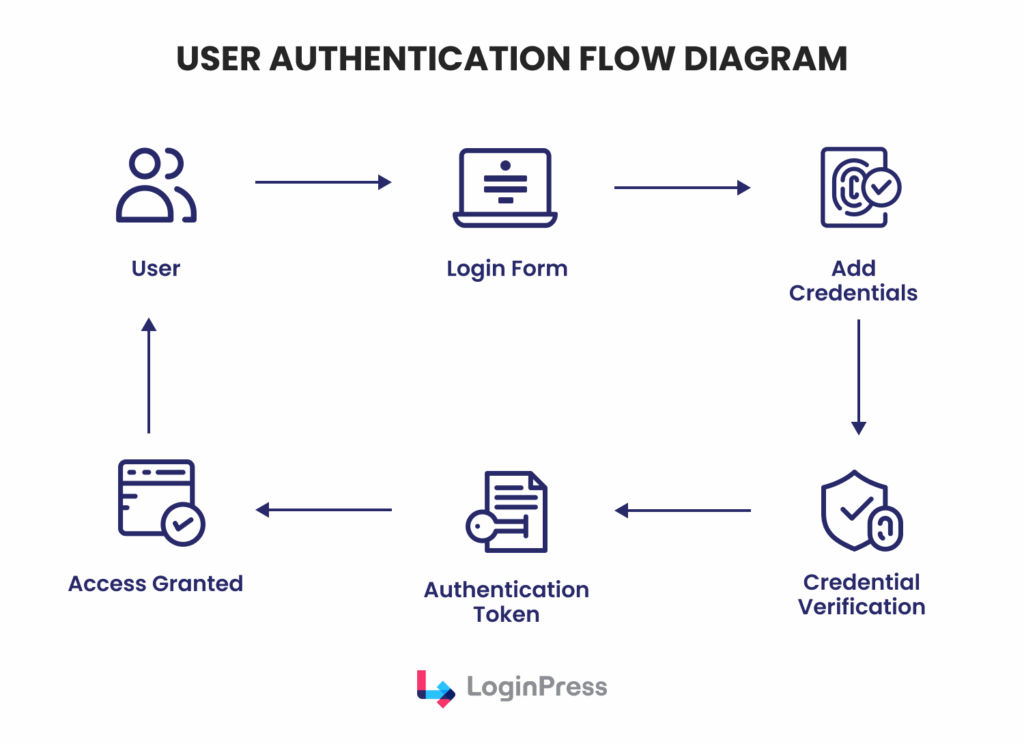
A structured authentication flow helps WordPress stay secure. It also ensures a consistent user experience.
How WordPress Authentication Works (Overview)
To understand how WordPress authentication works, we need to recognize that WordPress primarily uses a stateless, cookie-based authentication system.
With this setup, the server does not have to keep session data in memory.
This helps WordPress run faster and handle more visitors at once. When someone logs in to WordPress, the system starts a process to check their information.
After checking the login details with the database, the server creates secure cookies and sends them to the user’s browser.
These cookies serve as a persistent proof of identity throughout the session.
Hence, these authentication cookies store hashed authentication data, session identifiers (not actual credentials), and session information.
This hashing process ensures that sensitive data, such as plain-text passwords, is never stored in the browser.
Two main cookies are important in this authentication process:
- wordpress_[hash]: This cookie is utilized specifically for the /wp-admin directory and is required to perform administrative tasks.
- wordpress_logged_in_[hash]: This is used across the front-end and back-end to identify the user and retrieve their specific account details.
By checking for these cookies on every subsequent HTTP request, WordPress can instantly verify the user’s identity and permissions.
If the cookies are altered, expired, or missing, the WordPress authentication flow automatically redirects the user back to the login interface, maintaining a rigorous security perimeter.
Step-by-Step WordPress Authentication Flow
The WordPress authentication flow is a technical process that moves from the user interface to the database and back to the browser.
Understanding this cycle is important for maintaining site integrity and troubleshooting access issues.
Step 1: User Submits Login Credentials
The process starts when a user visits the login page, typically at /wp-login.php.
The user enters their username or email address along with their password.
Upon clicking the login button, a POST request containing these credentials is encrypted via SSL (if configured) and sent to the server for processing.
Step 2: WordPress Validates Credentials
After the server receives the request, WordPress checks the credentials against the site’s database.
WordPress looks at the wp_users table, where user data is stored. Passwords are never saved in plain text. Instead, WordPress uses secure hashing to compare the entered password with the stored version.
The main function that handles this is wp_signon(). At this point, WordPress also applies the authentication filter, so plugins or custom code can add extra checks.
If the credentials are correct, wp_signon() logs the user in and sets up the session data.
Step 3: Authentication Cookie Generation
After confirming the credentials, WordPress creates authentication cookies.
These cookies do not store the password. Instead, they hold hashed session tokens that are securely tied to the user and the site’s unique salt keys.
Once created, these cookies are sent to the user’s browser and stored there to keep the user logged in.
Step 4: Session Token Creation
At the same time, WordPress creates a unique session token and saves it in the wp_usermeta table on the server. This token keeps track of the active session.
This token records important details, such as:
- The exact login time.
- Information about the device and browser (User Agent).
- The set time when the session will expire.
By using both browser cookies and database tokens, WordPress can handle several active sessions for one user. This setup lets you end certain sessions without logging the user out everywhere.
Step 5: Authentication Validation on Each Request
The authentication process continues after the user logs in.
Each time the user opens a new page in the WordPress dashboard, the browser sends the authentication cookies automatically.
WordPress checks these requests and uses functions such as wp_validate_auth_cookie() to ensure the cookies are valid.
If the cookie is valid and matches the session token on the server, the user gets access without any interruption.
But if the cookie has expired, has been changed, or the session was ended remotely, the user is sent back to the login screen to sign in again.
WordPress Login Process Architecture (Technical Overview)
The technical architecture of the WordPress login process is modular, enabling both security and extensibility.
Unlike many PHP-based applications that rely on server-side PHP sessions, WordPress utilizes a cookie-based architecture.
This design choice is critical for scalability, as it stores session data in the user’s browser via cookies rather than on the server’s filesystem.
This way, WordPress can easily handle high-traffic environments and load-balanced server clusters without session synchronization issues.
The core components of this architecture include:
- Login Interface (wp-login.php): The entry point that handles user input and serves as the primary controller for authentication requests.
- Authentication Functions: A suite of core PHP functions, such as wp_authenticate() and wp_set_auth_cookie(), which process credentials and manage the transition from an anonymous visitor to an authenticated user.
- User Database: The wp_users and wp_usermeta tables, which store hashed credentials and session metadata.
- Cookie System: The client-side mechanism that stores the authentication hashes required for persistent access.
- Session Tokens: Unique identifiers stored in the database that link a specific browser cookie to a specific login event, allowing for precise session management.
This architecture ensures that the WordPress login process remains stateless from the server’s perspective.
When a request is made, WordPress simply validates the provided cookie against the salt keys in wp-config.php and the session token in the database.
If the cryptographic signature matches, the user is granted access, ensuring a high-performance authentication workflow that can scale across diverse hosting infrastructures.
Common Authentication Flows Used in WordPress
While the standard login interface is the most recognizable, the modern authentication workflow in WordPress has evolved into several distinct types to meet various security and usability requirements.
Depending on the sensitivity of the data and the intended user base, administrators may implement one or more of the following flows:
1. Standard Username/Password Authentication
This is the default authentication workflow provided by WordPress Core. It relies on a single factor, knowledge of a specific credential pair.
While it is the simplest to deploy, its security depends entirely on the strength of the user’s password and the presence of brute-force protections.
2. Two-Factor Authentication (2FA)
To mitigate the risks of compromised passwords, many sites integrate a second verification step. In this workflow, after entering a password, the user must provide a temporary code. Common methods include:
- One-Time Passwords (OTP): Sent via email or SMS.
- Authentication Apps: Generating time-sensitive codes (e.g., Google Authenticator).
- Hardware Tokens: Physical security keys that conform to the FIDO/U2F standard.
3. OAuth and Social Login Authentication
Commonly used in membership sites and SaaS platforms, this flow helps third-party identity providers such as Google, GitHub, or LinkedIn.
This reduces friction by allowing users to authenticate via an existing trusted account, utilizing the OAuth 2.0 protocol to verify identity without the user ever sharing their password with the WordPress site.
4. Application Password Authentication
Specifically designed for the WordPress REST API and XML-RPC, this flow generates unique, non-human-readable passwords for external applications.
It allows developers to securely integrate third-party tools and mobile apps, as these passwords can be revoked individually without affecting the user’s primary login credentials.
Security Risks in Weak Authentication Flows
A compromise in the WordPress authentication flow is often the primary objective of automated attacks.
If the login process is not properly hardened, the entire digital ecosystem becomes vulnerable.
Some of the risks include:
- Brute Force Attacks: Automated scripts systematically test thousands of password combinations against the login endpoint until access is gained.
- Credential Stuffing: Attackers use massive databases of passwords leaked from other platforms, exploiting the fact that many users reuse credentials across multiple sites.
- Username Enumeration: Poorly configured systems may reveal whether a username is valid through specific error messages (e.g., “The password you entered for the username admin is incorrect”), giving attackers 50% of the credentials needed for a successful breach.
The importance of login security cannot be overstated. Recent cybersecurity trends in 2026 show that weak authentication controls often lead to unauthorized administrative access.
Such breaches allow attackers to create rogue admin accounts, bypass traditional protections, and exfiltrate sensitive user data.
Best Practices for Secure Authentication Flow Design
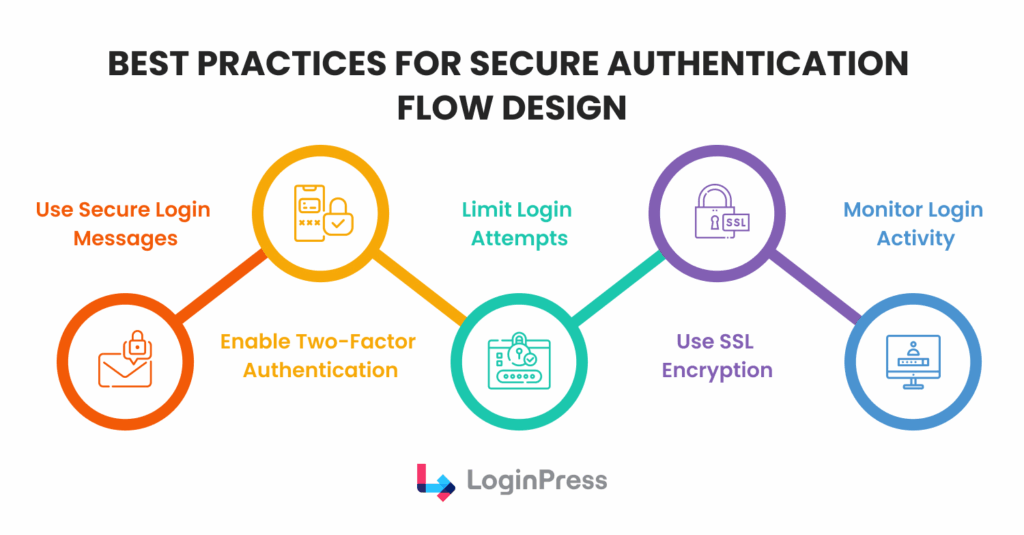
Implementing a resilient authentication flow design is a critical responsibility for any WordPress administrator.
A default configuration, while functional, often lacks the necessary defensive layers to withstand modern automated threats.
By adhering to established security protocols, you can ensure that your authentication workflow remains both secure and efficient.
The following best practices are essential for hardening the login process:
- Utilize Secure Login Messages: Configure your system to provide generic feedback during failed login attempts. Avoid specifying whether the username or the password was incorrect. Ambiguous messaging prevents username enumeration, a tactic in which attackers verify valid accounts by analyzing system responses.
- Enable Multi-Factor Authentication (MFA/2FA): Implementing a second layer of verification is the most effective deterrent against credential theft. Even if a password is compromised, the WordPress authentication flow remains protected by a secondary time-sensitive code or physical token.
- Limit Login Attempts: To thwart brute-force attacks, it is vital to restrict the number of failed login attempts permitted from a single IP address within a specific timeframe. Automated blocking or temporary lockouts effectively neutralize high-volume guessing scripts.
- Enforce SSL Encryption: Always serve your login pages over HTTPS. SSL encryption ensures that sensitive data entered into the login form is protected during transit, preventing interception by man-in-the-middle attacks.
- Monitor Login Activity: Maintain active logs of both successful and failed authentication events. Regular auditing enables early detection of suspicious patterns, such as an unusual volume of login requests from foreign regions or attempts to access administrative accounts.
By integrating these strategies into your authentication flow design, you create a multi-layered defense that significantly raises the technical barrier for potential intruders.
Improving the WordPress Login Experience with LoginPress
User experience (UX) is often overlooked in the design of secure authentication flows.
A confusing or generic login page can leave users unsure what to do, leading them to skip security steps or fall for phishing scams.
Using a tool like LoginPress helps site owners make their login process both secure and easy to use, all within a safe environment.
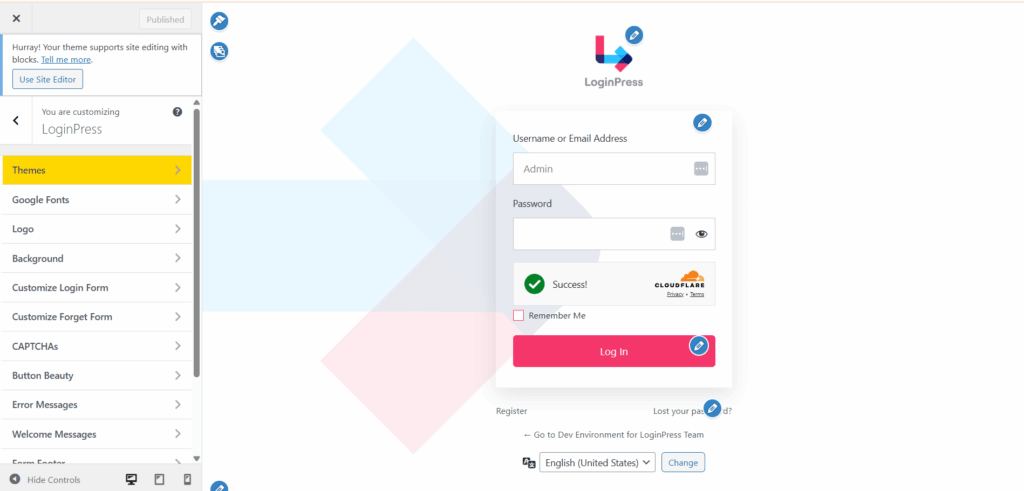
With LoginPress, administrators can go beyond the standard WordPress login page and create custom login screens that match their site’s look and feel.
Customizing the login page helps build trust in your brand and makes the login process feel like a natural part of your website. Key functional improvements include:
- Create Branded Login Experiences: Ensure users feel secure by avoiding redirects to generic, unbranded pages that might appear suspicious.
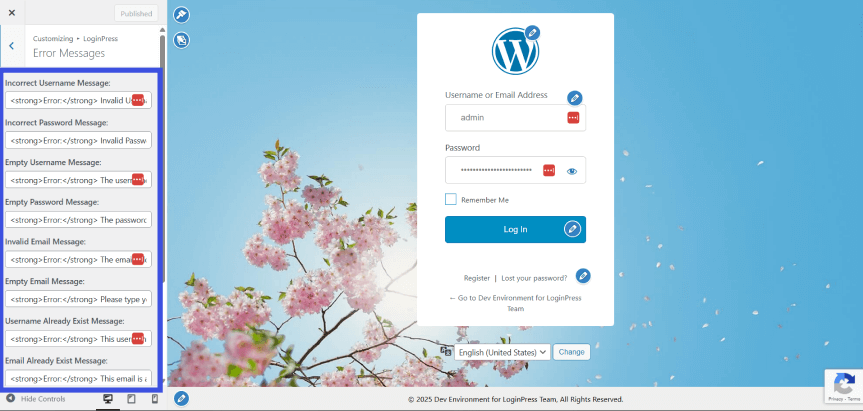
- Controlled Login Messages: As previously noted, generic error messages are vital for security. LoginPress allows administrators to easily modify these strings to provide helpful guidance without revealing sensitive details that could aid attackers.
- Improved Login Guidance: Site owners can add custom redirects to relevant pages, helping users navigate the WordPress authentication flow without friction.
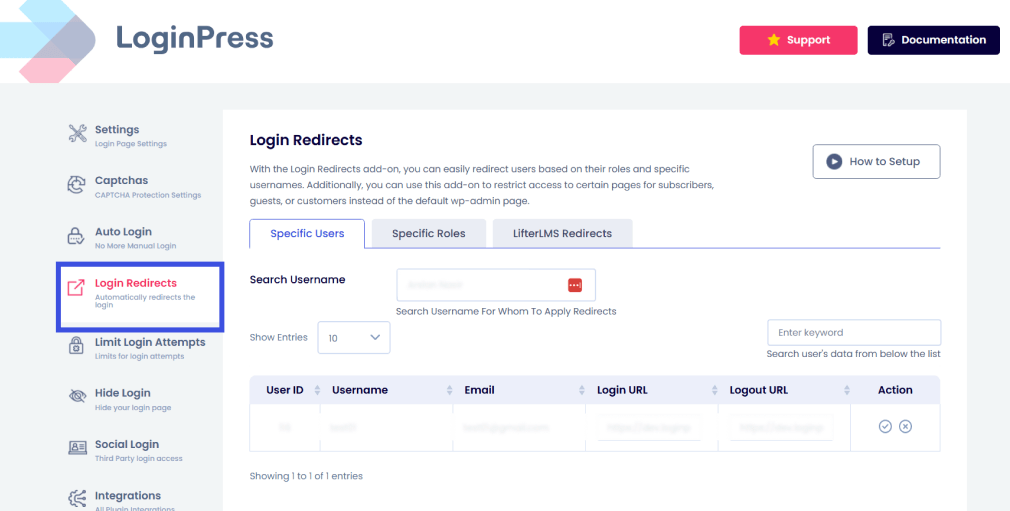
Ultimately, a refined UX supports secure authentication workflows by reducing user errors and ensuring that security features, such as limiting login attempts to combat automated brute force attacks, are clear and easy to follow.
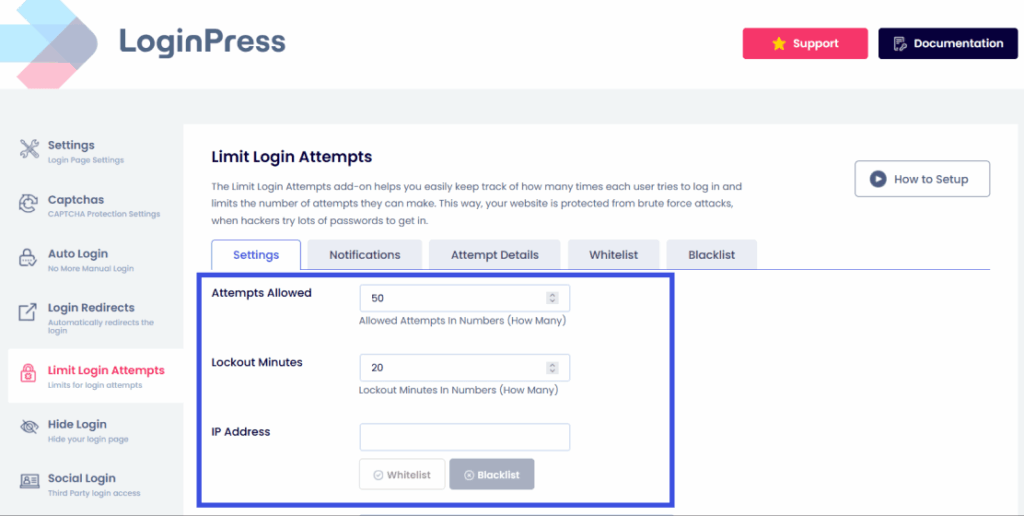
Transforming the login interface into a cohesive gateway is the most direct way to enhance both the usability and the perceived integrity of your site’s access controls.
Authentication Flow Optimization Tips for WordPress Sites
Optimizing a wordpress authentication flow requires a balance between layered security protocols and a frictionless user experience.
To ensure your authentication workflow remains efficient against modern threats, consider the following actionable steps you can take:
- Simplify the Login UI: A cluttered interface can lead to user error. Minimize the number of visible fields to the essentials, identity input, and credentials, to focus the user on the primary task.
- Add Clear Login Instructions: Providing contextual guidance, such as password requirements or recovery steps, reduces support overhead and prevents users from becoming locked out of the system.
- Utilize Branded Login Pages: Consistent branding helps users verify they are on the correct site, reducing the risk of successful phishing attempts during the WordPress login process.
- Monitor Authentication Errors: Regularly audit login logs to identify high-frequency failed login attempts. Error patterns often indicate a brute-force attack or a misconfigured user authentication system.
- Secure Login Endpoints: Beyond standard protection, consider obfuscating or restricting access to default login URLs. Moving the entry point away from standard paths can significantly reduce the volume of automated bot traffic hitting your server.
FAQs About WordPress Authentication Flow
What is a WordPress authentication flow?
A WordPress authentication flow is the sequence of technical steps the system follows to verify a user’s identity before granting access to the site’s dashboard. This authentication workflow typically involves a user submitting credentials via a login form, the server validating those credentials against the wp_users database, and the subsequent generation of secure, hashed authentication cookies and session tokens to maintain the user’s logged-in state.
How does the WordPress login process verify users?
The WordPress login process verifies users through a stateless, cookie-based system. When a user submits their username and password, the core function wp_signon() checks the input against hashed data in the database. If a match is found, WordPress generates two primary cookies, which the browser sends back to the server with every request to prove the user’s identity without requiring re-entry of credentials.
Why are authentication workflows important for site security?
An authentication workflow is the primary defense mechanism against unauthorized access. A robust authentication flow design prevents common cyber threats such as brute-force attacks, credential stuffing, and username enumeration. By implementing authentication layers, site owners ensure that only verified users can access administrative functions, thereby protecting the site’s data integrity.
Can I customize the WordPress authentication interface?
Yes, you can customize the WordPress authentication interface using tools like LoginPress. Customizing the login process lets you create branded login pages, which increases user trust and improves the overall user experience.
WordPress Authentication Flow: Conclusion
The way WordPress handles authentication is key to keeping your website secure and making sure users have a good experience.
Moving from basic password checks to a more advanced authentication process, with secure cookies, session tokens, and strong layered defenses, helps protect your site from the more complex threats expected in 2026.
If you understand how the WordPress login system works, you can spot weaknesses before anyone else does.
Using tools like LoginPress further optimizes this experience, ensuring that your authentication flow is not only impenetrable to automated attacks but also professional and intuitive for legitimate users.
Having a secure, branded, and closely watched login page is the best way to keep your WordPress site safe over time.
That is all for this post. For more related posts, check:
- How to Customize WordPress Login Error Messages (2026)
- WordPress Login Security Automation: Protect Sites Without Manual Monitoring
Given the rise in automated brute-force attacks this year, have you already implemented a complete authentication flow?