Optimize WordPress Login Redirects for SMBs and Agencies (Detailed Guide)

Optimizing WordPress login redirects means sending each user to a clear, branded next step right after login, instead of a generic dashboard or the homepage. For membership sites, stores and agencies, that first screen decides whether users stay, buy or come back.
If customers sign up but do not return, a confusing login redirect may be the cause, not your content.
A branded login experience supports retention by showing users they are in the right place.
This guide covers how to fix redirects for membership sites, online stores and agency client portals, how to troubleshoot common problems and which login metrics to track.
WordPress Login Redirects for SMBs (TOC):
Why Most WordPress Logins Drive Users Away (and How to Fix It)
Most WordPress logins drive users away because the default flow is built for developers, not customers. It adds friction before any content loads and gives a generic, unbranded experience.
The default login flow is designed for developers rather than customers, which results in a generic, unbranded experience.
When users encounter the standard WordPress logo and login screen, it can feel disconnected from your business.
A WordPress redirect after login not working can lead to a loss of trust immediately after a transaction.
The primary issue is the /wp-admin dashboard. Directing clients or students here exposes them to complex menus, notifications, and settings that are often confusing.
This complexity, due to WordPress redirect after login not working, can discourage user engagement.
A cluttered interface can also make users feel uncomfortable on your site.
The real damage, however, occurs when you fail to redirect users after they log in to WordPress.
Standard setups often dump every user onto the same irrelevant page, regardless of why they logged in.
A student shouldn’t have to hunt for their next lesson.
Instead, your site should automatically redirect students after login WordPress directly to their course. Similarly, a client should have access to the WordPress client portal login redirect.
Each additional step required to access content increases the risk of user abandonment. This confusion is not only a UX flaw but also a business liability.
For SMBs, it is a missed opportunity to strengthen brand authority.
Improving this flow improves your site from a technical platform to a professional service.
Membership Sites: How to Stop Losing Members After Login
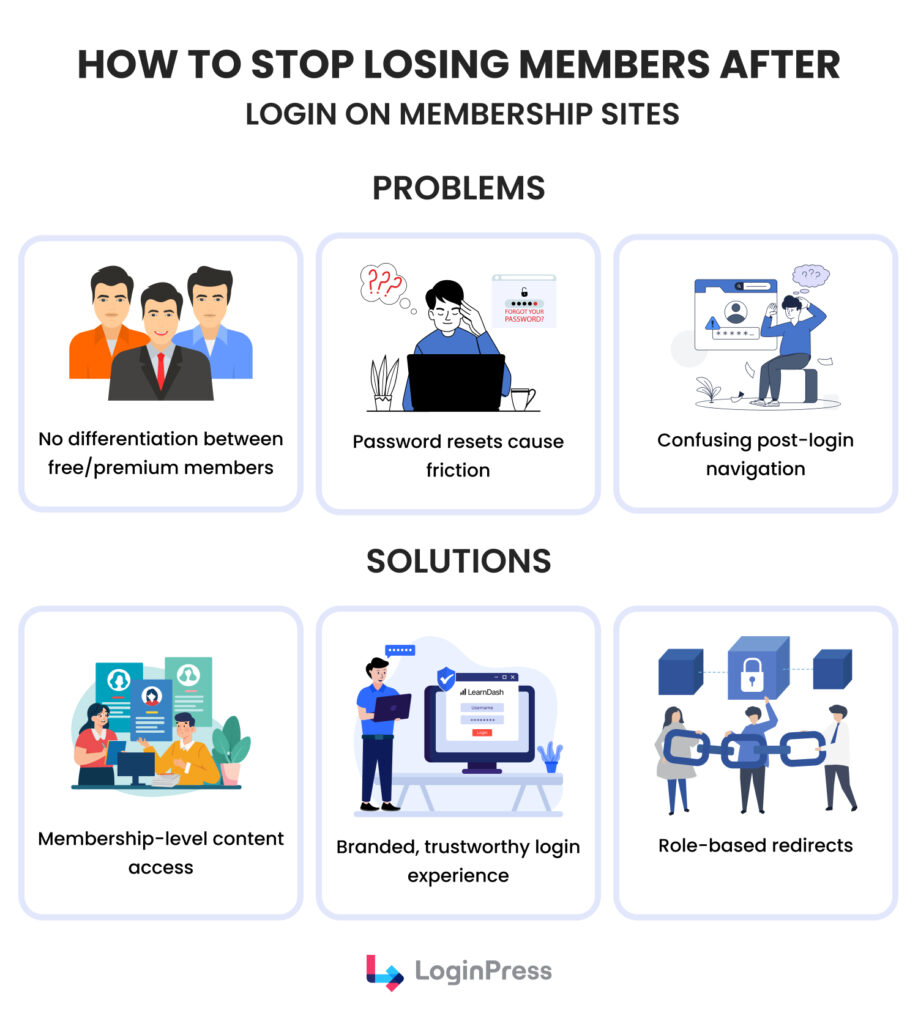
You stop losing members after login by sending them straight to the content they paid for. If a member cannot find it right away, they will eventually cancel.
Most site owners suffer from high churn because their post-login navigation is a mess.
In this scenario, a one-size-fits-all approach fails because it treats all users the same way.
Free members, premium subscribers, and students all have different needs, yet they are often redirected to the same generic page.
This lack of differentiation makes your premium content feel less valuable.
This is why implementing a dynamic WordPress login redirect based on user roles addresses this challenge.
Each user is directed to a destination tailored to their membership level, such as an exclusive dashboard for premium subscribers or a properly designed introductory page for free users.
A targeted approach establishes a clear, structured user journey and enhances the perceived value of premium offerings.
Additionally, standard WordPress password reset processes are often unbranded and may disrupt the user experience.
Introducing a branded and consistent login interface that reduces friction and fosters trust from the beginning.
LoginPress, the best WordPress login customizer, makes this level of personalization simple for SMBs. Instead of grappling with code, you can use it to tailor the login experience for every membership level.
It allows you to maintain design consistency so the login page looks like the rest of your brand. You can easily set specific rules to redirect users after login WordPress based on who the user is.
By directing members to their specific value zone the moment they enter, you turn a technical step into a retention tool.
Ecommerce Stores: How a Smooth Login Boosts Repeat Purchases
A smooth login boosts repeat purchases because friction at login or checkout costs sales.
Industry studies show that 9-in-10 abandon a purchase or account registration due to login issues.
A broken Woocommerce login redirect can suspend a purchase before completion, frustrating returning customers.
Many stores frustrate returning users by requiring login, only to redirect them back to the homepage instead of their cart or account page.
This disconnect is even worse for stores serving both wholesale and retail customers.
Retail buyers want product galleries, while wholesale partners need bulk order forms. Without a clear path, users spend more time searching and less time buying.
The Solution: WooCommerce Login Redirects
To encourage repeat purchases, make it easy for guests to become customers.
This can be done by separating the login and registration options to prevent confusion at checkout.
Successful WooCommerce stores offer personalized dashboards for different user groups, such as VIPs or bulk buyers, so customers see the correct prices and products as soon as they log in.
Also, ensure your site works well on mobile devices and offers a fast password reset. This helps customers keep shopping without interruptions.
LoginPress simplifies this complex logic without requiring custom code. You can easily set a WordPress login redirect by user role so every customer lands exactly where they belong.
It also lets you fully brand the login page to match your storefront, maintaining professional consistency throughout the buyer journey.
Most importantly, it helps you hide the back-end WP admin completely.
This keeps your customers within a polished store environment and away from your website’s technical settings.
For Agencies: How to Deliver a Polished Client Portal Experience Without the Headache
Agencies deliver a polished client portal by giving clients a branded login that lands on the right page. For agencies managing several client accounts, the login is often the first point of contact.
Using a single WordPress login for all clients can cause various issues.
Transitioning to a headless or custom configuration requires careful planning to ensure clients perceive the portal as a secure, high-quality environment rather than a generic backend.
Why Standard Logins Fail Your Clients
- Disorienting Redirects: Clients may be redirected to the default WordPress dashboard or to incorrect URLs, leading to confusion and increased support inquiries.
- Brand Dilution: Uniform client portals can diminish the perceived uniqueness of the agency’s services and may cause confusion when clients manage multiple projects.
- The Login Burden: Keeping track of different logins for many client sites takes up valuable time and makes it harder to hand off projects.
Solution: Designing a Smooth Access Layer
To give clients a top-notch experience, you need to treat the login and API parts as key features of your service.
Here are some steps to make your portal more straightforward to use:
- Implement Custom URLs: Stop using /wp-login.php, which is a common target for brute-force attacks. Instead, map unique subdomains or custom paths (e.g., portal.clientname.com) to their specific login environments to anchor the risk and provide a professional entry point.
- Enforce Role-Based Access: Ensure that upon login, the user is immediately routed to a specific project dashboard based on their role. This prevents “Unauthorized API Access” by ensuring the frontend requests only data relevant to that user’s permissions.
- Utilize Reusable Login Templates: Develop a library of high-quality login templates for quick deployment across clients. This ensures a consistent agency “signature” across all projects while allowing for quick branding tweaks.
Using LoginPress for WordPress Login Redirects
For agencies, LoginPress acts as the central command for this experience. Here is how to implement the strategy using its specific features:
Step 1: Achieve Total White-Labeling
Use the customizer to remove all WordPress branding.
Customize logos, backgrounds, and footers to make the portal feel like a proprietary tool built specifically for the client.
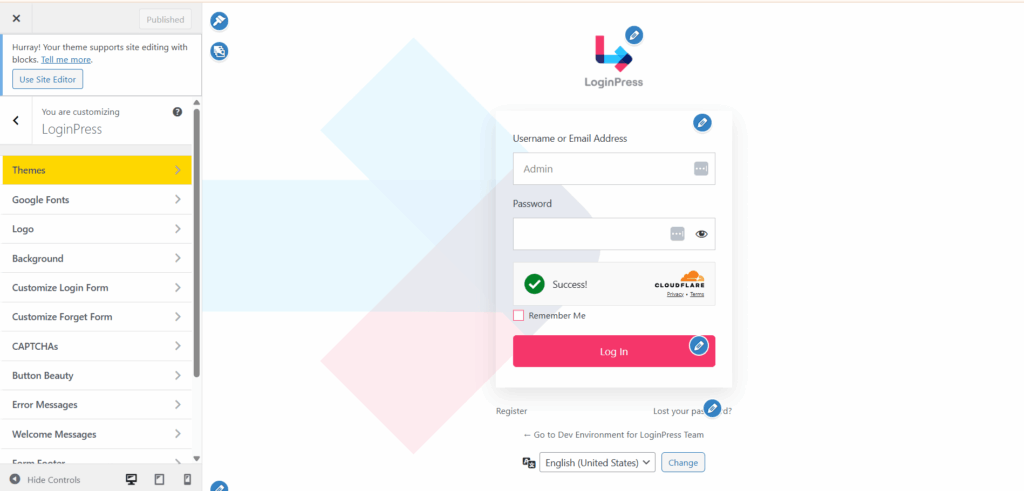
Step 2: Set up Centralized Login Management
Configure all client redirects and access rules from a single interface.
This reduces time spent on manual configuration and prevents users from landing in the wrong backend URLs.
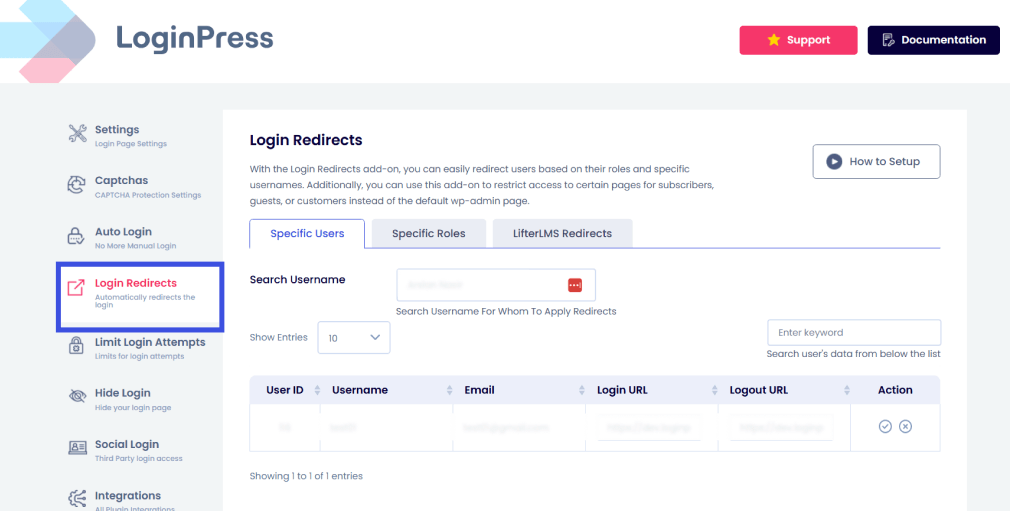
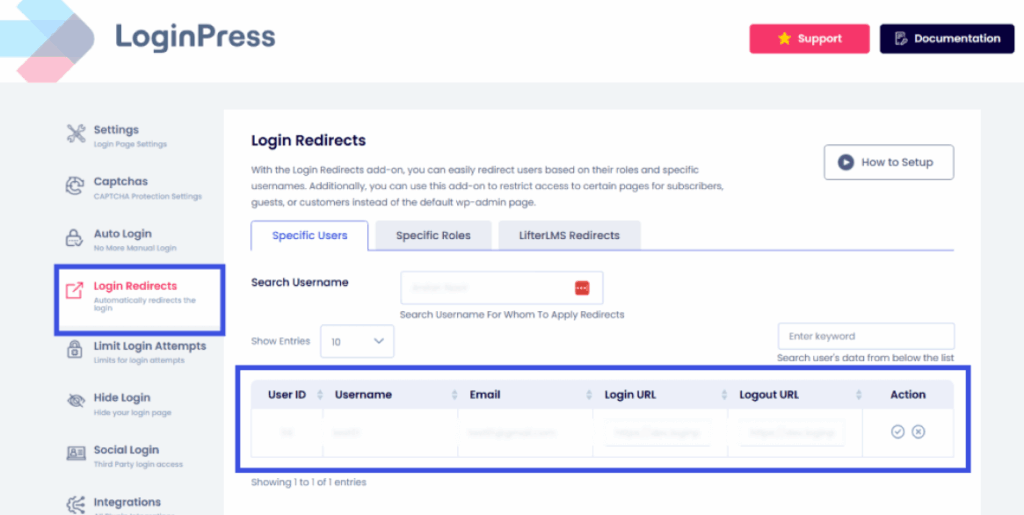
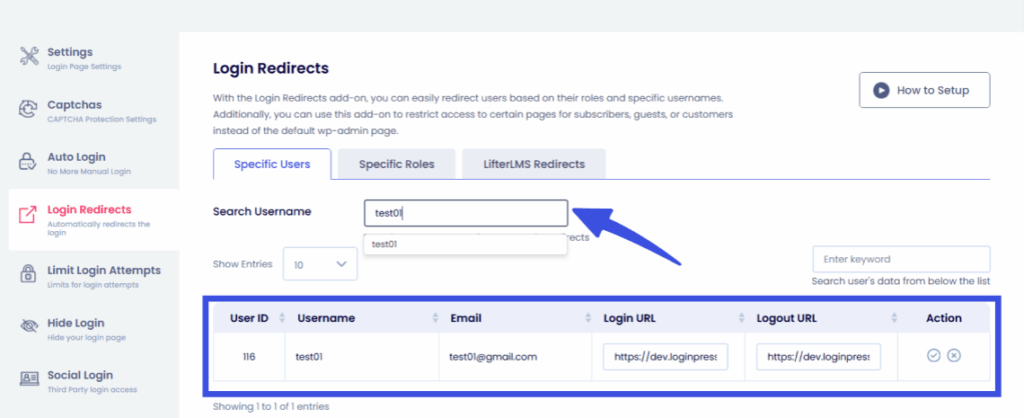
You can also set up redirects based on user roles, specific usernames, and also the LifterLMS users to the relevant dashboards.
Step 3: Deploy Reusable Templates
Create a Master Template for your agency and apply it to new client portfolios with a few clicks.
This maintains your professional standard without requiring you to start from scratch for every contract.
Step 4: Monitor Security Analytics
Use the built-in logs to track login attempts and brute-force patterns.
This allows you to protect your API layers before a vulnerability is exploited proactively.
You can track the login attempts and limit them in the Limit Login Attempts add-on:
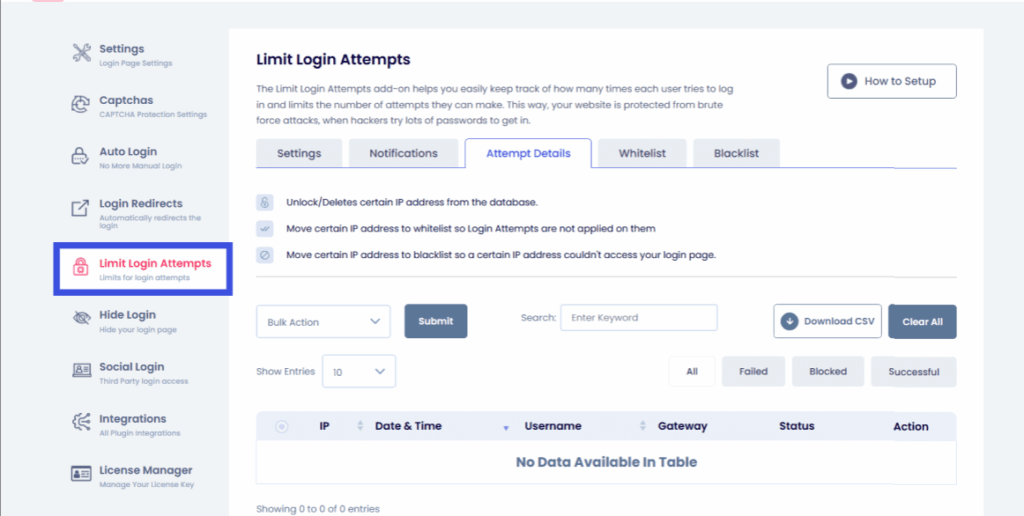
By following these steps, you transform the login process from a technical hurdle into a branded, secure gateway that showcases your agency’s value.
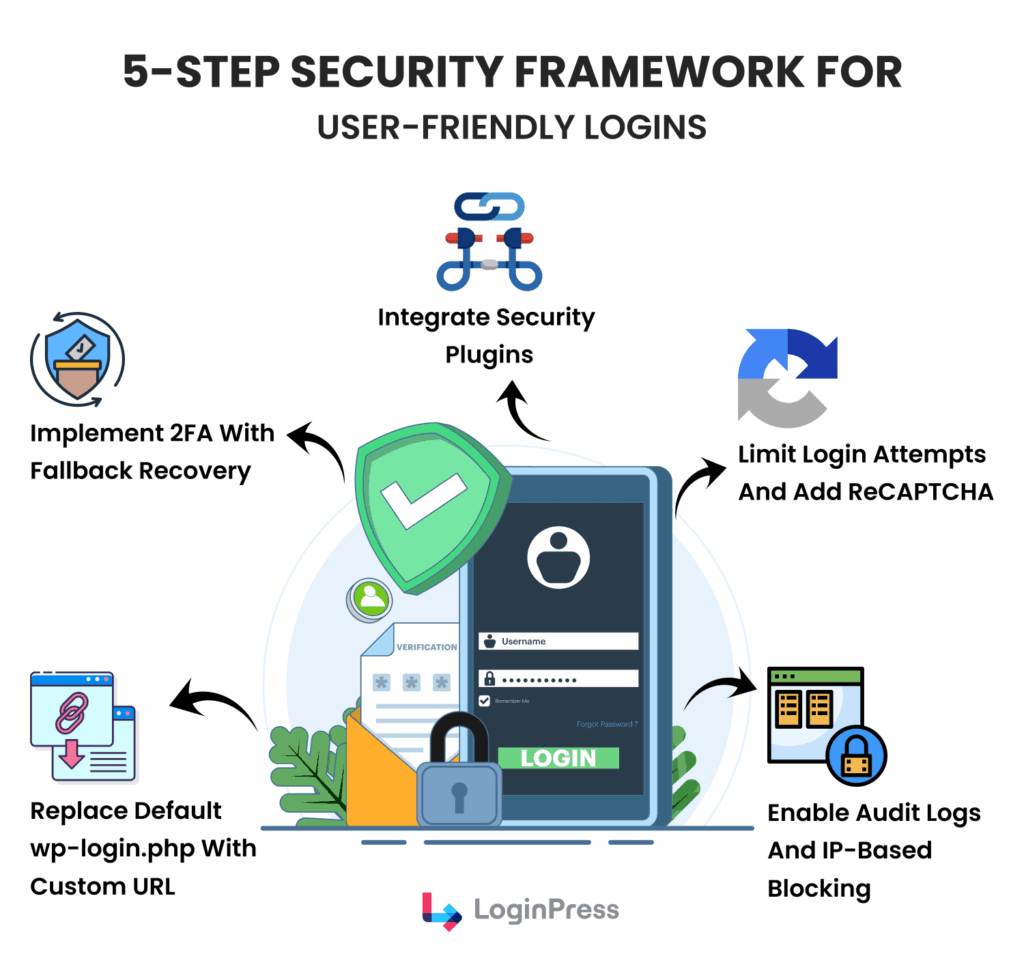
5-Step Security Framework for User-Friendly Logins
For agencies, a user-friendly login starts with treating the login and API layers as part of the service, not as a generic backend.
Using a single WordPress login for all clients can cause various issues.
Transitioning to a headless or custom configuration requires careful planning to ensure clients perceive the portal as a secure, high-quality environment rather than a generic backend.
Why Standard Logins Fail Your Clients
- Disorienting Redirects: Clients may be redirected to the default WordPress dashboard or incorrect URLs, resulting in confusion and increased support inquiries.
- Brand Dilution: Uniform client portals can diminish the perceived uniqueness of the agency’s services and may confuse clients when managing multiple projects.
- The Login Burden: Keeping track of different logins for many client sites takes up valuable time and makes it harder to hand off projects.
Solution: Designing a Smooth Access Layer
To give clients a top-notch experience, you need to treat the login and API parts as key features of your service.
Here are some steps to make your portal easier to use:
Common Login Issues and How to Troubleshoot Them Quickly
The most common login redirect issues are wrong destinations, loops and conflicts with other plugins, and each one has a quick fix.
Addressing these pain points quickly is critical to maintaining a professional client portal and protecting your authentication and API layers.
Let’s address some of the typical login issues and how you can troubleshoot them:
1. Resolving Redirect Loops
Redirect loops often happen when the frontend and backend disagree on a user’s login status.
This is often caused by conflicting Login and Logout WordPress login-redirect rules in your settings.
The Fix
Clear your browser cookies and verify that your custom login URL does not conflict with existing page slugs.
2. Plugin Conflicts (Cache & Membership)
Aggressive caching can serve outdated login pages, while membership plugins may try to override your custom login logic.
This creates a broken experience where users see generic WordPress errors.
The Fix
Exclude your custom login URL from your caching plugin’s settings for WordPress login redirect.
Ensure your security or membership plugins are configured to recognize and allow your specific API layers.
3. Frequent Session Timeouts
Users getting logged out too quickly usually indicates a stateless session mismatch or restrictive server-side cookie settings.
The Fix:
Adjust the Remember Me duration in your site settings.
Check your server’s PHP session timeout values to ensure they align with your frontend’s token expiration.
How LoginPress Reduces Manual Troubleshooting
LoginPress is designed to eliminate the trial-and-error often associated with custom login environments.
It provides a stable bridge between your branding and the WordPress core for WordPress login redirect.
- Centralized Redirects: Manage all Login and Logout paths from one dashboard to prevent redirect loops.
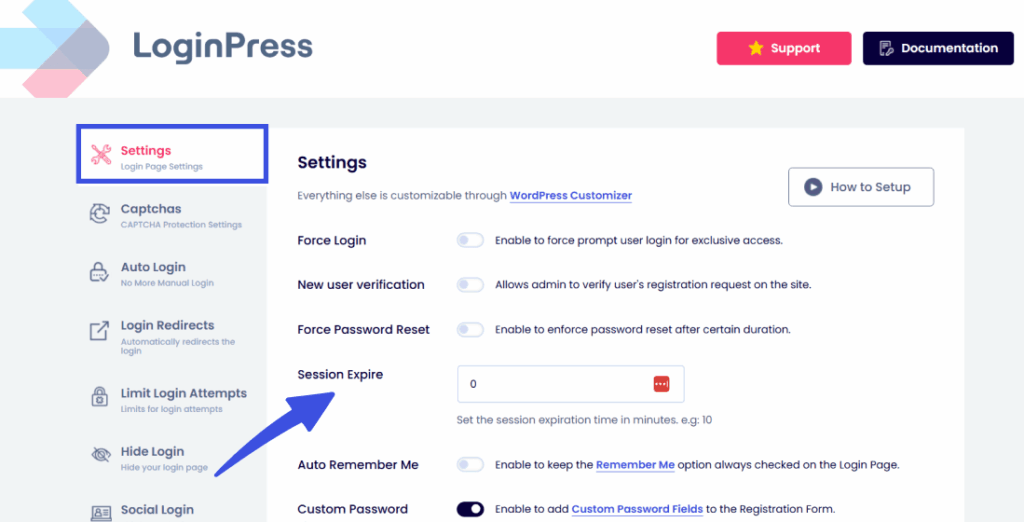
- Session Management: Easily control how long users stay logged in without needing to edit complex server files for WordPress login redirect.
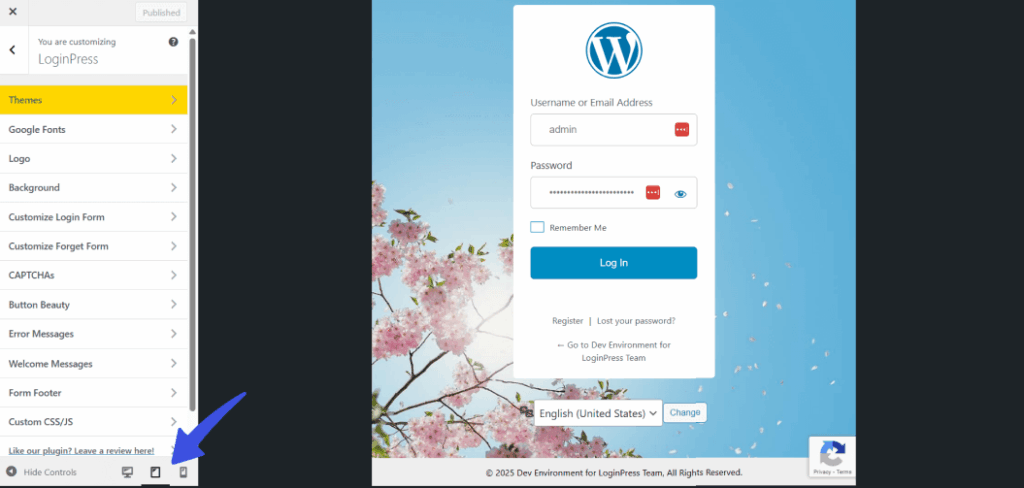
- Instant Preview: Use the LoginPress Customizer to see changes in real time, so you can catch layout or functionality issues before your clients do.
By centralizing these WordPress login redirect settings, you stop wasting time on manual fixes and focus on delivering a high-quality user experience.
Measure, Improve, Repeat: How to Analyze and Optimize Login Performance
You analyze login performance by tracking how many users log in, fail, drop off and reach their destination. A secure login is only effective if users can still reach it.
Monitoring your authentication and API layers lets you spot security threats and user friction before they affect your business.
Here are some of the right metrics you can track to analyze your login page:
- Login Success vs. Failure Rates: Monitor how many users successfully authenticate on their first attempt versus how many trigger brute-force protections.
- Login Page Bounce Rates: Track how many users land on your custom login URL but leave without signing in.
- User Flow Analysis: Analyze the time it takes for a user to move from the login screen to their designated dashboard.
- API Response Times: Measure how quickly your API layers validate credentials to ensure a lag-free experience for WordPress Login Redirect.
How to Use Data to Refine the Login Experience
- Identify Friction Points: Frequent failed attempts may indicate that your password requirements or 2FA steps are too complex for your audience.
- Detect Malicious Patterns: Use login logs to identify Unauthorized API Access attempts from specific regions or IPs.
- Iterate on Redirects: If users frequently navigate away from their landing page, adjust your role-based redirect logic to better suit their needs.
Optimize Continuously with LoginPress Analytics
LoginPress takes the guesswork out of optimization by providing a dedicated analytics dashboard within WordPress.
- Centralized Monitoring: View login attempts and error logs in one place to quickly identify system-wide issues, including WordPress LMS login redirects.
- Proactive Security: Identify and block repeat offenders using real-time data to protect your authentication and API layers for WordPress login redirects.
Case Studies: SMBs & Agencies That Fixed Their WordPress Login Redirect Flow and Saw Real Results
Real-world success stories demonstrate the power of a well-optimized login experience.
By focusing on authentication and API layers, these businesses transformed their client portals, resulting in significant improvements in user satisfaction and operational efficiency.
Case Study 1: The Learning Hub (Online Course Platform)
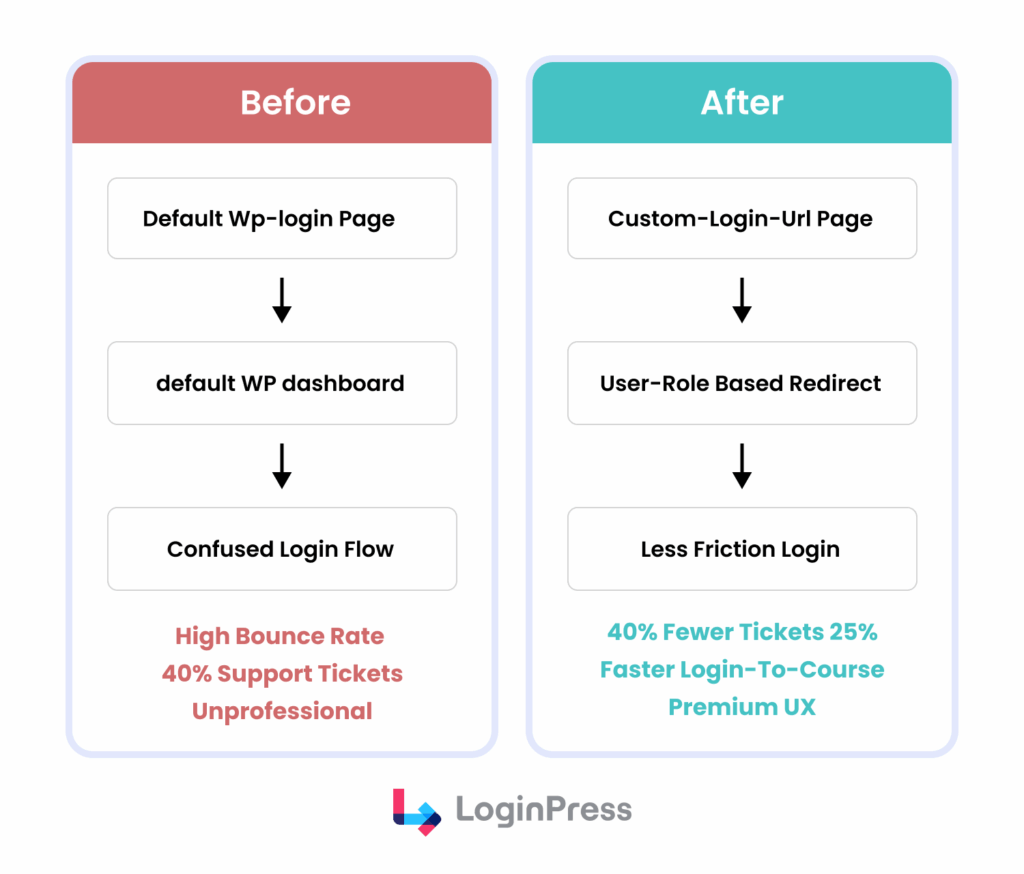
Problem: This SMB ran a membership site for online courses.
Their default WordPress login was confusing, resulting in high bounce rates on the login page and frequent support tickets about forgotten passwords or incorrect redirects.
Users often landed in the WP admin rather than their course dashboard.
Solution: The Learning Hub implemented a custom login URL, integrated reCAPTCHA, and used role-based redirects to redirect students after login to WordPress.
Results after WordPress Login Redirect:
- Reduced Support Tickets: 40% decrease in login-related support requests.
- Improved User Flow: 25% increase in students successfully reaching their course dashboard within 10 seconds of logging in.
- Enhanced Brand Perception: Students reported a more professional and intuitive experience.
Case Study 2: Creative Core Agency (Web Development Agency)
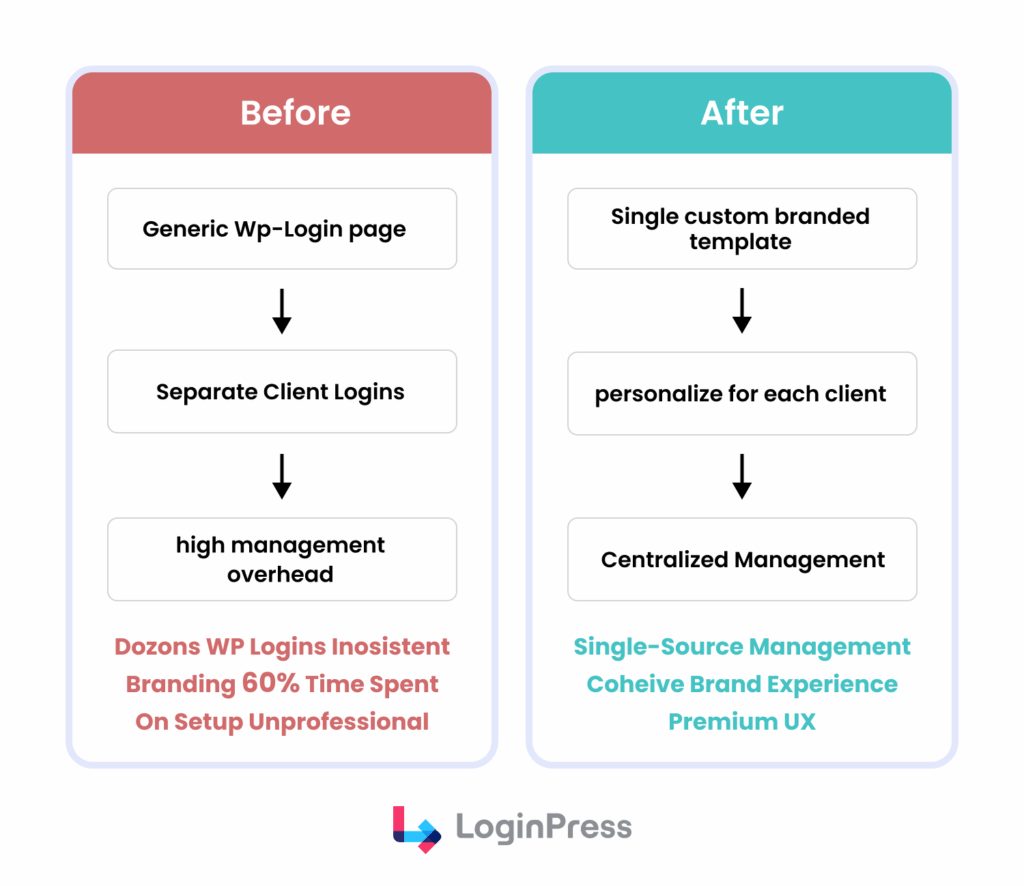
Problem: Creative Core Agency managed client portals for dozens of projects.
Each portal used the generic WordPress login, making it difficult for clients to distinguish between projects and causing brand inconsistencies.
Managing separate credentials was a time sink.
Solution: The agency standardized its client login experience using a white-label solution.
They deployed custom-branded login pages for each client and implemented centralized login management.
Results after WordPress Login Redirect:
- Time Savings: Reduced login management and customization time by 60% per client portal.
- Enhanced Client Perception: Clients reported a more cohesive and professional brand experience across all projects.
- Streamlined Onboarding: New client portal setup time cut in half.
Implementation Checklist: From Setup to Launch for WordPress Login Redirect
Building a secure and professional login requires a methodical approach. Follow this checklist to ensure your authentication and API layers are fully protected and user-friendly:
- Secure the Entry Point: Replace the default /wp-login.php with a custom, branded URL to reduce bot traffic.
- Configure CORS: Set strict Cross-Origin Resource Sharing rules to prevent unauthorized browser-level access to your API.
- Hardened Defense: Enable 2FA, limit login attempts, and integrate reCAPTCHA to stop brute-force attacks.
- White-Label Branding: Apply custom logos, backgrounds, and fonts to ensure a consistent agency experience.
- Set Redirects: Establish role-based login and logout redirects to prevent clients from landing in the backend admin area.
- Test: Verify the login flow across different devices and user roles to catch redirect loops or session issues.
- Optimize: Use analytics to identify where users drop off, and refine the interface to improve speed.
- Monitor: Enable audit logs to track successful logins and block suspicious IP addresses in real-time.
Frequently Asked Questions
Does a custom login page improve my site’s security?
Yes, but it is one piece of a larger puzzle. Moving away from /wp-login.php hides your entry point from basic automated bots, reducing noise from brute-force attacks. However, you must still maintain strong server-side protections, such as rate limiting and proper API authorization, because the underlying backend remains a potential target.
What is the difference between CORS and server authorization?
CORS is a browser-level security feature that determines whether a browser is allowed to request resources from a different origin. It does not replace server-side authorization. Even with CORS in place, your server must still verify user tokens and permissions to ensure that only authorized users can access sensitive data.
Why are my users getting logged out of their portal too often?
This usually occurs because the frontend session token does not match the backend PHP session timeout. In a headless environment, ensuring your API layers and frontend are synchronized is key. You can often fix this by adjusting the “Remember Me” settings in your login plugin or extending the session lifetime on your server.
Why is my WordPress redirect after login not working?
This issue is usually caused by plugin conflicts or aggressive caching settings. Often, a security plugin or an outdated theme script interferes with the redirect command, leading to a WordPress login redirect loop. To fix it, clear your site cache and verify that your redirect rules don’t clash with existing page permissions. Using a tool like LoginPress simplifies this logic, ensuring your WordPress login redirect works every time without manual code.
Can I redirect WordPress users to different pages based on their role?
Yes, and it is a best practice for improving user experience. Implementing a WordPress login redirect by user role allows you to send students to a learning dashboard, clients to a portal, and wholesale buyers to a bulk order form. This automation removes the need for manual navigation and ensures every user finds immediate value. It transforms a generic entry point into a personalized gateway that boosts engagement and brand trust.
Conclusion: A Great Login Is the Start of a Great Experience
A login screen is more than a security gate. It is the first impression of your site, and a polished redirect shows attention to detail.
By securing your authentication and API layers while maintaining a high-end brand aesthetic, you build trust from the very first click.
We encourage agencies to standardize this experience across their entire client portfolio.
Transforming a generic gateway into a polished, secure portal reduces support headaches and improves your service.
Learn more about login optimization here:
- How to Build Login Security for Headless WordPress
- WordPress Login Trust Psychology: What Makes Users Trust Your WordPress Site
- How To Customize WordPress Login Page For Clients (Detailed Guide)
Start optimizing your login flow with LoginPress today.