Session Hijacking in WordPress: How to Detect and Prevent It

WordPress session hijacking happens when someone steals your login session to access your site without permission.
In simple words, an attacker steals the digital key or session cookie that your browser uses to prove you are logged in. If a hacker successfully hijacks your session, they bypass your username and password entirely.
This leads to:
- Stolen accounts: Full administrative control.
- Unauthorized access: Sensitive data theft.
- Site defacement: Malicious code injection.
You prevent WordPress session hijacking with more than a strong password: enforce two-factor authentication, set idle logouts, monitor login logs and use HTTPS.
In this post, I will show you what WordPress session hijacking is, how it attacks your site, and easy ways to detect and prevent it.
WordPress Session Hijacking (TOC)
What is Session Hijacking in WordPress?
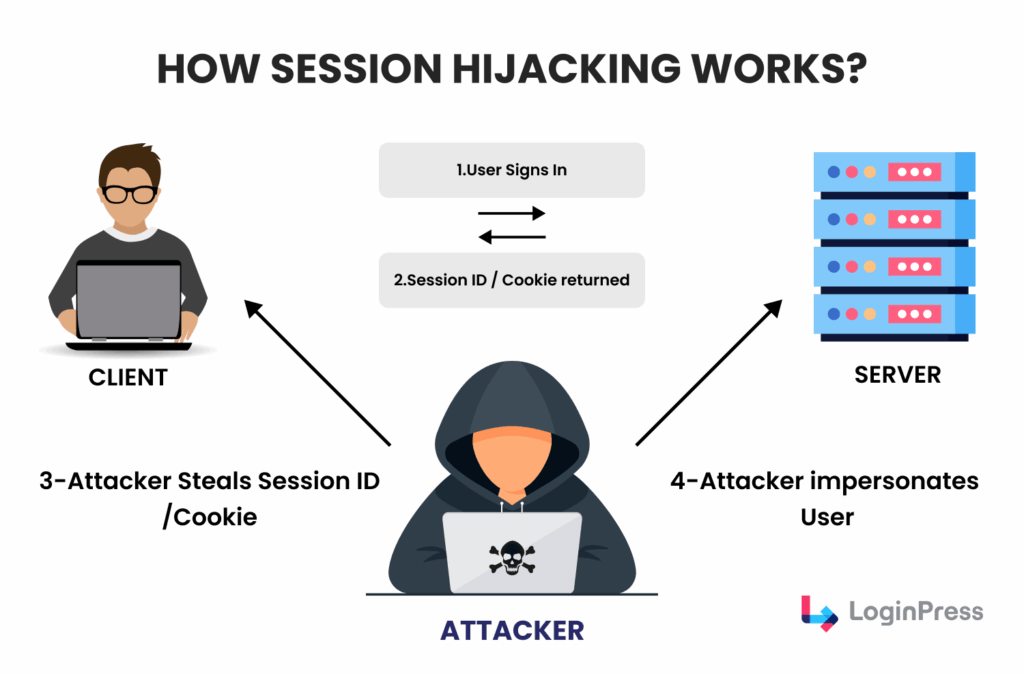
Session hijacking in WordPress works by stealing the session cookie your browser uses to prove you are logged in, so you need to understand how sessions work first.
This cookie contains a unique session token. As long as that token is present in your browser, WordPress knows you are authorized.
If an attacker intercepts this token, they can inject it into their own browser and instantly become you.
Common WordPress Session Hijacking Methods
Attackers use several technical vectors to execute WordPress session hijacking:
- Session Sniffing: Attackers use packet sniffers on unsecured Wi-Fi networks to intercept cookies sent over unencrypted connections.
- Cross-Site Scripting (XSS): An attacker injects a malicious script into a comment or a vulnerable plugin. When you view that page, the script runs in your browser and sends your session cookie directly to the hacker’s server.
- Session Fixation: The attacker assigns a fixed session ID to a user. They send you a link with a pre-set session ID. Once you log in using that link, the attacker uses that same ID to take over your account.
- Session Prediction: If a site generates weak, sequential session IDs, hackers use AI tools to guess the following valid ID.
Note: WordPress uses the wp_generate_password function to create high-entropy session tokens, making prediction difficult, but XSS remains a high-level threat.
Signs Your WordPress Session May Be Compromised
You detect a stolen WordPress session through active monitoring, because the attacker does not log in and you will not see a failed login attempt.
These are the key indicators of WordPress session hijacking:
- Discrepancies in Login Logs: Using LoginPress login logs, look for a single username associated with two different IP addresses or geographical locations at the same time.
- The Ghost Active Session: If you check your active sessions and see a device you don’t own, your session has been cloned.
- Instant Logouts: WordPress typically keeps you logged in for 48 hours. If you are suddenly logged out for no reason, a hacker may have hijacked your session and terminated it to cover their tracks.
- Modified User Metadata: Check for subtle changes in your profile, such as a modified Application Password or a secondary email address added to your account.
Pro Tip: With LoginPress, you can monitor login logs as an early warning system by highlighting anomalies in a centralized dashboard, so you can react before data is exfiltrated.
How to Prevent Session Hijacking in WordPress (Step-by-Step)
You prevent session hijacking in WordPress with a multi-layered defense. Use this technical checklist to protect your user data.
Step 1: Enforce Strong Passwords and Two-Factor Authentication (2FA)
While WordPress session hijacking often targets active sessions, many attackers start by brute-forcing credentials to create that session.
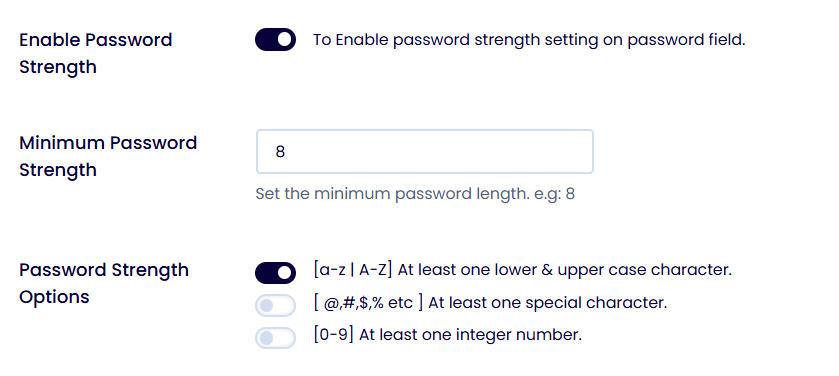
- The Action: Use the LoginPress’s password strength meter option to enforce high-entropy password requirements for all user roles.
- The Next Level: Enable 2FA. Even if a hacker has your password, 2FA acts as a secondary barrier, preventing the creation of the initial session they intend to hijack.
Step 2: Force SSL/HTTPS and Secure Cookie Flags
If your site runs on HTTP, session cookies are sent in plain text, making them easy targets for sniffing.
- The Action: Install an SSL certificate and force all traffic over HTTPS.
- Why it works: The HttpOnly flag prevents JavaScript from reading your cookies, effectively neutralizing most XSS-based hijacking attempts.
Step 3: Implement Real-Time Login Monitoring and Session Control
You cannot stop an attack you cannot see. Securing WordPress sessions effectively involves knowing exactly who is connected.
- The Action: Use the LoginPress Sessions dashboard to view a live list of all currently logged-in users.
- Centralized Control: If you spot an unrecognized IP address or a login from an unusual country, LoginPress lets you Force-Logout that user with one click. This instantly kills the hijacked session token.

Step 4: Limit Login Attempts (Throttling)
Session hijackers often use automated scripts to test stolen session IDs or credentials.
- The Action: Enable Limit Login Attempts within LoginPress, which allows you to set limits on concurrent sessions, set lockout minutes, and set the number of allowed attempts.
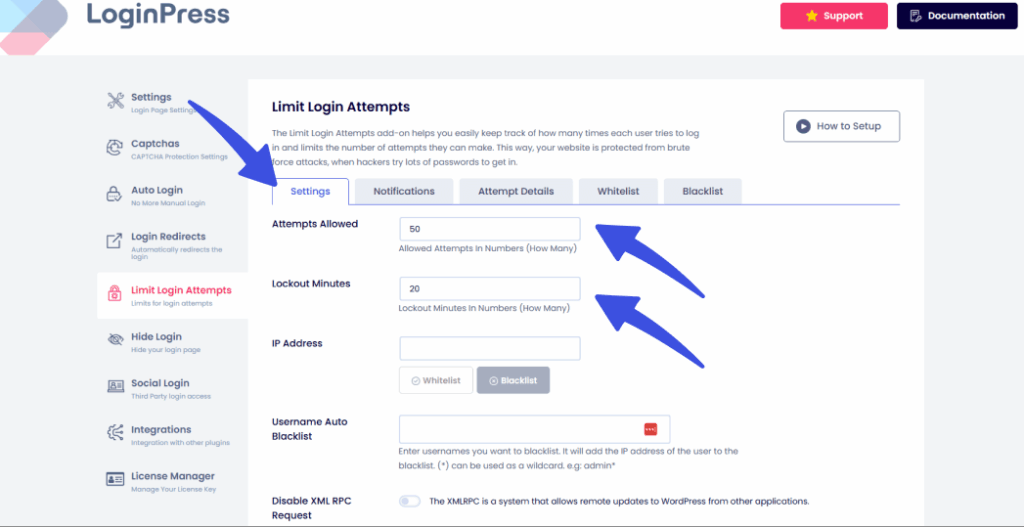
- The Benefit: This feature enables temporary lockouts after a specified number of attempts. By limiting the speed at which an attacker can interact with your login page, you disrupt the automated tools used in WordPress session attacks.
Step 5: Automatically Log Out Idle Users
The longer a session remains live, the larger the window of opportunity for a WordPress session hijacking. Administrators must be aware of active sessions and monitor logs.
- The Action: Prevent account sharing by restricting the number of active sessions per user, with role-based exclusions and automated blacklisting for suspicious usernames.
- The Strategy: LoginPress will automatically invalidate the session cookie and limit the number of concurrent sessions a user can have.
Step 6: Prevent XSS by Keeping the Stack Updated
Most stolen WordPress sessions result from Cross-Site Scripting (XSS) vulnerabilities in outdated code.
- The Action: Maintain a strict update schedule for WordPress Core, themes, and plugins.
- The Insight: Security patches often include fixes for “cookie-cloning” vulnerabilities. By staying updated, you ensure that the technical loopholes used to extract session data are closed.
How to Respond to a Session Hijacking Incident
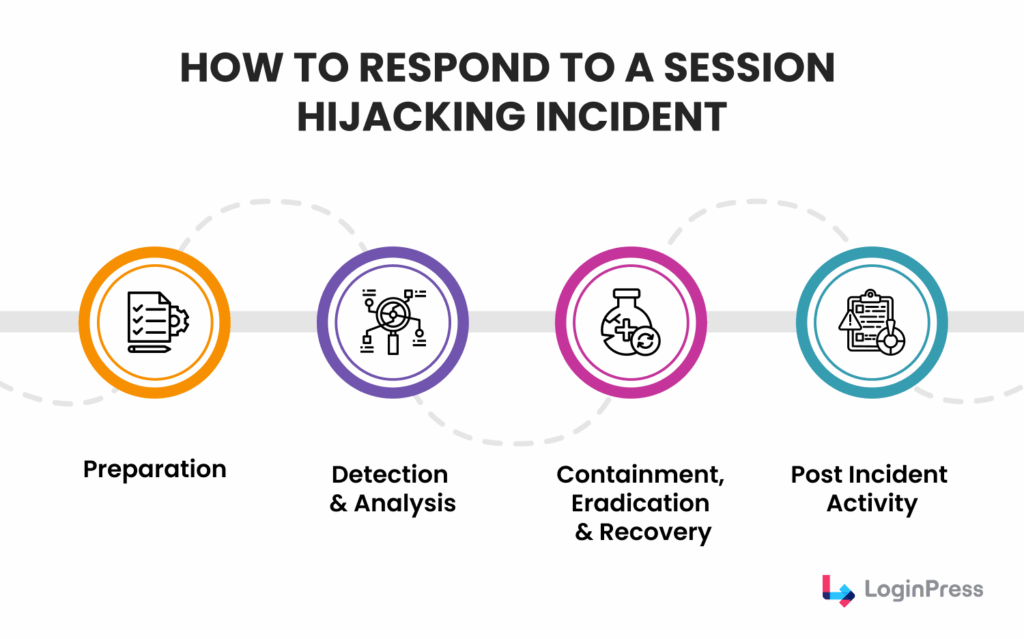
You respond to a session hijacking incident by acting immediately, because every second a hijacker stays authenticated is a second they can use to export user data or install backdoors.
Follow this technical response plan to recover from a stolen WordPress session:
| Incident Sign (Detection) | Immediate Action | Technical Implementation with LoginPress |
| Unrecognized Active Session in dashboard (unknown IP or device) | Terminate Concurrent Sessions | Use the Disable Concurrent Sessions option to block unknown active sessions. |
| User reports being logged out repeatedly without cause. | Force Password Reset | Use the LoginPress Force Password Reset feature for all roles to ensure credentials aren’t being used to re-establish sessions. |
| Suspicious activity (new users created, settings changed). | Audit Entry Points | Download Login Logs and track all the successful logins over the last 24 hours. |
| Site behaves strangely (redirects, pop-ups, or slow performance). | Perform Malware Scan | Use a security scanner plugin to look for XSS scripts or cookie-stealers injected into your header, footer, or database. |
| Bulk login attempts appearing in logs from a single IP | IP Blacklisting | Use the LoginPress Limit Login Attempts Add-On to permanently blacklist the offending IP address from reaching the login page entirely. |
Best Practices for WordPress Session Security
WordPress session security is not a one-time setup: it needs consistent maintenance and a proactive routine.
Add these habits to your monthly routine to secure WordPress sessions:
1. Audit Your Login Logs Weekly
Don’t wait for a WordPress session hijacking breach to check your data.
Proactive monitoring allows you to spot a stolen WordPress session before significant damage occurs.
What to Look For: Look for impossible travel patterns, such as a user logging in from New York and then again from Singapore ten minutes later.
Why it Helps: Identifying suspicious IP addresses early lets you blacklist them before they can execute a full-scale attack.
2. Periodically Rotate WordPress Security Keys (Salts)
WordPress uses a set of “salts” (random variables) to encrypt the information stored in user cookies.
If a hijacker has already stolen a cookie, rotating these keys is the only way to render that stolen data useless.
- The Result: This act instantly invalidates every active session on your site, forcing every user (including the hijacker) to log in again with fresh credentials.
- Pro Tip: Use the official WordPress.org secret-key service to generate new, high-entropy salts.
3. Enforce the Principle of Least Privilege
The blast radius of a hijacked session depends entirely on the compromised user’s permissions.
Auditing your user list and demoting anyone who does not strictly require “Administrator” or “Editor” capabilities.
- How to Secure WordPress Sessions: Assign users the lowest level of access possible (e.g., “Contributor” or “Subscriber”). If an attacker hijacks a Contributor session, they cannot install malicious plugins or delete your database.
4. Secure the Connection for Remote Teams
Many WordPress session hijacking attacks occur because an admin logs in to the dashboard over an unsecured network, such as public Wi-Fi at a coffee shop or airport. Mandate the use of a reputable VPN for all remote staff and editors.
- The Logic: A VPN creates an encrypted tunnel for your data, making it nearly impossible for hackers to perform “session sniffing” even if they are on the same local network.
- Education: Regularly remind your team that preventing session hijacking starts with their own local connection habits.Best Practices for WordPress Session Security
Frequently Asked Questions
How does session hijacking work in WordPress?
When you log in to WordPress, it creates a login cookie in your browser to remember that you’re authenticated. Session hijacking happens when an attacker steals or abuses that cookie. If they get it, they can access your WordPress admin without knowing your password.
This usually happens through:
Unsecured websites (no HTTPS)
Public Wi-Fi networks
Malicious plugins or themes
Cross-site scripting (XSS) attacks
Once hijacked, the attacker “pretends” to be you until the session expires or is forced to log out.
How do I know if my WordPress session is hijacked?
Common warning signs include:
You’re logged out of WordPress unexpectedly
You see login activity you don’t recognize
Settings, posts, or users change without you doing anything
Your admin dashboard behaves oddly or redirects
You receive security alerts about new logins
If any of these happen, your session may have been compromised.
Can insecure cookies lead to WordPress session hijacking?
Yes. Insecure cookies are one of the leading causes.
If login cookies are:
Not encrypted
Not restricted to HTTPS
Accessible by JavaScript
They can be intercepted or stolen, especially on public or shared networks. Once stolen, attackers can reuse them to log in as you, no password required.
How do I prevent WordPress session hijacking without coding?
You can reduce the risk significantly by doing the following:
Enable HTTPS (SSL) on your site
Use a login security plugin to protect wp-login.php
Limit login attempts and block suspicious IPs
Force logout of inactive users
Avoid using the WordPress admin on public Wi-Fi
Keep WordPress, plugins, and themes updated.
These steps protect your login sessions without touching any code.
WordPress Session Hijacking: Conclusion
Securing your site against WordPress session hijacking requires ongoing caution.
Real-time monitoring, idle logouts and audit trails with LoginPress close the main routes for session theft.
For more information on WordPress session management, check:
- WordPress Session Management: How to Secure User Sessions
- Modern WordPress Login UX Patterns (What Users Expect)
Have you ever spotted a suspicious session in your WordPress dashboard, and what steps did you take to secure your site? Share your experience in the comments below!