WordPress Login Optimization for Better User Retention (Explained)

WordPress login optimization improves user retention because the login page is the most frequent touchpoint for returning customers, and a generic login screen makes them leave instead of resetting a password. You optimize it by branding the page, adding social login and keeping the flow simple, which you can do with LoginPress.
This post shows you how login pages influence retention and how to optimize yours with LoginPress to reduce churn and improve the login experience.
Login Page Optimization (TOC):
How Login Pages Influence User Retention
Login pages influence user retention because every login connects user intent to your product’s value, and a poor first impression pushes users away.
If this connection is unreliable, user engagement declines. Improving the user experience of the login process matters for several reasons:
- Credibility: New users often judge a platform’s security and technology by how the login page looks and works.
- Annoyance Threshold: Returning users have little patience for slow or confusing login pages. If a page loads slowly or displays unclear errors, many users will stop trying to log in.
Expert Insight: If logging in takes more than three seconds or requires more than two clicks, more users are likely to leave.
What is WordPress Login Page Optimization?
Effective login user experience (UX) optimization involves strategically aligning the website’s entry point with user expectations.
This process focuses on minimizing cognitive load, thereby reducing the mental effort required for users to navigate from the website’s URL to their dashboard.
Investing in a custom WordPress login page involves optimizing four critical pillars:
1. Technical Performance
Given the prevalence of short attention spans, the login page should be the fastest-loading asset on the website.
- Time-to-Interactive (TTI): Ensuring the cursor automatically focuses on the Username field the moment the page loads.
- Asset Minification: Removing heavy default WordPress styles or scripts that aren’t needed for a simple form.
- Result: A frictionless entry that prevents the user from “bouncing” before they even type a character.
2. Communication Clarity
Standard WordPress error messages are often vague (e.g., “Invalid Username”).
Optimization should transform these into clear, actionable guidance for users:
- Instructive Errors: Instead of a dead end, your form should guide the user (e.g., “That email isn’t in our system. Did you sign up with a different one?”).
- Visual Cues: Using subtle animations (like a gentle shake for a wrong password) that provide instant, non-verbal feedback.
3. Visual Continuity and Trust
Security encompasses both perception and technical protocols for WordPress login optimization.
Transitioning from a modern landing page to a generic WordPress login interface can disrupt user trust due to inconsistent visual design.
- Brand Alignment: Optimization ensures your custom WordPress login page uses the exact HEX codes, typography, and button styling as your main site.
- The Safety Net: When the login page looks like your brand, users feel their data is being handled by you, not a generic third-party script. This drastically increases the completion rate for login attempts.
4. Path-to-Purpose
Optimization extends beyond the login action and includes implementing a Login Redirect strategy for WordPress login optimization.
- Contextual Routing: Don’t just dump every user onto the Profile page. An optimized flow sends a student to their latest lesson or a customer to their recent orders.
- The UX Win: You save users 3–4 clicks, which is the ultimate currency in WordPress user retention.
Expert Tip: Audit your login page on a mobile device with a 3G connection. If the Social Login buttons take more than 2 seconds to appear, your WordPress login optimization is incomplete. Mobile users will ghost your platform if the entry barrier feels like a chore.
Why Default WordPress Login Pages Hurt Retention
Default WordPress login pages hurt retention because a generic entry point signals a lack of professional quality and undermines user trust on membership, SaaS and community sites.
The impact on your bottom line is direct:
- Failed Logins Lead to Immediate Friction: Detailed error messages often cause user confusion. Without modern social login options, a single forgotten password can create friction.
- Abandonment via Login Fatigue: If a returning user encounters the default login page with no easy way to access it, they may close the tab.
- Increased Churn: This friction drives users away permanently, turning a minor design flaw into a major retention crisis.
Neglecting this critical interface means losing customers just as they are about to engage with WordPress login optimization.
What a High-Retention Login Experience Looks Like
A high-retention login page is a retention tool, not just a utility.
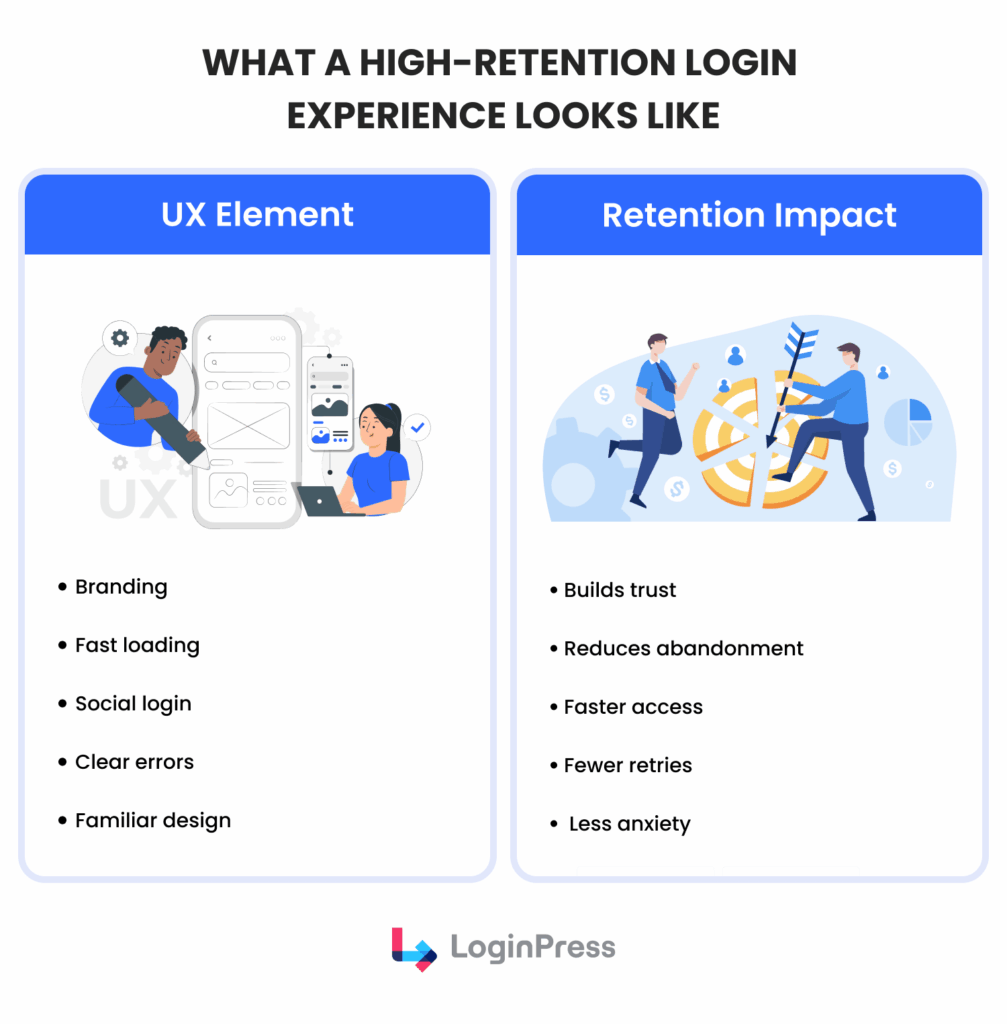
If a user struggles to access your site, they are already in a negative mindset before they even see your content. To improve the login experience.
| UX Element | Retention Impact | Why it Works |
| Visual Branding | Zero-Doubt Authority | By mirroring your site’s exact CSS, you provide immediate psychological safety and confirm they are in the right place. |
| Performance (LCP) | Friction Elimination | This prevents micro-abandonment, where a user gets distracted by a notification while waiting for your form to load. |
| Social Auth (OAuth) | One-Tap Access | By removing password fatigue, you eliminate the reason for churn: the dreaded password reset loop that undermines user momentum. |
| Heuristic Error Messaging | Frustration Management | Instead of an Invalid Login message, provide helpful feedback. This turns a failure into a guided path back to your product. |
| Visual Continuity | Cognitive Ease | Keeping the design familiar makes the transition from “Visitor” to “User” smooth. |
| Smart Redirects | Momentum Retention | High-retention sites don’t send everyone to the homepage. They use smart redirects to their last active session. |
How LoginPress Optimizes WordPress Login Pages for Retention
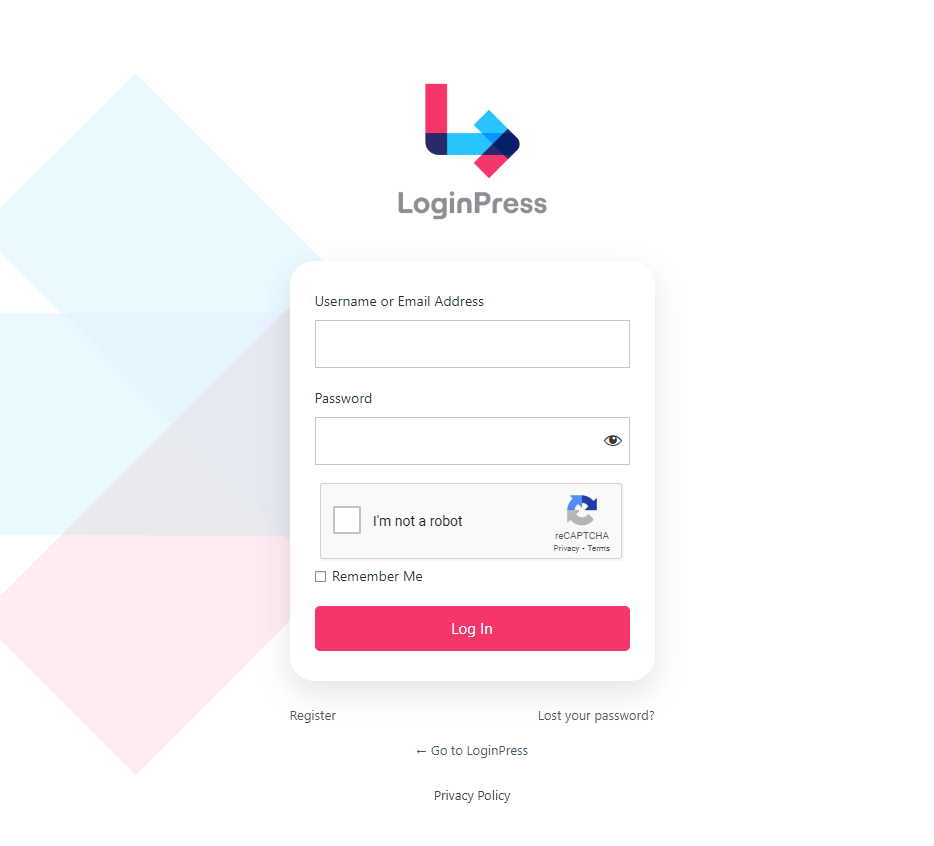
LoginPress optimizes WordPress login pages for retention by handling design, security and usability in one plugin.
Instead of stitching together several plugins, which slows the site and creates compatibility issues, you get one solution for login UX optimization.
Here is how LoginPress systematically addresses the friction points that lead to user churn:
1. Custom Login Page
The primary issue with the native WordPress login is the context switch.
The moment a user feels they’ve left your brand and entered a generic backend, credibility goes down.
That is why LoginPress remedies this by allowing you to build a custom WordPress login page directly in the WordPress Customizer.
The Solution: By providing control over backgrounds, logos, and button styles, the platform ensures the login screen remains a smooth extension of your site.
Here is how you can set up your own customized login page using LoginPress Customizer:
Step 1: Install and Activate LoginPress Pro
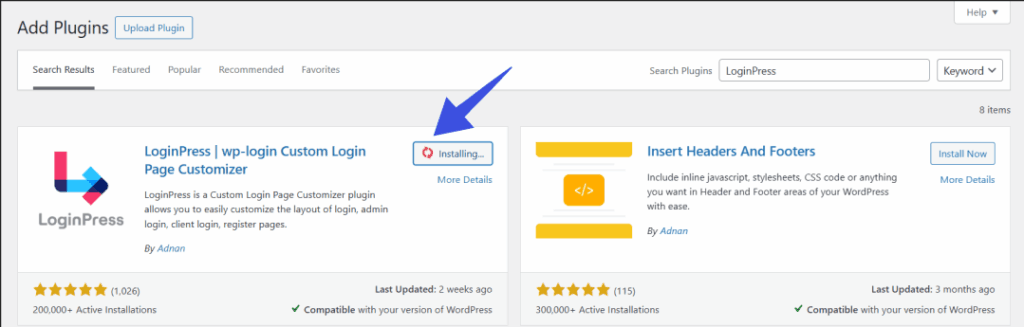
Step 2: Go to LoginPress Customizer
To access the customizer, go to LoginPress >> Customizer. You will be directed to a login page to customize your dashboard.
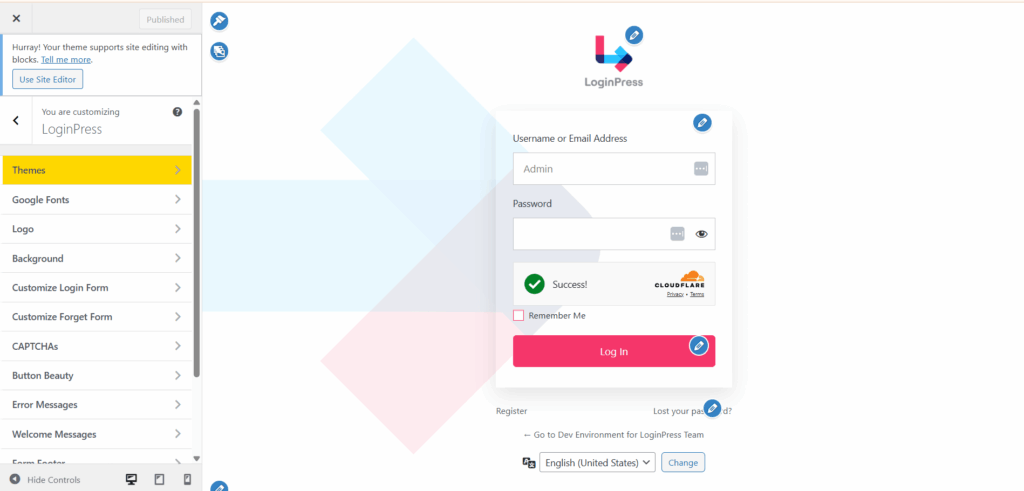
Step 3: Brand your Login Page
Branding your entry point through the LoginPress Customizer eliminates the visual whiplash of a generic login and replaces it with a trustworthy, professional environment.
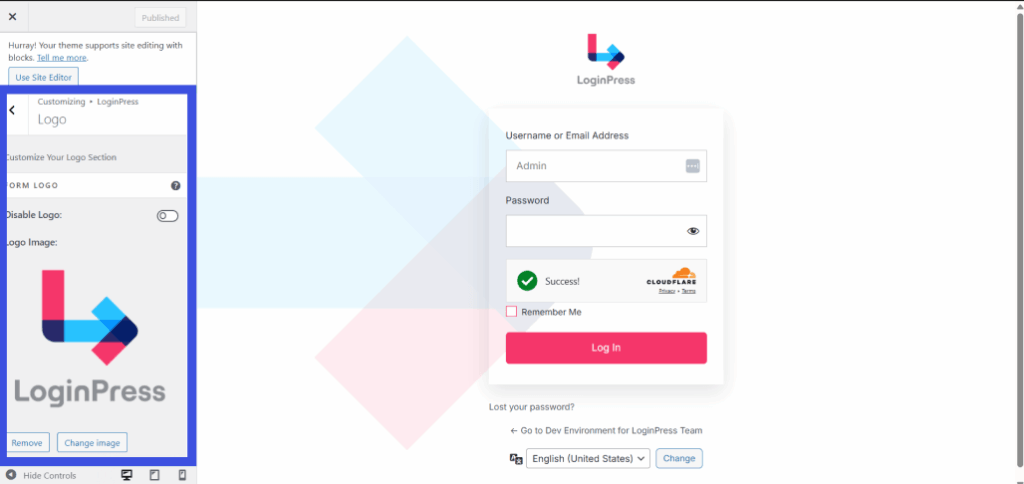
By matching your unique logo, typography, and color palette, you maintain brand consistency, reinforcing user trust and reducing security anxiety.
The Result: This branding continuity eliminates phishing anxiety and reinforces brand authority, ensuring users feel secure and in a professional environment.
2. Enable Social Login
Password fatigue is a leading cause of micro-churn.
Did you know that 1 in 4 people have at least one account compromised due to weak passwords?
If a user has to reset their password every time they return, they will eventually stop returning.
The Solution: LoginPress integrates a Social Login framework that allows users to authenticate via Google, Facebook, LinkedIn, or Apple ID.
According to 2025 reports, social login adoption grew from 10% to 29%. To enable this feature, go to LoginPress >> Social Login Add-On.
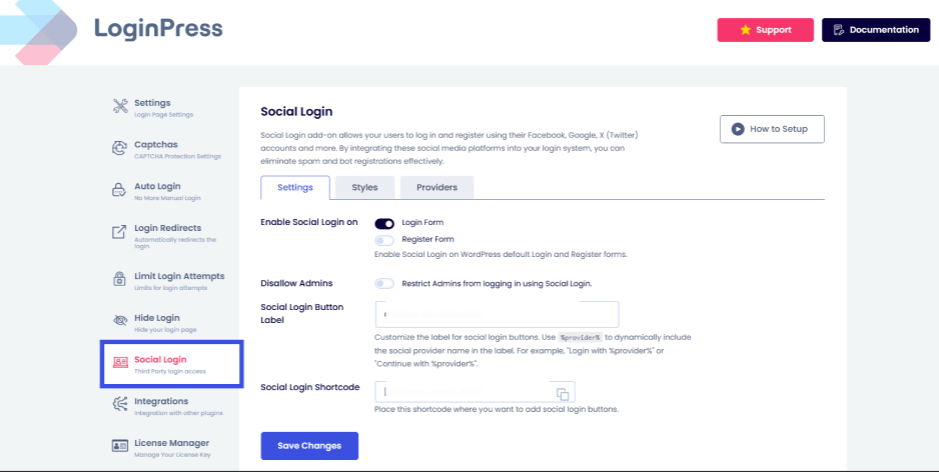
The Result: It shifts the security burden from the user’s memory to a trusted third-party provider.
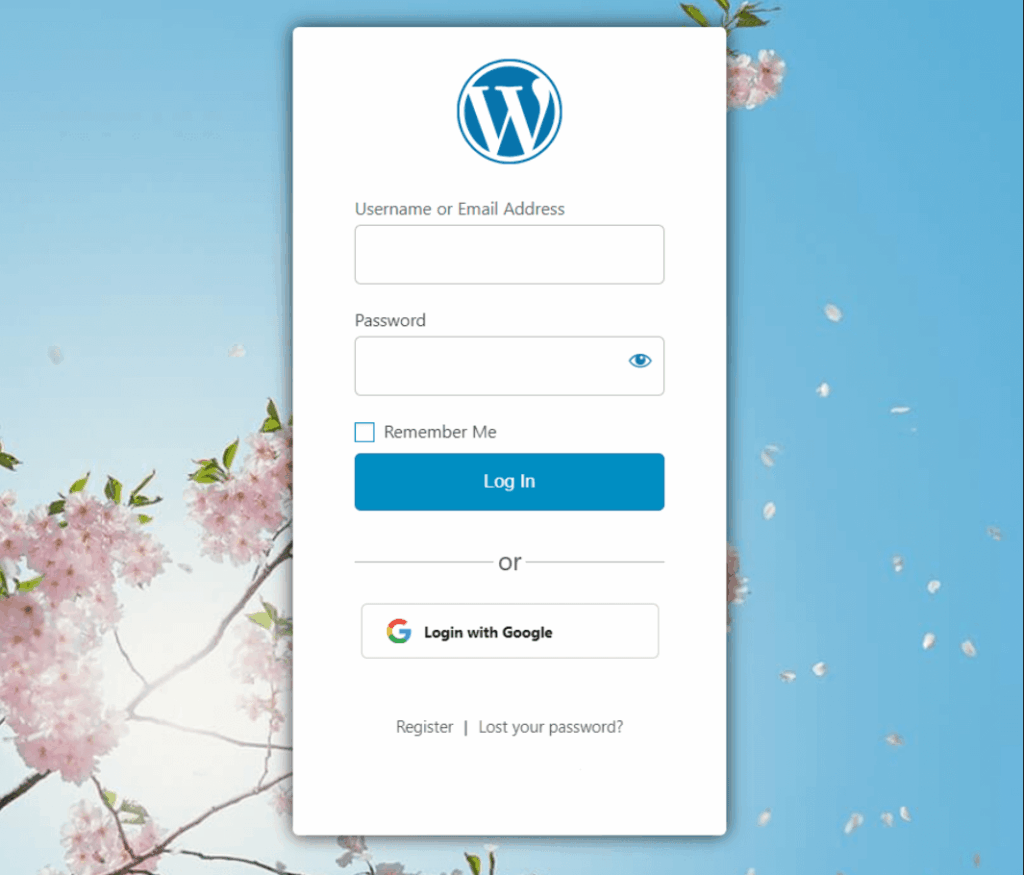
This effectively kills the password barrier, providing the one-click access that new users now expect as a standard feature.
3. Intelligent Error Messages
Default WordPress error messages are unhelpful, often providing generic invalid prompts that offer no path forward.
The Solution: LoginPress allows you to rewrite these dead-end messages into helpful, guiding prompts that won’t frustrate the user.
To customize error messages, go to LoginPress >> Customizer. Then navigate to the Custom Error Message option.
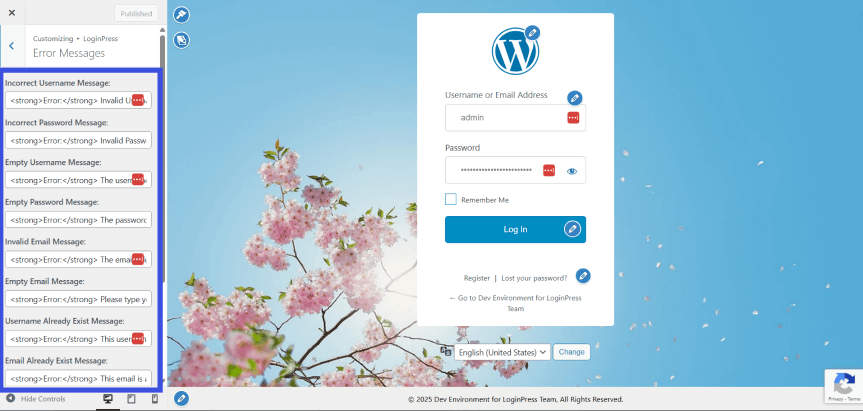
The Result: If a user enters the wrong credentials, the system can provide a clear, branded path to recovery. This improves the login experience by replacing frustration with a guided interaction, keeping the user in the “success loop” rather than the failure loop.
4. Smart Login Redirects
The value proposition doesn’t end when the user clicks submit.
Dumping every user onto a generic admin dashboard is a missed opportunity for engagement.
The Solution: LoginPress includes a Login Redirect engine that lets you define where users land based on their roles or previous actions. To enable smart login redirects, go to LoginPress >> Login Redirects.
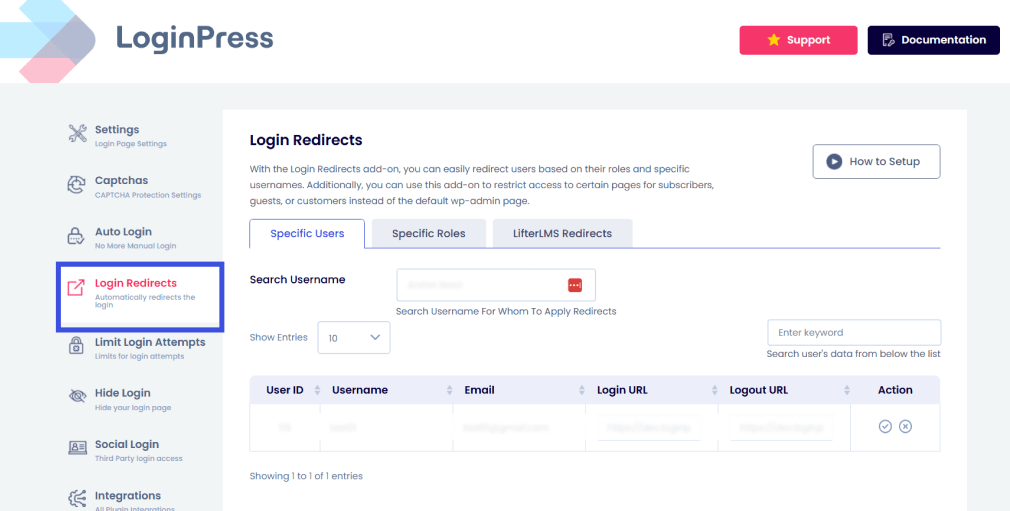
You can send a new subscriber to a Quick Start guide and a returning customer back to their active workspace.
Research shows that 71% of customers expect personalized interactions with a brand. Strategic redirects have been shown to maintain user momentum and reduce confusion.
Expert Tip: Optimize the learning curve by automatically routing students directly to their dashboard and teachers to their specific Instructor Portal. This instant-access workflow removes the friction that often leads to student drop-offs.
5. CAPTCHA and Limit Login Attempts
Security and UX shouldn’t always be at odds. Aggressive bot protection can accidentally lock out legitimate users, causing immediate churn.
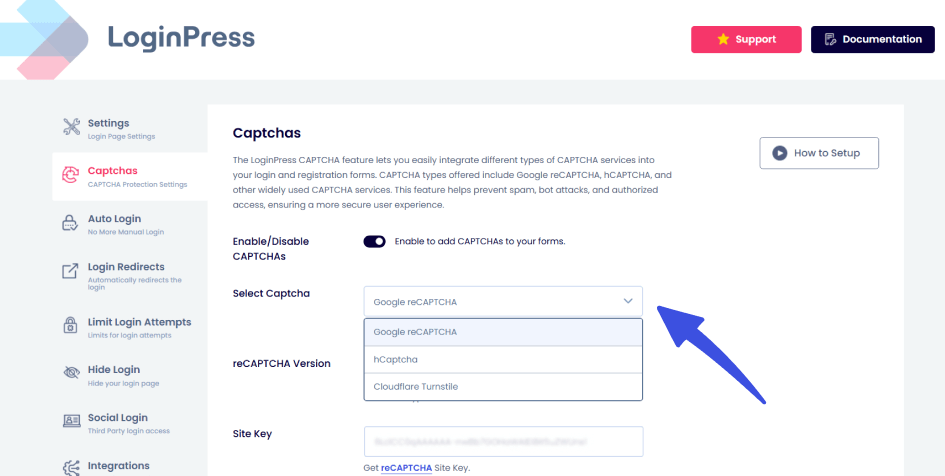
The Solution: By incorporating invisible reCAPTCHA and customizable Login Limits, LoginPress protects the site from brute-force attacks without forcing human users to solve complex puzzles.
To enable reCAPTCHA, go to LoginPress >> Captchas.
To enable limited login attempts and other top-grade security features, go to LoginPress >> Limit Login Attempts.
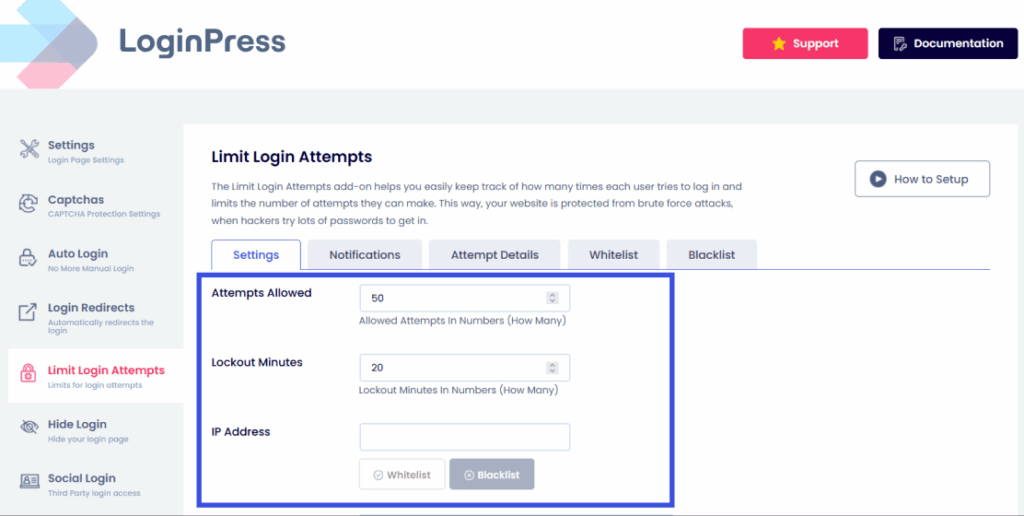
Beyond blocking threats, the Limit Login Attempts module provides control with real-time notifications for both successful logins and lockouts.
By auditing individual attempt logs, you can easily distinguish between forgetful members and malicious bots, allowing you to proactively whitelist trusted users or blacklist suspicious IPs.
This data-driven approach ensures your security protocols remain invisible to real users while maintaining total site integrity.
Real-World Examples: How Login Optimization Improves Retention
Login optimization improves retention differently for each WordPress business model:
- Membership Sites: High-tier members anticipate an exclusive experience. A custom WordPress login page ensures that the premium experience commences immediately. This reinforces the value of the subscription prior to content access.
- Online Courses (LMS): For students, login friction impedes progress. Optimizing WordPress login to redirect students directly to their current lesson module, rather than a generic or confusing administrative panel.
- Ecommerce: Prolonged time spent on login forms increases the likelihood of cart abandonment. Optimizing login user experience enables returning customers to bypass obstacles, resulting in faster checkouts and increased customer lifetime value.
- Digital Communities: In forums where users log in multiple times per day, even minor friction can contribute to user churn. Enhancing the login experience, such as social authentication, increases community retention by facilitating effortless participation.
Ultimately, regardless of organizational scale, an optimized login functions as a bridge rather than a barrier.
A smooth entry process increases the likelihood of user retention at critical engagement points.
Best Practices for WordPress Login Optimization
You optimize WordPress login by treating the login screen as a conversion funnel, not just a technical requirement.
These best practices keep your login page welcoming and efficient:
- Brand Your Login Page: Eliminate visual whiplash by aligning the login UI with your site’s identity through custom logos, backgrounds, and brand colors to reinforce credibility.
- Offer Social Login: Remove the password barrier with one-tap access to reduce abandonment.
- Avoid Long Forms: Keep input fields to an absolute minimum to reduce cognitive load and accelerate the user’s path to your core product.
- Show Clear Errors: Replace generic invalid prompts with helpful, branded guidance that directs users toward a successful recovery path.
- Redirect Users Properly: Use intelligent routing to send users exactly where they need to be, such as directing students or teachers to their dedicated dashboards upon entry.
- Protect Without Friction: Implement security measures such as login limits or invisible reCAPTCHA to block malicious bots without disrupting the human user experience.
Frequently Asked Questions
Can login pages affect user retention?
Yes. A confusing or slow login page frustrates users and increases failed attempts. A smooth, fast, and familiar login experience helps users access their accounts quickly, improving trust and long-term retention.
How to optimize WordPress login pages for users?
To maximize retention, use LoginPress to implement these WordPress login optimization essentials:
Simplify Design: A clean, branded interface builds trust and professional appeal.
Reduce Fields: Fewer inputs ensure faster access and lower abandonment.
Helpful Errors: Guided feedback resolves typos while maintaining security.
Social Login: One-click access eliminates “Login Fatigue”.
Mobile Speed: Fast, responsive pages prevent users from abandoning the site in frustration.
Streamlining these login page optimizations turns a friction-heavy barrier into a smooth entry point.
Does login UX impact churn?
Absolutely. Poor login UX, such as unclear error messages, repeated failures, or slow page load times, can lead users to abandon your site. A friction-free login experience reduces drop-offs and helps prevent user churn.
What are some of the best practices for WordPress login optimization?
Keep the login form clean and minimal
Use clear, user-friendly error messages
Optimize page speed
Support mobile users
Add security without adding friction (like smart CAPTCHA or login limits)
Following these best practices improves usability, security, and user satisfaction.
Final Thoughts
Your login page is a critical retention gateway, not just a technical hurdle.
By contrast, a strategic approach to WordPress login optimization ensures that the very first interaction after sign-up feels secure, branded, and effortless.
LoginPress helps you turn your WordPress login page into a high-retention experience that builds trust from the first click.
By prioritizing UX, visual consistency, and intelligent redirects, you reinforce your product’s value every time a user returns.
For more information on WordPress login optimization, check out:
- Modern WordPress Login UX Patterns (What Users Expect in 2026)
- How To Customize WordPress Login Page For Clients (Detailed Guide)
- Enhancing User Trust with Secure Login UX in WordPress
How are you planning to reduce login friction, and which best practices would you follow? Let us know in the comments below!