WordPress Access Control Strategy for Websites (2026)

Editorial Team
Do you want to learn how to manage a WordPress access control strategy? You are at the right place.
As WordPress powers nearly half of the web, it becomes the primary target for AI-driven credential stuffing and privilege-escalation attempts.
A WordPress access control strategy is no longer a luxury for just enterprise sites; it is the baseline for survival. Today, access control is about verifying who the user is, what they are allowed to do, and under what conditions they can do it.
Whether you are running a high-traffic e-commerce hub or a headless enterprise CMS, your secure access management framework must be adaptive and deeply integrated into your login workflow.
In this post, I will explain the concept of WordPress access strategy control and how to implement it with LoginPress.
WordPress Access Control Strategy (TOC):
What is a WordPress Access Control Strategy?
A WordPress access control strategy is a set of rules that determines how users can access your site’s backend and sensitive information.
Basic user management is just about adding or removing users. But a real strategy goes further by defining roles, permissions, and how users prove their identity and gain access.
The main goal is to keep your site secure and avoid broken access control, which is often listed as a top risk.
Sometimes, a data leak occurs when a Contributor is mistakenly granted Editor rights or an API endpoint is left open.
By seeing access as something to manage carefully, you shift from reacting to problems to actively managing who can do what.
Core Concepts: Roles, Permissions, and Authentication Control
To build a secure framework, you must understand the three pillars of authentication control:
- Role Based Access for WordPress (RBAC): This involves assigning permissions based on job functions rather than individuals. WordPress offers built-in roles (Administrator, Editor, Author, Contributor, Subscriber), but enterprise strategies in 2026 often require custom roles to prevent privilege creep.
- User Permissions in WordPress: These are the granular capabilities (e.g., edit_others_posts or manage_options) that define what a role can actually do. A true strategy audits these capabilities to ensure a “capabilities matrix” is strictly enforced.
- Authentication Control: The gatekeeping process. It includes login policies, multi-factor authentication (MFA), and session limitations. While authorization determines what you can do, authentication proves who you are.
| Pillar | Definition | Key Function | Security Impact |
| Role Based Access (RBAC) | Permissions assigned by job function. | Organizes users into structural tiers. | Prevents privilege creep via standardized tiers. |
| User Permissions | Granular individual capabilities. | Defines specific actions a role can perform. | Enforces a capabilities matrix to minimize risk. |
| Authentication Control | The gatekeeping and verification process. | Verifies identity before granting entry. | Prevents unauthorized entry via identity proofing. |
How to Design a Secure Access Management Framework
An effective access control strategy for WordPress should be grounded in a Security-by-Design approach.
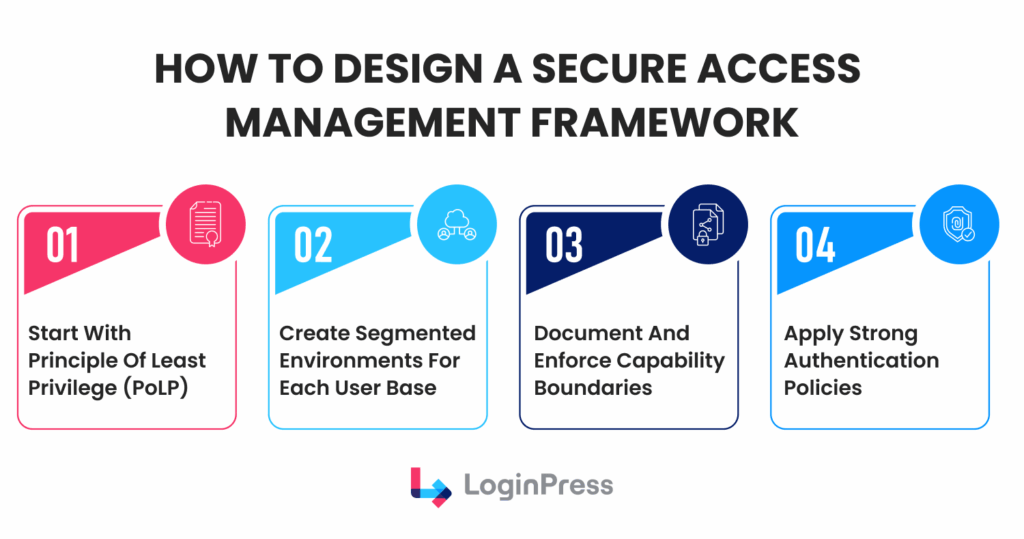
The following blueprint outlines key steps:
- Enforce the Principle of Least Privilege (PoLP): Assign each user only the minimum access necessary to fulfill their responsibilities. For example, users who only edit their own content should not be granted the Author role if it includes unnecessary publishing rights.
- Create Segmented Environments: Establish clear boundaries among administrators, editors, contributors, and guests. Employ secure access management tools to restrict administrative tasks to trusted IP ranges or devices.
- Document Capability Boundaries: Maintain an up-to-date record that maps each custom role to its corresponding permissions.
- Adaptive Authentication Policies: Enforce strong password requirements and mandatory two-factor authentication (2FA). Beginning in 2026, incorporate adaptive risk checks; for instance, if a user logs in from an unfamiliar location, the system should initiate a step-up authentication challenge.
How to Implement Access Control on WordPress
A common misconception is that standard WordPress user roles alone provide a sufficiently secure environment.
Although the hierarchy from “Subscriber” to “Administrator” provides a foundational structure, it does not sufficiently differentiate access privileges.
Let’s explore in detail how LoginPress can enhance WordPress access controls.
1. Enhance Access Controls Through Secure Login features of LoginPress
Standard login pages are frequently targeted by brute-force attacks, essentially surrendering control to automated scripts. LoginPress regains this advantage through:
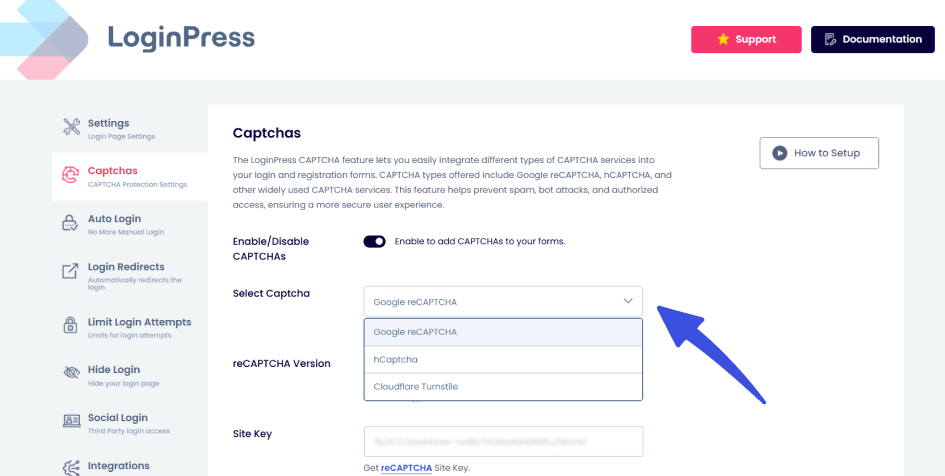
- Invisible reCAPTCHA and Turnstile Integration: Bots thrive on unattended login forms. By implementing behavioral analysis, you regain control over the human-to-bot ratio. This ensures that only legitimate users even reach the password field, effectively silencing automated noise.
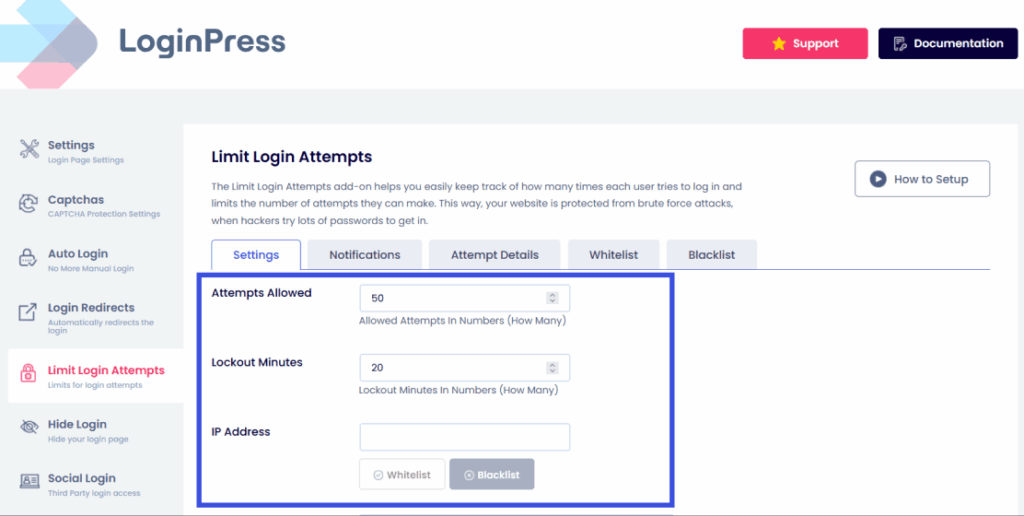
- Intelligent Limit Login Attempts: Brute-force attacks rely on the “unlimited time” an attacker has to guess a password. LoginPress regains the temporal advantage by imposing exponential cool-off periods. When a site automatically blacklists an IP address for 24 hours after 10 failed attempts, the cost of the attack becomes too high for the perpetrator to continue.
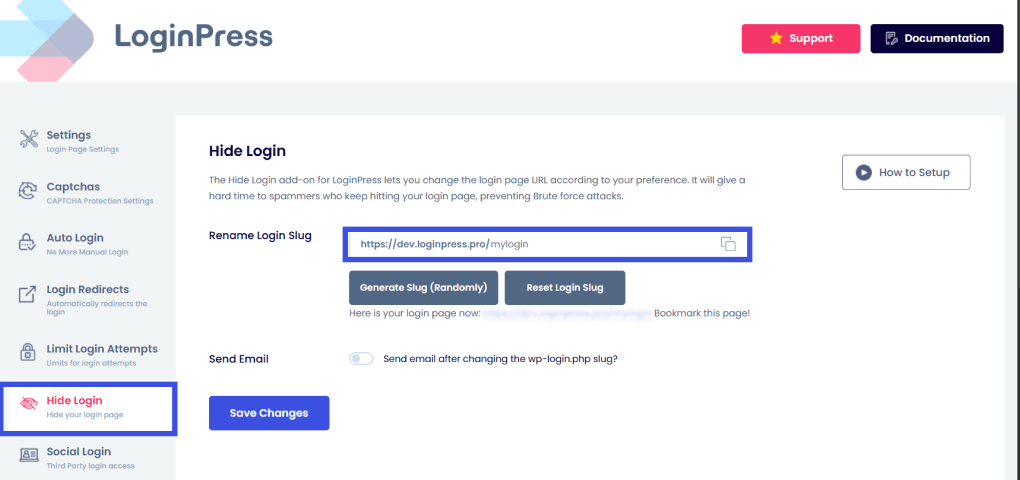
- Hide Login URL: The default wp-login.php is a beacon for hackers. By renaming it to a custom string, you regain control through obfuscation. If an attacker cannot locate the login form at the default login URL, they cannot attempt to hammer it using automated attacks, so they move on to easier targets.
2. Ensure Proper Session Management Using Session Controls
Most WordPress sites allow a single user to remain logged in across multiple devices without time limits, creating security risks. LoginPress Pro’s Session Management features address this by treating each connection as a potential vulnerability.
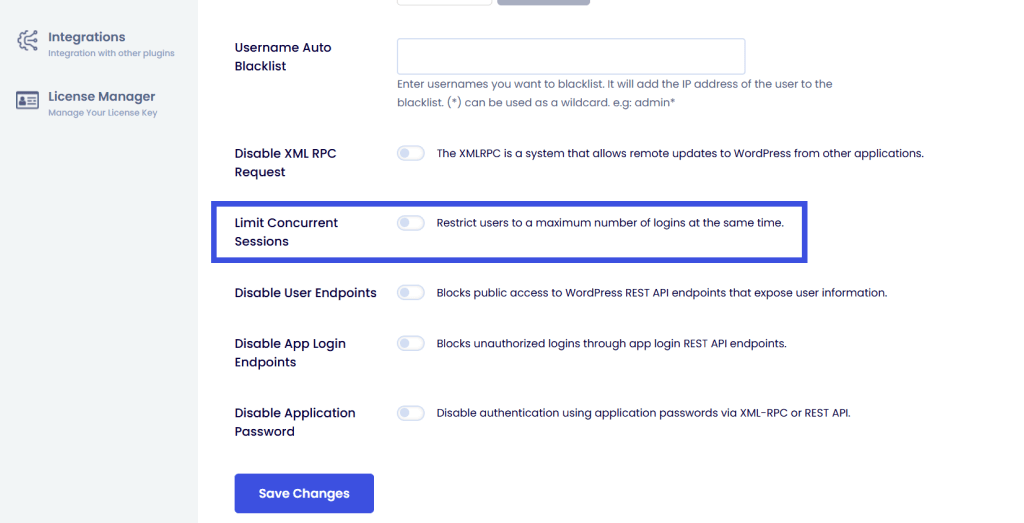
- Limit Concurrent Sessions: Account sharing (common in membership sites) effectively dilutes your access control strategy. LoginPress Pro regains control over individual identities by limiting the number of active connections. If a user logs in elsewhere, they are forced to terminate an existing session, ensuring that each set of credentials corresponds to a single physical person.
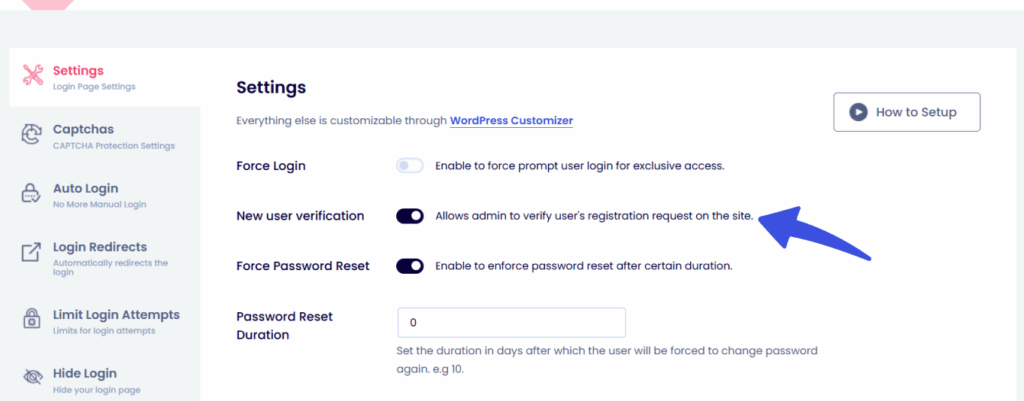
- New User Verification: Automated registration spam can quickly fill up your database. With this feature, administrators can review and approve every new account. This means only approved users can join, making your site invite-only with a single setting.
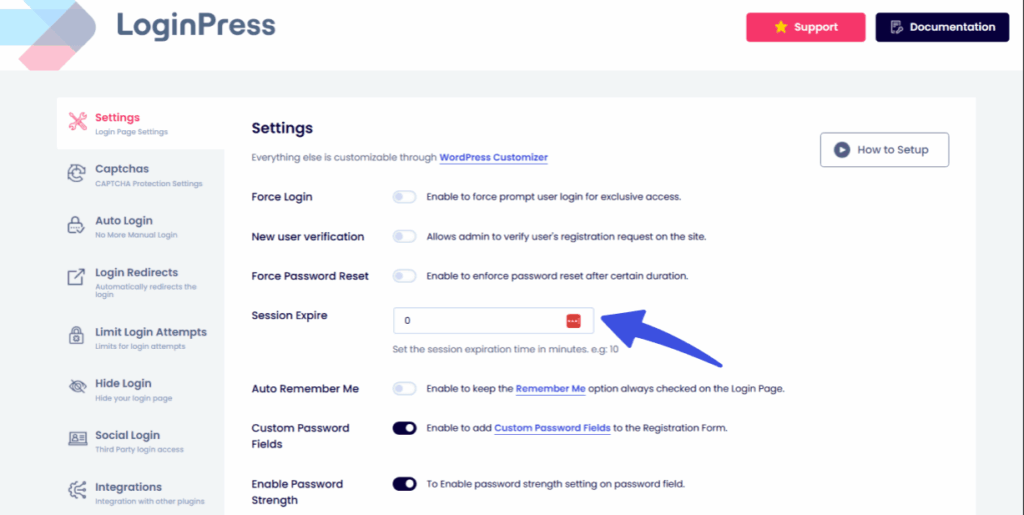
- Session Expire: With LoginPress, you can set custom idle timeouts to help keep your site secure. If someone leaves a workstation unattended, the system will automatically revoke access. This way, a session that is no longer active does not become a security risk.
3. Implement Logic-Based Custom Redirects Using Login Redirects Add-On
Effective access control involves not only restricting unauthorized access but also directing users to appropriate destinations.
Custom Login Redirects transform the login process into a structured workflow tool.
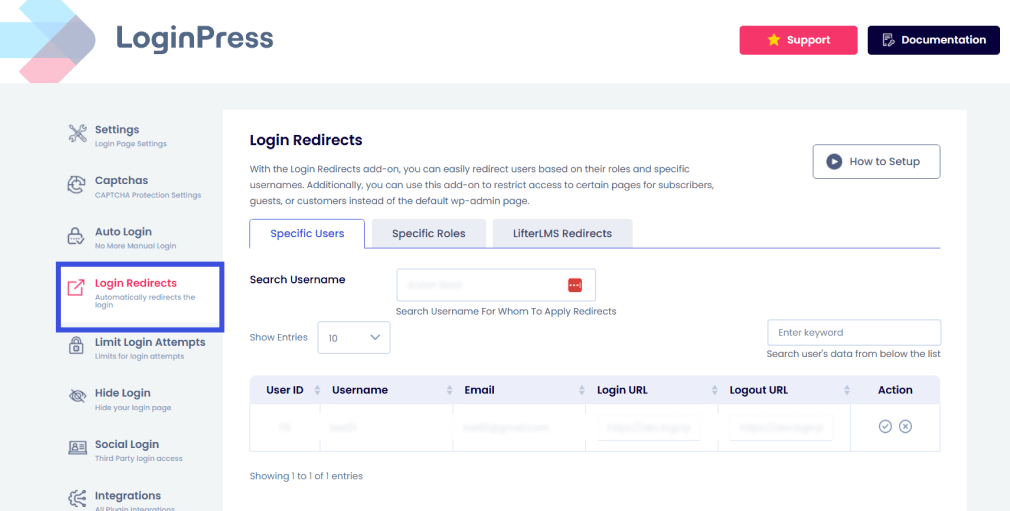
Expert Tip: A best-practice strategy uses redirects to “sandbox” users. Treat your administrative area like a high-security vault: only those with a specific business need should even know where the vault door is located.
The 2026 Security Landscape
In today’s environment, “Security through Obscurity” is no longer enough. You need active defense.
LoginPress strengthens your authentication layer for your login page, ensuring that the identity of the person logging in is verified not only by their password but also by their behavior, location, and session history.
Mapping a Login Access Strategy to Access Control
Mapping your login access strategy to maximize access control transforms the login page from a basic entry point into an advanced security checkpoint.
Within this framework, authentication serves as the initial layer of authorization.
The following outlines how to implement these three pillars using LoginPress as the primary tool.
1. Policy-Driven Flows
The login strategy should determine the level of authentication required for each user, based on their potential impact on the system.
Rather than using a single login process, implement role-based authentication.
LoginPress offers the necessary interface, and its compatibility with 2FA and FIDO2 plugins enables enforcement of these differentiated tiers.
Implementation:
- Administrators: Require a physical FIDO2 hardware key (like a YubiKey). Since LoginPress is compatible with top-tier 2FA plugins, you can ensure the login UI remains consistent while enforcing this high bar.
- Subscribers: Permit standard TOTP (application-based) or social logins. This approach maintains a low barrier for users with limited system access.
2. Session Timeout Rules
Access control isn’t just about entering; it’s about how long you’re allowed to stay.
LoginPress Pro allows you to set Session Expiration to ensure that high-privilege sessions don’t linger indefinitely.
Implementation:
- Admin/Editor: Configure the Session Expire feature to enforce a 30-minute idle timeout. If the user becomes inactive, the session resets and requires re-authentication.
- Subscriber: Set a longer session duration, such as 24 hours. This approach prioritizes user experience for low-risk accounts, where the consequences of session compromise are minimal.
3. Audit Logging (Black Box Function)
Visibility is the difference between a secure site and one that is not. LoginPress’s Limit Login Attempts (Pro) provides detailed logs that serve as your early warning system.
Failed login attempts on high-privilege accounts are frequently indicators of privilege escalation attempts, rather than simple forgotten passwords.
Implementation:
- Step-Up Monitoring: Monitor the Attempt Details tab for patterns. If you see a Subscriber account repeatedly failing to log in to the /wp-admin customized URL (or failing a 2FA step-up), you’ve likely identified a compromised account attempting to move laterally into an Admin role
Access Control in Multi‑Site and Enterprise WordPress
Enterprise WordPress setups, especially Multi-Site (WPMU) networks, make access control much more complex.
The main challenge is balancing strong security across all sites with the flexibility that individual site managers need. Centralized policy enforcement is essential for strong enterprise security.
With a unified authentication framework, administrators can make sure important safeguards like Hidden Login URLs, reCAPTCHA, and Login Limits are used everywhere.
This helps prevent a single weak sub-site from becoming a target for attacks across the whole network. A secure access management plan distinguishes between Global Privileges and Delegated Admin Roles.
In a multi-site environment, “Super Admins” oversee network infrastructure, while “Site Admins” are restricted to their specific sandbox.
Using LoginPress, enterprises can map these tiers to specific login access strategies. For example, a Super Admin might be subject to strict session timeouts and hardware-based MFA, while a local editor’s session remains more flexible to facilitate productivity.
From a performance and audit perspective, enterprise-scale sites must prioritize low-overhead security.
LoginPress is designed to handle high-traffic environments without compromising server response times.
Furthermore, centralized audit logging is essential for compliance; it allows security teams to monitor access patterns across the entire network from a single dashboard.
This level of visibility is vital for meeting SOC2, HIPAA, or GDPR requirements, ensuring that every login event is accounted for and verifiable.
Compliance Considerations
A WordPress access control strategy is the foundation of regulatory compliance.
Regulatory compliance frameworks such as GDPR, HIPAA, and PCI-DSS require
administrative, technical, and organizational safeguards.
LoginPress strengthens the authentication and session management layer, but compliance also requires documented policies, secure hosting, encryption, staff training, and periodic audits.
- GDPR and Data Privacy: Under GDPR’s Integrity and Confidentiality pillar, you must prove that user permissions in WordPress are restricted to the absolute minimum required for a user’s role. LoginPress’s role-based access limits the exposure of personal data in line with GDPR’s integrity and confidentiality principles.
- HIPAA and Healthcare: For sites handling protected health information (PHI), authentication control is non-negotiable. LoginPress’s Session Expire supports HIPAA’s automatic logoff safeguard.
- PCI-DSS and E-commerce: Maintaining a secure network for payment data requires strict role-based access for WordPress. By using LoginPress to hide the administrative login URL and implement reCAPTCHA, you satisfy PCI requirements for protecting against automated attacks.
Expert Tip for Compliance Teams: Regularly export your LoginPress attempt logs. These serve as a Black Box record of your login access strategy, providing the necessary forensic evidence to prove that your site actively mitigates unauthorized access attempts.
Case Study: Access Control Strategy in Action
FitQuest, a fast-growing fitness membership platform, ran into two big problems: many ‘Standard’ members were sharing accounts, and bots kept attacking their login page.
To protect their premium content and user data, they needed to rethink their WordPress access controls.
The team designed an ‘Identity-First’ system. They made the login page a secure entry point and set up the dashboard so that each area was clearly separated from the others.
For implementation, the team used LoginPress to hide the login URL and added Cloudflare Turnstile to block bots.
They also set up Limit Concurrent Sessions so each membership could only have one active user at a time.
Custom Login Redirects sent members straight to their workout videos and staff to the management dashboard, keeping both groups away from sensitive site settings.
After three months, unauthorized account sharing stopped, which led to more new subscriptions. Bot login attempts fell by 95%, and the admin team saw 60% fewer security support tickets.
By improving access management, FitQuest went from being an easy target to a secure, enterprise-ready platform.
Future Trends in WordPress Access Control
By 2026, WordPress will move from using static passwords to Passwordless Authentication and Device Trust systems.
As Passkeys (WebAuthn) and biometric checks become common, the risks of stolen or weak passwords are fading. Now, identity is linked to a physical device instead of something you have to remember.
AI is now helping enforce security policies. Instead of sticking to strict rules, new systems look at behavioral signals like how you type, where you log in from, and your device’s health.
If something seems off during a login, the system can automatically ask for extra verification or limit access to sensitive parts.
More companies are moving to Delegated Identity Providers (SSO) and federated identity, using platforms like Microsoft Entra ID or Okta to centralize access.
For LoginPress, this means becoming a smart Identity UI that connects complex backend authentication with the simple, customizable front-end experience site owners want.
Frequently Asked Questions
What is a WordPress access control strategy?
A WordPress access control strategy is a comprehensive security framework that dictates how users are identified and what they are permitted to do on a website. Unlike simple user management, a strategy uses the Principle of Least Privilege (PoLP) to ensure that every user has the minimum access necessary for their role. It integrates authentication control (proving identity via 2FA or LoginPress) and authorization (defining permissions) to prevent data breaches and privilege escalation.
How do I manage user permissions in WordPress effectively?
To manage user permissions in WordPress, you should move beyond default roles and implement a granular capabilities matrix. Start by auditing your current users and assigning them to specific, restricted roles. Use a secure access management tool like LoginPress to enforce your login access strategy by hiding the login URL, limiting concurrent sessions, and setting automated idle timeouts. This approach ensures that even if an account is compromised, the attacker is sandboxed within a limited area of the site.
Why is role-based access for WordPress important for security?
Role-based access for WordPress (RBAC) is critical because it reduces the internal attack surface of your website. By partitioning access based on job functions, you ensure that a Contributor cannot accidentally (or maliciously) change site-wide settings or access sensitive user data. In 2026, RBAC is also a key requirement for compliance standards like GDPR and HIPAA, as it provides a clear audit trail of who can access Protected Health Information (PHI) or Personally Identifiable Information (PII).
Final Thoughts: Login Access Strategy
WordPress access control strategy is the definitive line between a resilient enterprise and a vulnerable target.
Securing your site is no longer just about building higher walls; it’s about implementing a proactive identity governance system.
By leveraging LoginPress to harden your authentication flow through hidden entry points, intelligent session limits, and role-based redirects, you ensure that your “Zero Trust” environment is as user-friendly as it is impenetrable.
The most secure websites don’t just lock the door; they verify the guest, set a timer on the visit, and watch the exit.
For more related posts, check:
- How to Restrict Access in WordPress by User Role (Easy 2026 Guide)
- Can’t Access WordPress Admin? (15 Issues with Solutions)
- How to Secure WordPress Login for Remote Teams and Distributed Users
When was the last time you audited your “Administrator” list? Let us know in the comments below!