How to Stop Bot Traffic on WordPress (Complete Guide)

You stop bot traffic on WordPress with a layered defense: secure your login page, add CAPTCHA, limit login attempts, and add a firewall or CDN-level filtering for high-traffic sites. Bot traffic slows your server, skews your analytics and often goes undetected.
For the first time in a decade, automated traffic has surpassed human activity, accounting for roughly 51% of all web traffic.
A website may operate efficiently at one moment, but later experience server slowdowns and inaccurate analytics due to bot activity.
This post shows you how to identify bot traffic and how to stop it on your WordPress site with a multi-layered defense.
How to Stop Bot Traffic (TOC):
What is Bot Traffic on a Website?
Bot traffic is any website visit that does not come from a human user, such as automated scripts, crawlers and attack bots.
Types of Website Bots
In the context of SEO and website security, the objective is not to block all access.
It is to implement intelligent filtering mechanisms.
1. Good Bots
Beneficial bots are essential for maintaining website visibility and functionality.
- Search Engine Crawlers: Bots such as Googlebot and Bingbot crawl website pages to ensure they are included in search engine results.
- Monitoring Bots: Services such as UptimeRobot regularly check server status to verify website uptime and detect outages.
- Feed Bots: Tools such as Feedly and Pinterest crawl websites to provide subscribers with the latest blog posts.
2. Bad Bots
Malicious bots are typically programmed to steal information, deceive users, or exploit vulnerabilities.
- Scrapers: These bots rapidly access entire websites to extract pricing data or unique articles for unauthorized redistribution.
- Brute-Force Bots: These bots attempt to guess thousands of common password combinations on login pages, such as /wp-login.php, to gain unauthorized access.
- Spam Bots: These bots search for submission forms to populate databases with fraudulent comments or irrelevant leads.
The Anatomy of a Bot Attack
Most bot attacks follow a predictable pattern.
They execute a specific sequence of actions designed to bypass standard security measures.
This is why blocking all bot traffic can negatively impact SEO rankings, as search engines such as Google would be unable to index the website.
Therefore, modern security strategies emphasize behavioral analysis.
How to Identify Bot Traffic on Your WordPress Site
You identify bot traffic on a WordPress site by looking for the distinct digital footprint bots leave, which differs from that of human visitors.
These methods help you identify bot traffic and prevent fake traffic:
1. GA4 Indicators: Identifying Ghost Traffic
Google Analytics 4 (GA4) provides initial insights for detecting non-human traffic.
Patterns that deviate from typical human behavior should be closely examined in order to learn how to stop bots from crawling my site.
Here are some red flags to look out for in GA4:
Engagement Rate Near 0%: If you see a massive spike in sessions but an engagement rate of almost zero, those aren’t readers; they’re scripts.
Zero-Second Session: Human users generally spend time interacting with content, whereas bots often trigger tracking codes instantaneously before proceeding to subsequent pages.
Unusual Locations: If your business serves a local audience in New York, but you’re seeing thousands of hits from data centers in regions where you don’t market, you are likely looking at fake traffic on your website.
2. Hosting-Level Traffic Patterns (CPU & RAM)
Some bots operate in a headless manner, meaning they do not activate Google Analytics tracking codes.
In such cases, analysis of hosting dashboards is necessary. Here’s what to look out for to help learn how to stop bot traffic in WordPress:
Resource Exhaustion: High CPU usage with a low number of active users often indicates that bots are scraping data or performing automated background tasks
Bandwidth Theft: Malicious bots may crawl all images and scripts on a website. A sudden, unexplained increase in monthly bandwidth usage is a common indicator of bot activity.
3. Login and Activity Log Analysis
WordPress sites are frequently targeted by brute-force bots seeking to gain access. Here’s what to check in your login and activity logs to learn how to protect your website from bot attacks:
Failed Login Sprints: Security logs showing numerous failed login attempts for common usernames such as admin within a short time frame typically indicate automated password-guessing attempts by bots.
Admin Trap: Bots frequently use common usernames such as “admin,” “webmaster,” or the domain name.
4. Increases in Form and Comment Spam
Are you suddenly getting 100 New Comment notifications that are all promotional links?
This is a clear indicator that spam bots on my website have found an unprotected entry point.
These bots scan your HTML for the <form> tag and automatically inject content into the fields.
Identifying this early prevents your email server from being blacklisted for sending spam and avoids fake traffic on your website.
Common Types of Bot Attacks on WordPress
The most common types of bot attacks on WordPress target the login page and forms, because WordPress is the most widely used content management system and a primary target for automated attacks.
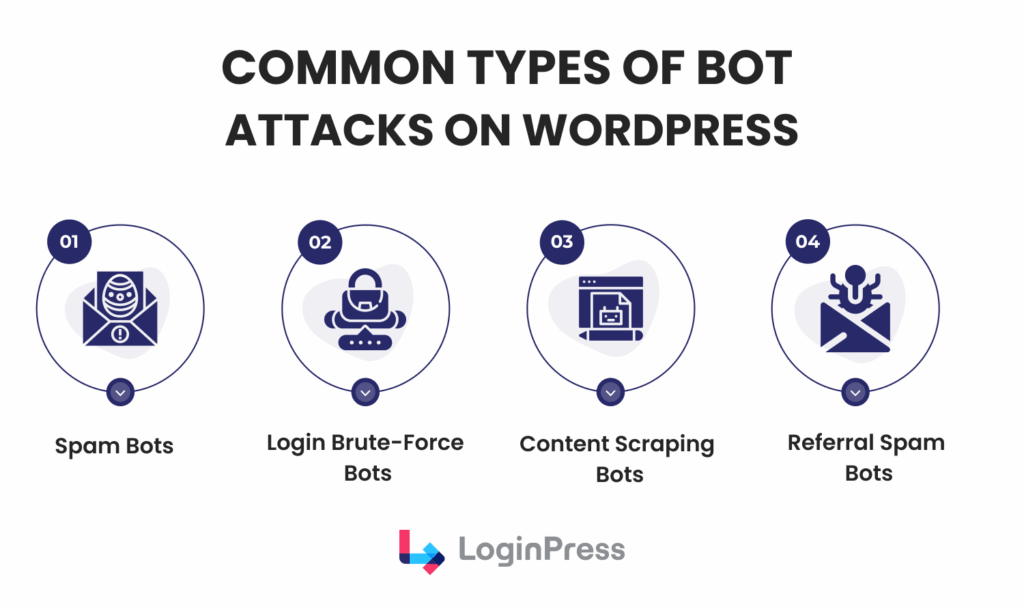
Here’s detailed information on the different types of bot attacks for how to stop bot traffic WordPress:
- Spam bots frequently populate comment sections and contact forms with unsolicited promotional links, such as those advertising pharmaceuticals or search engine optimization services.
- Brute-force bots utilize automated scripts to attempt thousands of password combinations on login pages in rapid succession.
- Scraping bots systematically access websites to extract original content, which is then often republished on unauthorized or low-quality websites.
- Referral spam generates fraudulent traffic in website analytics, with the intent of prompting administrators to visit specific URLs listed in their reports.
Learning how to stop spam bots on my website is the first step in reclaiming your server resources.
Why WordPress Sites are Frequent Bot Targets
WordPress sites are frequent bot targets because bots exploit system architecture rather than individuals, and WordPress powers over 40% of websites, which makes it a large and standard target.
The following points explain why WordPress sites are particularly vulnerable to automated scripts in order to determine how to stop bot traffic on WordPress:
- Predictable Entry Points: Automated bots know that the login page is at /wp-login.php. As a result, they do not need to search for access points, since the location is already known.
- Username Leaks: By default, WordPress frequently exposes the administrator username in author URLs. This disclosure provides automated bots with half of the required login credentials immediately.
- The Master Key Effect: Relying on default settings creates uniform vulnerabilities, allowing a successful exploit on one site to be replicated across many others.
- Plugin Vulnerabilities: Automated bots specifically scan for unpatched plugins or themes. Rather than browsing site content, these bots search for specific instances of outdated code to execute exploits within milliseconds.
How to Stop Bot Traffic WordPress (Actionable Methods)
You stop bot traffic on WordPress with a defense-in-depth strategy, not a single solution.
This step-by-step framework secures a website against automated threats:
1. Secure Your WordPress Login Page Against Bots
The /wp-login.php page is the primary target for automated attacks. If compromised, bots can gain full administrative control.
This is critical because most website bot traffic consists of scripts that attempt common passwords through brute-force attacks on the default login URL.
Learn more ways to enhance user trust with Secure Login UX in WordPress (2026 Guide) to learn how to stop bot traffic in WordPress.
Advanced strategy: In addition to protecting the login page, conceal it as well. By using a best-in-class login form customization plugin, such as LoginPress, the login URL can be redirected from /wp-login.php to a unique address, such as /my-secret-entry/, using the Hide Login Add-On.
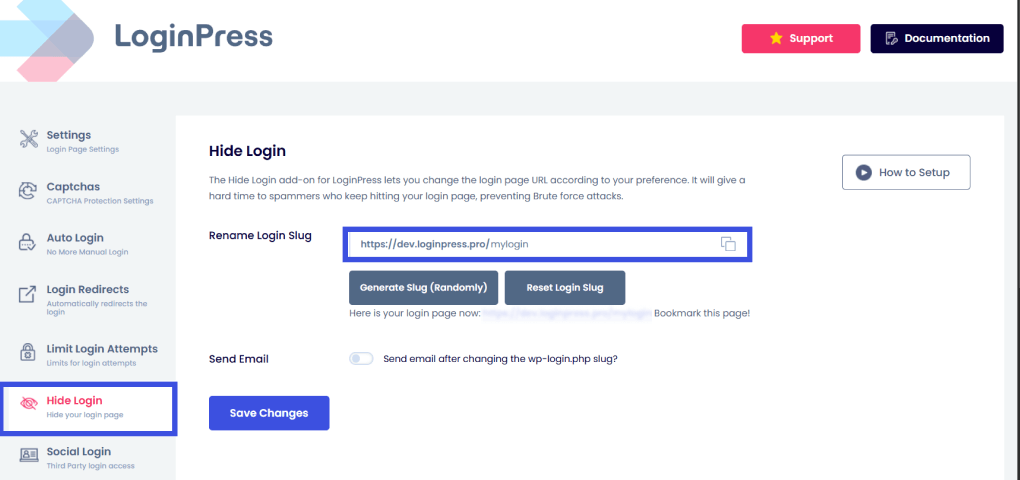
This action renders many automated scripts ineffective because they cannot locate the login page, hence helping you answer the question of how to block bot traffic in WordPress.
2. Add reCAPTCHA to Stop Bots on WordPress Login and Forms
Requiring each visitor to verify their human identity is among the most effective ways to protect a website from bot attacks.
CAPTCHA employs advanced risk analysis techniques to differentiate between human users and automated bots.
How you can implement with LoginPress:
LoginPress provides easy CAPTCHA integration for your important front-door forms, such as login and registration.
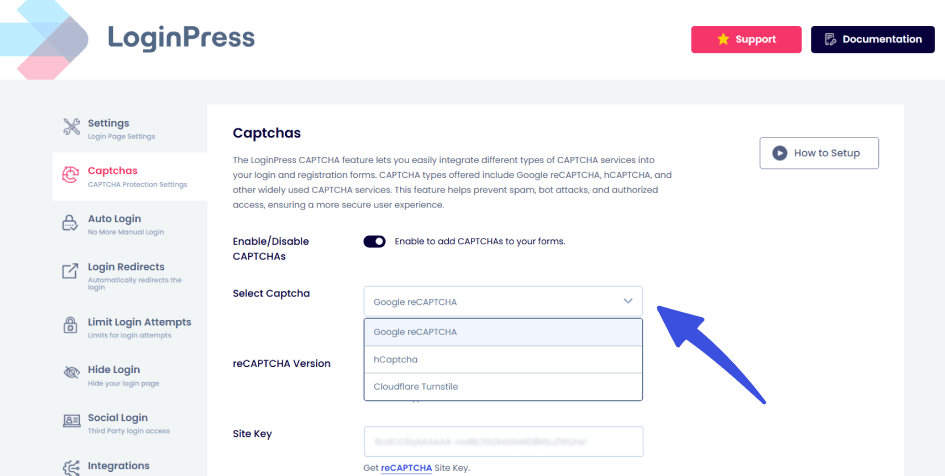
You can also select the type of CAPTCHA you need, such as Cloudflare Turnstile, hCaptcha, or reCAPTCHA. This can help you provide a frictionless entry on forms with high abandonment rates when friction is present.
Learn the difference in hCaptcha vs ReCAPTCHA: Which One is Better in 2026?
3. Implement Limit Login Attempts
Brute-force bots operate by rapidly attempting numerous password combinations per minute. It is essential to implement measures that permanently impede this process.
Recommended solution
Establish a Limit Login Attempts policy using LoginPress’s Add-on.
This way, even if a user or bot fails to log in three times within five minutes, their IP address is automatically blacklisted, which helps you learn how to stop bot traffic on WordPress.
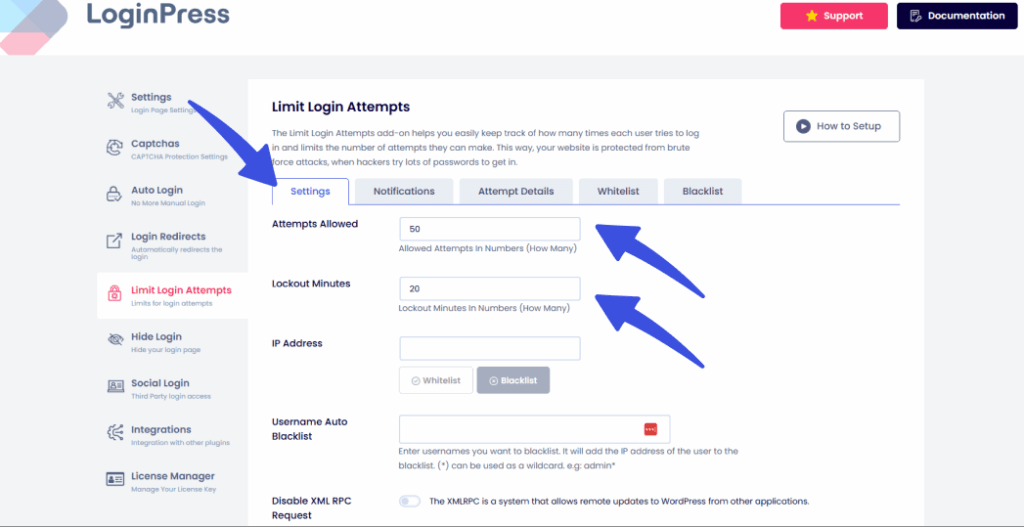
Lockout minutes may also be added subsequently to ensure that bots are effectively removed.
This approach reduces the likelihood that a bot will successfully guess a password, as repeated failed attempts result in prompt blocking.
You can also check out our complete guide on How to Stop WordPress Brute Force Attacks in order to learn how to stop bot traffic in WordPress.
4. Customize Error Messages
Standard WordPress is too helpful.
When someone fails a login, it says: “The password for the username Admin is incorrect.”
This practice poses a security risk by confirming to automated scripts that the username ‘Admin’ exists, thereby narrowing the focus to password guessing.
The Fix: Use LoginPress Login Customizer to customize your error messages. Change it to a generic: “Error: Invalid Credentials.”
Give the bot zero feedback. If they don’t know if the username or the password was wrong, they can’t optimize their attack.
Check out How to Customize Error Messages with LoginPress easily.
5. Control How Bots Crawl Your Site
Not all bots attempt to log in; some are designed to extract data.
The following are strategies for stopping bots from crawling the site:
Robots.txt: This file instructs legitimate bots on which directories, such as /wp-admin/ or /plugins/, are restricted from crawling.
Rate Limiting: Use a security plugin or a Web Application Firewall (WAF) to set a maximum request rate per minute. If a visitor tries to load 60 pages in 60 seconds, the system automatically blocks them.
6. Eliminate Form and Registration Spam
To prevent spam bots from submitting website forms, employ the Honeypot technique.
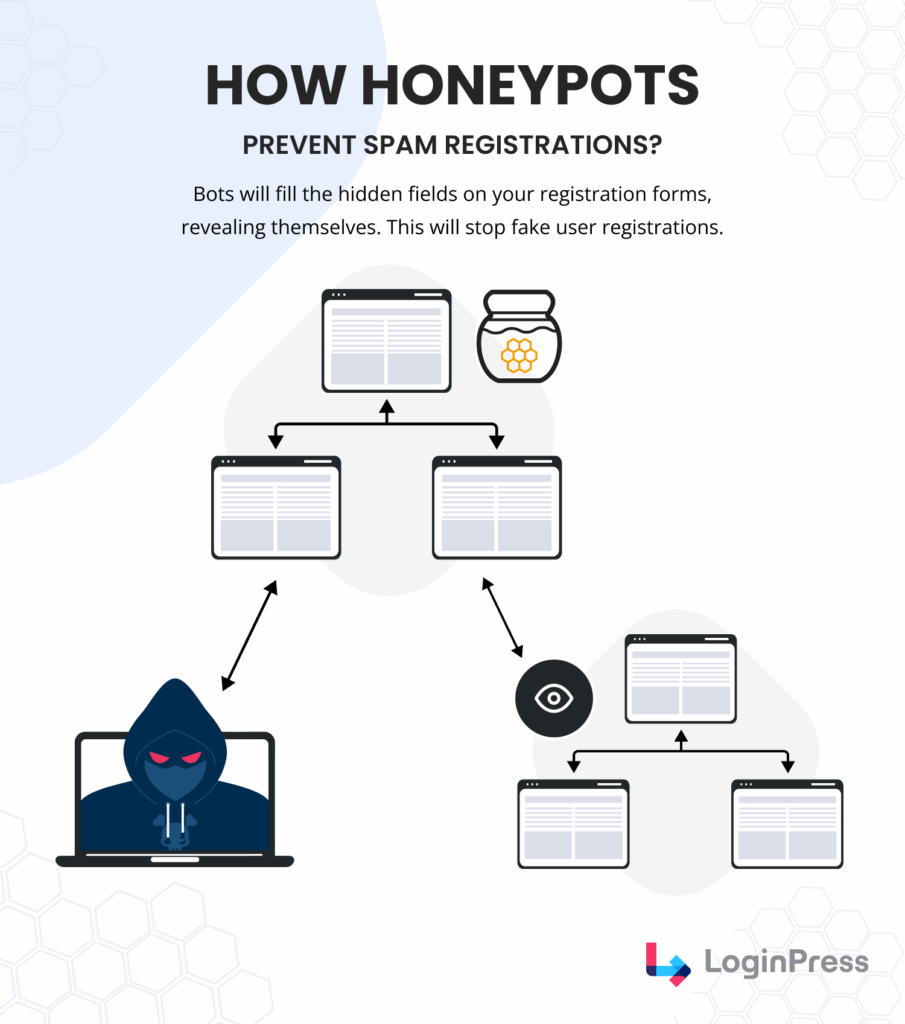
This is a hidden form field that is invisible to humans but visible to bots.
Humans leave it blank, but bots (which scan code) fill it out.
If the hidden field contains any data, the form submission is immediately classified as spam and discarded before reaching the inbox.
7. Use CDN & Hosting Protection to Block Malicious Bots
The most effective approach to managing how to block bot traffic on WordPress is to block it before it reaches the server.
The CDN Layer
Services like Cloudflare or Sucuri sit in front of your website. They maintain a global blocklist of known malicious IP addresses.
Turnstile and challenge mechanisms
When a visitor appears suspicious, the CDN issues a managed challenge. Bots are blocked at the DNS level, ensuring that the WordPress site remains performant by preventing bot access.
Best Practices to Avoid Fake Traffic Long-Term
You avoid fake traffic long term by treating bot protection as ongoing maintenance, because bots keep evolving and defenses must stay proactive.
These strategies turn best practices into a sustainable security framework:
1. Establishing an Update-First Culture
In 2024, more than 96% of WordPress vulnerabilities originated from plugins and themes rather than the core code.
- Close the Entry Point: When a developer patches a plugin, they are often closing a backdoor that bots are already scanning for. If you wait 30 days to update, you’ve given bots a month-long window to find you.
- The Pro Move: Enable Auto-Updates for minor releases and reputable plugins. For major themes, use a Staging Environment to test updates before pushing them live, ensuring you don’t break your site while keeping it secure.
2. Activity Monitoring (Forensic Logging)
Monitoring login activity helps you spot fake traffic on your website before a breach occurs.
- What to look for: Track specific events. If you see a user role changed at 3:00 AM or a plugin installed that you didn’t authorize, you know a bot has bypassed your perimeter.
- Identify Repeat Offenders: If a specific IP range from a foreign data center keeps hitting your site, you can block that entire CIDR block at the hosting or CDN level to permanently stop bots from crawling your site.
3. Move Beyond Strong Passwords
A strong password is good, but in the age of AI-driven brute-forcing, it’s no longer enough to protect your website from bot attacks.
- 16+ Characters: Use long, randomized strings generated by a password manager.
- Change Admin Username: Bots assume the admin username is yours. Delete the default account and create a unique one.
- MFA is Mandatory: Multi-Factor Authentication (MFA) is the ultimate bot-killer. Even if a bot guesses your 20-character password, it cannot replicate the one-time code from your physical device.
4. The Zero-Trust Architecture
Zero-Trust means your site assumes every request is a potential threat until proven otherwise.
- Never Trust, Always Verify: Instead of allowing anyone to see your login page, use Cloudflare Zero Trust to put a private identity wall in front of it.
- The Result: To even see your login screen, a user must first authenticate via an email pin or a corporate login. To a bot, your login page simply doesn’t exist.
Summary Checklist for Long-Term Defense Against Website Bot Traffic
| Action | Frequency | Impact |
| Audit User Accounts | Monthly | High (Removes Ghost access) |
| Review Security Logs | Weekly | Medium (Detects early probing) |
| Check Plugin Versions | Daily (Auto) | Critical (Closes known holes) |
| Change Admin Secret URL | Quarterly | High (Breaks bot scripts) |
What Not to Do When Trying to Stop Bot Traffic
The main mistake when stopping bot traffic is moving too fast and breaking things.
Avoid these three common traps to protect your website without hurting your growth:
1. Don’t Block All Bots
You might be tempted to block all non-human visitors, but doing so poses an SEO risk.
The Danger: If your firewall is too aggressive, you could accidentally block Googlebot or Bingbot.
The Result: If search engines can’t crawl your site, your rankings will vanish overnight. The goal is to filter website bot traffic, not to cut off your search visibility.
2. Relying Solely on Analytics Filters
Filters in GA4 are great for clean reports, but they are purely aesthetic.
The Misconception: Deleting fake traffic from your website dashboard doesn’t stop bots from hitting your server.
The Reality: These bots still consume your CPU and bandwidth. To truly stop bots from crawling your site, you need server-level or login-level protection, not just a cleaner graph.
3. Ignoring wp-login.php Security
Many owners focus on comment spam while leaving the front door wide open.
The Risk: Brute-force bots target the default /wp-login.php because it’s a universal vulnerability.
The Fix: If you don’t specifically secure this endpoint, you’re leaving a master key under the mat. Always prioritize login protection as your primary defense against spam bots on my website.
When Login-Level Protection is Enough and When You Need More
Login-level protection is enough for small sites, and larger sites need more. The right level depends on your site’s scale and data sensitivity.
- When Login-Level is Enough: For small blogs or portfolio sites, LoginPress handles the heavy lifting. It secures the primary entry point by blocking brute-force bots and filtering spam bots on my website forms. If your traffic is modest, this front-door focus is often all you need.
- When You Need More: If you run a high-traffic e-commerce store or handle sensitive user data, you need a multi-layered approach. This is where a Web Application Firewall (WAF) and CDN-level protection become mandatory to protect your website from bot attacks at the network edge, before they even touch your hosting.
The Honest Take: Start with strong login security. It’s the most cost-effective way to avoid fake traffic on your website without the complexity of enterprise tools.
Frequently Asked Questions
How can I identify bot traffic in Google Analytics 4?
To identify website bot traffic in GA4, look for sudden spikes in your Acquisition reports paired with a near-zero engagement rate and 0-second average session duration. You can also spot fake traffic on your website by checking Tech reports for unusual browser versions or geographic locations (like data centers) that don’t match your target audience.
Does blocking bot traffic hurt my WordPress SEO?
It depends on which bots you block. Beneficial bots, such as Googlebot, must be allowed to continue crawling your site and indexing your content. However, blocking malicious bot traffic from websites actually improves SEO by reducing server load and speeding up your site, both of which are key ranking factors.
How do I stop spam bots from filling out my WordPress forms?
The best way to stop spam bots on my website is to use a Honeypot field or a reCAPTCHA layer. Tools like LoginPress CAPTCHA features can distinguish between human users and automated scripts, ensuring that only legitimate inquiries reach your inbox while blocking automated registration and comment spam.
Is it possible to block all bots from my website?
You should never block all bots, as this would prevent search engines from ranking your site. Instead, the goal is to protect your website from bot attacks using a Web Application Firewall (WAF) or a CDN such as Cloudflare. These tools use managed challenges to verify visitors, allowing good bots through while automatically blocking malicious bot traffic.
Final Thoughts
Managing bot traffic keeps your analytics clean and your site fast, secure and available for real human visitors.
By securing your wp-login.php page and adding a layer of reCAPTCHA through tools like LoginPress, you can effectively learn how to stop bot traffic WordPress before they ever touch your server.
Start with the basics: keep your site updated, monitor your logs, and never trust a default setting.
Learn more about login security:
- Login Security for Membership Sites: What You Must Protect in 2026
- How to Build Login Security for Headless WordPress (2026 Guide)
- WooCommerce Login Security: Complete Guide (2026)
- LoginPress Latest Release Notes and Installation Guide
Have you noticed any strange traffic spikes in your GA4 reports lately, or have you already implemented a Front Door defense on your login page? Let me know in the comments below!