WordPress Identity Risk: How to Detect Suspicious Login Behavior

Editorial Team
Are you wondering what WordPress identity risk actually is?
While traditional security focused on hardening the site, closing ports, and updating plugins, modern threats target the user identity itself.
If an attacker has the right credentials, your firewall will politely let them in through the front door.
Identity risk detection adds behavioral intelligence to your login system by analyzing patterns such as location, device fingerprints, and login frequency.
It moves the goalposts by asking more complex, behavioral questions before granting access, such as geographical velocity, fingerprints, and suspicious login activity metrics.
In this post, I will cover ways to minimize identity risk in WordPress using LoginPress and how to implement best practices for login hardening.
WordPress Identity Risk (TOC):
What Is Identity Risk in WordPress?
Identity Risk in WordPress is the probability that a user’s credentials have been compromised or that an entity attempting to log in is not who they claim to be focusing on user behavior security.
Common Threat Types
- Brute Force: Systematic guessing of passwords.
- Credential Stuffing: Using leaked passwords from other site breaches.
- Automated Bots: Scripts designed to find weak points in the wp-login.php or XML-RPC.
- Password Reuse: Exploiting users who use the same password for their email and WordPress.
Business Consequences: A single admin takeover can result in SEO spam, ransomware, or the theft of customer PII (Personally Identifiable Information), leading to significant legal and reputational damage.
Types of Suspicious Login Activity
Maintaining site integrity requires a proactive approach. To effectively safeguard your platform, prioritize the identification of these five critical security red flags:
- Repeated Failed Logins: The most basic indicator of a brute-force attack.
- Credential Stuffing Bursts: A sudden spike in logins using different usernames from a single IP.
- Unknown IP or Proxy Access: Logins originating from Tor nodes or known data center IP ranges rather than residential ISPs.
- Geo-Anomalies: A user who typically logs in from London suddenly appears to be in a high-risk region.
- Impossible Travel: A login attempt from New York followed by one from Singapore 20 minutes later.
What Is Login Anomaly Detection?
Login anomaly detection works by comparing each login attempt against a user’s normal behavior patterns.
By analyzing historical patterns, the system assigns a risk score to each login attempt, enabling automated responses such as Multi-Factor Authentication (MFA) challenges or immediate account lockouts.
Key Indicators of Risk
To accurately detect anomalies, the system monitors four primary signal categories. When a signal deviates significantly from the baseline, it is flagged as a risk event.
| Signal | Normal Behavior | Suspicious Anomaly |
| Frequency | 1 login per day | 50 attempts in 2 minutes |
| Time | 9 AM – 5 PM (Business hours) | 3 AM (Off-hours) |
| Device | Known Mac/Chrome browser | New Linux/Python-request script |
| Location | Home City / Office | Foreign Country / VPN |
| Network Type | Standard ISP / Corporate Network | Log in from TOR or proxy networks |
| Credential Use | Single username per IP | Multiple usernames tested from the same IP |
Tools for Detecting Login Anomalies
Depending on your technical expertise and site scale, there are three main ways to monitor these anomalies:
1. Server Logs
Your server’s access logs (Apache or Nginx) record every hit to wp-login.php. While difficult to read manually, they provide the most granular view of IP addresses and request headers.
2. Login Customizer and Security Plugins
WordPress security plugins like LoginPress provide login monitoring and restrict login attempts without manual log analysis. LoginPress maps these capabilities into a user-friendly interface by:
- Automatically tracking failed attempts.
- Limiting login attempts based on IP behavior.
- Providing a visual dashboard to spot spikes in “Unauthorized” activity.
3. SIEM and Log Analyzers
Security Information and Event Management (SIEM) tools like Splunk or ELK Stack are used for advanced deployments. They ingest logs from multiple sources to find complex patterns that a single site might miss, such as an attacker hitting five different subdomains simultaneously.
Authentication Risk Assessment
A modern authentication risk assessment isn’t a one-time scan; it is a continuous evaluation of every login attempt.
To move beyond the basic pass/fail security, you must build an authentication risk model that categorizes login attempts based on how unusual they are, compared to their normal digital behavior.
Building a Practical Authentication Risk Model
An effective model acts as an automated filter. By weighing different inputs, you can assign a risk score to every attempt.
Key Inputs for Risk Scoring:
- Login Frequency: Is the user attempting to log in 5 times in 10 seconds?
- Origin (Geographic and Network): Is the request coming from a known home IP or a high-risk proxy?
- Historical Behavior: Does this user typically log in on a Saturday night or a Monday morning?
Categorizing Risk Tiers
Once these inputs are processed, the attempt falls into one of three risk tiers, each requiring a different automated response:
| Risk Tier | Characteristics | Automated Trigger |
| Low Risk | Known device, recognized IP, standard business hours. | Allow Access immediately. |
| Medium Risk | Correct password, but from a new city or an unrecognized browser. | Challenge: Trigger a CAPTCHA or Email OTP. |
| High Risk | Multiple failed attempts, known malicious IP, or Impossible Travel. | Block and Alert: Temporary IP ban and admin notification. |
Behavioral Security Metrics: Establishing Your Baseline
To identify an anomaly, you must first define what “normal” looks like. This is where behavioral security metrics come into play.
By tracking data over a 30-day window, you can establish a baseline login pattern for your unique site environment.
1. Baseline Login Patterns
A corporate site may have a baseline of 50 logins between 8 AM and 6 PM. An e-commerce site might see a steady stream 24/7. Monitoring this baseline allows your security system to alert when thresholds for outliers are crossed.
2. Tracking Failed vs. Successful Attempts
One of the most vital metrics for WordPress identity risk is the failure-to-success ratio.
- Healthy Ratio: 5% – 10% failure rate (usually humans forgetting passwords).
- Attack Ratio: 90%+ failure rate (indicates a botnet performing credential stuffing).
3. Thresholds and Triggers
Setting smart thresholds prevents security fatigue. For example, instead of blocking a user after one mistake, set a threshold of 3 failed attempts within 5 minutes. This trigger then executes a soft lock, protecting the account without requiring manual admin intervention.
Detecting Suspicious Login Activity: Beyond the Basics
To master WordPress identity risk, you must move from theoretical threats to real-world detection.
Identifying suspicious login activity is about recognizing the digital noise generated by automated scripts compared to the clean signal of a human user.
Real-World Examples of Suspicious Behavior
Modern attacks rarely look like a single person guessing a password. Instead, they manifest as high-volume, distributed events:
- Botnet Login Waves: These are synchronized attacks in which thousands of compromised devices (IoT cameras, routers, etc.) hit your /wp-login.php page simultaneously. The goal is to overwhelm your server resources or find a weak entry point through sheer volume.
- Credential Stuffing Bursts: Unlike a broad botnet wave, these are surgical. An attacker uses a “combo list” of leaked emails and passwords. You’ll see a sudden burst of different usernames being tested, often at a rate of 50–100 per minute.
- Anonymous IP Proxies: Professional hackers hide behind Tor, residential proxies, or VPNs. If your logs show a login attempt from a data center IP address (e.g., AWS or DigitalOcean) rather than a residential ISP (e.g., Comcast or AT&T), the authentication risk is significantly higher.
How to Detect Without Heavy Tools
You don’t need an enterprise-grade SOC (Security Operations Center) to spot login anomalies. You can find high-value indicators using built-in or lightweight methods:
- WordPress Native Logs: While WordPress doesn’t log every hit by default, many hosting environments provide access logs. Reviewing these for a high frequency of POST requests to wp-login.php is the first step in login threat detection.
- Failed Attempt Counters: By monitoring how many times a specific IP address fails to authenticate, you can identify persistent attackers. A human might fail twice; a bot will fail 200 times.
- Geo and User Agent Fingerprints: Pay attention to the “User Agent” string in your logs. If 1,000 login attempts all claim to be using an outdated version of Firefox from a country where you have zero customers, you’ve identified a suspicious login activity pattern.
Effective Detection Strategies in WordPress
To build a proactive defense, implement these three core detection strategies:
1. Log All Login Attempts
Don’t just log failures, log successes too. This allows you to spot Account Takeovers (ATO) where a successful login occurs from an impossible location. Maintain a clear audit trail of every login event, including the exact timestamp and IP.
2. Tag Suspicious Sources
Identify and tag IPs that repeatedly hit your login page with non-existent usernames (like admin, webmaster, or test). Once an IP is tagged as a probe, you can move it to a blacklist to prevent future resource drain.
3. Automated Alerts
Real-time login threat detection requires automation. Set up alerts for specific High-Risk events, such as:
- A user logging in from a new country.
- More than 10 failed logins site-wide in under 60 seconds.
- A successful admin login during non-business hours.
Login Threat Detection Techniques
To effectively manage WordPress identity risk, you must move beyond static security.
Modern login threat detection requires a dynamic response that adapts to the level of danger.
By utilizing LoginPress, you can implement techniques that challenge suspicious actors while keeping the door open for legitimate users.
1. CAPTCHA Logic and Risk Triggers
A CAPTCHA is a powerful tool, but displaying it on every login attempt can frustrate your users.
LoginPress supports adaptive CAPTCHA logic that balances user experience with high-level security.
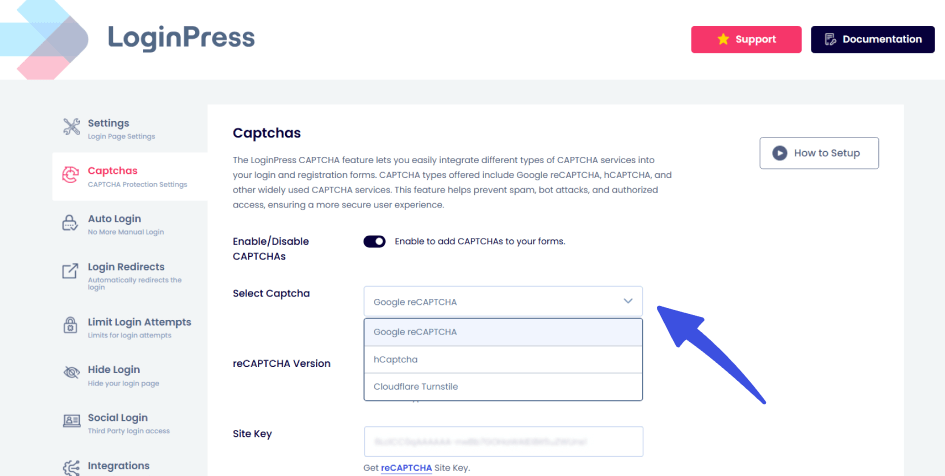
- When to show CAPTCHA: Instead of a permanent fixture, configure your settings to trigger Google reCAPTCHA only after a specific suspicious login activity is detected, such as two consecutive failed attempts from the same IP.
- Risk-Based Triggers: If a login originates from an unrecognized device or a high-risk network, the CAPTCHA acts as a secondary verification layer, stopping automated bots that can bypass simple username/password fields.
2. IP Reputation and Blocking
Your site shouldn’t be a free-for-all. Managing authentication risk means knowing who to trust and who to bar from entry.
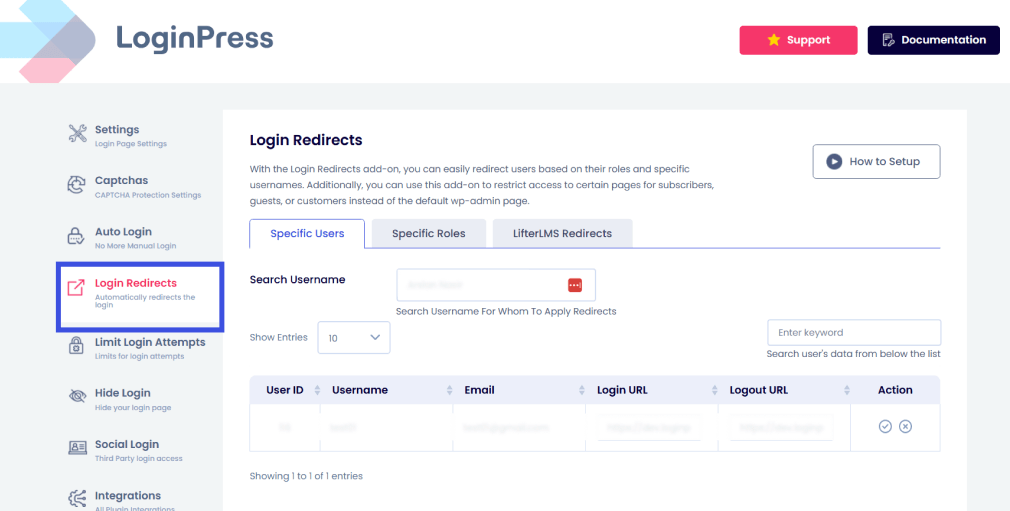
- Blacklists and Whitelists: Use the LoginPress Login Redirects Add-On features to create an all-inclusive list of trusted IP addresses (Whitelists). Conversely, you can instantly block known malicious ranges (Blacklists) that have a history of credential stuffing.
3. Limit Login Attempts
The most effective way to stop a brute-force attack is to remove the infinite guesses advantage. LoginPress provides granular control over how many failed attempts a user can make before being locked out.
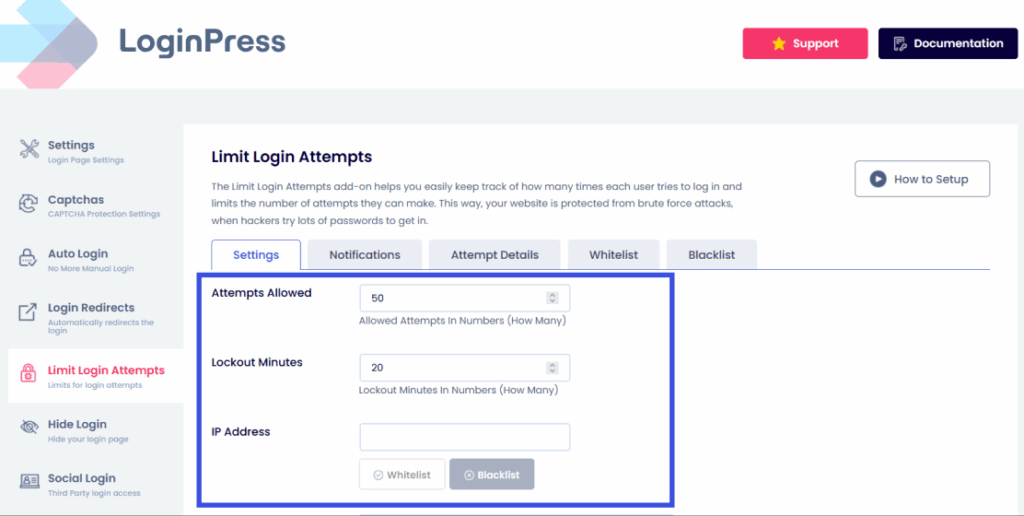
- Lock Accounts After Repeated Failures: Set a strict limit (e.g., 3 to 5 attempts). Once this threshold is reached, the IP is automatically barred from further attempts for a set duration.
- Cooldown Period Logic: A smart authentication risk model uses escalating cooldowns. The first lockout might last 15 minutes, but a repeat offender could be locked out for 24 hours. This progressively increases the “cost” of the attack for the hacker.
4. MFA as Risk Mitigation
Multi-Factor Authentication (MFA) is one of the best options for WordPress identity risk.
Even if an attacker successfully identifies a password through a credential stuffing burst, MFA stops them at the final hurdle.
- Detecting High-Risk Access: When a user is prompted for an MFA code and doesn’t provide it, your logs flag this as a high-risk failed attempt.
- Reducing Breach Probability: MFA ensures that knowledge (the password) must be paired with possession (a mobile device or email). This virtually eliminates the risk of automated account takeovers, even if your user’s credentials were leaked in a previous third-party breach.
Monitoring and Alerting: Staying Ahead of the Threat
Detection is only as good as your visibility. To effectively manage WordPress identity risk, you need a system that not only detects suspicious login activity but also notifies you before any major threat.
Dashboard Monitoring: What Metrics Matter?
Your security dashboard should tell a story. When reviewing your logs, focus on these high-impact metrics:
- Failed Login Charts: Look for vertical spikes. A steady baseline of 2–3 failures is normal; a jump to 50 in an hour is a clear signal of login threat detection.
- IP Heat Maps: Identify where your traffic originates. If your business is local to New York but you see a heat spike from a data center in an unexpected foreign region, you are likely facing an attack using an anonymous IP proxy.
- Real-time vs. Historical Analysis: Real-time monitoring allows you to kill active malicious sessions, while historical analysis helps you identify long-term “low and slow” brute-force patterns that occur over weeks.
Alerts and Notifications
You shouldn’t have to stare at your dashboard 24/7. Automated alerts act as your early warning system:
- Email Alerts for Suspicious Spikes: Configure notifications to trigger when failed attempts exceed a specific threshold (e.g., 20 failures in 5 minutes).
- Admin Notifications for High-Risk Sessions: Get an instant alert if an administrator account logs in from a new country or an unrecognized device.
Log Retention Best Practices
- Store Logs Securely: Ensure your security logs are protected from tampering. If an attacker gains access, their first move is often to “wipe the tapes.”
- Analyze Past Trends: Keep at least 30–90 days of logs to identify recurring attackers.
- GDPR Considerations: Ensure IP logging is handled in accordance with privacy laws. Anonymize data where possible and include your logging practices in your Privacy Policy.
LoginPress Security Rules and Controls
LoginPress serves as the central intelligence hub for your login page. It moves beyond standard WordPress functionality by integrating behavioral security directly into the authentication flow.
How LoginPress Detects Identity Risk
- Login Activity Logs: It provides a granular view of every attempt, allowing you to map out the authentication risk of specific users or IP ranges.
- Threshold-Based Triggers: You can set If/Then rules, for example, if an IP fails 3 times, then force a reCAPTCHA challenge.
- Behavioral Security Rules: By limiting login attempts and enforcing cooldown periods, LoginPress effectively “slows down” the internet for attackers, making your site an unattractive target.
Example Workflow: The Escalating Defense
- Normal State: User enters credentials.
- Suspicious Behavior Detected: 2 failed attempts trigger a CAPTCHA challenge.
- Anomaly Increases: 5 failed attempts trigger a Temporary IP Block.
- Admin Alert: An email is sent to the admin with the attacker’s IP and “Risk Score” for manual review or permanent blacklisting.
Actionable Checklist: Detecting Suspicious Login Behavior
Use this checklist to ensure your WordPress site is hardened against modern identity risks:
- Enable Detailed Login Logs: Use LoginPress to track usernames, IPs, and timestamps.
- Set Thresholds for Alerts: Configure email notifications for spikes in failed attempts.
- Add CAPTCHA at Risk Thresholds: Don’t show it to everyone; trigger it only after 1 or 2 failures.
- Implement MFA: Ensure all Admin and Editor accounts have Multi-Factor Authentication active.
- Analyze Patterns Weekly: Spend 10 minutes reviewing logs for “impossible travel” or odd geolocations.
- Block Repeat Offenders: Move persistent attackers from “temporary lockout” to your permanent Blacklist.
- Audit Security Events: Regularly check which usernames are being targeted most frequently to identify potential targeted attacks.
FAQs on Authentication Risk
Can I detect a login anomaly if the attacker has the correct password?
Yes. This is exactly why we monitor behavioral signatures. If a user typically logs in from a Chrome browser in New York but suddenly authenticates via a headless script in Singapore, it triggers a “High Risk” anomaly. LoginPress helps you spot these by logging the IP and device metadata for every single session.
How do I detect suspicious login activity in WordPress?
You can detect suspicious login activity in WordPress by monitoring login patterns, user behavior, and authentication attempts. Signs such as multiple failed login attempts, logins from unusual locations or devices, or sudden login activity at odd hours may indicate a potential security threat. Features like login attempt limits, activity logs, two-factor authentication (2FA), and real-time alerts can help you quickly spot and respond to suspicious activity before it leads to a security breach.
Does limiting login attempts block real users who just forgot their passwords?
It can, but that’s why adaptive logic is key. Instead of a permanent ban, use a soft lockout (e.g., 15 minutes). This stops automated bots, which would need to try thousands of combinations, while only causing a minor inconvenience to a human user who can then use a Magic Link or password reset.
Does limiting login attempts block real users who just forgot their passwords?
It can, but that’s why adaptive logic is key. Instead of a permanent ban, use a soft lockout (e.g., 15 minutes). This stops automated bots, which would need to try thousands of combinations, while only causing a minor inconvenience to a human user who can then use a Magic Link or password reset.
Is a custom login URL enough to stop identity-based attacks?
It’s a great first step in security through obscurity. By moving your login from /wp-admin to a custom path, you hide from 90% of generic bot scans. However, targeted attacks will eventually find the door, so you must pair your custom URL with active login threat detection like CAPTCHA and MFA.
How do I handle GDPR compliance while logging IP addresses for security?
Security is a “legitimate interest” under GDPR. To stay compliant, only store what you need, inform users in your Privacy Policy that you monitor login attempts for security purposes, and use a plugin like LoginPress that allows you to manage and prune your logs effectively.
Conclusion: Login Anomaly Detection
As we’ve explored, WordPress Identity Risk is the most critical security frontier in 2026.
Attackers have moved away from breaking in and are now focused on logging in using stolen or spoofed identities.
By shifting your strategy from static passwords to a dynamic authentication risk model, you aren’t just reacting to breaches, you are preventing them.
Monitoring for suspicious login activity, establishing behavioral baselines, and utilizing automated tools like LoginPress allow you to stay ahead of botnets and credential stuffing without ruining the experience for your legitimate users.
That is all for this post. For more related posts, check:
- Trust Based Authentication: Building Confidence in User Login Systems
- WordPress Identity Security: Protecting User Access
- How to Secure WordPress Login for Remote Teams and Distributed Users
Now that you know how to spot the digital fingerprints of an attacker, which security metric will you check first in your dashboard?