
How To Customize WordPress Login Page For Clients (Detailed Guide)

Editorial Team
If your development team has spent months perfecting a client’s custom WordPress site, don’t let the default dull WordPress login page undermine your hard work.
Ignoring the unbranded, default login page is a crucial mistake agencies make that can instantly lower the perceived value of the project they delivered. This is why providing a fully branded, custom login page for WordPress clients can enhance the quality of your deliverables and elevate the client experience.
By the end of this guide, you’ll learn how to customize WordPress login page for clients to create a customized and functional login page using LoginPress and amplify your agency’s quality work on every single project.
Customize WordPress Login Page for Clients (TOC):
Why Should WordPress Agencies Customize the Login Page for Clients?
For development agencies, customizing the login screen is a crucial detail that improves the overall user experience. Here is why learning how to customize WordPress login page for clients is essential:
1. Improves Client Experience (CX)
First impressions are 94% influenced by design. Up to 75% of users trust a visually appealing website. A branded login screen maintains brand consistency from the public site to the administrative backend.
Using a custom WordPress login page for client projects prevents the generic software look, reminding them that they received a premium, custom-built product.
2. Strengthens Agency Value
Attention to detail justifies premium pricing for clients. This is why customizing the WordPress login page for clients can help display essential design elements, such as attention to detail. This can further help your agency stand out.
3. Improves Security and Support
Customization lets you easily combine important security features, such as reCAPTCHA, and add custom support messages, resulting in a smoother, safer experience for you and your client.
What Makes a Great Custom Login Page for WordPress Clients?
A great custom login page for WordPress clients is functional, secure, and perfectly aligns with the client’s brand tone. Research shows that about 88% of users won’t return to a site after a bad UX encounter. And a “bad login experience” is a top culprit.
Here are the key elements your agency should focus on when learning how to customize WordPress custom login page for clients:
- Client Logo: Replace the default WordPress icon with the client’s brand logo.
- Brand Colors: Match the form, links, and buttons to the client’s official palette.
- Background: Use a professional image or a subtle pattern that reflects the client’s business.
- Welcome Message: Add a short, personalized greeting.
Essential UX and Functionality
- Responsiveness: Must look clean and work perfectly on all devices (mobile first).
- Speed & Clarity: Keep it clean, fast-loading, and focused only on the login task.
- Personalized Links: Ensure the “Back to” link directs to the client’s homepage, not a generic link.
By blending these design and functionality elements, your agency can deliver a high-value WordPress custom login page for clients.
How Can Agencies Customize WordPress Login Page for Clients (Step by Step)?
Agencies can follow either of these three main paths to deliver a custom login screen for WordPress client projects. Your choice should depend entirely on your team’s skill set, budget, and scalability needs.
For agencies looking to deliver a custom login screen for WordPress, there are three methods to follow:
- Using a dedicated plugin
- Adding custom code and CSS
- Using Page builders
Let’s now explore each method step by step:
Method 1. Using Custom Login Page Plugin LoginPress
This is the recommended, most efficient method for agencies looking to learn how to customize the WordPress login page for clients. Login customization plugin LoginPress is specifically designed to customize the login page without touching code.
Step 1: Install and Activate LoginPress
To start with a fully customizable and functional login page, you need to install and activate the LoginPress Pro plugin.
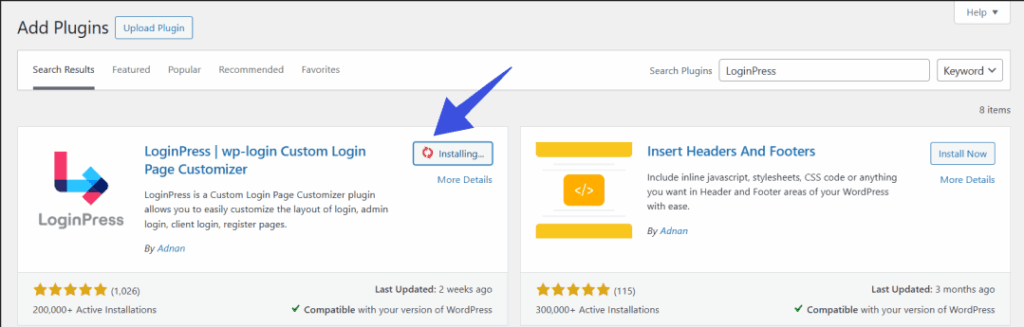
Step 2: Design Your Login Page using Customizer
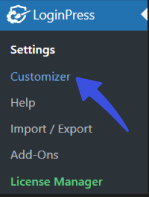
Then, navigate to LoginPress >> Customizer to start customizing your login page in a few easy clicks. No coding needed.
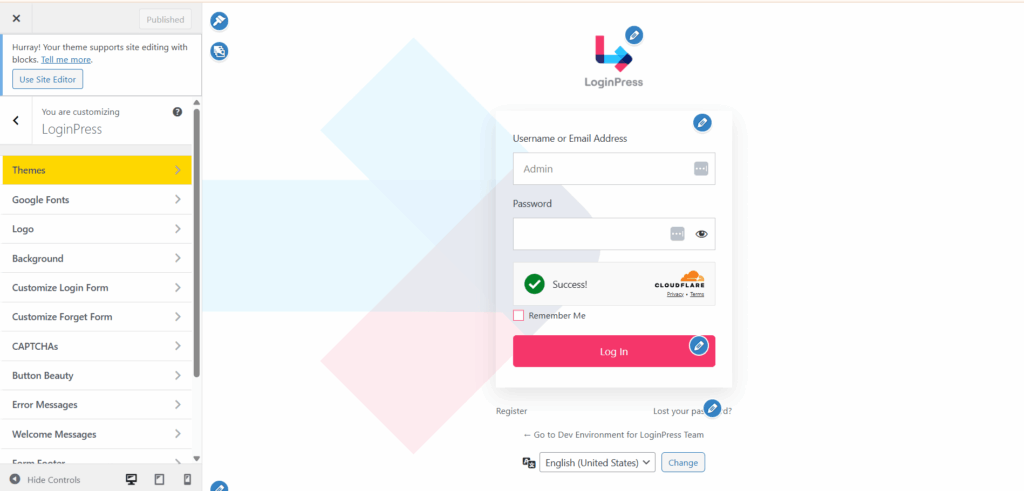
Once the customizer is open, you can check all the different design options given for your preferences:
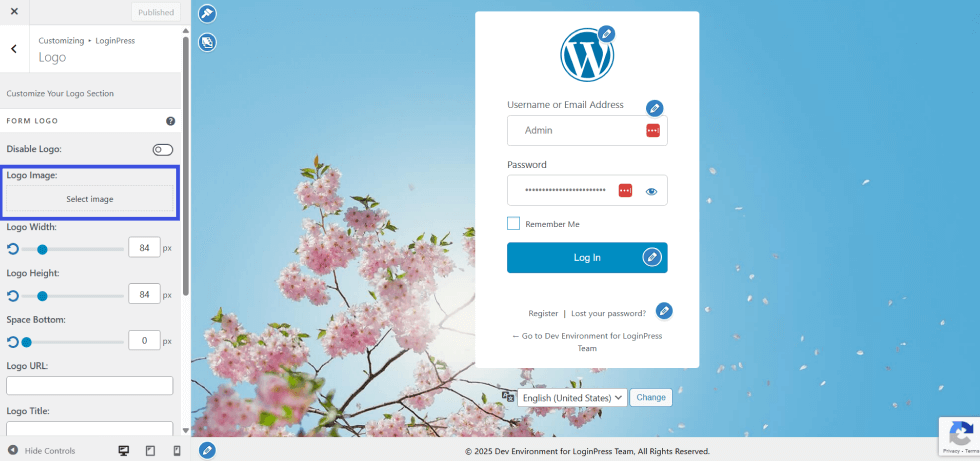
Step 3: Add Custom Logo
You also get live previews as you change the logo, colors, backgrounds, and security features. Let’s start by replacing the default WordPress logo with your own customized one:
Go to the Logo option in the customizer dashboard. From here, you can upload your own logo to the login page to showcase your brand.
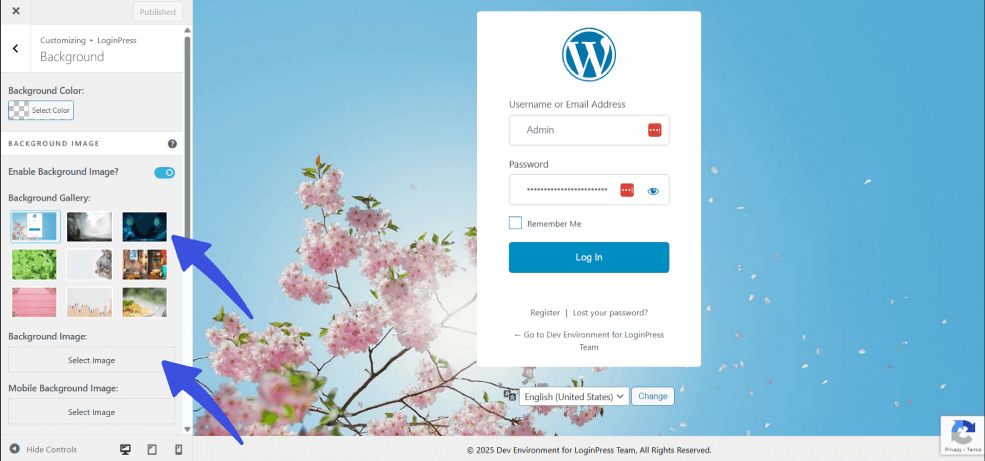
Step 4: Add Custom Background
LoginPress provides a pre-built background gallery to match your brand’s tone. These help to further personalize your login experience. You can choose from the pre-built background gallery or upload your own.
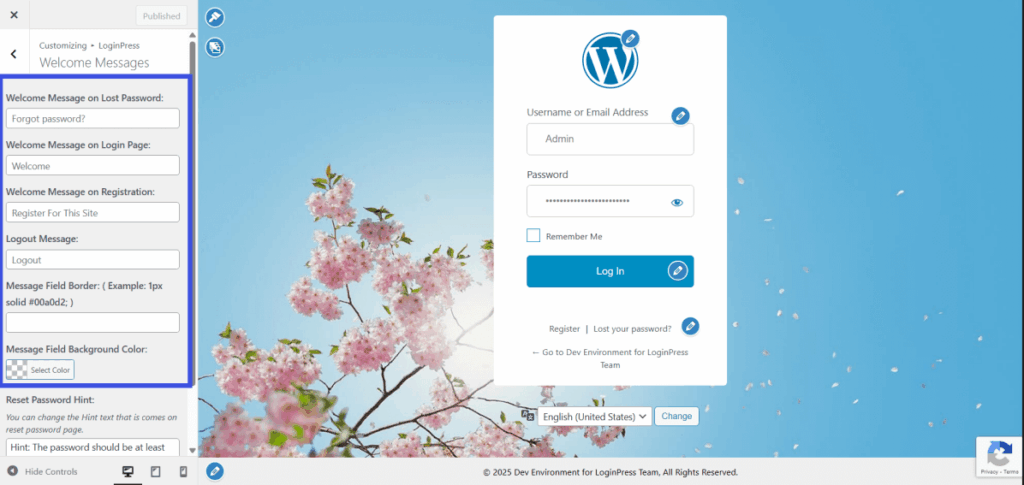
Step 5: Add Custom Welcome Messages
This option in the LoginPress customizer lets you add your own welcome messages for users, ensuring a smooth onboarding process.
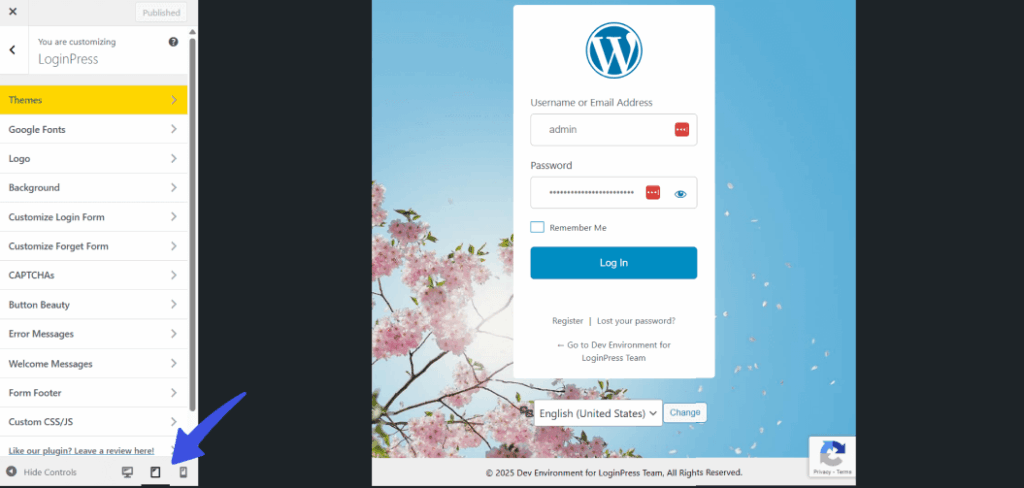
Step 6: Preview Your Changes
You can also preview your login page across desktop, mobile, and tablet sizes to see whether the client’s login site is device-optimized.
To do that, click the device icons under the customizer options to check your design across all device sizes and optimize it.
Step 7: Secure your Login Page (Additional)
LoginPress not only excels at visual customization but also provides top-grade security features. This allows you to create a branded login page for your clients that is both functional and secure.
- Enable reCAPTCHA on Forms
You can enable reCAPTCHA on all your forms, such as forgotten password, login, and registration forms. For that, navigate to LoginPress >> Settings >> Captchas.
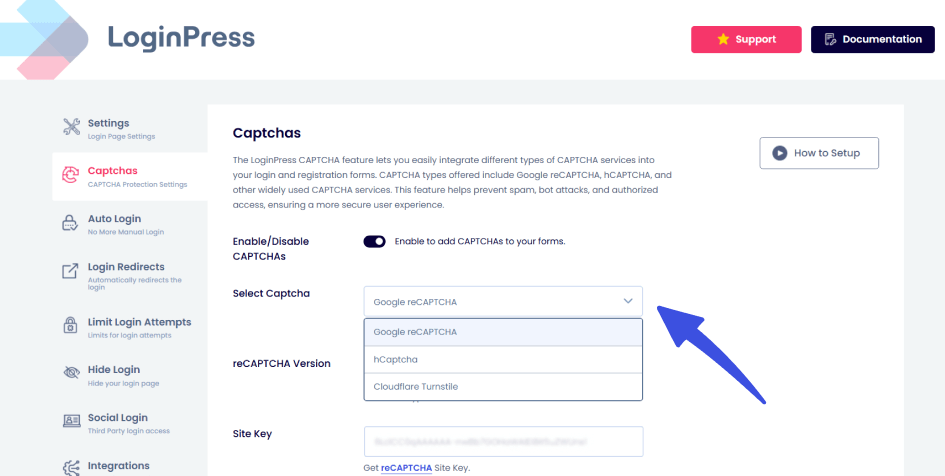
LoginPress also provides multiple CAPTCHA types, including Cloudflare Turnstile, reCAPTCHA, and hCaptcha.
- Enable Social Login
You can enable social login on your forms to provide instant logins and reduce user friction, boosting engagement and signups. To enable this feature, navigate to LoginPress >> Social Login.
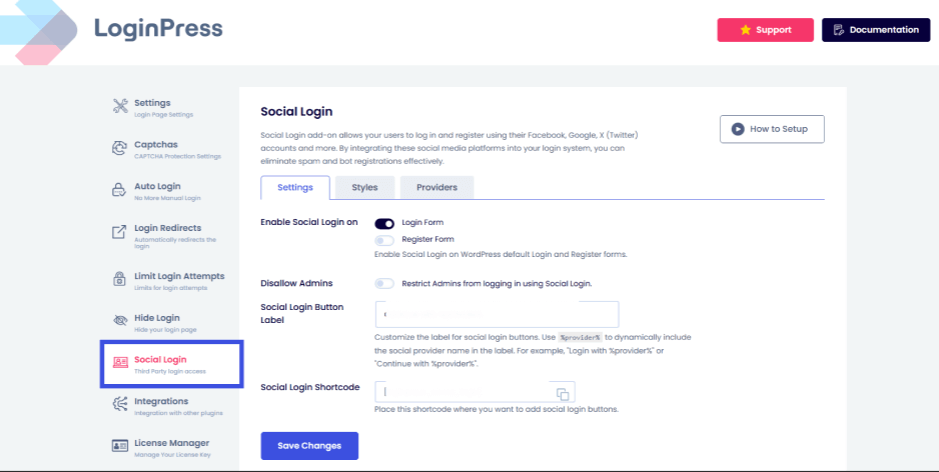
Here, you can enable the social login feature for your client’s login and registration forms to ensure clients receive a brand-aligned experience.
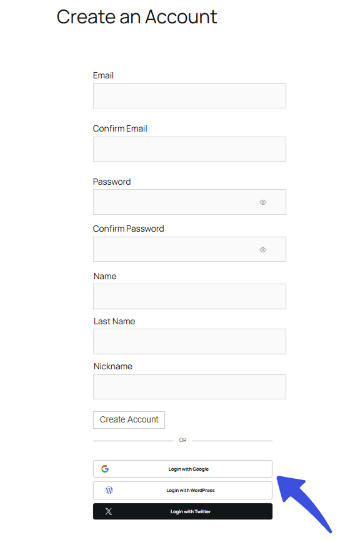
This plugin-based method is best for agencies handling multiple clients who need a fast, recurring, non-coding solution. LoginPress ensures that every custom WordPress login page for clients is secure and consistent.
Method 2. Using Custom Code and CSS
Some agencies choose the manual route for designing a custom login screen for WordPress client when they need absolute control over every pixel. Usually, this occurs when the project requires highly specific functionality that plugins cannot provide.
Developers typically use this method to apply minute customizations, such as modifying the entire login layout, changing colors, refining button styles, or customizing the form structure using CSS.
Here is how you can edit the file using the child theme:
Step 1: Go to Admin Dashboard
First, you need to access the WordPress admin dashboard. Then navigate to Appearance >> Theme File Editor.
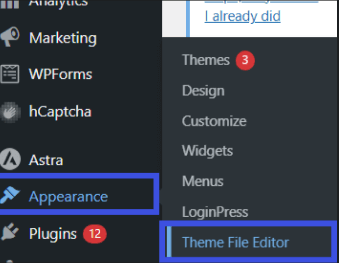
Step 2: Choose the Child Theme
Now that you have accessed the theme editor, next you need to choose the child theme from the Choose Theme to Edit option:
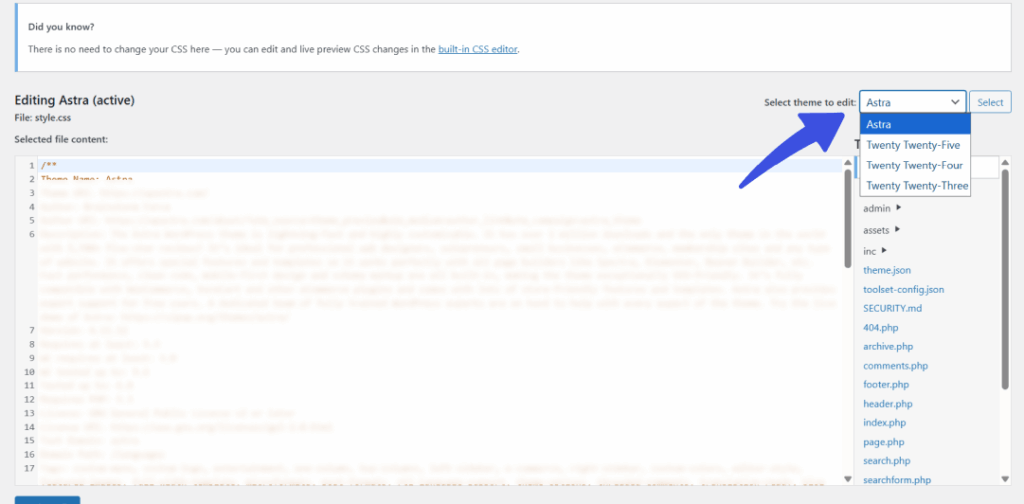
Make sure the child theme is selected; it will usually be listed with the parent theme name, e.g., Twenty Twenty-One Child.
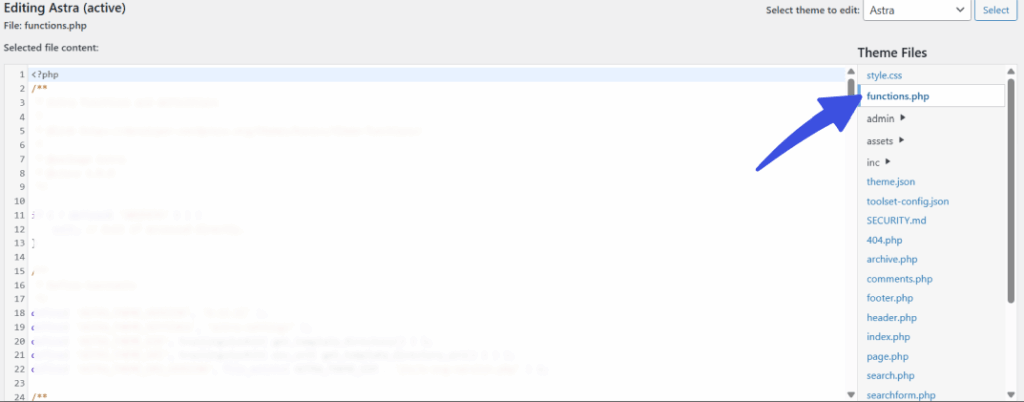
Step 3: Edit the Functions.php file
Click on functions.php to open it for editing and adding your custom code.
Step 4: Save Changes
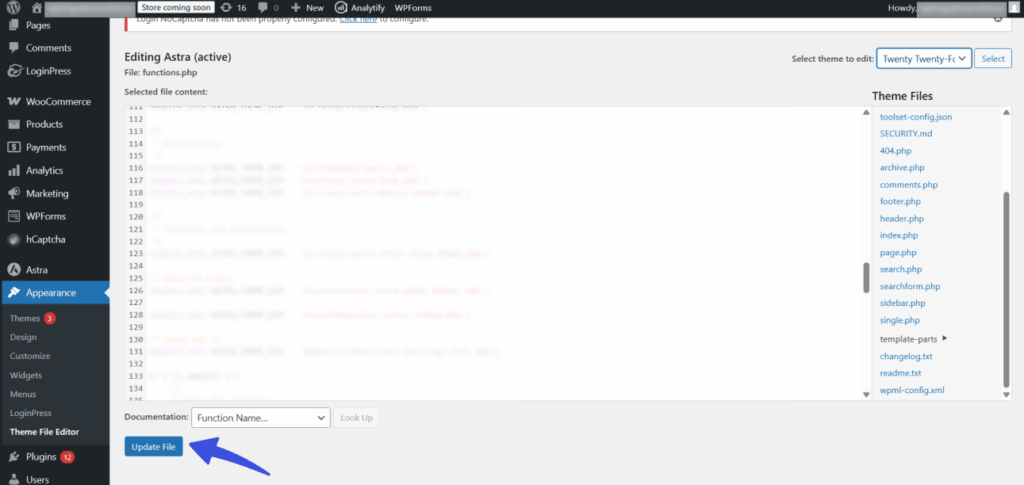
After making the required edits, save the file and update the changes across your site by clicking on Update File.
Important Instructions:
- Use a Child Theme: It is important to work within a child theme. This makes sure that your customizations are update-safe and won’t be erased when the main WordPress theme updates.
- Backup is Essential: Custom code carries multiple risks, including errors and maintenance headaches. Always back up your site before implementing any changes.
- How it Works: Developers edit the functions.php file, using PHP filters (like login_headerurl) to change the logo link and add custom CSS to inject styling.
Here are some pros and cons of using the manual approach for designing a custom WordPress login page for client:
- Pro:
Offers maximum control and is ideal for highly custom, single-client projects or minor design tweaks. - Con:
- Requires deep developer knowledge, as it is generally too risky
- Not scalable for agencies managing a high volume of clients.
- Time-consuming as it can be, it can introduce new bugs, and debugging takes time.
- A non-technical client could have issues resolving custom code-related bugs in the future.
3. The Builder Route: Page Builders or Themes
Some themes or page builders, such as Elementor Pro, offer such pre-built templates for creating a custom WordPress login page for client on a separate URL.
This drag-and-drop method for customizing your login page is quick and requires minimal code knowledge, making it a good option for small client sites or simple aesthetic changes.
All you need to do is design a new page using the builder, drag a login form widget onto it, and then set that new page as the default login URL. Here are some simple steps you can follow to use a page builder like Elementor to create a customized login screen for WordPress:
Step 1: Install and Activate Page Builder
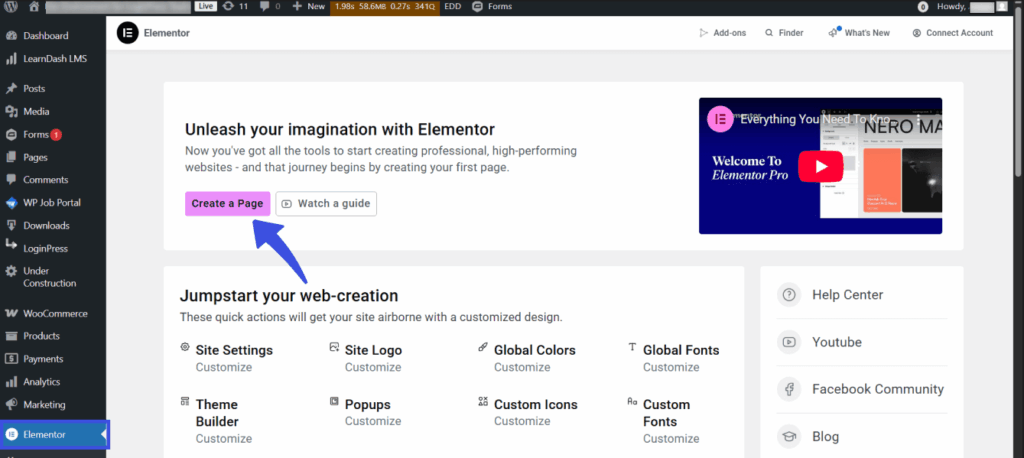
Install and activate any page builder. For this tutorial, I will be using Elementor Pro. Next, click on the Create a Page button to create a new page.
Step 2: Edit your Login Page
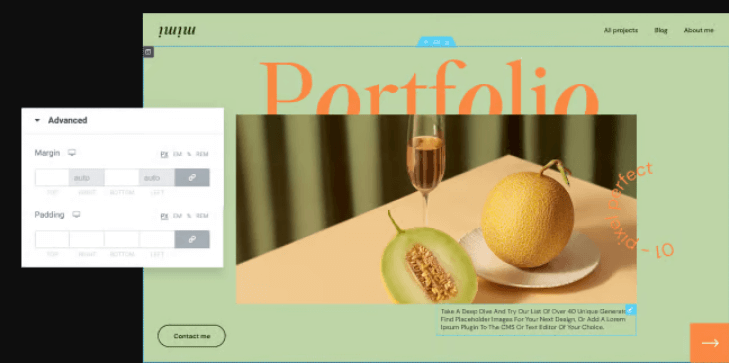
Next, you will be redirected to the Elementor design dashboard, where you can drag and drop elements you want in your site.
Here is a quick comparison of the three approaches to help agencies choose the proper method for designing a custom WordPress login page for clients:
| Feature | Plugin (LoginPress) | Code/Custom CSS | Page Builders |
| Scalability | High (Template Export/Import) | Low (Manual per site) | Medium (Can be template-based) |
| Effort/Time | Minutes | Hours (to code and debug) | 15-30 Minutes |
| Code Risk | None (Visual interface) | High (Potential for errors) | Low-Medium (Builder lock-in) |
| Security Features | Built-in (reCAPTCHA, Limit Attempts) | Requires extra custom code | Often requires extra add-ons |
How to White-Label the WordPress Login Page for Multiple Client Sites?
Agencies and development firms managing 10-50+ clients’ websites cannot afford to customize the login screen for every website manually. Scaling your project delivery requires a white-label solution that can save hours per client and boost your project quality.
This is where login customizer plugins, such as LoginPress, provide high-level customization features designed to efficiently customize the WordPress login page for clients at scale without touching code.
Instead of editing code or custom CSS on dozens of individual sites, LoginPress allows you to:
- Create Custom Templates: Design a perfect login page once (including layout, logo, and color scheme).
- Export Settings: Save the entire custom design and security configuration as an exportable file.
- Import at Scale: Rapidly import that file to any other client site, applying the comprehensive branding instantly.
This establishes that the client receives a structured, branded login experience that increases their trust in your agency, without requiring time-consuming manual work for each deployment.
What are the Common Mistakes Agencies Make When Creating Client Login Pages?
While the goal of white-labeling is a smooth client experience, agencies often ignore the important details that affect the quality and usability of deliverables.
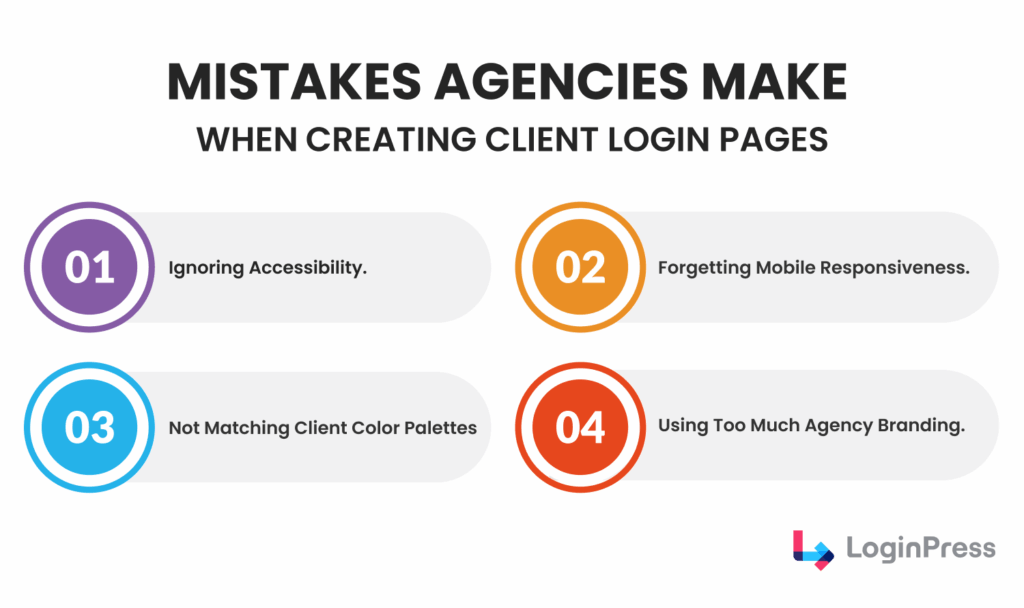
Avoiding these common mistakes ensures client retention and better agency repute:
- Excessive Agency Branding: The white-label process should focus entirely on the client’s brand. Using too much of your own agency branding on the client’s login page can confuse users, making the site feel less tailored and professional.
- Ignoring Accessibility: Login pages must be accessible. This includes ensuring sufficient color contrast for readability, proper form labeling, and keyboard navigation support.
- Ignoring Mobile Responsiveness: Since many users access WordPress from tablets or phones, the login page must be fully responsive. A broken or oversized login form on a mobile screen instantly degrades the client experience.
- Failing to Match Client Color Palettes: A custom login page should feel like an extension of the client’s website. If the login elements clash with the client’s official brand colors, the result appears disconnected from the rest of the site.
To maintain brand consistency and high quality, agencies must carefully test all front-end elements before final deployment.
How Can Agencies Use Custom Login Pages to Improve Client Retention?
A custom WordPress login page for client sites is a powerful way to build trust and improve client retention. Here’s how LoginPress solves common agency challenges:
- Boost Perceived Value: Thoughtful design that perfectly matches the client’s brand signals attention to detail. This strengthens trust, makes the client feel valued, and boosts credibility.
- Create Upsell Opportunities: The login page is an ideal place to introduce optional add-ons. Agencies can use it to pitch tiered services, such as seasonal design changes, turning the login page into a recurring revenue source, and positioning the agency as a reliable partner.
Ultimately, a branded login page secures client trust and retention while driving new revenue and opportunities for agencies to excel.
Why LoginPress is the Best Plugin to Customize WordPress Login Page for Clients?
Speed and scalability are everything for development agencies. When delivering a high-quality WordPress custom login page for clients, you cannot afford to waste hours coding CSS for every project.
LoginPress is built to solve agency pain points. It lets you deliver branded login screens fast. Here’s how LoginPress solves common agency challenges:
- Save Hours with Branding Tools: Agencies can make branding and any other design changes instantly, without coding. This removes the need to edit PHP or CSS files manually.
- Fast Turnaround: You can use ready-made, responsive templates. Agencies deliver polished login screens faster.
- Total Brand Control: Easily remove all WordPress and LoginPress logos. This ensures the client sees only their own brand for maximum personalization.
- Multi-Site Management: Deploy your standard login template across many client sites in seconds. This uses the simple Import/Export feature for maximum Scalability.
Key Takeaways for WordPress Agencies
For WordPress agencies focused on professional delivery and long-term relationships, learning how to customize the WordPress login page for clients is essential to growing your client base.
- Branding Builds Credibility: A professionally branded login screen builds immediate credibility for both the client’s site and your agency’s commitment to detail.
- Scalable Solution: LoginPress makes delivering this high-value experience simple and highly scalable across all your projects.
Frequently Asked Questions
Why is a branded WordPress login page important for client trust?
A professionally branded login page is crucial for establishing immediate trust and credibility. It serves as the client’s first security and quality check, reinforcing that the website is a tailored, high-value, and secure product delivered by a competent agency, rather than a default WordPress installation.
What is the primary benefit of white-labeling the WordPress login screen for an agency?
The primary benefit is scalability and efficiency. White-labeling allows agencies to replace the default WordPress branding with the client’s (or their own) identity instantly. Using tools like LoginPress, agencies can design a master template once and quickly export/import the branded settings across dozens of client sites, saving significant time and ensuring consistency.
Which plugin is best for customizing the WordPress login page for multiple clients?
LoginPress is widely considered the best plugin for agencies because it directly addresses pain points related to speed and management. Its key features, such as one-click visual branding tools, professional login templates, and robust Multi-Site management with Import/Export functionality, make it easy to deploy a high-quality, custom WordPress login page for client sites at scale.
Can a custom client login page be used to generate recurring revenue?
Yes, strategically. Agencies can use the custom login screen as a low-friction opportunity to upsell premium services. By offering optional features like advanced security upgrades (e.g., multi-factor authentication) or seasonal design changes for the custom login screen, agencies can convert a standard project deliverable into a reliable, recurring revenue stream.
Custom Login Page for WordPress Clients: Final Thoughts
The quality of your client-facing work is judged instantly, and often, the first element they notice is the login screen. By utilizing a custom WordPress login page for client projects, agencies move beyond default setups and into proactive, branded deliverables.
This simple act of white-labeling is important for building trust, demonstrating attention to detail, and creating scalable revenue opportunities. That is all for this post.
For more related posts, check:
- WordPress Smart Login Redirects: Personalized UX (Guide)
- Enhance Your WooCommerce Login Experience with LoginPress (Guide)
How will you leverage the power of the login screen to standardize your agency’s brand and increase your client retention rate? Let us know in the comments below!