Login Page Language Switcher in WordPress 5.9

WordPress 5.9 added a language switcher dropdown to the login page. It lets users view the login, password reset and registration screens in their own language, and you can filter or remove it with code.
Since WordPress 4.9, you can also set the login language with the wp_lang query variable, for example wp-login.php?wp_lang=fr_FR.
In this post, I will show you how to show only specific languages in the dropdown or remove it entirely.
Filters Default Arguments For The Languages Dropdown
Please note that the language list in the dropdown is based on the currently installed languages of the WordPress installation. To install a new language, websites administrators can use the language selector available on Settings > General.
Go to the site languages drop-down, select a language to install and save changes. This installs and switches the site language, you can switch back if you do not want that as the default language.
To show only fr_FR and de_DE in the dropdown on a site with several languages installed, use this filter:
Add specific languages in the dropdown Usage example:
function loginpress_filter_login_language_dropdown_args( $args ) {

   $args['languages'] = array( 'fr_FR', 'de_DE' );

   return $args;

}

add_filter( 'login_language_dropdown_args', 'loginpress_filter_login_language_dropdown_args', 10, 1 );
Remove The Language Dropdown Entirely
Remove the language dropdown entirely with the login_display_language_dropdown filter.
Remove dropdown Usage example:
add_filter( 'login_display_language_dropdown', '__return_false' );Usage in LoginPress:
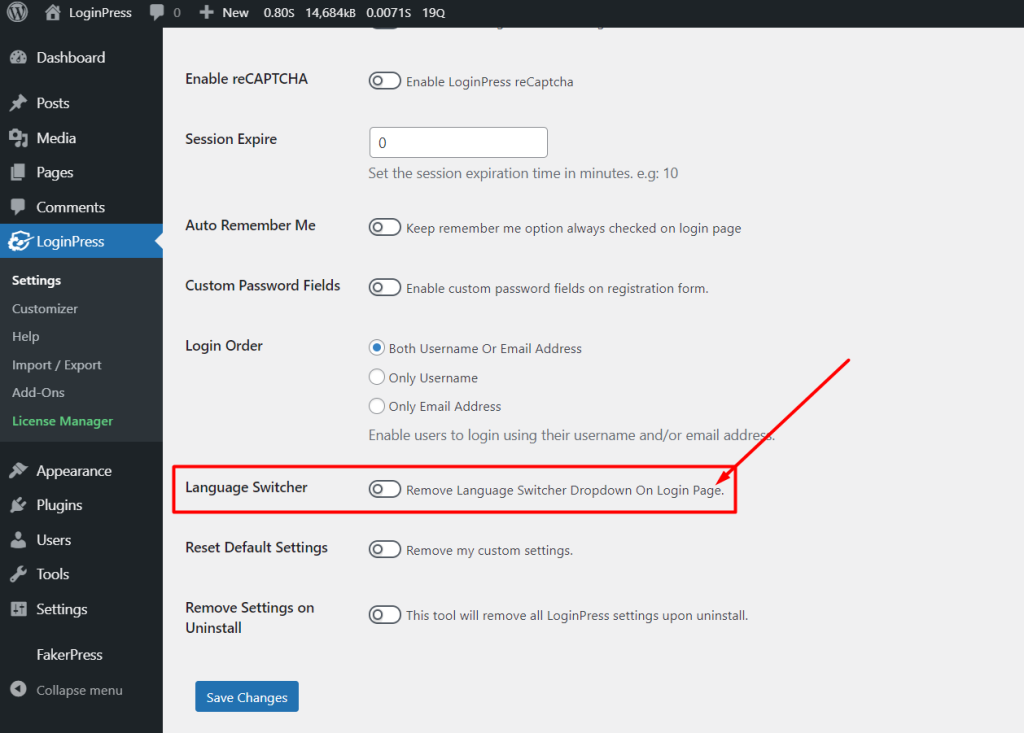
LoginPress has adapted the login page language switcher in version 1.5.11 so the user can customize it accordingly.
LoginPress is providing the feature to allow the admin of the site to control the availability of language switchers to the general public on the login screen.
That’s all! You can also check out How to Find the WordPress Login URL (Easy Guide) and How to Easily Change the Login Logo in WordPress.
Not using LoginPress yet? What are you waiting for?
Related guides: how to set up the language selector with LoginPress (no code) and how to build a multilingual login page (full multilingual setup).