Login Security for Community Websites: Forums, Groups, and Networks

Editorial Team
Trust is essential for community websites to succeed.
If you run a forum, many people log in, which can also attract bots, brute-force attacks, and credential stuffing.
With public registration and user-generated content, login security for community websites soon becomes a major concern.
The problem?
The default WordPress login page was not built for busy communities. It does not protect well against automated attacks and provides little control over user logins.
It also offers almost no options for roles such as moderators or group admins.
This guide offers clear, practical advice on how community websites can secure logins without making things harder for users.
You will find practical, plugin-friendly tips to protect WordPress logins for forums, BuddyPress, and BuddyBoss using layered security rather than strict rules.
Login Security for Community Sites (TOC):
Why Community Websites Are High-Risk Targets
Community websites face a distinct threat compared to standard blogs or business-oriented sites.
This is because public user registration increases the potential attack surface. Most community platforms typically require the following features:
- Open or semi-open user registration processes
- Frequent user logins, often on a daily or weekly basis
- Persistent user sessions to support messaging, content feeds, or ongoing discussions
That combination makes WordPress community login security more complex than usual.
Attackers don’t need admin access since even compromised member accounts can be used to:
- Disseminate spam within forums
- Abuse private messages
- Scrape member data
- Launch internal phishing attacks
Community websites often expose weaknesses unintentionally:
- WP-login.php Exposure: Bots relentlessly target the default WordPress login URL.
- Weak Password Enforcement: Users often reuse passwords across multiple platforms, particularly on forums.
- Conflicts between Installed Plugins: Community plugins add login hooks that can bypass basic protections.
- Risks Associated with Session Hijacking: Long login sessions increase the impact of stolen cookies.
Balancing UX and security requirements is where many admins struggle. For example:
- Forcing complex passwords without guidance frustrates new users
- Aggressive lockouts can block legitimate members
- CAPTCHA on every action kills engagement
The goal isn’t maximum security at all costs. It’s layered protection that stays invisible to real users.
Therefore, community websites require plugin-assisted login security solutions tailored to their specific needs, rather than generic, one-size-fits-all rules.
Core Concepts in Login Security
Before implementing specific tools, it is important to understand the foundational elements of secure community authentication.
- Strong Password Enforcement
Passwords remain the primary line of defense in authentication systems. Recommended practices for community websites include the following:
- Minimum length (12+ characters)
- Block common and breached passwords
- Promote the use of passphrases rather than relying solely on complex symbols.
This approach enhances security while minimizing obstacles for users.
- Two-Factor and Multi-Factor Authentication (2FA/MFA)
Two-factor authentication introduces an additional verification step, which may include
- App-based codes
- Email verification
- Hardware security keys for advanced configurations
In community environments, two-factor authentication should be implemented as follows:
- Mandatory for admins and moderators
- Optional but encouraged for members
This strategy safeguards high-privilege accounts and maintains a straightforward onboarding process for users. LoginPress describes authentication methods in detail to help users better understand which methods work best for their needs.
- Brute-Force Attack Protection and Login Attempt Limitations
Automated attacks typically depend on a high volume of login attempts. Effective protection for forum logins includes the following measures:
- Login attempt limits
- Temporary lockouts
- IP-based throttling
A detailed guide on How to Stop WordPress Brute Force Attacks (2026 Guide) can help you implement this core concept effectively.
- Secure Session Management
Even authenticated sessions may be compromised. Some of the essential safeguards to protect WordPress sessions include the following:
- HTTPS everywhere
- Secure and HttpOnly cookies
- Reasonable session timeouts
- Forced re-login for sensitive actions
These measures mitigate potential damage in the event of credential or session exposure.
Securing Community Logins with LoginPress
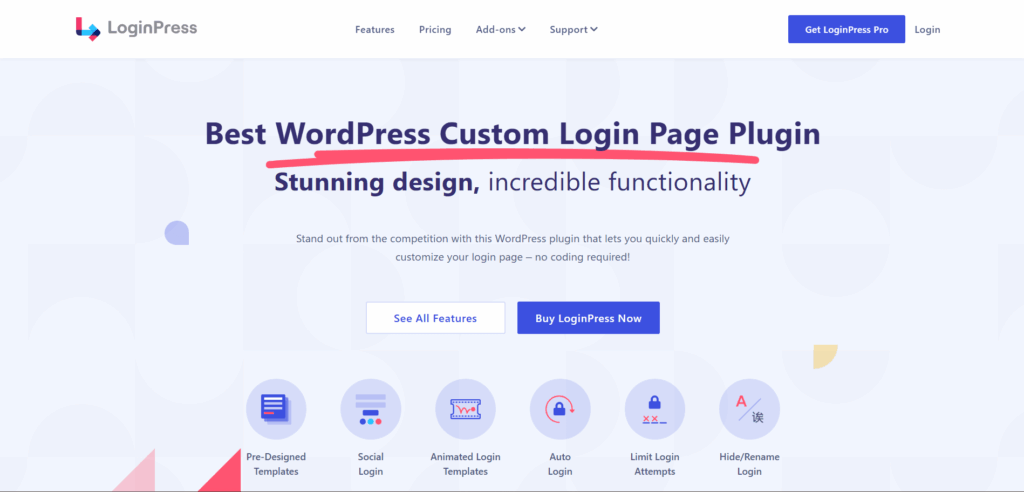
LoginPress provides an effective way to implement layered login security without modifying existing authentication logic, a critical requirement for community platforms.
In this section, I will show you how to apply LoginPress across WordPress, forums, BuddyPress, and BuddyBoss environments.
WordPress Community Login Security with LoginPress
Fundamentally, all community sites continue to depend on WordPress authentication mechanisms.
So, to implement a layered security, start with:
1. Protect WP-login.php
The default login URL is frequently targeted by automated bot attacks.
With LoginPress Hide Login Add-On, you can:
- Rename the login URL and restrict direct access to wp-login.php.
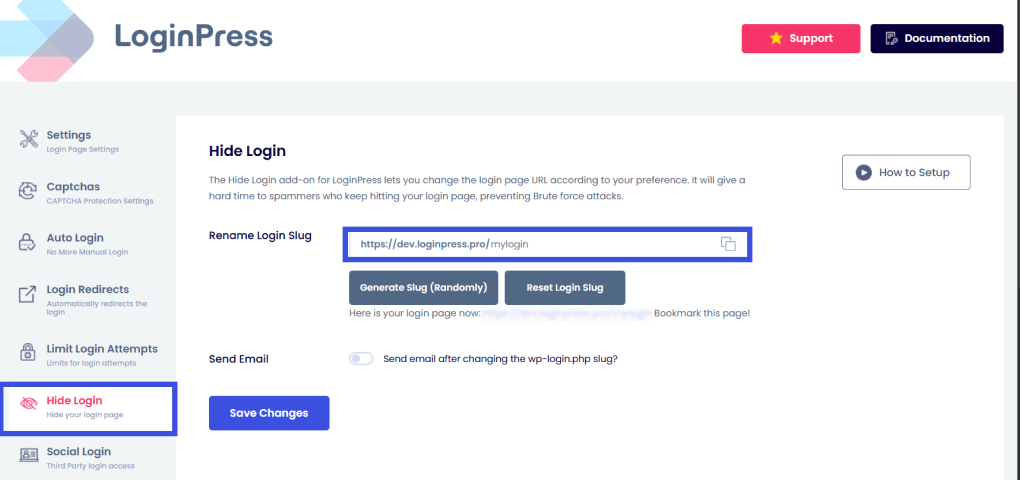
This method itself blocks a large percentage of automated attacks. You can also enable the Send Email option to receive your newly generated login slug in your inbox.
2. CAPTCHA Integration
CAPTCHA should be deployed only when necessary to minimize user friction.
Although advanced CAPTCHA systems, such as Cloudflare Turnstile, are now available and invisible to users.
Best practice:
- Trigger CAPTCHA after failed attempts
- Avoid displaying CAPTCHA on the initial login attempt.
With the LoginPress CAPTCHA option, you can enable CAPTCHA on required forms without bloating the UX or causing excessive user friction.
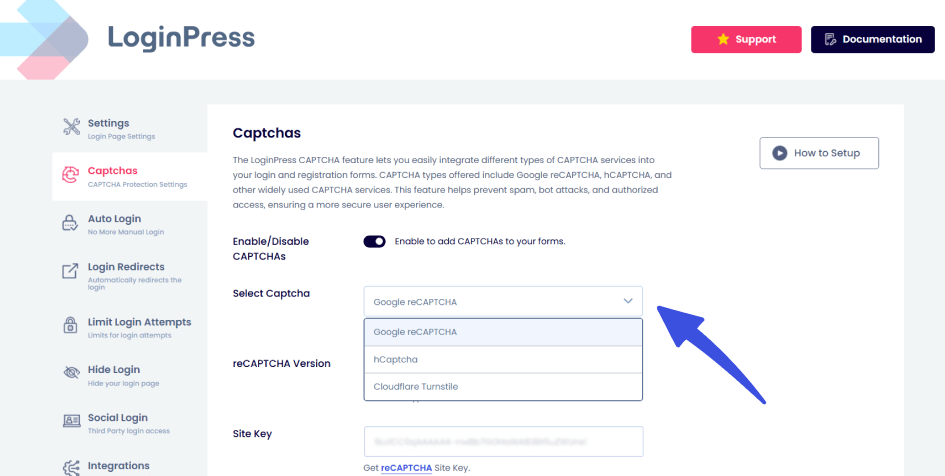
This balances security and usability, especially for active communities.
3. Role-based Controls
User access requirements vary based on assigned roles. This is where role-based redirects are important.
Check out these example role-based controls:
- Administrator access is restricted to specific IP addresses.
- Moderators must use two-factor authentication (2FA).
- Members are completely restricted from accessing backend systems.
LoginPress Login Redirects Add-On helps administrators enable role-based access controls to reduce security risk.
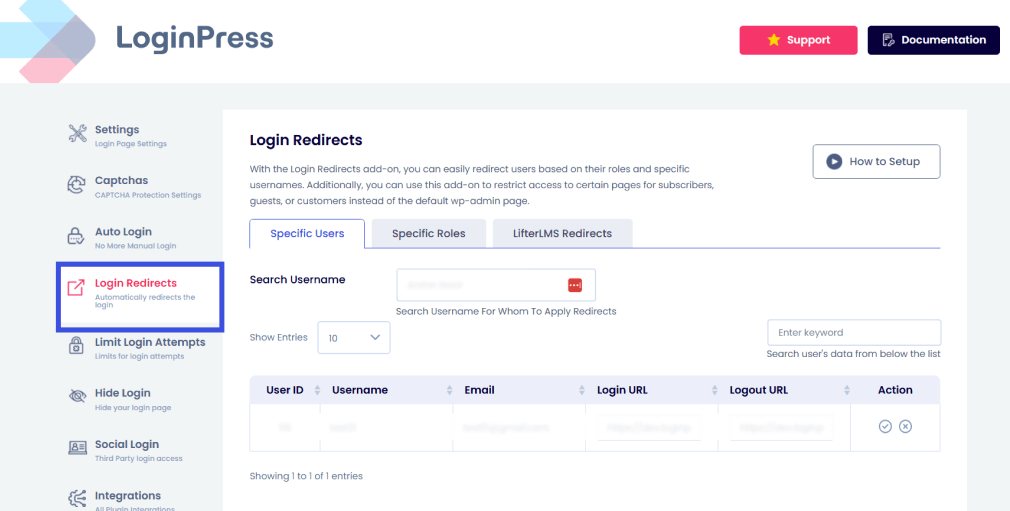
This also helps maintain a seamless experience for standard users and provides personalized smart redirects to each user, ensuring a seamless UX.
4. Enable Two-Factor Authentication
Two-factor authentication (2FA) is a security protocol that requires two separate factors to access an account.
These factors include knowledge-based credentials, such as a password or PIN, and possession-based verification, such as a phone, an application, or a hardware token.
Some rules you can implement:
- Enforce 2FA for admins and moderators.
- Permit optional two-factor authentication for regular members.
- Email or application-based verification methods are supported.
These measures are particularly important for communities that include:
- Private groups
- Paid memberships
- Sensitive discussions
Forum Login Protection
Forums are high-value targets due to their public visibility and constant activity. Here are some security practices for a secure forum login security for community websites:
1. Enforce Login-Only Access
Public forums are vulnerable to spam and unauthorized data scraping.
With LoginPress:
- Redirect guests to custom login pages.
- Preserve the original thread URL after renaming the login slug.
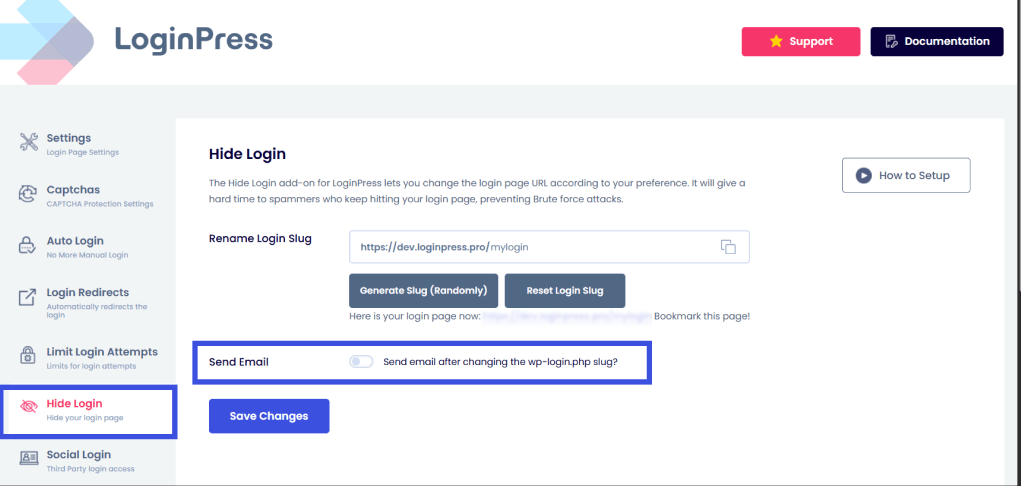
This approach enhances both security and user engagement. It also protects discussion threads with role-based access.
Users are assigned different privilege levels according to their designated roles.
Examples:
- Read-only access for new members
- Posting allowed after email verification
- Moderator actions are protected by 2FA.
This strategy mitigates abuse while preserving accessibility for authorized users.
2. Limit Login Attempts
Forum login pages are often attacked directly by bots. Some ways you can limit interaction without affecting legitimate user interaction are:
- Limit login attempts per user, enhancing login security for community websites.
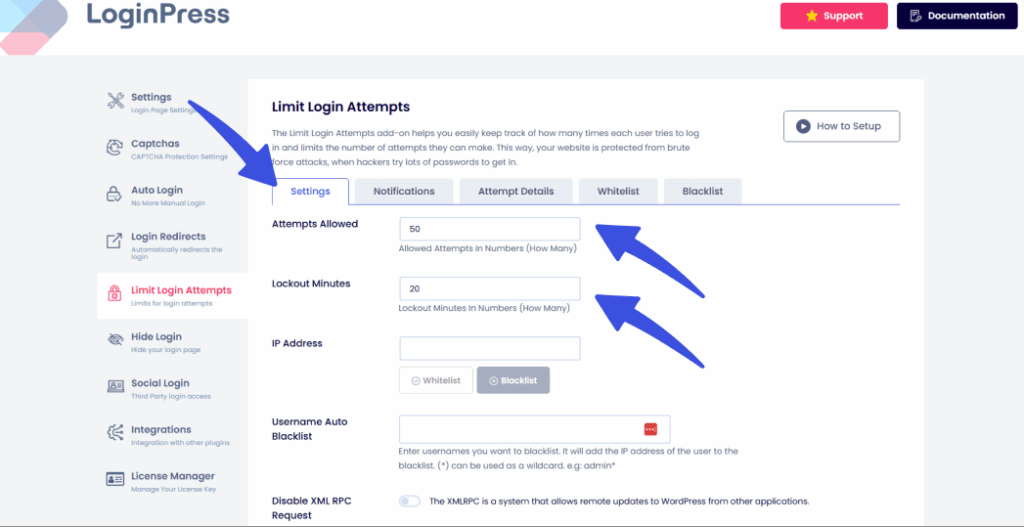
- Applying temporary or permanent lockouts
- Logging suspicious activity for review
This is essential forum login protection at scale.
BuddyPress Login Security
BuddyPress communities depend primarily on front-end user interactions. This is why it is essential for administrators to balance both UX and security.
BuddyPress uses custom login flows that can bypass basic WordPress protections. LoginPress integrates by:
1. BuddyPress + LoginPress Integration
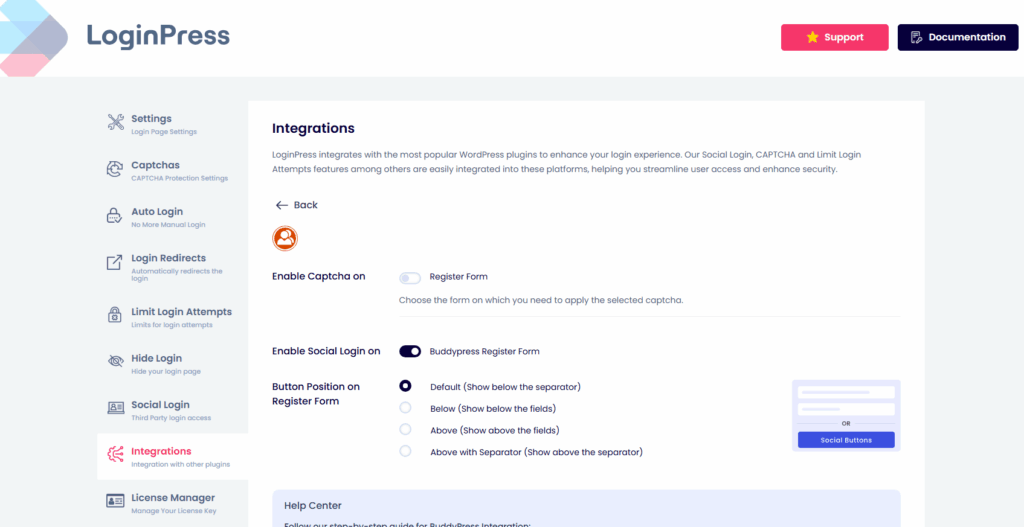
- Applying security rules to BuddyPress login forms
- Enforcing CAPTCHA and lockouts consistently
- Respecting BuddyPress registration workflows
2. Restrict Access to Community Features
Certain content should remain restricted from public access.
- Block activity feeds for logged-out users.
- Protect private messages and groups.
- Redirect users to login before interaction.
This reduces the risk of data scraping and anonymous abuse.
3. Maintain Compatibility with Add-Ons
Community sites often use extensions:
- Group management tools
- Messaging enhancements
- Profile add-ons
LoginPress is designed to prioritize authentication, which minimizes compatibility issues with most BuddyPress add-ons.
BuddyBoss Authentication
BuddyBoss enhances BuddyPress’s functionality by adding advanced community features.
1. Layered login experience
BuddyBoss login security workflows are designed to optimize the user experience.
LoginPress complements this by:
- Adding brute-force protection
- Enforcing 2FA where needed
- Securing backend access
This approach implements layered login security for BuddyBoss while preserving existing user workflows.
2. Password-Protected Discussions and Content
For private communities:
- Restrict access until login
- Apply stricter rules for premium groups
- Enforce re-authentication for sensitive actions.
This strategy increases trust among members of closed community networks.
3. Brute-force protection and 2FA
BuddyBoss communities often attract substantial user audiences. LoginPress helps by:
- Blocking automated attacks early
- Protecting moderator and admin accounts
- Supporting scalable security as the community grows
Step-by-Step LoginPress Setup Checklist
Refer to this checklist to systematically implement effective login security measures.
Pre-launch Configuration
- Enforce HTTPS across the site
- Audit installed plugins and themes
- Remove unused authentication plugins
- Install and activate LoginPress
Community-Specific Configuration
- Change the default login URL
- Enable login attempt limits
- Configure CAPTCHA after failed logins
- Require login for core community actions
- Set role-based access rules
- Enable 2FA for admins and moderators
- Configure post-login redirects to improve UX
Ongoing Monitoring and Maintenance
- Review failed login logs weekly
- Set alerts for brute-force spikes
- Test login flows after updates
- Re-evaluate rules as the community grows
Security is not “set and forget,” especially for active community platforms.
Best Practices and Common Mistakes in Login Security for Community Websites
Effective login security for community websites involves applying appropriate controls to specific users at relevant times, rather than indiscriminately restricting access.
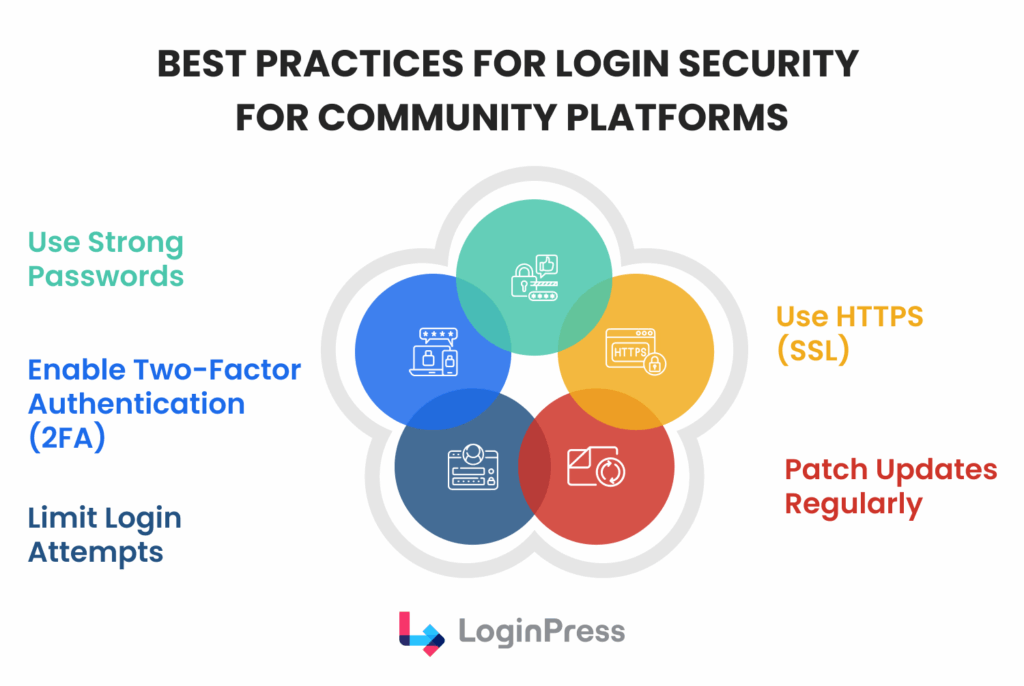
The following best practices and common pitfalls are informed by observed behaviors in production WordPress communities.
Best Practices for Login Security to Follow
Check out these best practices for login security to ensure seamless login security for community websites.
Practice 1: Enable 2FA for All Administrative Roles
Administrative and moderation roles present the highest security risk. If an admin account is compromised, attackers can:
- Change site settings
- Inject malicious code
- Access private user data
Two-factor authentication adds an additional verification step, substantially mitigating this risk. For community websites, the recommended approach includes:
- Mandatory 2FA for admins and moderators
- Optional but encouraged 2FA for regular members
This strategy safeguards critical roles while minimizing friction during the onboarding process for new members.
Practice 2: Audit New Registrations Regularly
Regular audits facilitate the ability to:
- Spot suspicious signup patterns
- Identify disposable or fake email domains
- Catch compromised accounts early
Even with CAPTCHA and email verification in place, manual or automated reviews of new registrations provide an additional layer of protection. This is particularly helpful for forums and social networks with open signups.
Practice 3: Patch WordPress and Plugins on Time
Outdated software remains one of the most prevalent attack vectors. Community websites often rely on:
- BuddyPress or BuddyBoss
- Forum plugins
- Multiple add-ons and integrations
Each update may address security vulnerabilities related to authentication or session management.
Delaying updates increases the likelihood that attackers will exploit known vulnerabilities, especially at login and registration endpoints.
Practice 4: Use Layered Protection
No single security feature is enough on its own. Effective login security combines:
- Strong passwords
- Login attempt limits
- CAPTCHA after failed attempts
- Two-factor authentication
- Secure session management
This layered approach ensures that if one defense fails, another remains in place to protect the login system.
Additionally, it enables configuring less aggressive individual layers, thereby enhancing usability.
Practice 5: Balance Login Friction with UX
Security measures that inconvenience legitimate users frequently result in negative outcomes.
For example:
- CAPTCHA on every login slows down active members
- Frequent forced logouts disrupt conversations.
- Overly strict password rules increase support requests.
Instead, apply friction progressively. Let trusted users log in smoothly, and introduce additional checks only when behavior looks suspicious. This keeps login security for community sites.
Common Mistakes to Avoid: Login Security for Community Websites
Here are some common mistakes during implementation that you must avoid for a smooth transition to a more secure and controlled environment on your community sites:
1. Relying on one security layer
Many sites rely on a single safeguard, such as a CAPTCHA or a firewall. This is risky because:
- CAPTCHA can be bypassed.
- Firewalls don’t stop credential stuffing.
- Password rules alone don’t prevent account takeovers.
Login security for community websites should be designed with the expectation that some defenses may fail, necessitating contingency planning.
2. Leaving wp-login.php fully exposed
The default WordPress login URL represents one of the most frequently targeted endpoints on the internet.
Leaving it unprotected means:
- Constant bot traffic
- Increased server load
- Higher chances of brute-force success
At a minimum, community sites should restrict access, apply login limits, or move the login endpoint to reduce automated attacks.
3. Ignoring error logs and alerts
Failed login attempts provide valuable insights into potential security threats.
Ignoring logs means missing:
- Brute-force attack spikes
- Targeted attacks on specific user roles
- Misconfigured security rules are blocking real users
Regularly reviewing login-related alerts helps you adjust protections before issues escalate.
4. Forcing CAPTCHA on every login
CAPTCHA should function as a fallback mechanism rather than the default setting.
Always-on CAPTCHA:
- Frustrates active members
- Slows down moderators and admins
- Encourages insecure workarounds (like saved passwords in shared devices)
A more effective approach involves triggering CAPTCHA only in response to suspicious behavior, such as repeated failed login attempts.
5. Using the same rules for all user roles
Not all users pose the same risk. Applying identical login rules to:
- Admins
- Moderators
- Members
- New registrants
This practice often results in excessive security for low-risk users or insufficient protection for high-risk roles. Role-based login policies are essential for scalable login security for community websites.
FAQs on Login Security for Community Websites
How do community websites effectively secure logins?
Community websites secure logins by using a layered authentication approach rather than relying on a single security feature.
This typically includes:
Strong password enforcement
Login attempt limits to stop brute-force attacks
CAPTCHA triggered after suspicious behavior
Two-factor authentication for high-privilege users
Secure session handling with HTTPS and cookie protections
The key is combining these measures in a way
What is the best login security setup for forums?
The best login security for forums focuses on preventing automated abuse while keeping discussions accessible.
Effective forum login protection usually involves:
Requiring a login to post or interact
Limiting failed login attempts
Applying CAPTCHA only after repeated failures
Locking down moderator and admin accounts with 2FA
This setup helps reduce spam, account takeovers, and scraping without discouraging genuine participat
Why are WordPress community sites more vulnerable to login attacks?
WordPress community sites are more vulnerable because they combine:
Public registration
High login frequency
Multiple plugins interacting with authentication
This creates more entry points for attackers, especially through default login URLs, weak passwords, and unprotected registration flows. Without additional safeguards, these sites become easy targets for brute-force and credential-stuffing attacks.
Final Thoughts: WordPress Community Login Security
Securing logins for community websites isn’t about building walls everywhere; it’s about protecting the right access points at the right time.
Forums, BuddyPress networks, and BuddyBoss communities face constant login threats, but aggressive security can harm usability as much as weak protection invites abuse.
A layered, role-aware approach maintains trust, reduces attacks, and keeps interactions smooth for real users.
The most effective communities treat login security as an evolving system that adapts as traffic grows, features expand, and user behavior changes.
For more information on login security for community websites, check:
- Login Security for Membership Sites: What You Must Protect in 2026
- Secure WordPress User Registration: Best Practices for 2026
If someone compromised one of your moderator accounts today, would your current login security stop them, or help them get in faster?