Login Security for Membership Sites: What You Must Protect in 2026

Editorial Team
Login security for membership sites has become a major target for cyberattacks.
Cybercriminals go after more than just site data. They also target members’ credit card details, premium content, and personal information.
The new threats, such as AI-driven phishing and credential stuffing, have made traditional security methods less effective.
A single successful brute-force attack can compromise an account, causing significant damage to brand reputation.
To protect your membership sites and member data, it is essential to secure the critical areas discussed in this guide.
WordPress Membership Security (TOC):
What You Should Protect in Login Security for Membership Sites
In the past, a secure login meant a 12-character password. But that is not enough anymore.
Hackers now use AI to bypass traditional firewalls and scrape member data in seconds.
To protect these specific areas, here is exactly what you need to lock down. Each of the areas below represents a common entry point attackers use specifically against LMS and community-based login security for membership sites:
User Credentials
The Risk: Weak and Reused Passwords
Many people use the same password for several sites. According to recent statistics, “Globally, 78% of people admit to reusing passwords.”
If one of those sites is compromised, your membership site could be at risk as well.
The Solution: LoginPress Password Policies
You shouldn’t rely on users alone to keep things secure. It’s important to set strong password policies yourself.
Here is how LoginPress helps you set strong password policies for login security for membership sites:
- Go to LoginPress >> Settings >> Enable Password Strength.
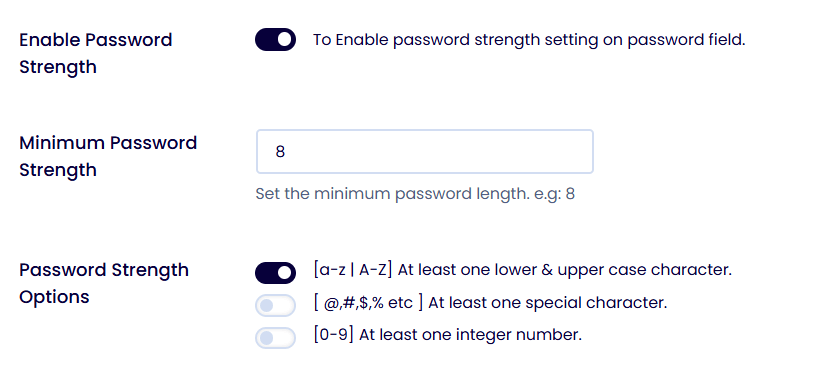
- Set the Minimum Password Length (we recommend 12 or more).
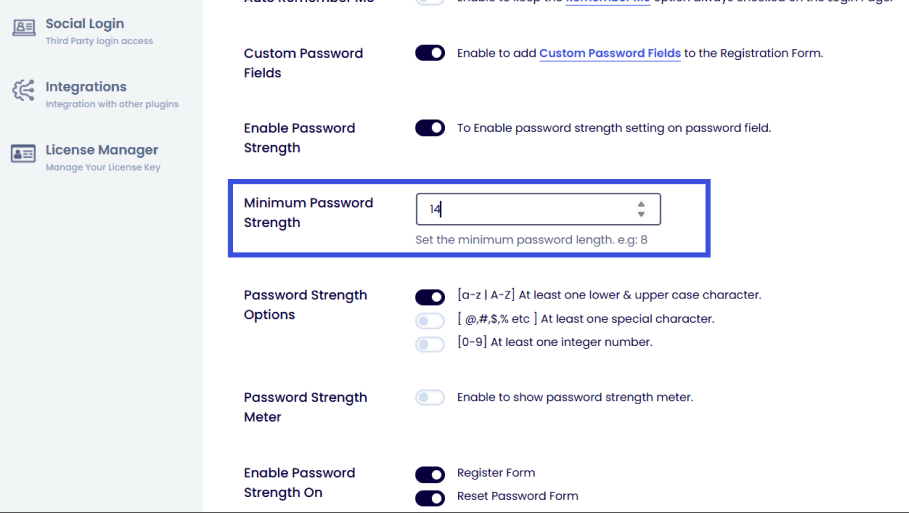
- Using the Password Strength Options, toggle on requirements for numbers, symbols, and uppercase letters.
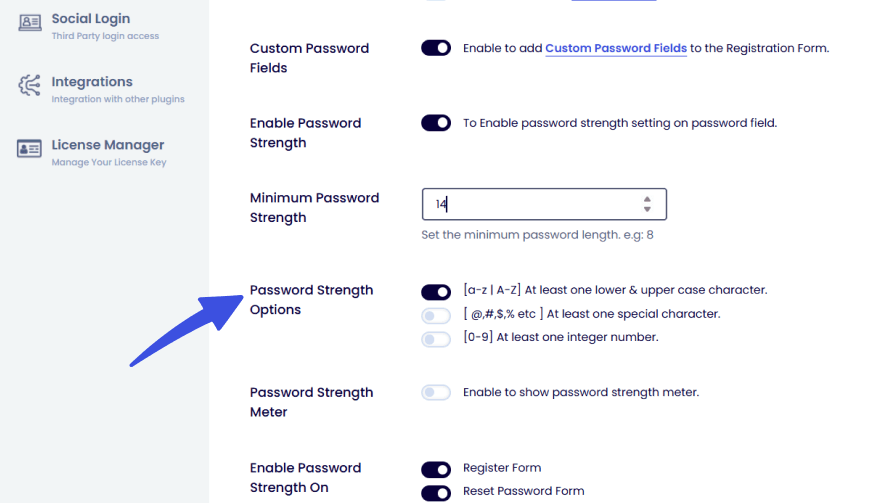
4. You can also add a Password Strength Meter to visually help users set a strong password while registering.
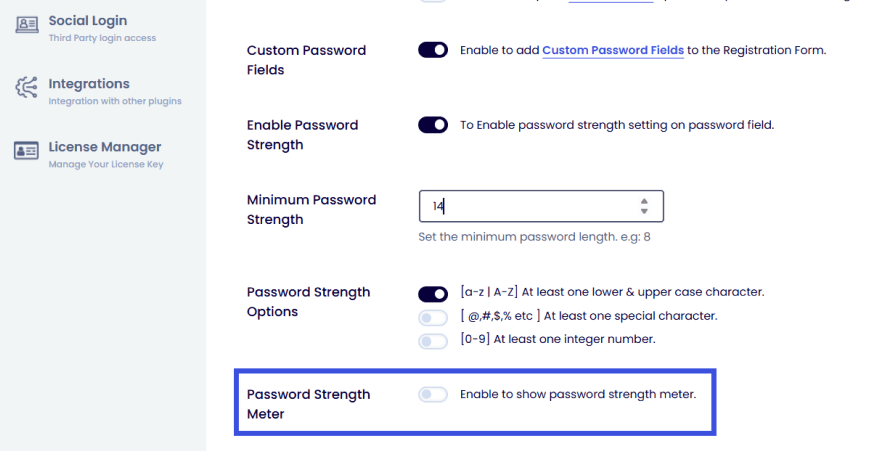
Save your changes. When existing users log in next time, they’ll be asked to update any weak passwords.
Learn more about best practices for password strength in our complete guide: WordPress Password Strength: The Essential Guide to Best Practices (2026)
Login and Brute-Force Protection
The Risk: 24/7 Bot Attacks
In early 2025, a massive brute-force campaign leveraged over 2.8 million IP addresses.
This looming threat is even more dangerous, given the capacity of automated bots to test thousands of passwords every second.
The Solution: Limit Login Attempts and CAPTCHA
With LoginPress’s Limit Login Attempts Add-On, you will be able to block bots by locking the login page after a few failed attempts for login security for membership sites.
Here is how limiting login attempts can help you to stop brute-force attacks for WordPress member login security:
- Limit Login Attempts: Go to LoginPress >> Limit Login Attempts. Set a threshold (e.g., 3 failed attempts) before an IP is temporarily banned.
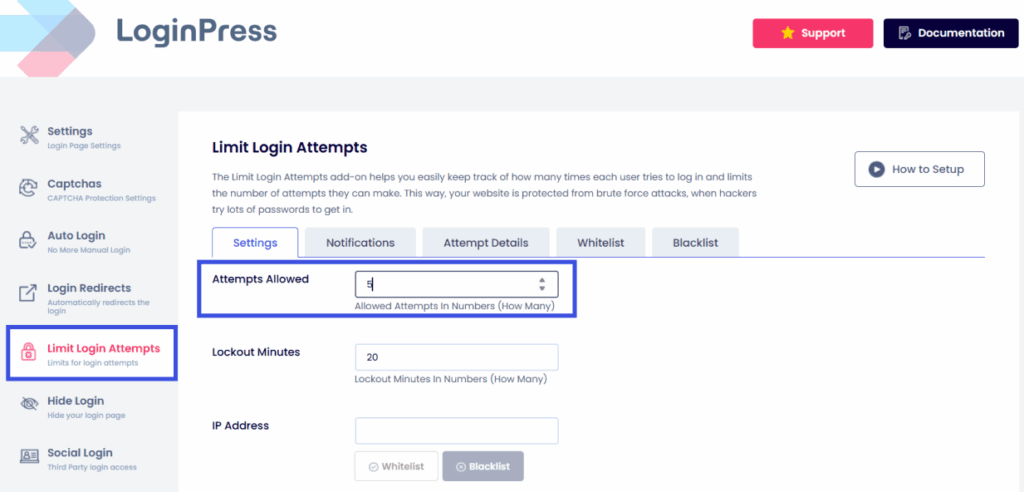
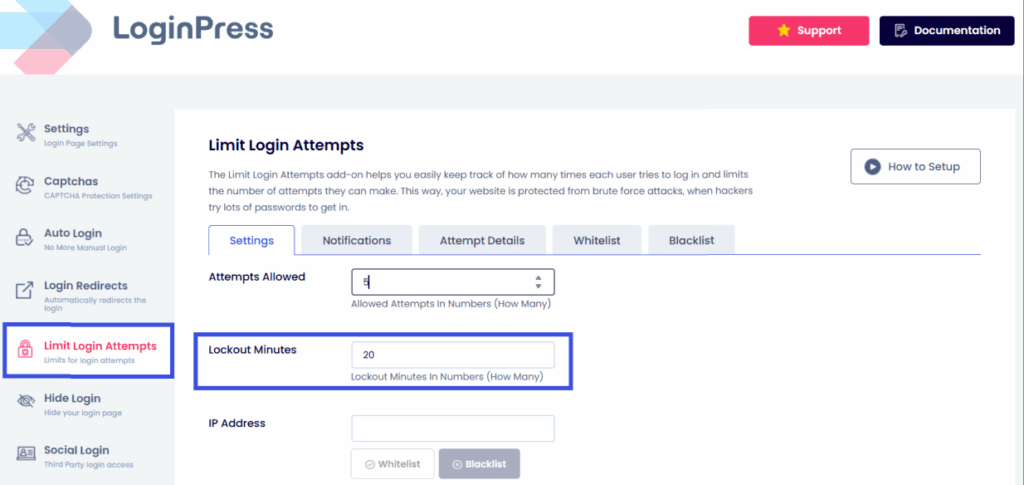
- Ensure a proper lockout system by adding Lockout Minutes when the allowed number of attempts has been exceeded.
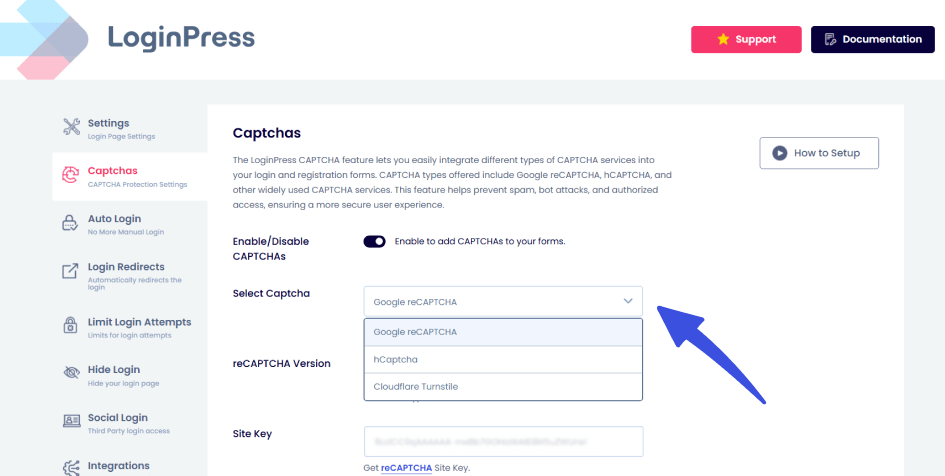
- Enable reCAPTCHA by navigating to LoginPress >> CAPTCHA. With LoginPress CAPTCHA, you can add an invisible reCAPTCHA, hCaptcha, or Cloudflare Turnstile. This blocks bots without bothering your real members. LoginPress allows you to customize or obscure default login URLs to reduce exposure for login security for membership sites.
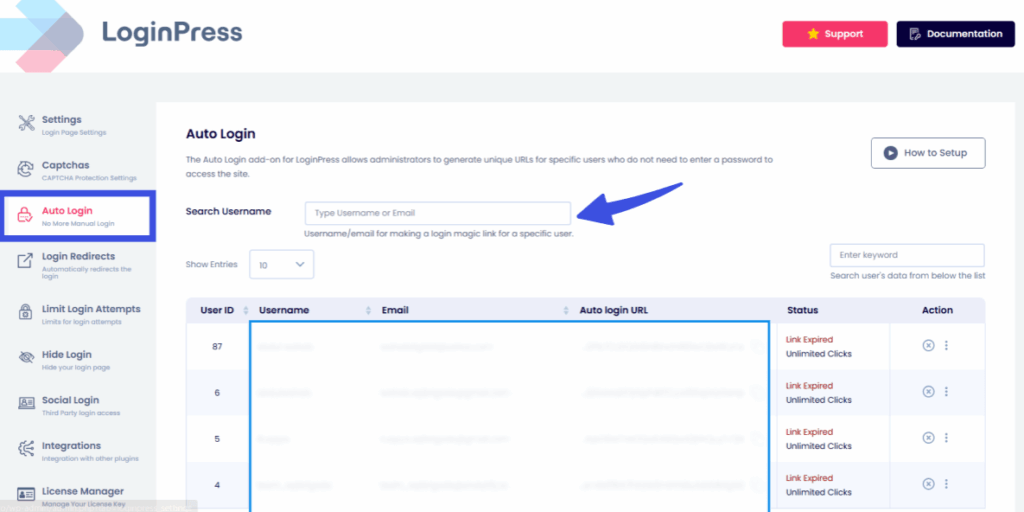
- Custom Login URL: Move your login page away from the default /wp-admin to prevent detection by generic scanners. To do this, go to LoginPress >> Auto Login.
Multi-Factor and Adaptive Authentication
The Risk: Stolen Login Info
Even if someone gets hold of a username and password, they still shouldn’t be able to log in.
In fact, compromised credentials are the #1 cause of data breaches for membership platforms.
Many membership sites enforce MFA for admins and instructors, while using adaptive MFA for members to reduce friction.
According to a recent security study, 81% of hacking-related corporate breaches stem from weak or reused passwords or other credential issues.
The Solution: LoginPress MFA Compatibility
Microsoft estimates that “Enabling MFA can deter 96% of bulk phishing attempts, which are attacks aimed at compromising accounts.”
While many security plugins are closed systems, LoginPress is built for compatibility.
It integrates seamlessly with leading WordPress MFA providers to ensure your customized login page remains both beautiful and secure.
Learn How to Set Up Multi-Factor Authentication for WordPress with our helpful guide.
Recommended methods:
- TOTP Apps: Support for Google Authenticator or Authy ensures that only the person holding the physical device can access the account.
- Email Codes: These work well for users who prefer not to use extra apps. LoginPress ensures these input fields match your site’s branding perfectly.
- Adaptive Prompts: The smart way to secure sites. The MFA prompt appears only when someone logs in from a new device or an unfamiliar location.
By using LoginPress with your preferred MFA plugin, you maintain a frictionless user experience and membership site login security.
Session Management and Secure Cookies
If a member logs in at a coffee shop and leaves their browser tab open, someone else could take over their session. The session can be stolen without membership site authentication.
Session hijacking can become a serious threat if it is not managed properly. Here are some ways LoginPress helps:
The Solution: Force Login and New User Verification Settings
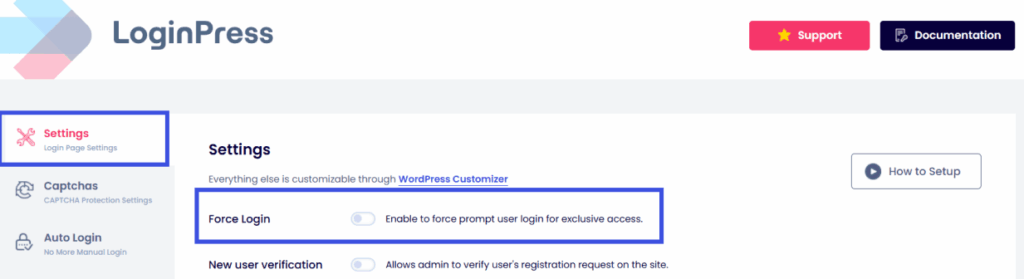
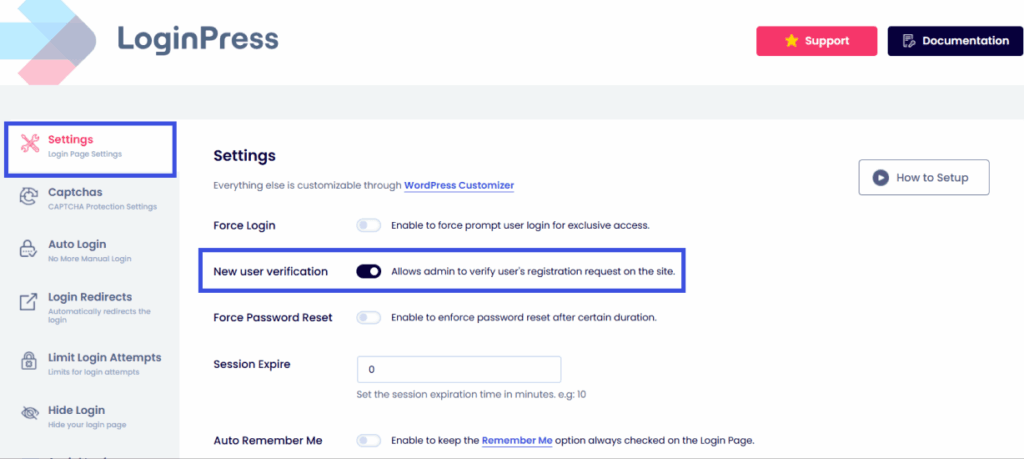
Keep your WordPress logins secure by setting limits on how long users can stay logged in. To enable these, navigate to LoginPress >> Settings.
- Force Login: LoginPress helps enforce controlled access through forced login flows and new user verification, reducing the risk of unauthorized session reuse. Set the settings to enable a forced user login prompt for exclusive access.
- New user verification: Allows the admin to manually verify the user’s registration request on the site for greater control.
Login Monitoring and Activity Logs
The Risk: The Silent Intruder
Sometimes hackers break in and quietly copy your premium course content without being noticed. This is why it is necessary to monitor login logs to prevent account takeover WordPress.
Multiple logins from different locations within a short time frame can indicate account sharing or credential compromise.
The Solution: Login Logs and Alerts
You can’t solve problems you don’t know about. That’s why monitoring is essential for a secure user login WordPress. You can prevent account takeover in WordPress:
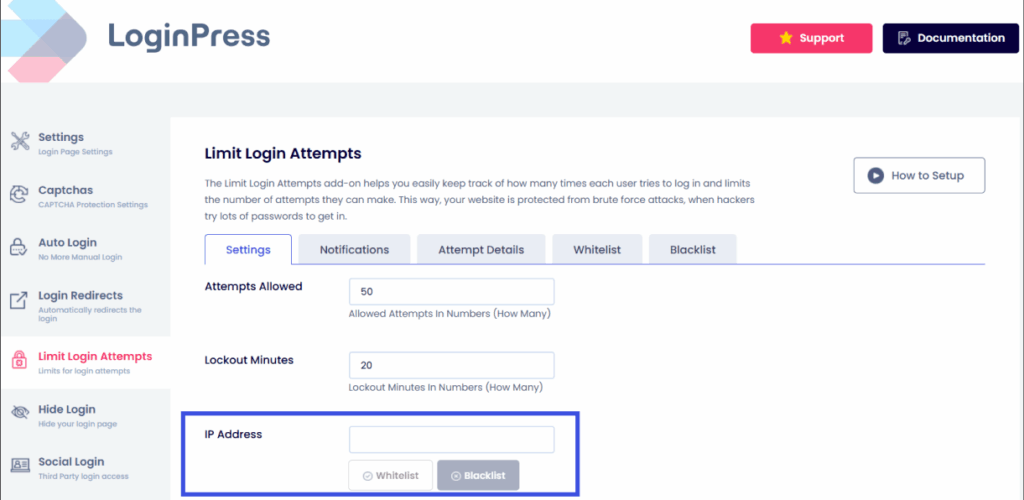
- IPs: If you see the same IP address trying to guess passwords hundreds of times, it’s not a forgetful member; it’s a bot. With LoginPress, you don’t need to be a developer to shut them down.
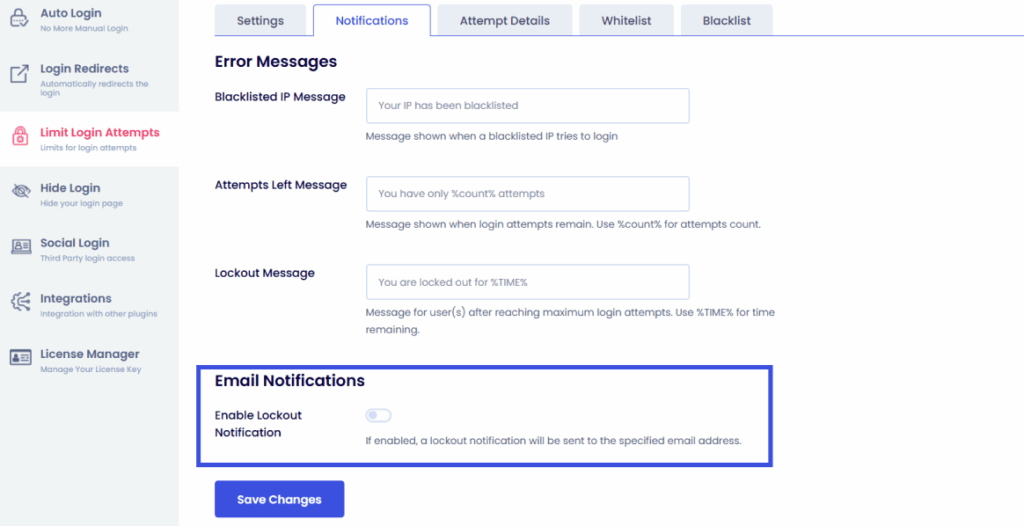
- Failed Login Notifications: Instead of manually checking logs, let the alerts come to you. Notifications also help you spot real members who are struggling to get in. You can proactively reach out to help them reset their password before they get frustrated and cancel their membership.
Passwordless and Frictionless Authentication
The Risk: User Friction
Strong security can sometimes be frustrating.
If logging in is too difficult, or if a member forgets their 16-character password for the fifth time, they might give up and leave.
In the membership world, friction equals churn.
The Solution: Magic Links & WebAuthn
Passwordless login is the future of login security for membership sites.
It removes the password variable entirely, which eliminates common attack vectors.
By combining LoginPress’s branded login experience with a passwordless authentication plugin, you give your members the most secure and modern experience possible in 2026.
Learn more about Passwordless Ecommerce: Is it the Future?
Integration Considerations for Membership Platforms
Spam accounts and fake profiles are common attack vectors in community platforms. If you run a community or an LMS, your security needs are specialized.
BuddyPress and BuddyBoss
Community sites are prime targets for spam and account takeover.
With LoginPress integrations, it is essential to secure the registration and login forms to keep your social space safe.
Don’t let people share accounts to access your expensive courses.
LoginPress helps reduce account misuse through login limits, monitoring, and authentication controls.
Learn more about securing membership account logins with LoginPress.
Compliance and Data Privacy
Establishing customer trust requires adherence to legal security requirements.
- GDPR and CCPA compliance mandate the protection of user data and prompt notification of unauthorized access.
- LoginPress supports compliance by securely storing and managing login data with transparency.
Educating Users and Best Practices
Technical solutions alone are insufficient; user awareness and education are essential as well.
- Phishing Awareness: Inform members that passwords should never be requested via email.
- Password Hygiene: Recommend adopting a password manager to enhance security.
- MFA Adoption: Incentivize users to enable multi-factor authentication by providing exclusive benefits.
FAQs About Login Security for Membership Sites
How do I secure my WordPress membership site?
The best way is a layered approach: enforce strong passwords, limit login attempts, enable MFA, and use a dedicated plugin like LoginPress to manage the login experience. Combining these layers ensures that even if one defense is breached, others remain standing.
What is the most secure login method for 2026?
Passwordless authentication (Passkeys) combined with Adaptive MFA is currently considered the most secure and user-friendly method. Passkeys are phishing-resistant and rely on biometric data (such as Face ID), while Adaptive MFA only triggers when a login appears suspicious, reducing friction for your members.
How can I prevent brute-force attacks on my membership site?
Use a tool to limit login attempts and implement a CAPTCHA. This stops automated bots from guessing thousands of passwords by locking out an IP address after a few failed tries. For 2026, we recommend “Invisible CAPTCHA” to maintain a smooth user experience.
Why is an activity log important for membership sites?
An activity log acts as your “security camera.” It allows you to spot suspicious patterns, such as a single user account logging in from five different countries in one hour. This is critical for preventing account sharing and identifying a breach before it escalates.
Can I secure my site without a developer?
Yes. Plugins like LoginPress are designed to give non-technical site owners enterprise-grade security. You can toggle on password policies, login limits, and custom login URLs directly from your WordPress dashboard without writing a single line of code.
Login Security for Membership Sites: Conclusion
Securing a membership site in 2026 requires more than just strong passwords.
A proactive, multi-layered strategy is essential to protect both site content and member trust.
To recap, your 2026 security stack should include:
- Strong Credentials: Enforce strong policies to prevent users from using “password123.”
- Bot Protection: Use an invisible CAPTCHA to prevent bots from entering.
- Advanced Authentication: Transition to multi-factor authentication and passkeys to effectively eliminate phishing threats.
- Continuous Monitoring: Regularly review login logs to detect unauthorized access early
Don’t wait for a “Your site has been compromised” email to act. A secure login page isn’t just a technical necessity; it’s a competitive advantage that keeps your community safe.
Learn more about strengthening login security for membership sites here:
- How to Secure and Optimize BuddyPress Login & Registration with LoginPress (2026)
- The Ultimate Guide to BuddyBoss Login Customization (2026)
- How to Personalize LearnDash Login Page Customization with LoginPress
The real question is: If your membership site were attacked tonight, would your current login security hold the line?