Magic Link Login: How It Works and When to Use It in WordPress

Have you ever wondered whether magic link login is a better option than using traditional passwords?
Traditional login methods depend on usernames and passwords.
But people often forget their passwords, use the same ones on different sites, or give up if logging in feels too complicated.
Social logins are another option, but they can have privacy issues or might not always be available.
These problems can lead to more failed logins, extra support requests, and less user engagement.
This is where link login offers a modern solution.
Instead of entering a password, users receive a secure, time‑limited login link by email. fThey just click the link to sign in.
By clicking the link, they gain access without the need to remember passwords or complete reset procedures.
Many SaaS platforms, membership sites, and content providers now use magic links to make logging in easier while still keeping things secure.
In this guide, I’ll explain what a magic link is, how it works, and how you can set up magic links on your site with LoginPress.
Passwordless Login Links (TOC):
What is Magic Link Login?
Magic link login is a passwordless authentication method that allows users to sign in by clicking a unique link sent to their email address.
Instead of entering a username and password, the user:
- Enter their email address.
- Receives a login email containing a secure link
- Clicks the link to authenticate instantly
This is why magic links are often called passwordless login links.
With standard WordPress logins:
- Users must remember passwords.
- Passwords must be stored (securely) and validated.
- Failed attempts trigger resets, lockouts, or support requests.
Magic link removes passwords entirely from the process.
Authentication is based on email ownership, not memorized credentials.
Magic Link Login Examples
You’ve likely used magic link without noticing:
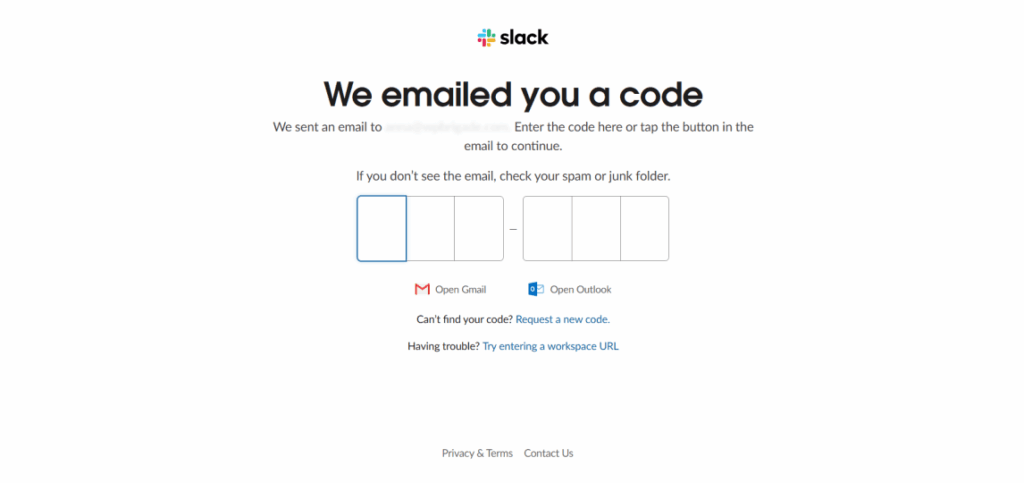
- Slack’s email sign-in option
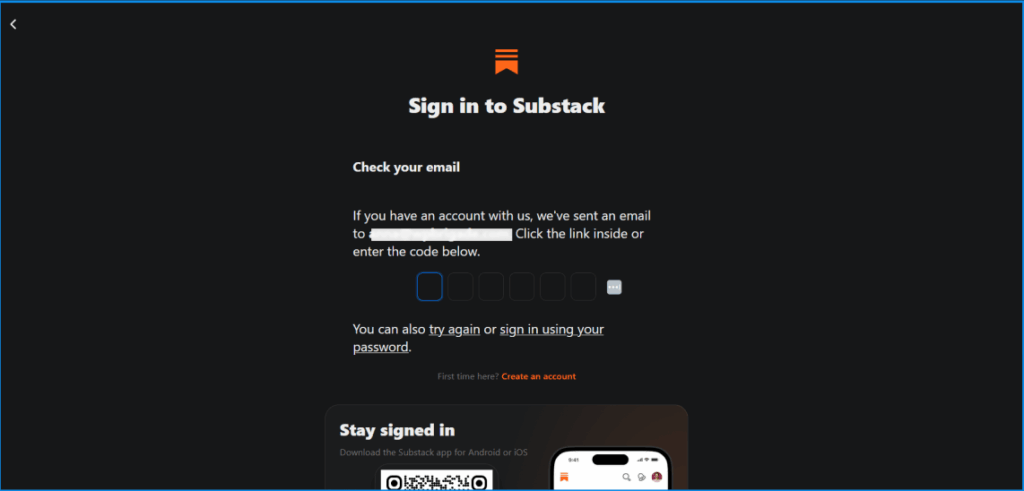
- Substacks Email login
- Community platforms and event portals
These are common examples of magic link logins where ease of access matters more than long-term credential storage.
How Magic Link Login Works (Step by Step)
Magic link follows a straightforward user flow as shown in the image below:
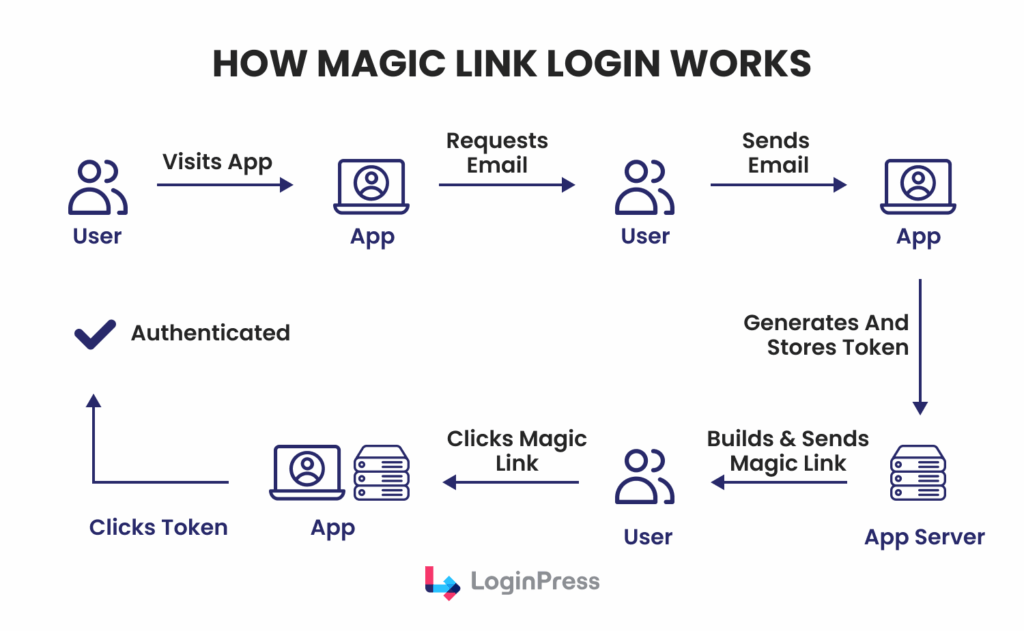
Here is the step-by-step workflow for how Magic Login works:
Step 1: Login request
The user provides an email address in the login form.
Step 2: Link Generation
The system generates a unique, cryptographically secure token for each user.
Step 3: Email Delivery
The token is embedded within a login URL and delivered to the user via email.
Step 4: Single-Click Authentication
Upon clicking the link, the system verifies the token and authenticates the user.
Step 5: Token Invalidation
The token expires or is marked as used, rendering it unusable.
This process is commonly known as email-based login authentication. A secure magic login system depends on the following elements:
- Random, unguessable tokens
- Token expiration timestamps
- One-time use validation
- HTTPS-only delivery
In WordPress, these tokens are usually stored in a hashed format, similar to passwords.
This means that even if someone accesses the database, they cannot use those tokens to log in
As a result, database access does not expose usable login links.
Security Considerations
Magic links provide strong security when implemented according to best practices:
- Tokens should expire quickly (minutes, not hours)
- Each link should work only once
- Login URLs must be delivered over HTTPS
- Failed or reused tokens should be rejected
LoginPress implements these principles by generating secure login links that focus on controlled expiration, rather than relying on credentials.
- Magic login links are generated per request
- Tokens are time-bound and single-use
- Authentication happens within WordPress’s native user system
- Admins can control redirects and behavior
The result is a passwordless authentication flow that connects seamlessly with WordPress, without replacing the core user management system.
When and Why to Use Magic Link Login
Magic login is not suitable for every website; however, in appropriate contexts, it can be highly effective.
Here are some best use cases for when and why to use:
- Community Forums and Groups
Members of these platforms typically log in infrequently and may forget their passwords.
Magic login links minimize friction and promote greater participation.
- Membership Sites
This approach is effective for content-driven membership sites, where users expect quick access rather than complex security procedures.
- Events and Single-Session Access
Virtual events, online courses, and temporary access portals benefit from passwordless authentication methods.
- Contributor or Author Portals
Writers and editors typically do not require long-term credentials but do require secure access during their periods of contribution.
In these scenarios, magic login links enhance user engagement while maintaining access controls.
Here is why magic login links are beneficial over passwords:
- Elimination of Password Fatigue
- No Requirement for Password Reset Processes
- Reduced Login Abandonment Rates
- Fewer support tickets
Magic login methods also present certain trade-offs:
- Email Dependency: Users must have access to their email inbox to authenticate.
- Delivery Delays: Inadequate email configurations may prevent timely access.
- Forwarded Emails: Authentication links may be unintentionally shared, potentially compromising security.
- Time sensitivity: expired links frustrate users
LoginPress minimizes many of these challenges by offering custom expiration times, redirect options, and support for alternative authentication methods.
Practical Approaches for WordPress Implementation
Many websites provide magic link login in the following ways:
- As a primary authentication option for members
- As a secondary option in conjunction with traditional passwords
- As part of a hybrid authentication system that includes social login options
This flexibility is more effective than mandating a single email login authentication method.
Magic Link Login vs Passwords, Social Logins, and 2FA
Before deciding whether Magic Link is right for your WordPress site.
It helps to compare it with other common authentication methods.
Let’s start with the most familiar option:
WordPress Magic Link Login vs Traditional Passwords
Passwords
- Passwords are widely recognized but are often reused across multiple sites.
- They are exposed to phishing attacks and data breaches.
- Password management typically requires reset procedures, increasing user friction.
Magic link
- Magic link authentication does not require password storage.
- Credential reuse is eliminated, reducing associated security risks.
- Support overhead is reduced due to fewer password-related issues.
Magic login links are generally more usable, especially on non-daily login sites.
Magic Login vs Social Login Links
Here is the simple comparison between magic login vs social login links for clarity:
Social login links
- Social login links provide a fast and familiar authentication experience.
- These methods depend on third-party platforms for authentication.
- They may raise concerns regarding user privacy and service availability.
Magic login links
- Magic link authentication is managed directly by the service provider.
- There is no reliance on external platforms such as Google or Facebook.
- This method is accessible wherever email services are available.
LoginPress supports social login links, allowing you to offer both and letting users choose their preferred method.
Magic Login vs 2FA
The difference between Magic Login and 2FA is given below:
2FA
- Two-factor authentication provides an additional layer of security.
- However, it introduces additional steps to the login process.
- This approach still relies on traditional passwords as a primary factor.
Magic Link Login
- Magic link authentication streamlines the login process by reducing the number of required steps.
- It is inherently passwordless, enhancing user convenience.
- The security of this method depends on the user’s email account security.
For high-risk administrative accounts, two-factor authentication may be preferable.
For general members and contributors, magic links often offer a better balance between security and usability.
Hybrid Authentication Setups
Many WordPress sites combine:
- Magic login links for convenience
- Social logins for speed
- Passwords + 2FA for admins
LoginPress is designed to accommodate hybrid authentication models. It allows flexibility without mandating a single approach.
How to Set Up Magic Link Login in WordPress with LoginPress
This section covers the practical implementation of passwordless login with LoginPress.
Here are some prerequisites you need to follow before enabling it:
- A working WordPress installation
- Proper email delivery (SMTP recommended)
- Verified sender email/domain
Reliable email delivery is necessary to ensure the effectiveness of passwordless login.
Step 1: Enable Auto Login Add-On
Using LoginPress’s Auto Login Add-On, enable magic login links for WordPress.
To enable it, navigate to LoginPress >> Settings. Locate the Auto Login Add-On in the sidebar.
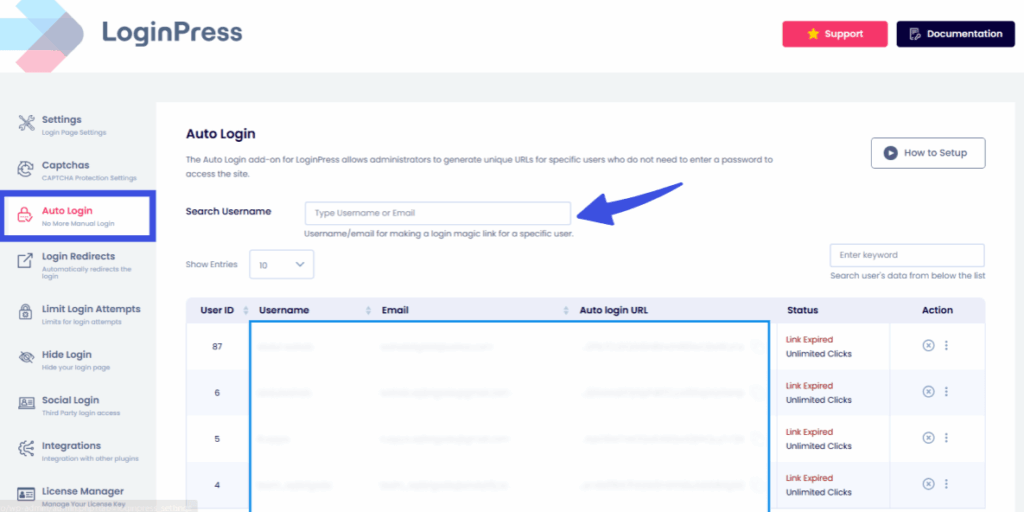
Choose which users to allow, with complete user details displayed in the dashboard for centralized control.
This feature connects directly with the standard WordPress authentication process.
Step 2: Customize Magic Link Behavior
LoginPress Auto Login also allows setting for:
- Link expiration time (minutes recommended) for more secure passwordless logins.
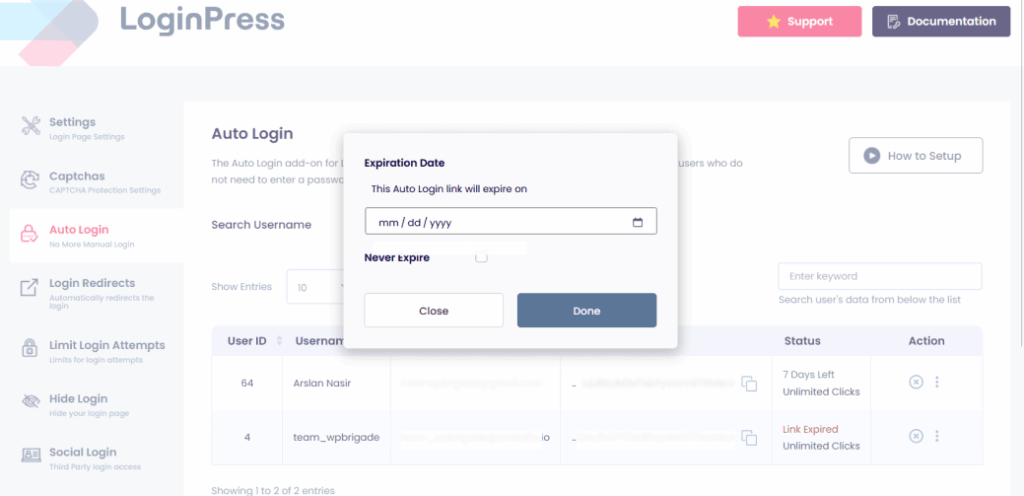
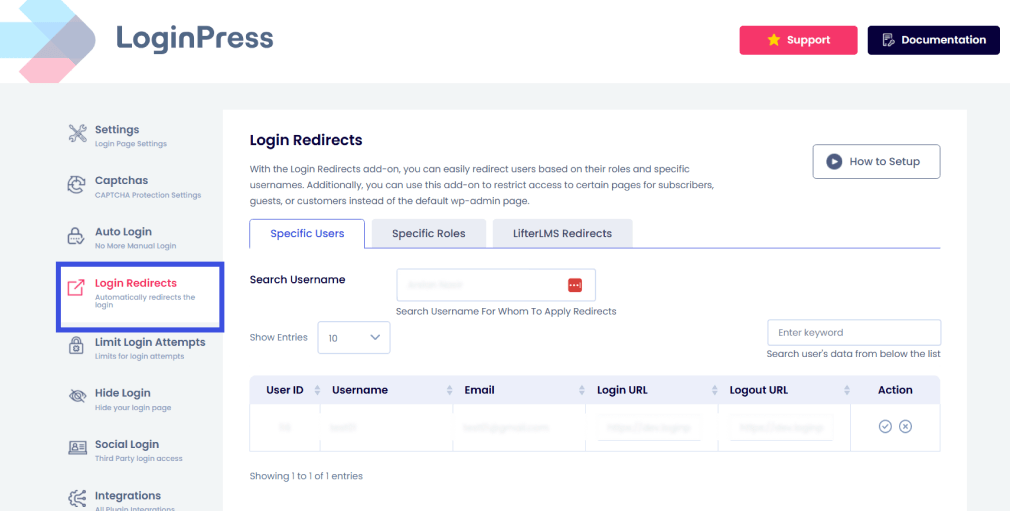
- Redirect URLs after login using the Login Redirects Add-On. This enhances the user experience and increases its relevance.
- To enable login redirects, go to LoginPress >> Settings. Then navigate to the Login Redirects option in the side menu.
- Add clear and concise error messages. To customize them, go to LoginPress >> Customizer. Select the Error Messages option to edit them according to brand tone and aesthetics:
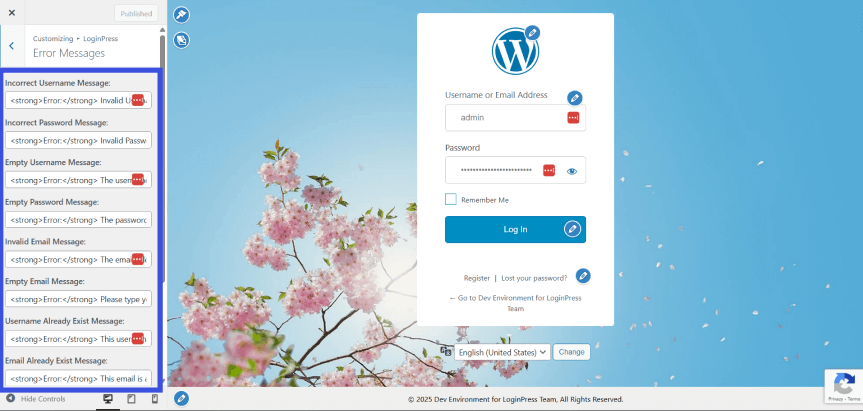
Clear messaging ensures users recognize the time-sensitive, secure nature of magic login links.
Step 3: Test the Login Workflow
Always test before launch:
- Request a magic link
- Confirm email delivery
- Click the link within the expiration window
- Attempt reuse (should fail)
- Test expired links
These steps verify that the login workflow remains secure and functions as intended.
Step 4 (Optional): Combine with Social Login
Many sites enable:
- Magic link
- Social login links (Google, Facebook, etc.)
- Traditional login as a fallback
With LoginPress Social Login Add-On, you can easily add layers of authentication security for a more controlled environment and seamless UX.
Magic Link: Best Practices and Security Tips
To keep the magic link secure and reliable:
- Always use HTTPS
- Enforce short expiration times.
- Ensure single-use tokens
- Use secure email delivery (SMTP, DKIM, SPF)
- Monitor login activity regularly.
Users’ communication is necessary:
- Links expire quickly
- Links should not be forwarded.
- They can request a new link at any time.
Clear communication reduces confusion and support load.
Admin-Level Controls
For WordPress admins:
- Restrict magic links for high-privilege roles if needed.
- Combine with 2FA for administrators.
- Log failed or invalid token attempts.
LoginPress makes it easier to manage these decisions without custom development.
FAQs on Secure Magic Link
What is a magic login link?
Magic login is a passwordless authentication method in which users sign in by clicking a secure link sent to their email address.
Is a magic link secure?
Magic links are secure when implemented with short-lived, single-use tokens and delivered over HTTPS. Security relies on proper token expiration and safeguarding email accounts.
How to implement magic login in WordPress?
You can implement WordPress magic links with LoginPress by enabling passwordless login links, configuring expiration, and verifying email delivery.
Can Magic Link replace passwords completely?
For certain websites, magic login can fully replace traditional passwords. Other sites may use it alongside passwords or social logins, depending on risk assessment and user requirements.
Final Thoughts: Magic Login Links
Magic link offers a practical way to reduce login friction without sacrificing security.
Eliminating passwords allows WordPress site owners to reduce support requests, enhance user experience, and increase engagement.
When implemented correctly, magic login links provide:
- Secure, time-limited access
- Fewer failed logins
- Better conversion and retention
LoginPress enables WordPress administrators to implement magic login responsibly, providing control over token expiration, redirect settings, and hybrid authentication configurations.
Rather than replacing every login method, magic link works best as part of a thoughtful authentication strategy that balances usability and security.
If you manage a WordPress community, membership site, or contributor-driven platform, it’s worth experimenting with LoginPress magic link login features to see how passwordless access fits your users’ needs.
For more information on passwordless authentication methods, check:
Which passwordless authentication method will you choose, and why? Let us know in the comments below!