Single Sign-On vs Social Login in WordPress: What Should You Use?

Editorial Team
Choosing the wrong authentication method for your WordPress site can silently affect conversion rates.
While complex logins drive users away, weak security puts your data at risk. This can leave many administrators caught between protecting their site and solving password fatigue.
Two popular solutions often surface: Single Sign-On vs Social Login.
Although they share the goal of simplifying access, they serve very different business needs.
This guide compares how each method works and provides actionable tips to help you choose the best fit for your user experience and security goals.
Social Login vs SSO (TOC):
What is Social Login?
Social login is a form of federated identity management.
With social login, users can sign in to a WordPress site using their accounts on trusted platforms such as Google, Facebook, or X (Twitter).
Social login does not give the site access to the user’s password. It uses the OAuth 2.0 and OpenID Connect (OIDC) protocols.
WordPress Use Cases: Single Sign-on vs Social Login
For most WordPress site owners, WordPress social login is about one thing: Reducing Friction.
- For eCommerce sites using WooCommerce, social login lets customers sign in with one click, allowing them to check out right away.
- On membership sites, removing the need to create a new password can boost registration rates by 20 to 40 percent.
- Typing long passwords on mobile devices is tough, but a one-tap Google login makes it much easier.
Many WordPress social login plugins automatically create WordPress accounts, but some skip important WordPress steps.
This can cause issues with custom roles or email notifications.
This is why using the best WordPress social login customizer tool, like LoginPress Social Login, helps keep everything working as it should.
Real World Use Case: WordPress Social Login
- The user starts the login process by clicking the “Login with Google” option.
- Google then verifies the user on its own servers.
- After that, Google sends an authentication token to the WordPress site.
- WordPress verifies the token, creates (or matches) a user account, and starts a logged-in session.
What is Single Sign-On (SSO)?
While WordPress social login focuses on making things easier for users, Single Sign-On (SSO) helps organizations manage access more effectively.
With SSO, users sign in once with a central Identity Provider (IdP) and can then use many different applications, including your WordPress site.
How SSO vs WordPress Social Login Works
In a WordPress SSO authentication setup, WordPress serves as the Service Provider (SP).
When someone tries to access the dashboard, WordPress sends them to an external server such as Okta, Azure AD, or OneLogin.
After logging in, they return to WordPress with an authenticated session.
Types of SSO
- SAML SSO: It uses XML-based data exchange to share security tokens.
- OAuth/OIDC SSO: A modern approach to link multiple WordPress Use Cases seamlessly.
- Corporate Intranets: When employees log into their computers, they are also automatically signed in to the company’s WordPress portal.
- University Portals: Students can use a single ID to access library resources, check grades, and visit the campus blog built on WordPress.
- Multi-Site Networks: Centralized login means users do not need to sign in again when moving between site1.example.com and site2.example.com.
Social Login vs SSO: Core Differences
Although both methods enable users to bypass manual password entry, their underlying purposes and mechanisms differ significantly.
Check out this summary table for a quick TL;DR:
| Aspect | Social Login | SSO |
| Primary Audience | Public Visitors / Customers | Employees / Internal Members |
| Identity Source | Public (Google, FB, LinkedIn) | Private (Azure AD, Okta, LDAP) |
| Primary Goal | Conversion & UX | Security & Centralized Control |
| Protocol | OAuth 2.0 / OIDC | SAML / OAuth / OIDC |
| Management | User manages their own account | Admin manages access centrally |
It’s worth noting that social login is technically a form of SSO.
When you use Google to log into Pinterest, Spotify, and a WordPress blog, Google is acting as the SSO provider.
Within the WordPress ecosystem, a distinction is typically made as follows:
- Social login is generally associated with business-to-consumer (B2C) scenarios.
- Single sign-on (SSO) is primarily used in business-to-business (B2B) or internal business-to-employee (B2E) contexts.
When you compare social login and SSO, convenience is just one part of the picture.
The other important factor is risk mitigation.
Both methods aim to eliminate passwords, but they manage your WordPress data in very different ways with respect to security and compliance.
Pros & Cons at a Glance
| Security Feature | Social Login | Enterprise SSO |
| Phishing Protection | High (Provider Dependent) | Very High (Policy Dependent) |
| Password Storage | None (on your server) | None (on your server) |
| Admin Control | Low | Absolute |
| Compliance Proof | Moderate | High (Audit Logs included) |
OAuth Login & Passwordless: The Future of WordPress Authentication
The traditional username-and-password combo is dying.
Between phishing attacks and the sheer annoyance of “Forgot Password” loops, users are looking for a way out. That’s where OAuth login, WordPress, and passwordless tech come in.
OAuth 2.0 & OpenID Connect
Modern authentication revolves around OAuth 2.0.
When implementing this protocol on a WordPress site, the server does not store user passwords. Instead, the system utilizes JSON Web Tokens (JWTs).
In this workflow, an identity provider, such as Google or a dedicated SSO server, authenticates the user and issues a signed token.
Your WordPress site then validates this signature to establish a secure user session.
This approach enhances both security and scalability. Because the server is not required to repeatedly verify encrypted password strings against a local database, it operates more efficiently under high traffic loads.
Trends of Passwordless WordPress Login
If you want to achieve true login experience optimization, you need to consider passwordless trends. We are seeing a massive shift toward:
- Magic Links: An email is sent with a unique, time-sensitive URL. One click, and the user is in.
- OTP (One-Time Passwords): A 6-digit code sent via SMS or email.
- Biometric SSO: Using TouchID or FaceID via the browser (WebAuthn) to log into a WordPress dashboard.
These methods don’t just feel seamless; they drastically reduce churn.
When the barrier to entry is a thumbprint or an email click, users are much more likely to complete the registration process.
Hybrid Patterns: The Best of Both Worlds
You don’t have to choose just one passwordless authentication method in the competition of social login vs SSO.
Many high-conversion sites use a hybrid pattern.
They offer social login for the “one-click” crowd, but keep a passwordless WordPress login (like Magic Links) as a fallback for users who don’t want to link their social media accounts.
This covers all bases and ensures no user is left behind because they forgot their credentials.
Passwordless Login with LoginPress
For most site owners, building this from scratch is a developer’s nightmare.
LoginPress Login Customization simplifies this by offering:
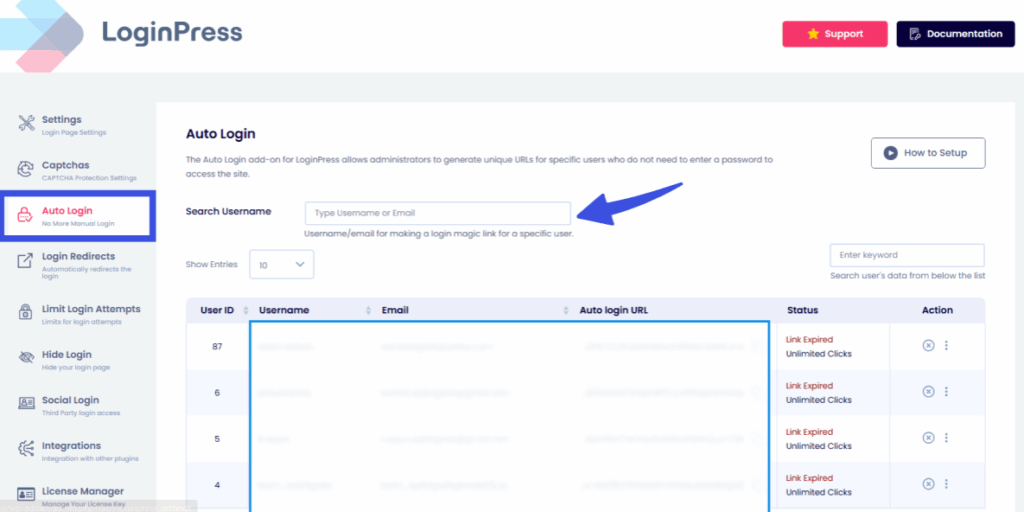
- Auto Login Links: Give your users a seamless entry point without the friction.
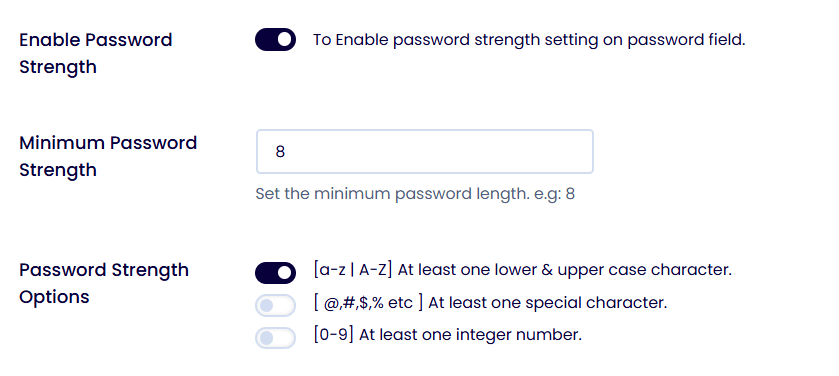
- Password Strength Features: Since no passwords are stored, password-based attack vectors are eliminated.
- Membership portal security: If you run a content portal or membership site, this is the ultimate upgrade for seamless redirects you need.

By combining these tools, you turn a boring login page into a high-performance gateway that actually helps your business grow.
Choosing Between Social Login vs SSO in WordPress
Choosing between social login vs SSO comes down to finding what best fits your business model.
Pick the wrong option, and you could frustrate your users or run into security problems. Here’s how to choose the right one.
Before adding a plugin, consider these points:
- Audience Type: Are your users customers and members, or are they internal staff? Public users want quick access, while staff need strong security.
- Compliance Needs: Do you manage sensitive data that needs a central audit trail (SSO), or just basic profile info (Social Login)?
- Developer Resources: SSO for WordPress often needs custom mapping to connect your company groups to WordPress roles. Social login is usually ready to use out of the box.
- UX Priorities: Are you focused on boosting signups and sales (Social), or do you need users to access several company tools with one login (SSO)?
Social Login vs SSO: Scenario-Based Recommendations
Let’s decide which you should choose: social login vs SSO. It all depends upon your business criteria. Here are some recommendations:
1. Small Biz Blog or eCommerce Store
- Best Method: WordPress social login.
- Why: Reducing checkout drop-offs is key. Letting users log in with Google or Facebook makes buying faster and easier.
2. LMS or Membership Site
- Best Method: Hybrid Approach.
- Why: Social login helps students and members stay engaged. For staff, instructors, and moderators, use SSO tools such as Okta or Azure AD to secure access.
3. Enterprise Networks & Agencies
- Best Method: SAML-based SSO.
- Why: You need role mapping. If someone is promoted to Manager in your company directory, their WordPress permissions should update on their own. Only SSO can handle this for large teams.
4. WordPress Multisite Networks
- Best Method: Centralized SSO.
- Why: Users should log in once on the main site and stay logged in as they move between subdomains. This makes the site feel like one smooth portal.
Single Sign-On vs Social Login: Pros & Cons Checklist
| Feature | Social Login | WordPress SSO |
| Setup Time | < 15 Minutes | 1-2 Hours (Minimum) |
| User Friction | Zero (One-click) | Low (Redirects to IDP) |
| Role Control | Basic (Subscriber only) | Advanced (Groups to Roles) |
| Maintenance | Set and forget | Requires periodic token/cert updates |
| Cost | Usually Free/Low-cost | Often requires Premium/Enterprise plans |
WordPress Plugin Ecosystem Guidance
When choosing a plugin, don’t just check the star rating. Make sure it supports the right hooks.
WordPress uses a hook called wp_login for logins. Good social login or SSO plugins should trigger this hook correctly.
If you use custom code or security plugins that track logins, a poorly made authentication plugin might skip them, leaving gaps in your security logs.
Pro Tip: Always read the Changelog. If a plugin hasn’t been updated in more than six months, avoid it. Login protocols change fast, so you need a developer who keeps up.
LoginPress vs. Enterprise SSO: What to Use and When
Think of these options as different tools you can use:
- Use LoginPress Social Login if your main goal is a smooth user experience and more signups from the public.
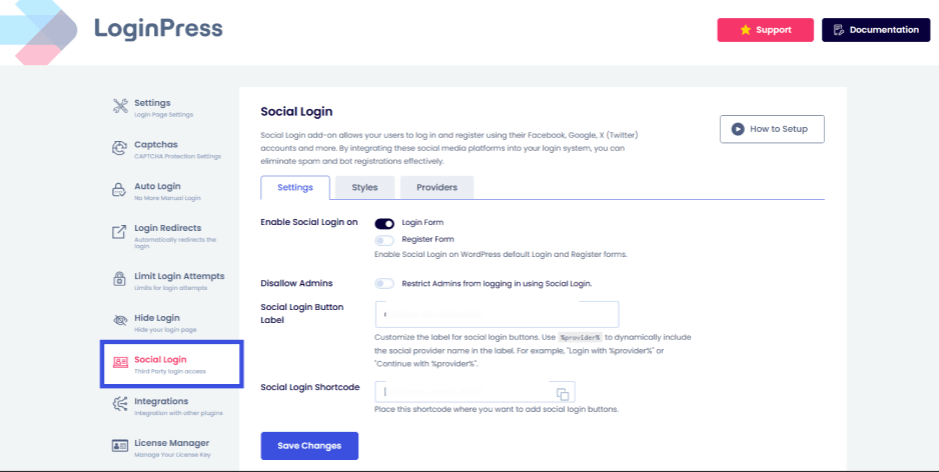
It’s lightweight, looks good, and integrates with all the login customizations you use to brand your page.
- Use LoginPress Auto Login to remove password-related risks on your membership site without requiring social media logins.
- Use single sign-on vs social login when you have a 3rd-party Identity Provider (such as Okta or Microsoft Entra ID) that must be the single source of truth for your users.
Note: LoginPress does not replace enterprise identity providers; it integrates where WordPress UX is the priority.
Security Best Practices for WordPress Login
Switching to single sign-on or social login makes things much easier for users, but it also creates a single point of failure.

If a hacker gets access to a user’s Google account or SSO token, they can get into your whole WordPress site. Here are some ways to protect yourself.
1. Hardening Single Sign-on vs Social Login
Don’t rely on the provider to do everything. You also need to secure the connection between your site and the identity provider.
- HTTPS Everywhere: Without an SSL/TLS certificate, authentication tokens travel in plain text, making them easy pickings for “Man-in-the-Middle” attacks.
- Check your redirect and callback URLs: In your Google or Facebook Developer Console, only allow your exact login URL. This stops hackers from tricking your site into sending tokens to a fake domain.
- Keep your API keys safe: Treat your Client ID and Client Secret like a bank password. Don’t put them in your theme files.
2. Plugin Risk Mitigation
93.25% of all WordPress vulnerabilities exist in plugins. WordPress social login, check its “Last Updated” date.
If it hasn’t been updated in 6 months, it likely contains unpatched OAuth vulnerabilities.
- Keep an eye on security news. Follow sources like Wordfence, Patchstack, or the r/WordPress subreddit. These groups often warn about new plugin vulnerabilities before a fix is available.
- Be careful with auto-updates. They are usually helpful, but for important things like WordPress SSO, test updates on a staging site first. This way, you can ensure a new version won’t lock your team out.
3. Defense in Depth Layer
Think of these as your safety net. These steps are your backup.
If someone gets past your main login, these controls can still stop them.
Even with single sign-on vs social login, adding a second layer (such as an Authenticator App or a hardware key) reduces the risk of credential theft.
- Use a tool like LoginPress to limit login attempts. This stops bots from guessing usernames or using login hints.
- Set session expiry rules. Log out users who are idle. Session hijacking, or stealing active login cookies, is a significant threat. Requiring users to log in again after 2 hours of inactivity helps protect your site.
- Use IP restrictions. If your team uses SSO, limit access to the /wp-admin area to your office IP or a specific VPN. This keeps your dashboard hidden from everyone else.
FAQs About Social Login vs SSO
Is Social Login the same as SSO?
Technically, Social Login is a type of Single Sign-On. Both let you access multiple services with a single set of credentials. However, in a WordPress context, Social Login usually refers to consumer-facing options (such as Google and Facebook) used to boost registrations. SSO typically refers to enterprise-grade tools (such as Okta and Azure AD) used by companies to manage employee access to internal apps.
Is it safer to use Social Login or a standard WordPress password?
For the vast majority of users, Social Login is significantly safer. Standard WordPress logins are vulnerable to brute-force attacks and credential stuffing (where hackers use passwords leaked from other sites). Social Login providers like Apple and Google use advanced threat detection and multi-factor authentication (MFA) that most individual WordPress sites simply cannot match.
Can I use both SSO and Social Login on the same WordPress site?
Yes, and for many high-traffic sites, this is the basic setup. You can offer Social Login for your customers or community members to keep the barrier to entry low, while enforcing a strict Enterprise SSO login for your Editors and Administrators to ensure your backend remains secure.
Single Sign-On vs Social Login: Conclusion
When it comes to single sign-on vs social login, there is no universal winner, only the right tool for your specific goals.
- Choose Social Login if you are running an eCommerce store, a public blog, or a community forum. It is the king of login experience optimization, helping you turn anonymous visitors into registered users with a single click.
- Choose Single Sign-On (SSO) if you are managing a corporate intranet, a university portal, or a high-security agency site. It provides centralized control and audit logs required for modern enterprise compliance.
- Go Passwordless to bridge the gap, providing a modern experience that eliminates password fatigue without requiring a social media account.
The most important takeaway from this is to stop relying solely on the default WordPress login form.
By implementing one of these modern methods, you protect your data, reduce your support tickets, and, most importantly, make life easier for your users.
Check out some detailed guides on login optimization:
- Optimize WordPress Login Redirects for SMBs and Agencies (Detailed Guide)
- How To Customize WordPress Login Page For Clients (Detailed Guide)
Ready to upgrade your WordPress security and UX?
Don’t let a clunky login page kill your conversion rates. Try LoginPress and see how easy it is to set up Social or Passwordless Login.