How to Set up Custom WordPress Login Credentials

To set up custom WordPress login credentials, go to Users > Add New User, enter a unique username and email, set a strong password, assign a role, and then delete or demote the default “admin” account.
This guide explains what login credentials are, why custom ones improve security, and the exact steps to create them.
WordPress Login Credentials (TOC)
What are WordPress Login Credentials?
WordPress login credentials are the username (or email) and password users enter on the login page to reach the dashboard.
- Email address and Username
- Password
See the image below:
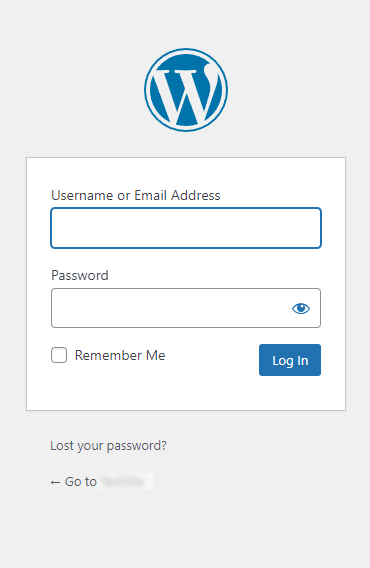
The problem with the default WordPress login credentials is that the Username is usually set to admin. These credentials are set up during the installation of WordPress or can be created later by an administrator.
What are Custom WordPress Login Credentials?
Custom WordPress login credentials replace the default username created during installation with a unique one that is harder to guess.
Keeping these login credentials safe and secure is essential to prevent unauthorized access to the website. Here are some tips for creating custom login credentials for WordPress:
- Choose a Unique Username: Avoid using usernames like “admin” or your website’s name. Instead, pick something that is not easily guessable.
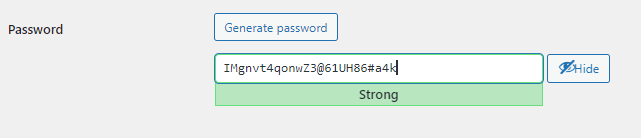
- Use a Strong Password: The password should be a strong combination of letters, numbers, and special characters to prevent unauthorized access. So, ensure a long, complex, and unique password.
Note: If you need help, we suggest the Strong Password Generator online password generator tool. It generates a strong password for you.
- Regularly Update Your Password: Change your password periodically to reduce the risk of unauthorized access.
Here is an example of a custom WordPress password:
Why Do You Need to Create Custom WordPress Login Credentials?
Custom login credentials add a layer of security because attackers cannot guess a unique username, which makes it harder to reach your admin area.
Here are some reasons why you might want to create do it:
- WordPress Default Login Credentials: The WordPress default login credentials are weak. So, it’s better to set a strong password for your login form.
- Enhanced Security: Custom login credentials for each user based on their roles ensure that only authorized individuals can access specific parts of your website. For instance, You can give editors access to create and edit content but restrict access to site settings and plugins.
- Improved Organization: Suppose multiple users work on your WordPress site; creating custom login credentials can help you track who logged in.
- Streamlined Workflow: Custom login credentials help reduce the risk of errors or conflicts arising from multiple users working on your site.
How Can You Change the WordPress Default Login Credentials
You create custom login credentials for each user by giving them their own account and a role. Roles control permissions such as:
- Subscriber: Subscribers are the ones who can only manage their profile.
- Contributor: They can write and manage their posts but cannot publish them.
- Author: They are the ones who can publish and manage their individual posts.
- Editor: Editors can publish and manage posts, i.e., posts of other users.
- Administrator: The one with access to all the administration features within a single site.
If you don’t want a user to have all the permissions of the administrator role, you can choose from Editor, Author, Contributor, or Subscriber. It helps better manage and secure your WordPress site. Like,
Simply follow these steps:
Step 1: Go to the Admin Dashboard of Your Website
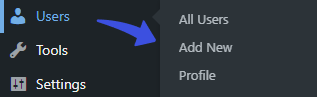
First, go to the left sidebar of the WordPress admin dashboard, navigate to Users, and click the Add New option.
Step 2: Add New User
On the Add New User screen, you’ll need to fill in the information, including your Username and Email.
Next, check the Send User Notification option and select the Role of the user (depending on the access level), i.e., Subscriber, Contributor, Administration, etc.
When done, click the Add New User button.
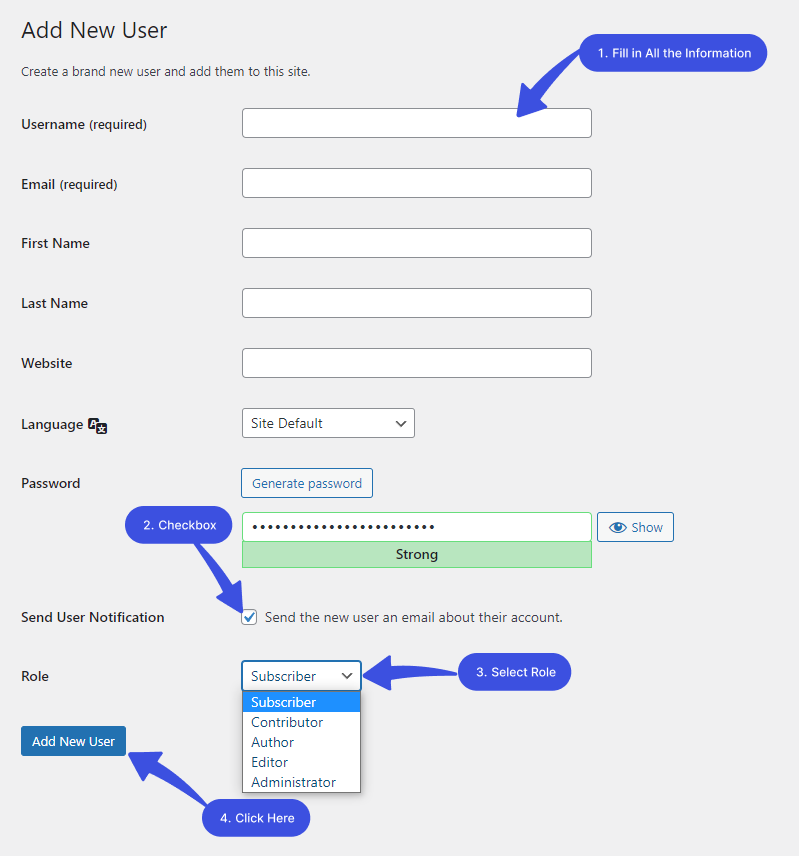
All done! Now, the new user will start receiving an email for setting up a new password and finalizing the registration process.
WordPress Login Credentials FAQs
What are custom WordPress login credentials?
Custom WordPress login credentials are a set of unique usernames and passwords you create for your WordPress website to replace the default login credentials. These custom credentials help increase the security of your website and prevent unauthorized access.
How do I set up custom WordPress login credentials?
To set up custom WordPress login credentials, log in to your WordPress admin dashboard. Navigate to Users > Add New. Enter a new username and a strong password, then assign a user role to the new user. Save your changes, and a new user with the custom login credentials will be created.
What are the recommended practices for creating custom WordPress login credentials?
It is recommended to use a unique username. Plus, passwords should consist of uppercase and lowercase letters, numbers, and special characters.
Can I change my custom WordPress login credentials later?
Yes! You can change your custom WordPress login credentials at any time. For this purpose, log in to your WordPress dashboard > Users > find your user account > and click Edit. From there, you can generate a new username and password.
What if I forget my custom WordPress login credentials?
If you forget your custom WordPress login credentials, simply go to the “Lost your password?” link on the login page to reset your password. You’ll receive an email from WordPress with instructions on how to create a new one.
Conclusion
Setting up custom WordPress login credentials is very important in securing your WordPress site. Creating a custom username and password for users based on their roles can help prevent unauthorized access to your site.
We hope this article helps you understand how to set up custom WordPress login credentials. So, don’t wait any longer; follow these steps to set up your custom login credentials and ensure the safety of your WordPress website.
Thank you for reading this article. You may also want to check out our other guides:
- How to Add Custom Fields in WordPress User Registration Form
- How to Add CAPTCHA to WordPress Login and Registration Form
- How to Customize and Secure a WordPress Login Page.
- How to Change Your WordPress Login Page URL (4 Easy Steps)
How far have we helped you set up custom WordPress login credentials?
Let us know by leaving a comment in the comment section below!