hCaptcha vs ReCAPTCHA: Which One is Better? (Complete Guide)

hCaptcha is the better choice if privacy matters most, reCAPTCHA is the easiest to set up, and Cloudflare Turnstile is the least intrusive for visitors. All three stop bots on WordPress login, registration and comment forms, and you can add any of them with LoginPress Pro without code.
CAPTCHAs are a first line of defense against bots, spam and automated attacks, but they can annoy real visitors. The challenge is balancing strong security with a smooth experience.
The three most discussed CAPTCHA tools right now are:
- Google reCAPTCHA is the established industry leader.
- hCaptcha, which is the privacy-focused competitor that has rapidly gained adoption.
In this post, I will compare the three, then show how to add each one to your WordPress site.
hCaptcha vs ReCAPTCHA (TOC):
What is reCAPTCHA? (The Google Standard)
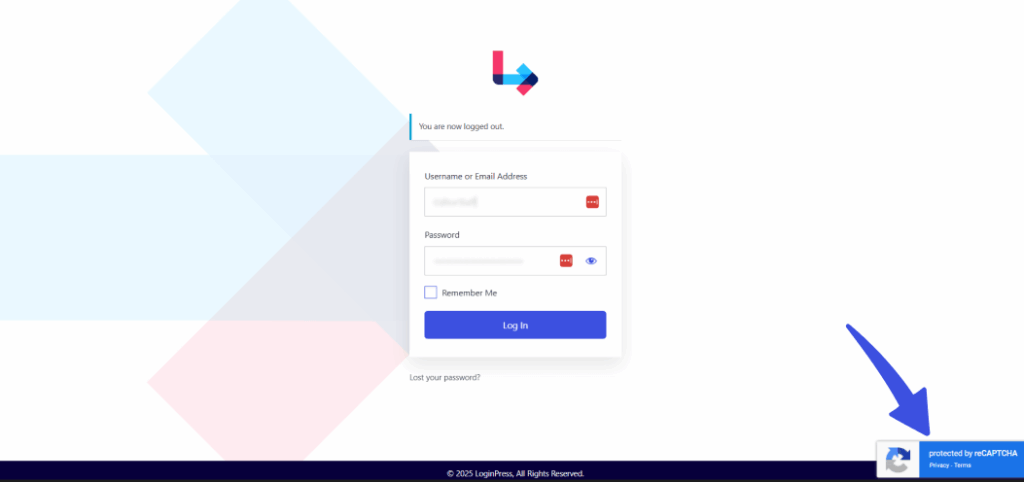
reCAPTCHA is Google’s CAPTCHA service, and it has been the default choice for millions of websites for over a decade.
Although the technology of CAPTCHA was introduced by English scientist, Luis von Ahn, it was later acquired by Google in 2009.
What started out as a tool to help digitize books by having users type deformed words has, over time, evolved into today’s versions when discussing reCAPTCHA vs hCaptcha.
ReCAPTCHA evolved into two main versions till we see today, and those are:
- reCAPTCHA v2 (I’m not a robot)
- Users tick a checkbox.
- Sometimes followed by image-based tests (crosswalks, buses, etc.)

- reCAPTCHA v3 (Invisible)
- Runs in the background.
- Assigns each visitor a bot probability score.
- Website owners decide what score to block.
- It can be controversial since users don’t always know they’re being monitored.
Pros of reCAPTCHA
Let’s go through some of the key advantages of reCAPTCHA vs hCaptcha:
- Familiar: Users instantly recognize it.
- Strong security: Backed by Google’s advanced machine learning.
- Free: For most small-to-medium websites.
Cons of reCAPTCHA
With its pros come many disadvantages of Google’s reCAPTCHA; here are some:
- Privacy concerns: Being tightly integrated with Google’s ecosystem, it collects behavioral data.
- User friction: Image challenges can be frustrating, especially on mobile.
- v3 complexity: Requires fine-tuning scores, may block legit users.
What is hCaptcha? (The Privacy-First Alternative)
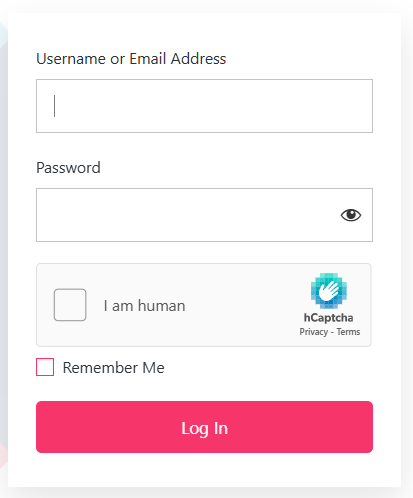
hCaptcha is a privacy-first reCAPTCHA replacement that launched in 2018. Unlike Google, it does not track users across the web to power advertising.
Another unique element of hCpatcha’s business model is that website owners can earn rewards (often in the form of cryptocurrency or credits) when users complete challenges, as the labeling work helps train AI models.
Pros Of Google Recaptcha Alternative
Here are some advantages of hCaptcha compared with reCAPTCHA:
- Privacy-focused: Minimal data collection, GDPR/CCPA-friendly.
- Rewards site owners: You can earn small payouts for user solves.
- Widely supported: Many platforms (including WordPress) now integrate it.
- Strong bot detection: We constantly improve our algorithms.
Cons of hCaptcha
There are some cons as well to this hCaptcha compared with the ReCAPTCHA approach:
- Image challenges can be more complex: Some users find hCaptcha puzzles trickier than Google’s.
- Less familiarity: Some users hesitate when they see it for the first time.
- Enterprise pricing: Free for basic use, but large sites may pay for advanced features.
What is Cloudflare Turnstile? (A Newer Competitor)
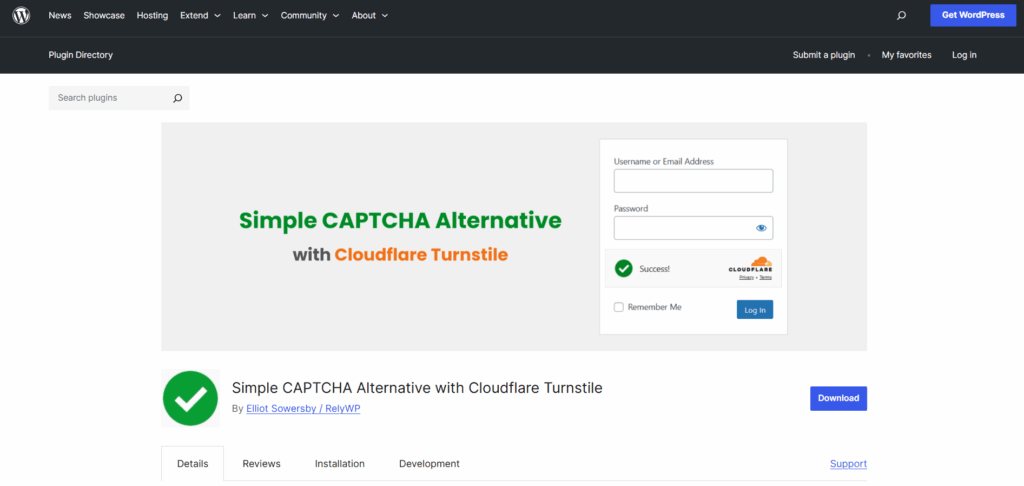
Cloudflare Turnstile is a CAPTCHA that replaces image puzzles with background checks that decide whether a visitor is human.
Think of it as a frictionless CAPTCHA: users don’t even realize they’ve passed a check.
Pros of Cloudflare Turnstile
- No user friction: No images, no checkboxes, just smooth access.
- Privacy-respecting: Doesn’t sell user data, doesn’t rely on ads.
- Fast and lightweight: Minimal impact on page speed.
- Free: Cloudflare currently offers it at no cost.
Cons of Cloudflare Turnstile
- Less mature: Newer than hCaptcha and reCAPTCHA, so not as widely adopted.
- Fewer integrations (for now): Not all platforms natively support it yet.
- Relies on Cloudflare ecosystem: Works best if you’re already using Cloudflare services.
A Quick Comparison Table of CAPTCHA Tools for WordPress
This table compares reCAPTCHA, hCaptcha and Cloudflare Turnstile on privacy, user experience and cost.
| Feature | reCAPTCHA (Google) | hCaptcha (Privacy-first) | Cloudflare Turnstile |
| User Experience | Checkbox + image puzzles, or invisible (v3) | Similar puzzles, often trickier | Completely invisible |
| Privacy & Data | Collects user data for Google services | Minimal data collection, GDPR-friendly | Strong privacy focus |
| Security | Advanced AI + Google database | Strong bot detection, improving constantly | Background checks are still maturing |
| Ease of Setup | Widely supported, simple keys | Drop-in replacement for reCAPTCHA | Easy if using Cloudflare, limited elsewhere |
| Cost | Free for most, enterprise tier available | Free basic, paid enterprise | Free |
| Business Model | Supports Google ecosystem (ads/AI) | Pays site owners small rewards | Free, supports the Cloudflare network |
| Familiarity | Very high (billions of users) | Growing fast, less known to some | New, less recognized |
How to Add hCaptcha, reCAPTCHA, or Turnstile to Your WordPress Site
You add reCAPTCHA, hCaptcha or Turnstile to WordPress with a plugin, or manually with code. A CAPTCHA protects your site from these three things:
- Blocking spam comments.
- Securing login and registration forms.
- Preventing brute-force attacks.
To add a CAPTCHA to your site for protection, several methods are available. In this section, I will make sure to go through each one of them thoroughly so you can choose which one works the best for you and your site.
Method 1: Add CAPTCHA Using a Plugin (Easy Way)
The easiest way to add CAPTCHA to your site is to use LoginPress, the WordPress plugin.

LoginPress Pro makes it effortless to add any CAPTCHA to WordPress. With just a few clicks, you can enable:
- Google reCAPTCHA (v2 and v3)
- hCaptcha
- Cloudflare Turnstile
The best part about this efficient WordPress CAPTCHA plugin is that it requires no coding or manual configuration.
How to Set Up CAPTCHA using LoginPress
Let’s learn how to set up CAPTCHA using LoginPress in easy steps.
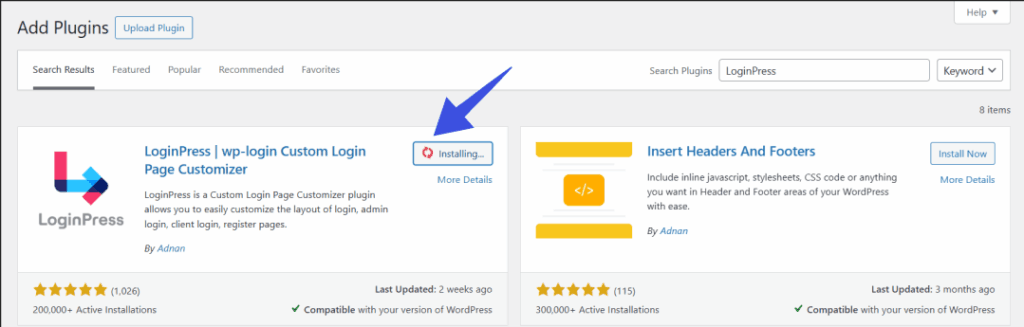
Step 1: Install and activate LoginPress Pro.
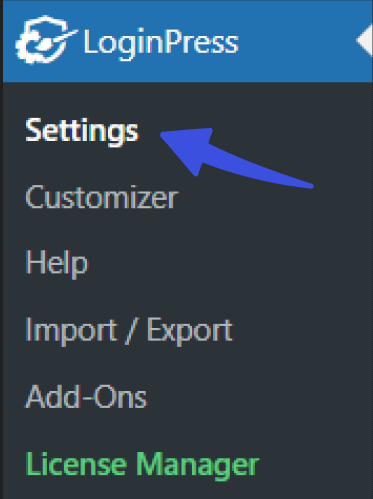
Step 2: Go to the Security Settings in the plugin.
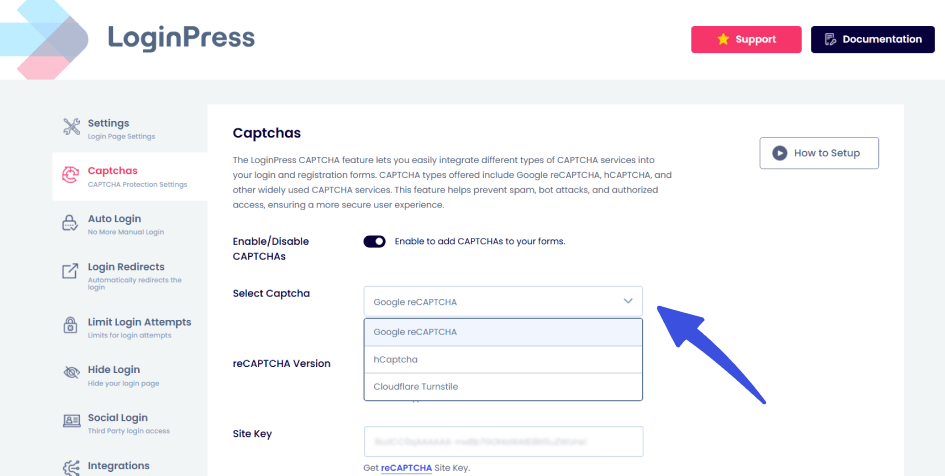
Step 3: Choose your preferred CAPTCHA solution.
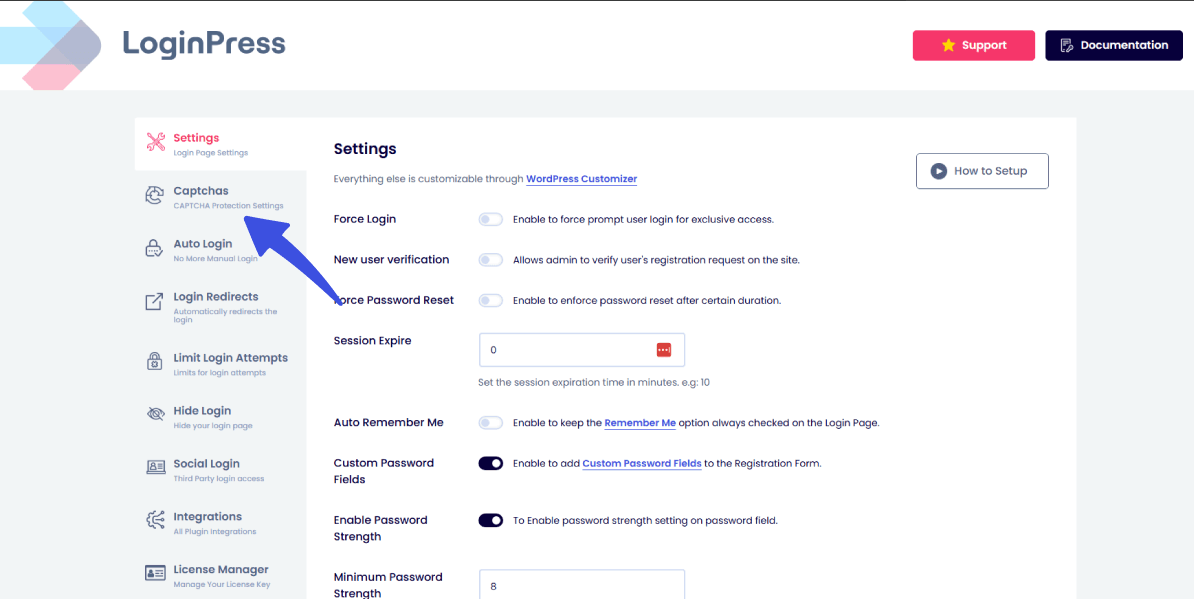
Step 4: Paste in your site and secret keys.
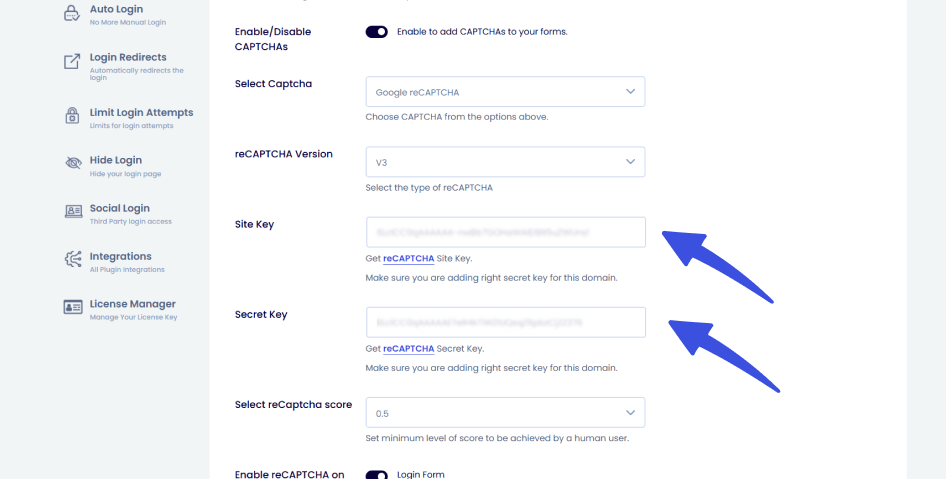
By navigating to the CAPTCHA settings, you can scroll down to the Site Key and Secret Key option.
Now paste the keys into the respective fields.
Step 5: Enable protection on login, registration, password reset, and comment forms.
On the same CAPTCHA settings page, you can find the toggle option for enabling the reCAPTCHA on your forms.

That’s it! You’ve instantly added an extra security layer to your WordPress site with zero technical headaches.
With LoginPress, you don’t have to choose one CAPTCHA tool forever. You can easily switch between hCaptcha, reCAPTCHA, and Turnstile based on what works best for your audience and site. This is why 250,000+ people love it!
Method 2: Add CAPTCHA Manually
This method is the hands-on, do-it-yourself setup, where you manually combine CAPTCHA into your site. Although it is flexible, with a lot of control residing with the user, it does require some coding know-how.
Here’s what it works:
- First, you’ll have to generate API keys from the CAPTCHA provider (like Google reCAPTCHA).
- Then, edit your theme or plugin files to insert the necessary code.
- You can add CAPTCHA scripts directly into your login, registration, or comment forms.
- Also, edit the styling and resolve any conflicts to ensure it integrates smoothly with your site’s design.
For developers, this gives complete control. However, for non-technical users, the process can quickly become overwhelming and time-consuming, making LoginPress the best solution.
Frequently Asked Questions on hCaptcha vs ReCAPTCHA
What is reCAPTCHA?
ReCAPTCHA is Google’s CAPTCHA solution that uses checkboxes, image puzzles, or invisible background scoring to block bots.
What is hCaptcha?
hCaptcha is a privacy-focused CAPTCHA tool that works like reCAPTCHA but collects less user data.
Is hCaptcha better than reCAPTCHA?
It depends. hCaptcha wins on privacy and site owner rewards, while reCAPTCHA is more familiar to users and slightly more polished.
What is Cloudflare Turnstile?
Turnstile is a new CAPTCHA alternative from Cloudflare that removes puzzles entirely and verifies humans in the background.
What is the best CAPTCHA plugin for WordPress?
The best option is LoginPress Pro, since it supports all major CAPTCHA solutions (hCaptcha, reCAPTCHA, and Turnstile) in one plugin, all done without requiring coding.
hCaptcha vs reCAPTCHA: Final Words
The right choice between hCaptcha and reCAPTCHA depends on your needs and goals. I’d pick hCaptcha for privacy, reCAPTCHA for familiarity and Turnstile for the smoothest visitor experience.
To conclude:
- Choose reCAPTCHA if you want a familiar, Google-backed solution with advanced AI detection.
- Choose hCaptcha if privacy and earning rewards matter to you.
- Choose Cloudflare Turnstile for a frictionless, puzzle-free experience.
At the end of the day, the “best” CAPTCHA depends on your site’s priorities. And the good news is, you don’t have to pick just one forever. With LoginPress Pro, you can enable hCaptcha, reCAPTCHA, or Turnstile on your WordPress site in minutes without touching a single line of code.
That means you stay protected, keep users happy, and focus on what really matters: growing your website.
That’s all for this post. For more related articles, check:
- 7 Best reCAPTCHA Alternatives for WordPress
- How to Fix reCAPTCHA Not Working in WordPress
- How to Add CAPTCHA to WordPress Login and Registration Form
Now, over to you, which CAPTCHA do you prefer, or are you excited to try Cloudflare Turnstile on your WordPress site in 2025?