Secure WordPress User Registration: Best Practices

You secure WordPress user registration by adding CAPTCHA, blocking fake and disposable emails, verifying new users, limiting registration attempts and protecting authentication after signup. The default WordPress registration form is simple and easy for automated scripts to abuse.
In this post, I will show how to build a secure signup that blocks spam and stays easy for real users.
Unsecured registration leads to these problems:
- Your database may become populated with fraudulent user accounts.
- Wasted server resources.
- Security vulnerabilities that lead to site takeovers.
Secure WordPress User Registeration (TOC):
How WordPress User Registration Works (And Where It Breaks)
Default WordPress registration is too simple to protect against modern automated attacks.
The basic WordPress registration flow works like this:
- User Input: A visitor enters a username and email address.
- Auto-Generation: WordPress automatically generates a password.
- Email Delivery: The system sends the password to the user via email.
And that’s about it. While this is great for ease of use, it creates a security liability in the AI-powered web era.
The Critical Gaps in Default Registration
Out of the box, WordPress leaves several open doors that attackers frequently exploit:
- Zero Bot Protection: There is no built-in CAPTCHA to stop automated scripts from creating thousands of fake accounts.
- Weak Password Requirements: Default settings often allow users to keep insecure passwords, making them easy targets for brute-force attacks.
- Lack of Email Verification: Users can register with fake or “disposable” emails because the system doesn’t require them to click a verification link before the account becomes active.
- No Admin Moderation: Anyone can join your site instantly, without a manual review.
To close these gaps, you cannot rely on the core WordPress software alone. You need to implement best practices for secure user registration.
Using a dedicated registration plugin is the only way to add the maximum number of security layers, such as biometric login, two-factor authentication (2FA), and advanced spam filtering, to keep your site safe from modern threats.
1. No CAPTCHA by Default
WordPress does not include CAPTCHA on login, registration, or comment forms natively.
Without a CAPTCHA, your site is an open target for automated bots.
These bots can perform “credential stuffing” (trying millions of leaked passwords) or “comment spamming” at a rate impossible for a human.
This can lead to account takeovers or overwhelm your database with millions of spam comments, slowing your site down.
2. Weak Password Enforcement
While modern WordPress versions include a “Strong Password” generator, the core system does not force users to use it.
Administrators can create users with weak passwords, such as password123, and the system will display only a warning checkbox.
Attackers use Brute-Force attacks, in which they use software to guess common passwords.
If a user with “Editor” or “Admin” privileges uses a simple password, the entire site is compromised.
Once an attacker cracks a weak password, they can install malware, delete content, or steal customer data.
3. Unlimited Registration Attempts
By default, WordPress allows an infinite number of registration and login attempts.
It does not lock out an IP address after a certain number of failures.
An attacker can try thousands of password combinations per minute without ever being blocked by the server.
Constant login attempts place a heavy load on your server’s resources (CPU and RAM), potentially causing your site to crash even if the attacker never successfully logs in.
4. Limited Role-Based Controls (RBAC)
WordPress does have a built-in Roles and Capabilities system (Subscriber, Contributor, Author, Editor, Administrator), but it is often criticized for being too rigid.
You cannot easily create custom permissions for a specific user without a plugin.
For example, you might want a user to be able to edit a specific page but not others, or access a specific plugin’s settings without being a full Administrator.
This often leads to privilege creep, in which site owners grant users “Administrator” or “Editor” status just to perform a single small task.
This violates the Principle of Least Privilege, meaning too many people have the power to break or compromise the site.
Common Registration Security Threats
Identifying the common registration threats is the first step to securing your site.
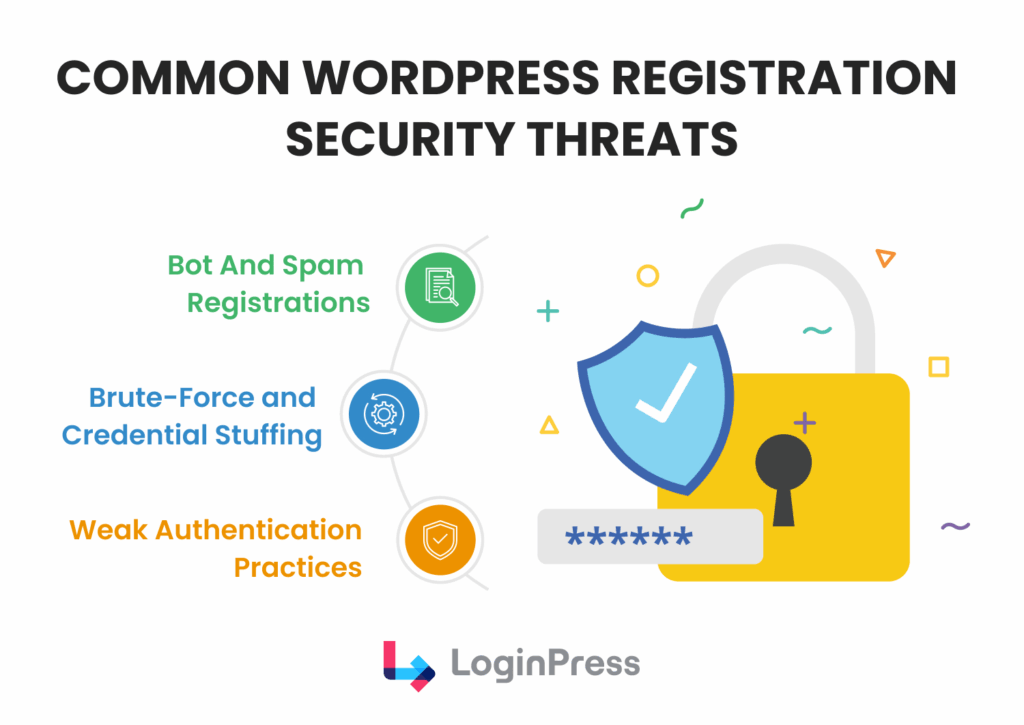
Standard WordPress configurations commonly show these vulnerabilities:
- Spam Bot Exploitation: Standard forms often lack effective bot detection, enabling automated scripts that constitute approximately 37% of internet traffic to inundate databases and potentially result in server blacklisting.
- Weak Password Vulnerability: Although WordPress recommends strong passwords, it does not enforce this requirement, leaving sites exposed to risks associated with weak credentials such as ‘password123’.
- Unrestricted Brute Force Attacks: Without login attempt limits, attackers can repeatedly submit credential combinations via credential stuffing without being locked out.
- Information Disclosure via Error Messages: Default error messages frequently indicate whether a username is valid, thereby facilitating a significant portion of an attacker’s efforts.
Best Practices for Secure WordPress User Registration
A secure registration stack uses these best practices:
1. Enable CAPTCHA on Registration Forms
Enable CAPTCHA on registration forms, because without it bots can attack your site freely.
Solution: LoginPress CAPTCHA allows you to add a gatekeeper to your forms. You have three main choices:
- Google reCAPTCHA v2: The classic “I am not a robot” checkbox.
- Google reCAPTCHA v3: Runs in the background (Invisible).
- Cloudflare Turnstile: The modern, privacy-focused alternative.
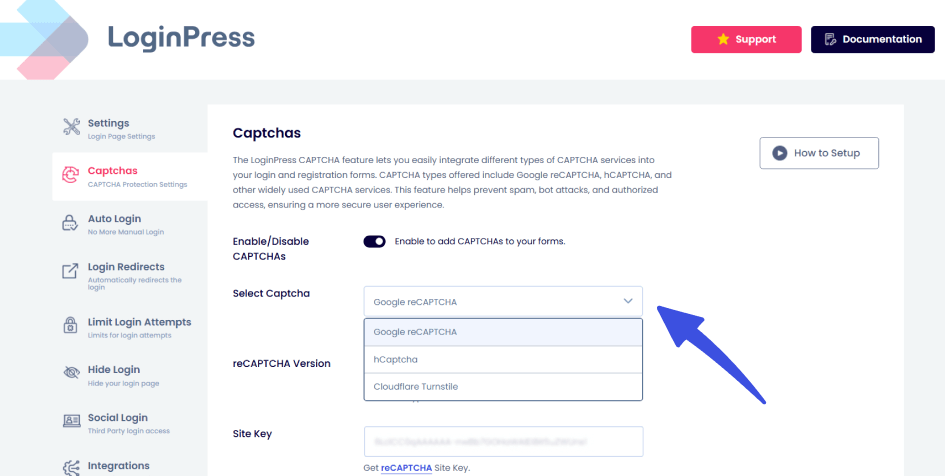
Where to apply it: Don’t just enable it on the registration page. Enable it for Login and Password Reset too.
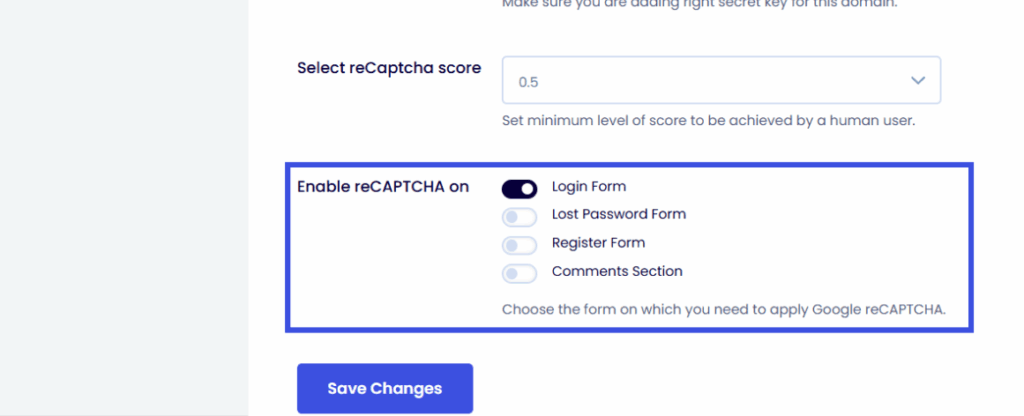
Pro Tip: Using Cloudflare Turnstile with LoginPress strikes the best balance between WordPress registration spam prevention and a frictionless user experience.
2. Limit Registration and Login Attempts
Automated attacks rely on speed. If you take away their speed, they give up on the consistent hammering.
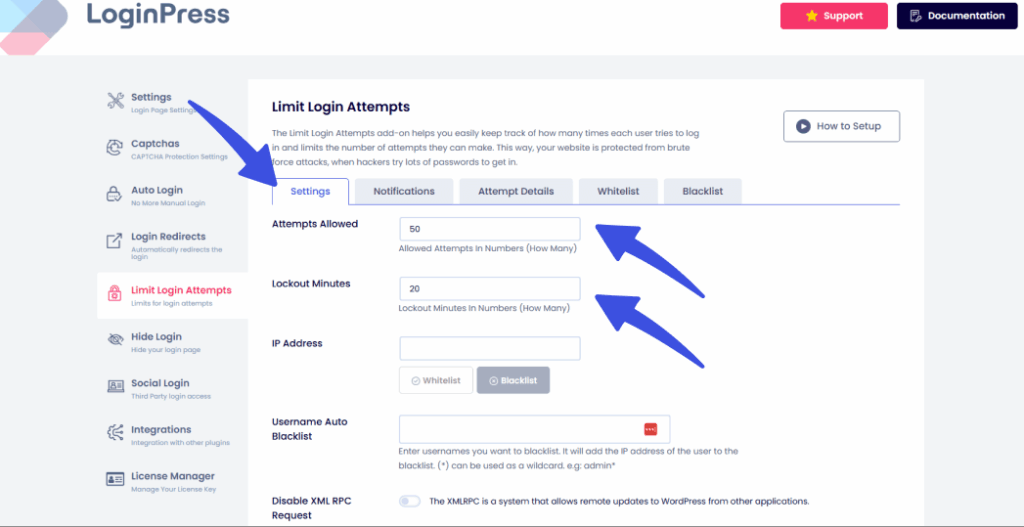
By using LoginPress’s Add-On, Limit Login Attempts, you can:
- Set a lockout after 3 failed tries.
- Block specific IP addresses.
- Set a number of attempts allowed per user
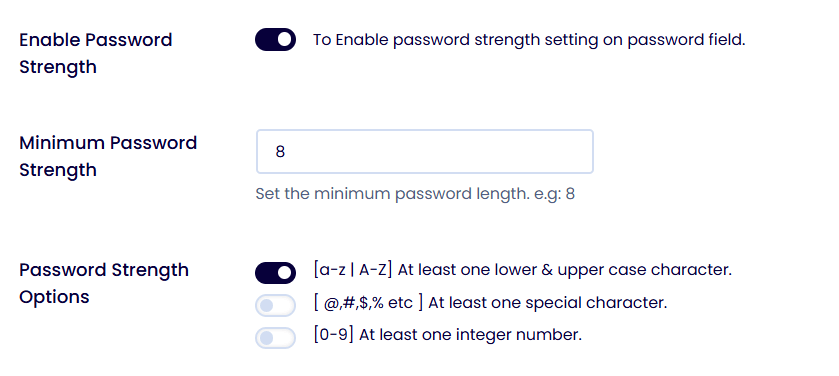
3. Enforce Strong Password Policies
You can’t trust users to pick strong passwords. You have to force them by implementing such policies.
Use a password policy plugin to require:
- Minimum 12 characters.
- Mix of symbols and numbers.
- No “common” passwords (like “admin” or “12345”).
LoginPress supports password-strength enforcement and policy plugins to secure WordPress user registration.
4. Customize Error and Validation Messages
Did you know that default WordPress errors leak information?
If a user enters an incorrect password, WordPress often displays: “The password you entered for the username ‘admin’ is incorrect.”
This means you’ve just told the hacker that “admin” is a real username.
With LoginPress Customizer, you can change these to generic messages, such as “Invalid login credentials.”
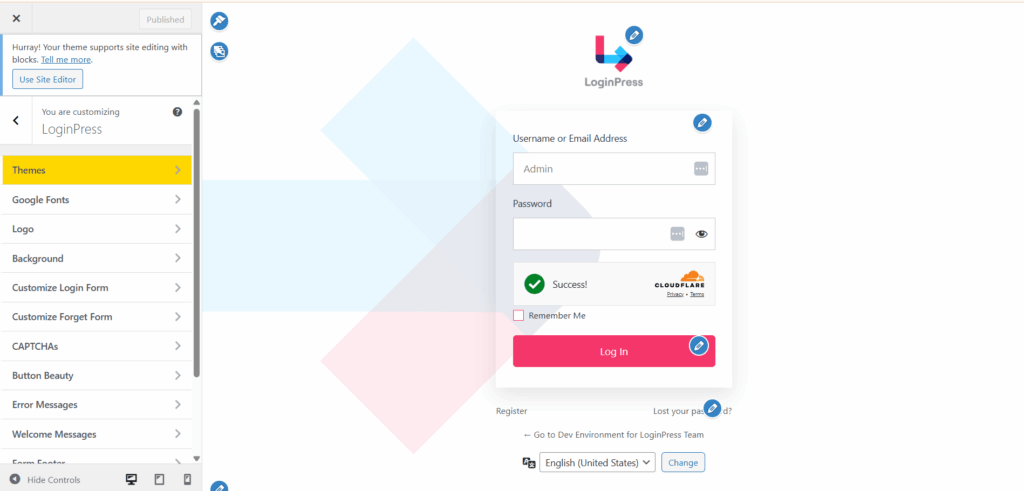
The result is to give the attacker zero clues about which of the two fields is wrong.
5. Control User Roles at Signup
Never let a user register with high-level permissions. This is why you need role-based access controls in your site to secure WordPress user registration.
Tip: Never expose role selectors on public forms.
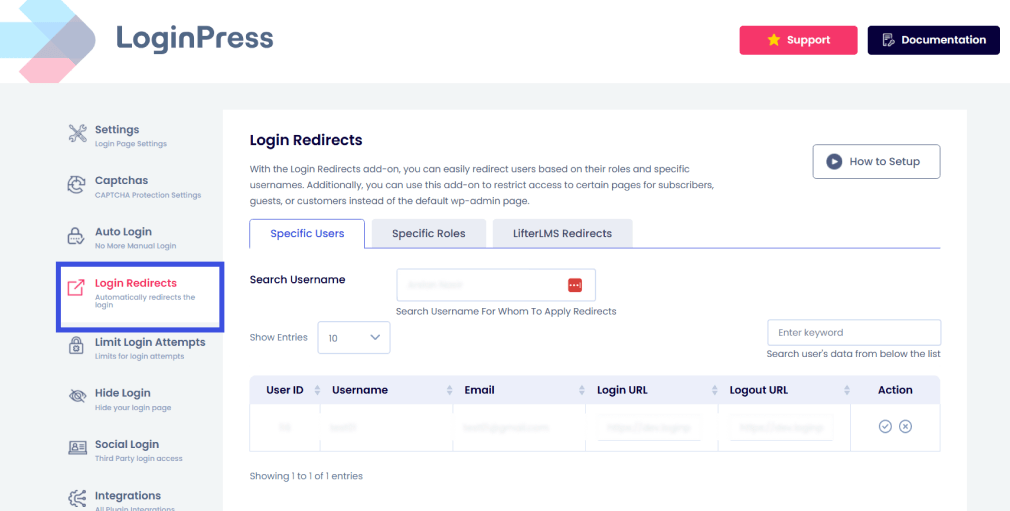
- Membership sites: Set default to “Subscriber.”
- WooCommerce: Set to “Customer.”
- LifterLMS: Set to “Student” so they can be redirected.
Protecting WordPress Registration Forms from Spam (Advanced Tactics)
CAPTCHA is a strong first line of defense, but advanced protection needs more layers.
In 2026, sophisticated headless browsers and AI-driven scripts can sometimes mimic human behavior well enough to bypass standard visual puzzles.
To truly secure WordPress user registration, you need to move beyond basic gates and implement a multi-layered defense.
Here is how to build a secure fortress around your signup page:
Layer 1: The Silent Form Defenses
When CAPTCHA fails, these “invisible” tactics step in without hurting your user experience and secure WordPress user registration.
- Honeypot Fields: These are hidden form fields that real users can’t see, but bots “read” and fill out automatically. If data is entered into a honeypot, the system immediately kills the registration.
- Domain-Based Restrictions: High-level spam often comes from specific clusters. You can configure your registration to block entire top-level domains (TLDs) that are known for abuse.
- Blocking Disposable Emails: Many bots use throw-away email services (like 10-Minute Mail). By blocking these providers, you ensure only legitimate users with permanent mailboxes can join.
Layer 2: Email Verification Workflows
This is the ultimate bot-killer.
By requiring Email Verification, you stop sleeper accounts from ever activating.
A user registers, but their account remains “Pending” until they click a unique link sent to their inbox.
The Power Move: The LoginPress + SMTP Combo:
If your verification emails land in the spam folder, your registration numbers will tank. To do this right, you need a specific plugin stack:
- LoginPress manages registration security and customizes the user flow.
- Form Integration: If you use any form plugins for custom signups, LoginPress acts as the security skin, hardening.
- those specific entry points.
Strategy: The Multi-Plugin Defense
Don’t rely on a single tool to do everything. The best setups use a best-of-all approach to secure WordPress user registration:
- For Memberships: Use LoginPress and membership integrations to secure login/registration logic, while your membership plugin handles content access.
- For Custom Forms: Use the LoginPress CAPTCHA and attempt-limiting features to wrap around your form installations.
By layering these tactics, you create an environment in which bots must jump through too many hoops to be profitable, hence creating a secure WordPress user registration.
Strengthening User Authentication After Registration
Strengthening authentication after registration matters because registration is only the first interaction, while authentication is a continuous process.
Many site owners mistakenly consider security complete once a user verifies their email.
However, in the age of automated attacks, this approach increases the risk of account takeovers.
To effectively secure WordPress user registration, it is essential to strengthen the entire user authentication process well beyond the initial registration.
The following strategies outline how to secure the post-registration experience while preserving a positive user experience:
1. Post-Registration Login Hardening
Security measures must extend beyond signup, as most attacks target the login interface and secure WordPress user registration.
When automated bots cannot register, they often attempt to access existing accounts by systematically guessing credentials.
LoginPress secures this entry point with three specific features:
- CAPTCHA Persistence: Displaying a CAPTCHA only once is insufficient. If a user or automated bot fails a login attempt, LoginPress can activate a CAPTCHA to effectively prevent automated credential guessing.
- Login Attempt Controls: Implement strict limitations on login attempts. For example, after three failed login attempts, the account can be temporarily locked for 30 minutes. This approach significantly reduces the feasibility of brute-force attacks.
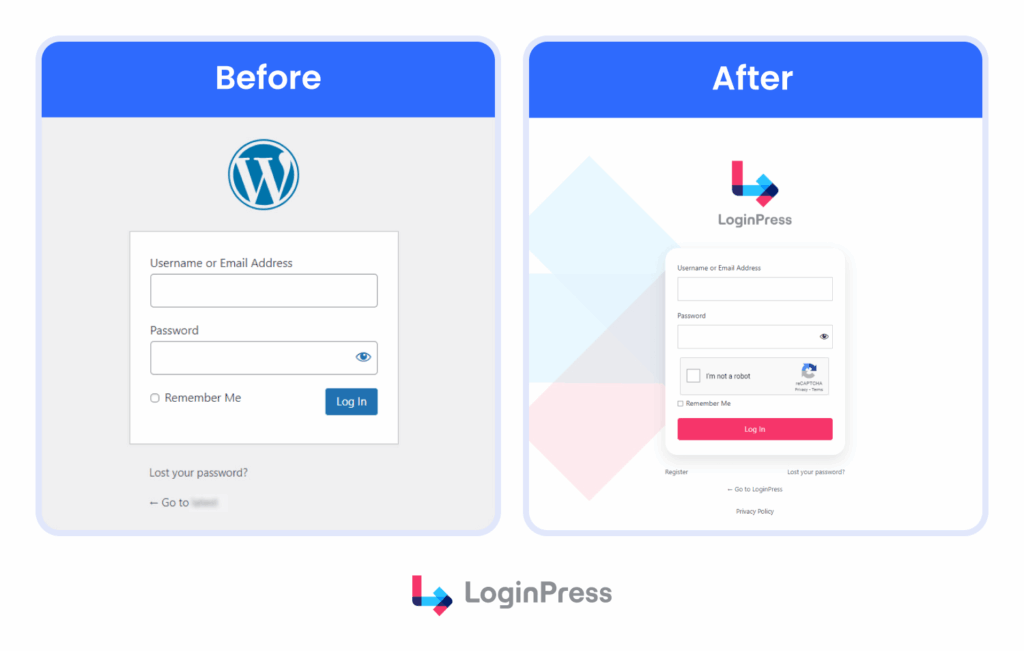
- Custom Branded Login: Default WordPress login pages may appear untrustworthy to high-value users. Customizing the login page with LoginPress enhances user trust and decreases the risk of successful phishing attempts.
2. Implementing Two-Factor Authentication (2FA)
If you want 100% certainty that a user is who they say they are, 2FA is the only way.
When should two-factor authentication be enforced?
- Administrators and Editors: Mandatory implementation.
- LMS/Membership Users: Highly recommended to prevent account sharing and data theft.
LoginPress is compatible with leading 2FA plugins, including Wordfence.
It ensures that 2FA prompts integrate smoothly within custom-designed login themes, maintaining both user experience and security.
Real security means watching the door every time it opens, not just the first time someone walks through it.
Recommended Plugin Stack for Secure WordPress User Registration
Secure registration requires a combination of tools because no single plugin covers every security need.
A layered security stack gives you secure WordPress user registration.
The following combination is recommended:
Core Component: LoginPress
Role: The Registration & Login Security Layer.
LoginPress isn’t a complete security suite; it focuses entirely on the Front Door. It handles your CAPTCHA, customizes error messages to hide usernames, and ensures your registration pages look professional. It’s a specialized tool for WordPress registration spam prevention.
Shield Component: Wordfence or Solid Security
Role: Site-Wide Firewall.
While LoginPress secures the login form, these plugins protect the server by blocking malicious IP addresses, scanning for malware, and providing complete firewall protection.
Brute Force Protection: Limit Login Attempts Add-On
Role: Brute Force Prevention.
Even if a bot bypasses your CAPTCHA, it shouldn’t be allowed to guess passwords forever. LoginPress ensures that after 3 or 5 failed tries, the door is locked tight.
The Messenger: WP Mail SMTP
Role: Reliable Email Verification.
Registration security fails if your “Verify your email” message lands in the spam folder. WP Mail SMTP ensures your WordPress site actually sends emails that get delivered, making your WordPress user authentication flow smooth.
Optional Components (Industry-Specific)
- Membership/LMS: Tools like MemberPress or LearnDash.
- Workflow: LoginPress secures the entry point, while additional plugins manage user experience after successful authentication. It should serve as the primary entry-point security, enabling other plugins to function effectively without interference from automated threats.
Secure WordPress User Registration Checklist (Quick Reference)
Use this checklist to audit your secure WordPress user signup flow.
If you can’t check all six boxes, your site is likely at risk from automated bot attacks.
- CAPTCHA Enabled: Activate Google reCAPTCHA v3 or Cloudflare Turnstile on Registration, Login, and Password Reset forms to block the majority of automated traffic.
- Strong Password Enforcement: Require a minimum of 12 characters and a mix of symbols to prevent weak user credentials from serving as easy entry points.
- Limited Registration Attempts: Install a “rate-limiting” system to automatically block IP addresses that attempt multiple signups in a short window.
- Role Restrictions Applied: Ensure the default user role is set to “Subscriber” or “Customer” to prevent unauthorized “Role Escalation” attacks.
- Email Verification Enabled: Use an email-based workflow to ensure every new user owns a legitimate, non-disposable email address.
- Login Protection Configured: Use LoginPress to hide default WordPress error messages that leak usernames to potential hackers.
FAQs: WordPress Registration Security
How do I stop spam registrations in WordPress?
The most effective way is a “Multi-Layered” defense. First, use LoginPress to add a CAPTCHA to your registration form. Second, enable Email Verification, which requires users to click a link in their inbox before their account is activated. This combo kills 99% of bot registrations instantly.
Can LoginPress secure WooCommerce registration pages?
Yes. One of the best features of LoginPress is its ability to extend security to WooCommerce. It hardens the “My Account” page by adding login-attempt limits and custom error messages, ensuring your store’s customer data remains protected against brute-force attacks.
What’s the best way to protect WordPress registration forms?
The “Gold Standard” combines Cloudflare Turnstile (for frictionless bot detection) and Two-Factor Authentication (2FA). By using LoginPress to manage the login aesthetics and security logic, and a dedicated 2FA plugin for identity verification, you create a fortress that doesn’t frustrate your real users.
Recap: Building User Registration Security in WordPress
You do not have to choose between secure WordPress user registration and a smooth user experience.
If the registration process is overly restrictive, legitimate users may abandon the platform.
Conversely, insufficient security measures can allow automated bots to compromise the database.
An effective solution for secure WordPress user registration is to implement a “Quiet Security” approach. This approach focuses on user registration security in WordPress.
Using LoginPress strengthens registration forms, a primary target for online attacks, without impeding legitimate users.
Features such as CAPTCHA and custom error messages that conceal usernames offer essential security layers necessary for safe scalability.
Remember: Your registration page is the very first interaction a user has with your brand.
Don’t let a bot-infested signup process be their last.
Check out detailed guides on login and registration security here:
- WordPress Phishing Login Attacks: How to Spot and Block Them (2026)
- Invisible WordPress Security: Protection Without Breaking User Experience (2026)
What’s the one security measure you’re missing that’s letting bots slip through your net?