How to Create a Branded Login Page Experience for Your Website

You create a branded login page experience in WordPress by replacing the default login with your own logo, colors, fonts and background, using a customizer such as LoginPress, with no code. Agencies and SaaS platforms often go further with a white label login page that removes WordPress branding completely.
In this post, I will show how to create a branded login page and which best practices keep it professional and easy to use.
Branded Login Page (TOC):
What is a Branded Login Page?
A branded login page is a customized login screen that reflects your brand instead of the default WordPress design.
A custom branded login WordPress includes your logo, colors, fonts, and styling to create a consistent look.
With proper custom login branding, you can turn a basic login form into a professional and user-friendly experience.
This improves trust, strengthens brand identity, and makes your site feel more polished.
Key Elements of a Branded Login Page
A strong login page includes several key elements that reflect your brand and enhance the user experience.
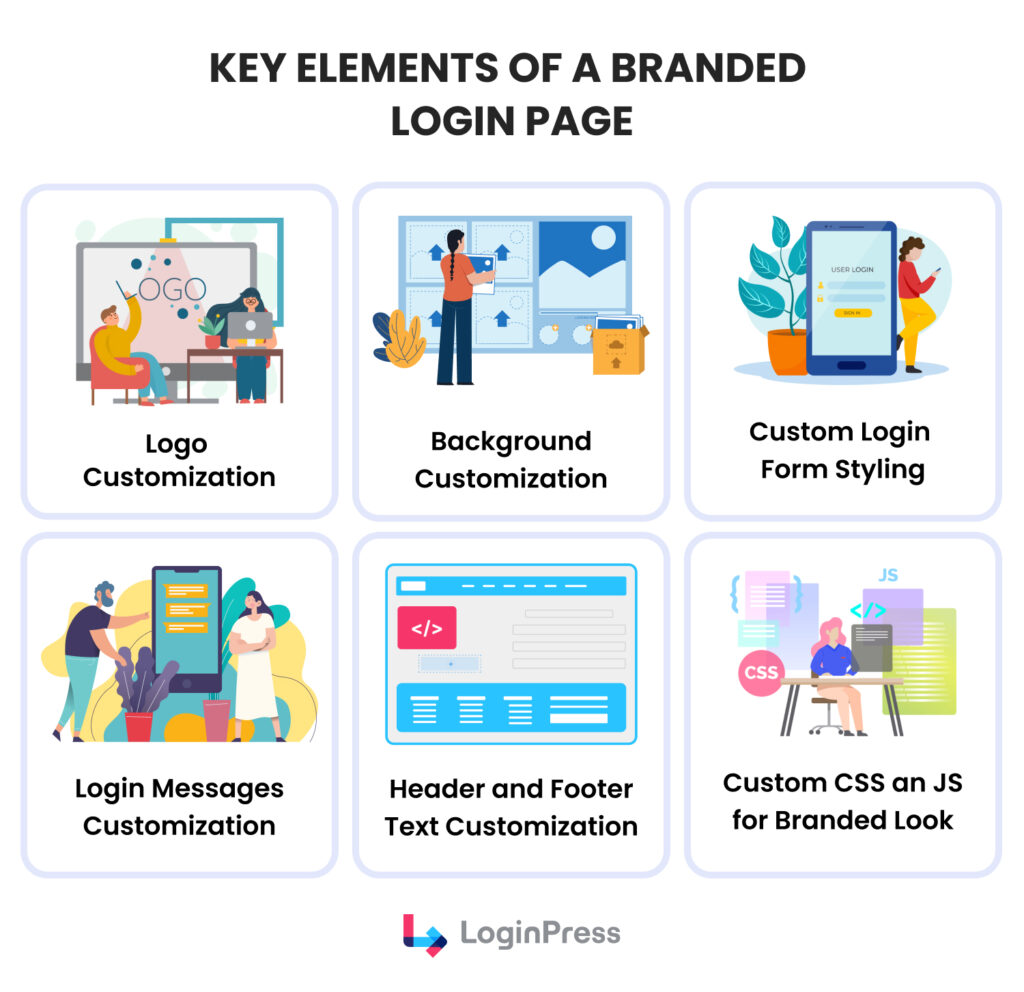
These elements work together to create a consistent and professional WordPress login design.
- Logo and site name customization: Add your logo and brand name to make the login page instantly recognizable and replace default WordPress branding.
- Background and color schemes: Use your brand colors and background styles to create a consistent look that matches your website.
- Customize the login form: Use buttons, input fields, and fonts to improve usability and align with your WordPress login design.
- Footer text, messages, or links: Include copyright text, privacy links, or short brand messages to support your custom login branding and build trust.
- Welcome messages or instructions: Add friendly greetings or client-specific instructions to create a more personalized experience.
- Custom CSS and JS: Explore more control over your login experience by adding custom CSS and JS.
All these elements contribute to effective custom login branding and help you create a professional, user-friendly experience.
| Feature | Default WordPress Login | Branded Login Page |
| Branding | WordPress logo and styling | Custom logo, colors, and identity |
| User Experience | Basic and generic | Polished and user-friendly |
| Professional Appearance | Limited | High, client-ready |
| Customization Options | Very limited | Fully customizable |
| Trust & Security Perception | Standard | Higher with branded elements |
| White-Label Capability | Not available | Fully supported |
Why a Branded Login Page Matters?
A branded login page matters because it is often the first step in a user’s journey, and first impressions shape how they perceive your website.
This is especially important for businesses that manage sensitive data or client accounts.
One of the main benefits is a consistent brand identity. A customized login page matches your website’s colors, logo, and style.
This creates a unified look across all touchpoints. It also helps users instantly recognize your brand every time they log in.
Another benefit is a better user experience. A customized login page is easier to use and less confusing.
Clear design, simple layout, and familiar branding make the process smooth and efficient.
A branded login page also improves security perception. When users see a professional and well-designed interface, they feel safer entering their credentials. It reduces the risk of doubt or hesitation.
With a custom branded login WordPress setup, you can easily apply these improvements without complex development work.
Tools like LoginPress make it simple to create a professional, secure, and consistent login experience for your users.
How to Create a Branded Login Page Using LoginPress
You create a branded login page in WordPress with LoginPress by following the steps below, without writing code.
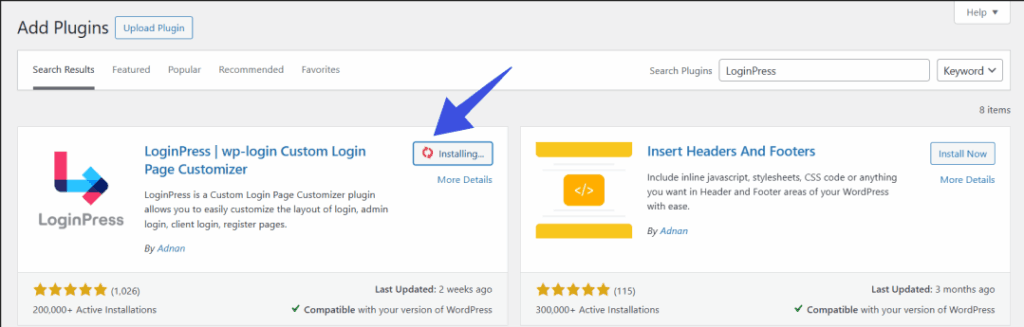
Step 1: Install and Activate LoginPress
Start by installing and activating the LoginPress plugin from your WordPress dashboard.
Step 2: Access the LoginPress Customizer
Once activated, go to LoginPress >> Customizer.
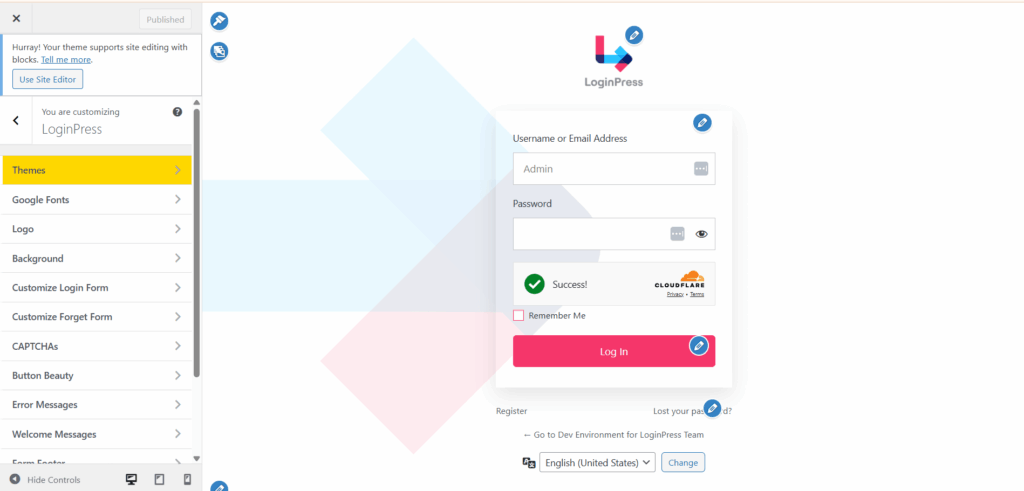
This opens a live preview interface where you can edit your login page in real time. No coding is required.
Step 3: Upload Your Logo and Set Branding Colors
Now start building your custom login branding:
- Upload your company logo
- Set your brand colors (background, buttons, text)
- Adjust the login form alignment if needed
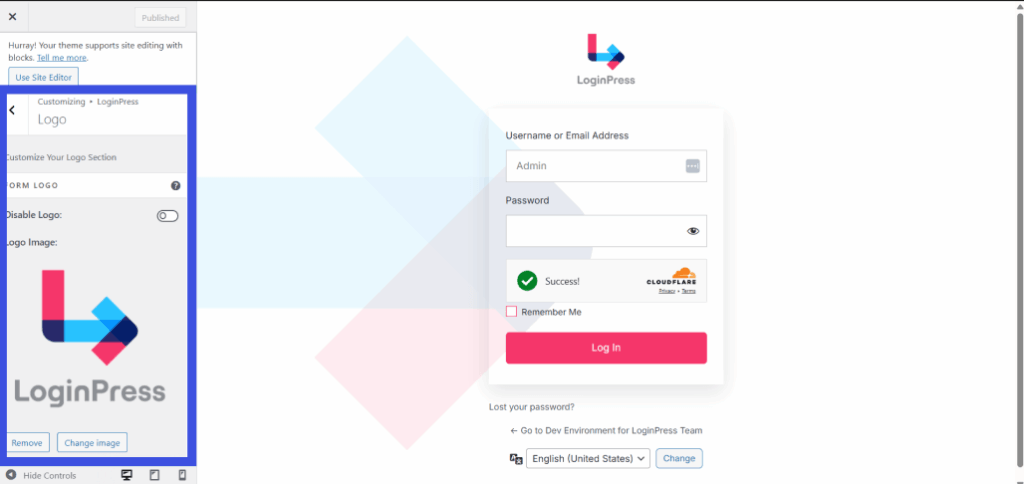
This step helps you create a consistent WordPress login design that matches your website. Your logo will now appear on the login screen.
Step 4: Customize Form Fields and Buttons
Next, style your login form:
- Edit button colors and hover effects
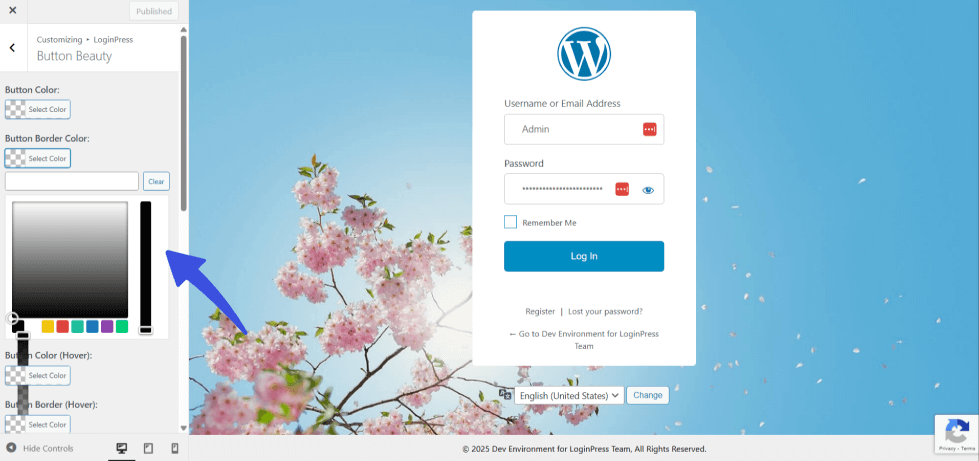
- Adjust input field styles (border, padding, focus)
- Change fonts to match your brand identity
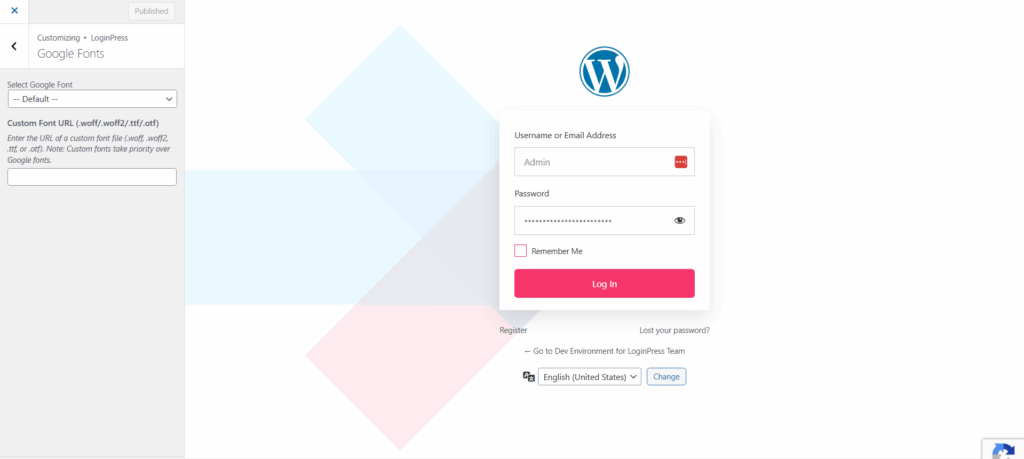
This improves usability and strengthens your branded look, and your customizations are now applied to the login screen.
Step 5: Add Background Images or Videos
Enhance your login page with visuals:
- Upload a background image or gradient
- Add a background video (optional)
- Ensure the background does not reduce readability
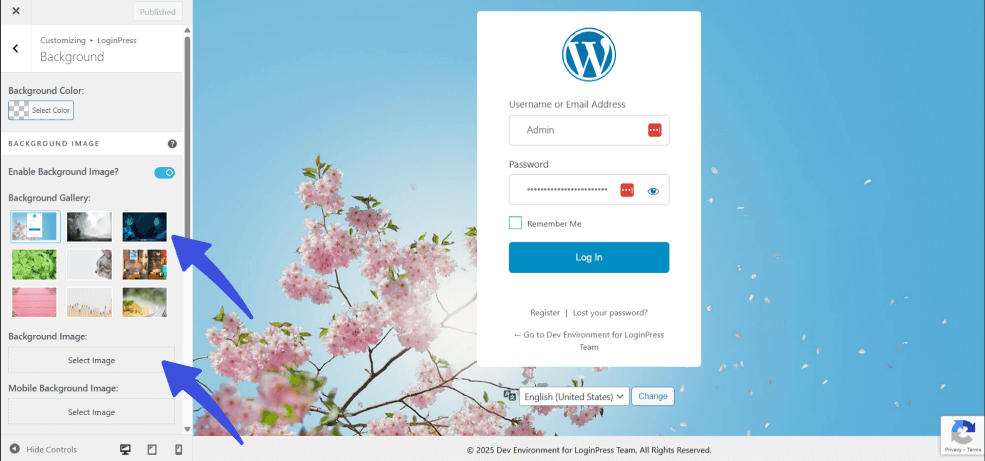
Your video/image is now added to the login screen for login page customization. This step makes your login page more engaging and visually appealing.
Step 6: Preview and Publish Your Branded Login Page
Before publishing:
- Preview your changes in real time
- Test on desktop and mobile devices
- Make sure everything looks clean and responsive
Once satisfied, click Publish.
Note: Check mobile preview before publishing.
This process is perfect for agencies and SaaS platforms. You can quickly create a white-label login page for each client without writing any code.
Note: If changes don’t appear, clear the cache and refresh again.
With LoginPress, your custom login branding is easy to manage, scalable, and fully customizable.
You can match each client’s identity while maintaining control over the design.
The result is a polished, secure, and fully branded login experience that improves trust and user satisfaction, without any technical complexity.
Best Practices for a Brand Login Experience
A strong brand login experience depends on clarity, usability and trust, not just design. Follow these best practices:
- Keep it simple and clean
Avoid unnecessary elements. A clean layout helps users focus on logging in without confusion. Stick to essential fields and clear labels for a better WordPress login design.
- Use high-contrast, accessible design
Make sure text, buttons, and fields are easy to read. Use high contrast between background and content. This improves accessibility and ensures all users can navigate your login page.
- Optimize for mobile and responsive devices
Many users log in from mobile devices. Your login page should adapt to all screen sizes. Test your design on phones and tablets to ensure a smooth experience.
- Minimize distractions
Avoid clutter, animations, or too many links. A login page should be focused and distraction-free. This helps users complete the login process quickly.
- Include subtle security messaging
Add small trust signals, such as secure login or privacy links. These reassure users without overwhelming the design. A secure-looking page improves confidence and reduces hesitation.
- Maintain branding consistency
Your login page should match the rest of your website. Use the same colors, fonts, and style across all pages. This creates a smooth and professional brand login experience.
- Security vs Branding balance insight
Keep the login layout familiar, make fields clear and easy to find, and always show visible security cues to maintain trust and usability.
When these best practices are applied, your WordPress login design becomes more effective.
It not only looks professional but also improves usability, trust, and overall user satisfaction
Advanced Customization Options
You can take a branded login page further with advanced customization options.
Add custom CSS for deeper personalization
Custom CSS gives you precise control over your design. It’s especially useful in real scenarios like:
- Matching exact brand guidelines (fonts, spacing, button styles)
- Overriding theme or plugin conflicts that affect your login design
- Fine-tuning layout details like alignment, responsiveness, and animations
This is ideal for agencies that need pixel-perfect custom login branding for clients.
Integrate third-party login plugins or social logins
You can improve user convenience by adding social login options, such as Google or Facebook.
This reduces friction and speeds up the login process.
It’s especially helpful for membership sites and SaaS platforms where quick access matters.
Create role-based or client-specific login pages
For agencies and multi-client setups, you can design different login experiences based on user roles. For example:
- A custom login page for admins
- A branded portal for clients
- A unique experience for members or students
This approach supports a true white-label experience.
Each user group gets a tailored interface while maintaining consistent custom login branding.
With these advanced options, you can scale your custom branded login WordPress setup while keeping full control over design and user experience.
Common Mistakes to Avoid
The most common branded login page mistakes are listed below, and avoiding them keeps the experience smooth and professional.
- Overcomplicating the Design
Adding too many colors, animations, or elements can make your login page confusing. Keep the design simple and focused.
A clean layout improves usability and keeps attention on the login action.
- Ignoring Mobile Responsiveness
Many users access login pages on mobile devices.
If your page is not responsive, it can break layouts and frustrate users. Always test your design on different screen sizes to ensure a consistent experience.
- Skipping Security Consideration
A login page must feel secure. Avoid weak visuals or missing trust signals.
Add subtle cues, such as secure messaging or privacy links, to reassure users. A professional-looking page builds confidence.
- Using a Generic WordPress Login Page
Leaving the default login screen untouched is a missed opportunity. It looks unprofessional and breaks brand consistency.
A white label login page helps you remove generic branding and create a more polished experience.
By avoiding these mistakes, your branded login page will look cleaner, perform better, and deliver a stronger impression to users and clients.
FAQs on Custom Branded Login WordPress
How do I customize the WordPress login page without coding?
You can customize the WordPress login page using plugins that provide visual, no-code editors. These tools let you change the logo, colors, background, typography, and layout through a drag-and-drop or settings-based interface. Popular options also include pre-built templates, so you can quickly apply a branded design without touching CSS or PHP. This approach is ideal for beginners or anyone who wants fast, safe customization without the need for development work.
Is it safe to customize the WordPress login page?
Yes, it is generally safe to customize the WordPress login page as long as you use reputable plugins and avoid modifying core files directly. Stick to well-maintained tools from trusted sources, keep everything updated, and test changes in a staging environment if possible. Proper customization does not affect your site’s core functionality, but poor-quality plugins or incorrect code changes can introduce security or compatibility issues.
Which WordPress plugin is best for branded login pages?
The best plugin depends on your needs, but a strong choice is a dedicated branding and login customization plugin that offers templates, styling controls, and login security features. Look for plugins that allow logo replacement, custom backgrounds, form styling, and white-label options. Advanced plugins like LoginPress are commonly used because they combine ease of use with flexible design controls and additional features like custom error messages and redirects.
Conclusion: Branded Login Page
A branded login page is a simple upgrade that builds trust, improves the user experience and keeps your branding consistent across your website.
Whether you run a business, SaaS platform, or agency, a customized login page creates a more professional and secure first impression.
LoginPress gives you full control over your login page design without any coding.
From logos and colors to layouts and backgrounds, you can create a login experience that perfectly matches your brand.
If you want to improve your website’s look and deliver a better user experience, now is the time to get started.
For more related posts, check out:
- WordPress Authentication Flows Explained (2026)
- How to Customize WordPress Login Error Messages (2026)
Try LoginPress today and create a custom, branded login page that truly represents your brand.