How to Use Your WordPress Login Page as Marketing Funnel

You can turn your WordPress login page into a marketing funnel by replacing the default form with a branded layout that promotes offers, announcements, and upsells using LoginPress.
This post explains why the login page is your most overlooked touchpoint, shows five marketing use cases and walks through setting them up with LoginPress.
Table of Contents
Why the Login Page Is Your Most Overlooked Marketing Surface
Your WordPress login page as marketing funnel is the most overlooked marketing surface because every person who reaches it is already a registered, committed user. That is the only page on your site where 100% of traffic is pre-qualified.
Unlike your homepage, which is visited by cold browsers, your login screen is visited exclusively by people who have already committed to your brand.
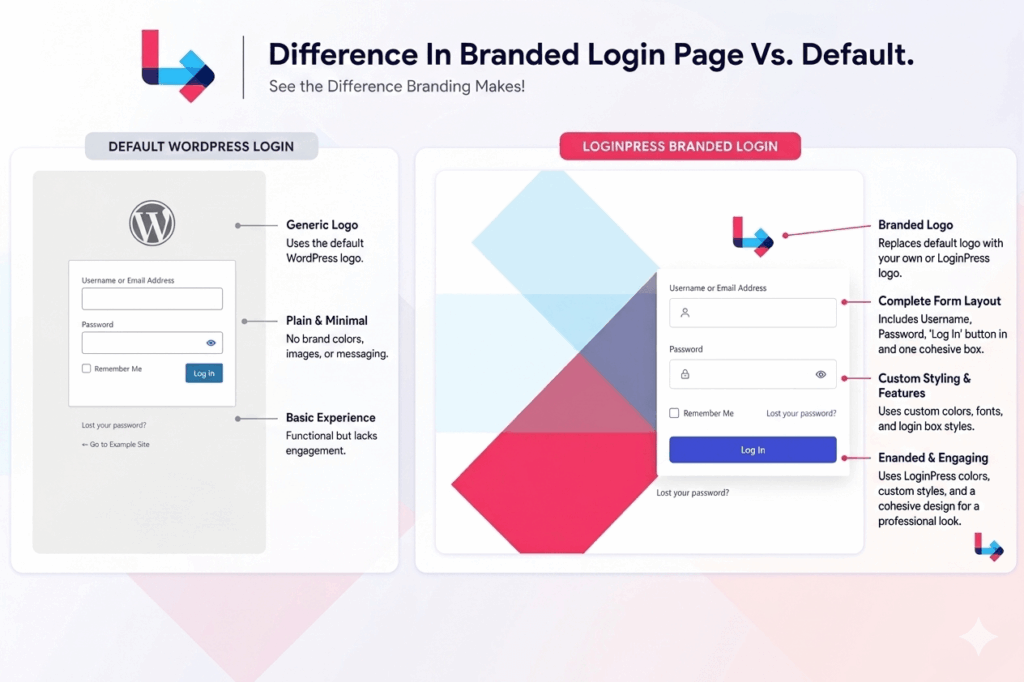
Still, many WordPress sites use this valuable space as little more than a utility, showing only a default logo, a plain white background, and a password field.
Research shows an overwhelming 88% of users won’t return to a site after a bad UX encounter.
By leaving the login page blank, you are ignoring three massive marketing advantages for using the WordPress login page as a marketing funnel:
- Captive Attention: While waiting to log in, users aren’t distracted by a social feed or long-form content. You have 5–15 seconds of their focused attention.
- Segmented Audience Quality: This is the only page on your site where 100% of traffic is from registered members. It is perfectly pre-segmented for loyalty offers.
- High-Frequency Reach: Important announcements posted here reach your entire active user base instantly, bypassing the low email open rates and the noise of push notifications.
So, what should you actually put on this page? Here are the five use cases that generate real results.
What Can You Actually Market on Your WordPress Login Page?
You can market member-exclusive offers, premium plan upgrades, new content drops, and community milestones directly on your WordPress login page. Each of these targets your most loyal users when they are most engaged by utilizing WordPress login page as marketing funnel.
This is why LoginPress, a dedicated login customizer, can help transform your login page into a marketing funnel.
Here are five marketing ideas for WordPress login page to turn your login screen into a high-performance marketing surface:
1. Promote a Time-Sensitive Offer or Sale
One of the most effective ways to use WordPress login page as marketing funnel is by treating it as a digital billboard for exclusive member sales.
Unlike a generic site-wide banner, a login page offer feels like a behind-the-scenes perk for registered users.
- Works best for: WooCommerce stores, course platforms, and membership sites.
- Use Case: Imagine a WooCommerce store running a 48-hour flash sale. Instead of placing a branded banner on the login screen: “MEMBERS ONLY: 20% off all orders this weekend. Use code MEMBER20 at checkout.
- What to include: A clear sale headline, a unique discount code, an expiration date to create urgency, and a link to the shop.
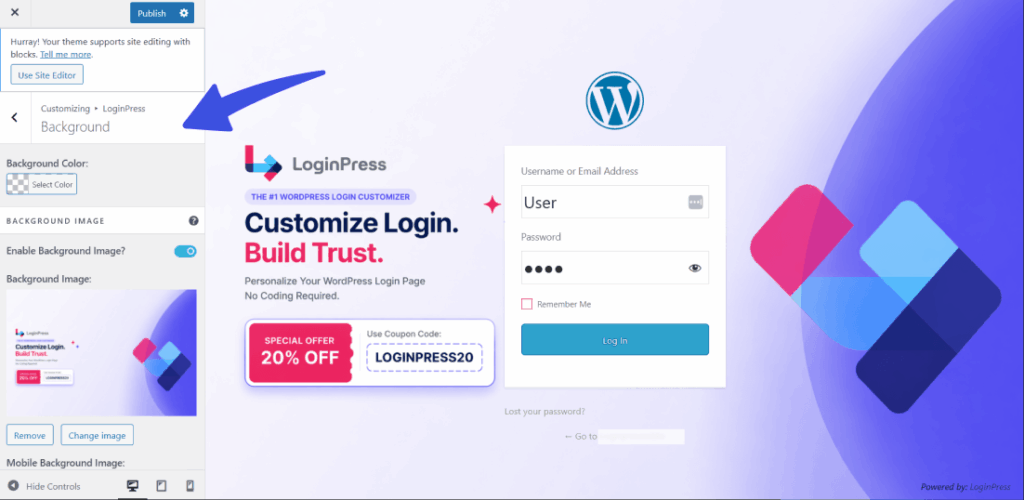
How LoginPress Helps Market: Use the Login Customizer to set a promotional graphic as your custom background image. You can also add specific offer details in the Welcome Message field so the text remains legible across screen sizes to use WordPress login page as marketing funnel.
2. Announce New Features, Content, or Updates
Email newsletters often go unread, and social media algorithms are unstable.
To use WordPress login page as marketing funnel, however, is an unavoidable communication channel. Use it to ensure your members never miss a new content drop.
- Works best for: SaaS tools, online communities, and niche membership sites.
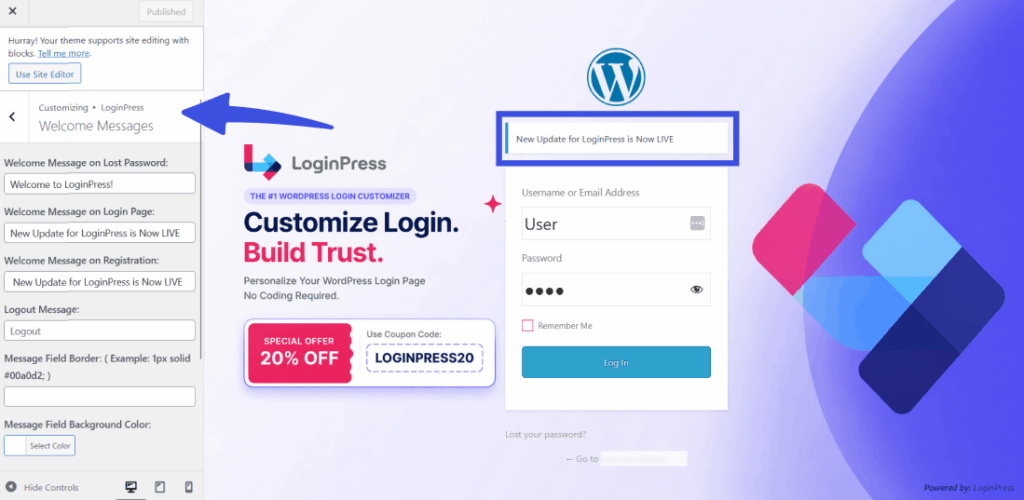
- Use Case: A photography membership site releases a new masterclass. Instead of hoping users find it in the dashboard, the login page states: NEW: The New LoginPress Update is now live. Update here.
How LoginPress Helps Market: Simply update your Welcome Message with the announcement text and a hyperlink. For major launches, swap the background image to match the new content’s branding for 2–3 weeks for using WordPress login page as marketing funnel.
3. Upsell a Premium Plan or Membership Tier
If you run a freemium model, use the WordPress login page as marketing funnel, as it is prime real estate for conversions.
This is the moment a user is about to access your tool; using WordPress login page as marketing funnel is the perfect time to remind them of what they’re missing by not being Pro.
- Works best for: Tiered membership sites and SaaS tools built on WordPress.
- Use Case: A free-tier member arrives at the login screen and sees a callout block stating: “You’re on the Free Plan. Pro members get unlimited downloads and 24/7 support. Upgrade for just $9/month.“
How LoginPress Helps Market: This is where LoginPress Pro shines. Use the Form Footer text to place your upgrade messaging. This keeps the marketing content at eye level.
4. Highlight Social Proof or Community Activity
Reinforcing the value of your site helps reduce churn. By showing recent success stories or community milestones, you remind the user that they are in the right place.
- Works best for: Coaching programs and masterminds.
- Use Case: A fitness community displays a rotating testimonial: “This week: Mark reached his 50-day workout streak!” Seeing this before logging in motivates other members to keep their own streaks alive.
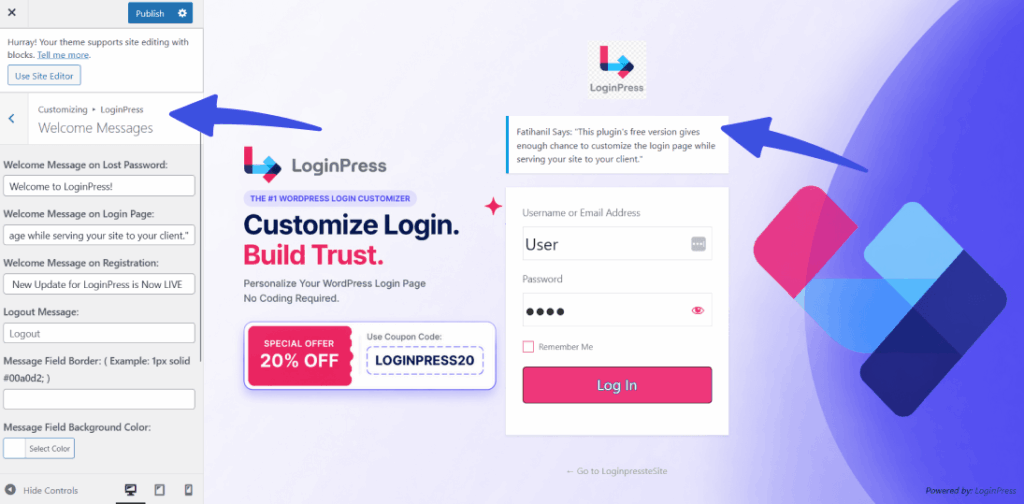
How LoginPress Helps Market: Use the Welcome Message area to display formatted testimonials. Keep it updated monthly to keep the social proof fresh.
5. Direct Users to a Specific Action After Login
Sometimes, the best marketing is simply directing a user to take the next step in their journey. This is especially powerful during seasonal challenges or onboarding for using WordPress login page as marketing funnel.
- Works best for: Challenge-based courses or community events.
- Use Case: A 30-day “Clean Eating” challenge site updates the login page: “Day 12: Have you logged your water intake today? [Go to Tracker →]”.
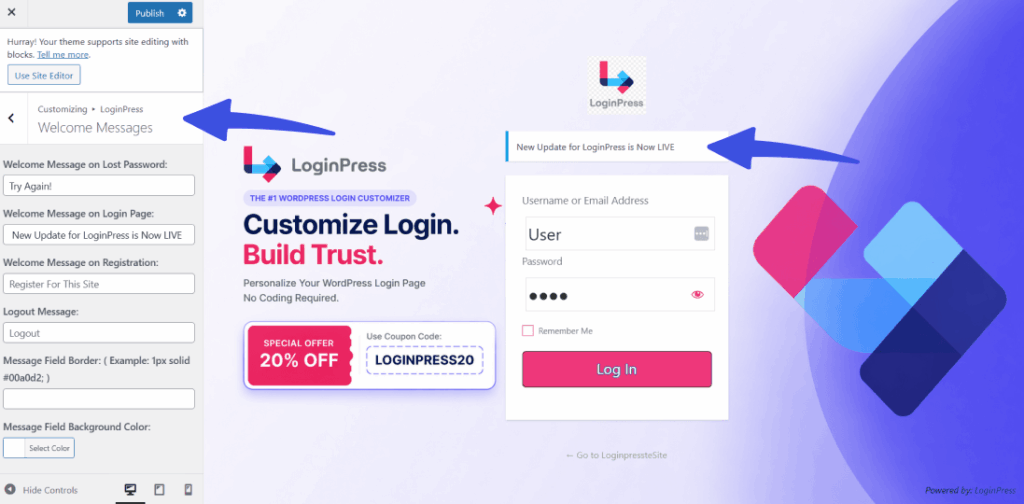
How LoginPress Helps Market: Add a directional Welcome Message with a call-to-action link. This primes the user to complete their daily task before they get distracted by the rest of your site’s content.
How to Create a Marketing-Focused WordPress Login Page with LoginPress
LoginPress gives you three built-in tools to turn your login page into a marketing surface: custom welcome messages, background images with overlays, and custom CSS and JS for advanced elements.
Login Customization features such as custom welcome messages, background images with overlays, and custom CSS/JS for advanced elements. You can apply these marketing strategies directly within the WordPress Customizer.
Here are the specific features you can use to build your login funnel:
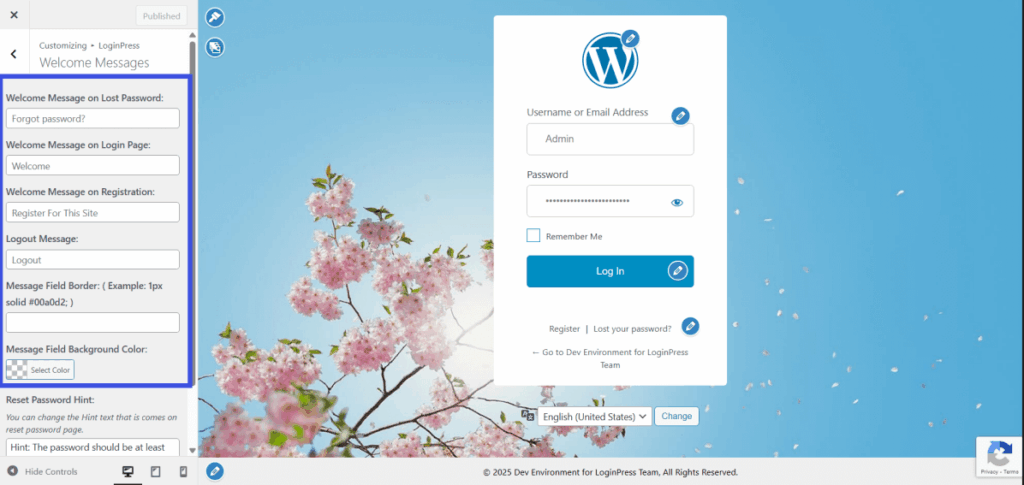
- Custom Welcome Messages: LoginPress allows you to add targeted text above or below the login form. Since this field supports basic HTML, you can easily insert hyperlinks to redirect users to a specific sale page or a new content drop.
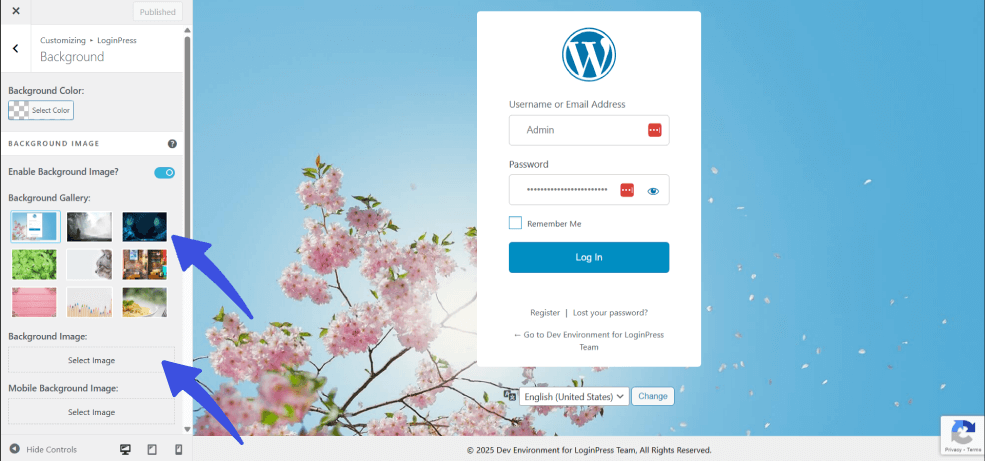
- Background Images with Overlays: You can replace the default WordPress background with a high-quality promotional banner. This is the fastest way to signal a time-sensitive offer or a seasonal event to every returning user.
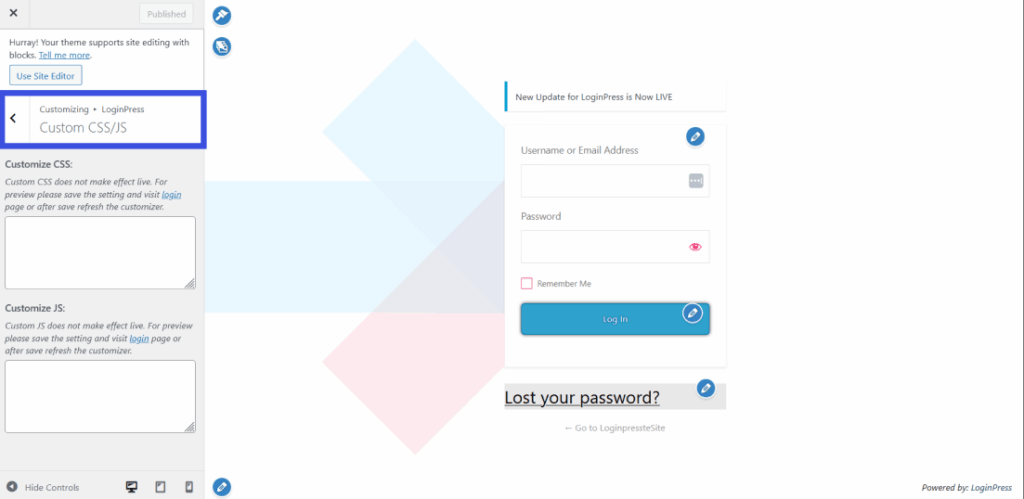
- Custom CSS and JS: For more advanced marketing, the Pro version allows you to add custom CSS and JS. This is perfect for embedding countdown timers for sales, adding CTA buttons with custom styling, or displaying member testimonials with photos.
By using these design tools, you move beyond simple branding and treat your login page as a functional part of your customer journey.
Check out LoginPress Pricing Comparison and build your WordPress login page as marketing funnel.
| Feature | Start Up | Agency (Most Popular) | LifeTime |
| Annual Price | $99 | $199 | $499 (One-time) |
| Website Limit | 2 Websites | Unlimited | Unlimited |
| Two-Column Layout | Included | Included | Included |
| Custom HTML Blocks | Included | Included | Included |
| All Add-ons | Limited Selection | All Current and Future | All Current and Future |
| Support | General | Priority | Priority |
4 Rules for Keeping Your Login Page Marketing Effective
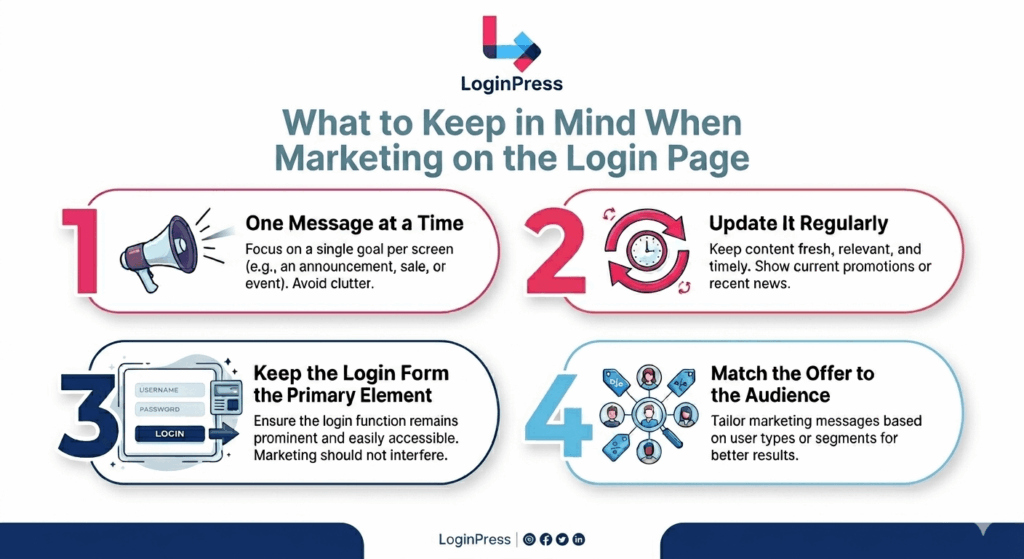
Four rules keep your login page marketing effective, starting with this one: treat it as a high-frequency touchpoint, not a landing page.
A few principles keep it effective for the WordPress login page as marketing funnel without interfering with the user experience:
One Message at a Time
The login page is not the place for three promotions, two announcements, and a testimonial if you want to use WordPress login page as marketing funnel.
Pick one marketing job per period and do it well. Overloading the screen with competing messages confuses users and significantly dilutes the impact of your primary call to action.
Update It Regularly
A promotion that sits on the login page for six months eventually becomes invisible while using WordPress login page as marketing funnel.
Members stop reading it after the third login, once their brains categorize it as “background noise.”
Treat this space like a retail window display; update the content monthly or alongside major platform updates to keep it fresh and engaging.
Keep the Login Form the Primary Element
The marketing content is always secondary to the user’s primary goal: logging in. If your promotional banner is so dominant that it slows down the login process or obscures the input fields, users will quickly grow to resent it.
For a smooth experience, the login form must always remain the focal point of the page. This is how branded login with CTAs and banners can help boost conversions when using the WordPress login page as a marketing funnel.
Match the Offer to the Audience
Remember that the login page is accessible only to registered users. Avoid promoting “new visitor” offers, such as free trials or first-time sign-up discounts, here.
Instead, focus on member-exclusive perks, tier upgrades, and internal announcements relevant to people already active in your ecosystem for using WordPress login page as marketing funnel.
Frequently Asked Questions
How do I turn my WordPress login page into a funnel?
Start by transforming the default login page into a customizable canvas using a plugin like LoginPress. Once installed, choose a single marketing objective, such as promoting a seasonal sale or upselling a membership tier. You can then add targeted messages, background banners, or CTAs using the LoginPress customizer. To keep the funnel effective, ensure you update the content whenever your promotion or marketing focus shifts.
How do I use the WordPress login page for marketing?
The login page is most effective when targeting returning, registered users. Use this space to promote member-exclusive deals, announce new feature releases, or direct users toward a specific community event or challenge. The key to success is keeping the message singular and specific: one clear offer, one link, and one call to action per period.
What can I promote on a branded WordPress login screen?
The most effective promotions for a login screen include time-limited member discounts, new course modules, and upgrade offers for lower-tier users. You can also highlight social proof, such as member testimonials or community milestones. Always avoid promotions designed for new visitors (like “Sign Up” discounts), as the login page is exclusively seen by people who already have an account.
How do I add CTAs and offers to a custom login page?
With LoginPress, you can add a CTA using the Welcome Message field, which supports basic HTML for hyperlinks. For a more visual approach, use a custom background image designed as a promotional banner. LoginPress Pro takes this further by offering a Two-Column Layout for a dedicated marketing panel alongside the form, as well as a Custom HTML block for richer content, such as buttons or countdown timers.
Does the login page get enough traffic to be worth marketing on?
For most membership or subscription sites, the answer is a resounding yes. Since every active member must visit this page to access your content, the impression count is often higher than your top-performing blog posts. A site with 500 members logging in three times a week generates 1,500 impressions per week from your most loyal, high-value audience.
Conclusion: WordPress Login Page as Marketing Funnel
Your WordPress login page is the only surface on your site guaranteed to be seen by your most engaged users every time they return. A default form wastes that attention.
LoginPress Pro gives you the tools to replace it with a branded, conversion-focused experience in under an hour, so you can use login page for announcements.
LoginPress Pro turns your login page into a branded, customizable marketing surface. Upgrade to LoginPress Pro Today!
That is all for this post. For more related posts, check:
- How WordPress Social Login Can Increase Sign-Ups on Your Site
- What is Gated Content? (Top Examples & Best Practices 2026)
Is your login page optimized as your marketing funnel? Let us know your methods in the comments below!