How WordPress Social Login Can Increase Sign-Ups on Your Site

Social login increases sign-ups because visitors register with one click using an existing Google, Facebook or Twitter account instead of filling out a long form and creating a password. In WordPress, you can add it with the LoginPress Social Login add-on.
In this post, I will explain how social login works, what it improves and how to set it up.
Table of Contents
What are Social Logins and How Do They Work?
Social logins let users sign up or log in to your website with an existing social media account, such as Google, Facebook, Twitter or LinkedIn.
Instead of creating a new username and password that you might forget, visitors can click a social login button and use their existing social account details.
Once approved, they’re logged in instantly with no long forms or password resets needed.
For example, if you click Continue with Google, your site connects to Google, confirms your identity, and logs you in within a few seconds.
It’s fast, secure, and familiar to most users.
Social logins are also safe because they use a trusted system called OAuth.
OAuth is a technology that safely connects your website to social platforms without sharing the user’s actual password.
It simply confirms who the user is and gives your site limited access.
77% of users believe that social login is a good WordPress user registration optimization solution.
It has replaced the traditional registration form with a one-click solution, saving users time and making it easier to join your WordPress site.
Why Traditional WordPress Registration Forms Create Friction
Traditional WordPress registration forms create friction because long forms and forgotten passwords make visitors leave before they finish signing up.
This is why a complex or time-consuming registration process can kill your WordPress sign-up conversion rate.
Every extra step or delay adds to registration friction that pushes users away before they even start using your site.
In this section, let’s explore some common barriers that cause visitors to abandon registration:
- Long and complicated forms: Most users prefer not to spend time typing multiple fields, such as name, email, username, and password.
- Password creation fatigue: Creating and remembering yet another password can feel like a chore.
- Forgotten credentials: Traditional login systems rely on usernames and passwords that users often forget. Which isn’t secure, but it happens because people want to avoid having to remember more logins.
- Mobile typing challenges: On mobile devices, filling out forms is even harder. Small screens and on-screen keyboards make it easy to make mistakes. This poor user onboarding experience on WordPress can quickly lead to form abandonment.
When you add up these issues, the outcome is more friction, fewer sign-ups, and lower conversions.
Users today expect quick, easy access to your website; if your registration process fails to deliver, they’ll move on to another site that does.
That’s why it’s time to rethink your registration process and explore modern, user-friendly options like LoginPress social login that simplify onboarding and boost conversions.
What Makes Social Login a Growth-Optimized Strategy
Social login is a growth-optimized strategy because it removes the biggest points of friction in registration. It does this in these ways:
Lower Drop-Offs
A manual registration form might require numerous steps, but social login offers a valid one-click login for WordPress.
Users select a social icon (like Google or Facebook) and instantly confirm their identity.
Verified User Data
When users sign up with a social login WordPress plugin, the platform often shares basic profile information, including a verified email address.
Unlike traditional forms, where users might input fake emails or incomplete names, social connections provide more reliable data.
This leads to cleaner subscriber lists, less spam, and more accurate user profiles for better personalization.
Improved Mobile Experience
For users browsing your site on a phone, typing out a complex, unique password and username is dull and error-prone.
Social login solves this problem by making use of the already-logged-in status on their mobile apps.
This further allows them to tap a button and instantly sign in.
According to recent reports, 59.7% of global website traffic now comes from mobile devices.
Lower Support Load
By using a social login WordPress plugin, such as LoginPress, you reduce “forgot password” requests, which are one of the most common and costly support tickets.
When users log in via a social account, the social platform handles password security and recovery, not your site.
This smoother login and re-login process creates a better user experience overall.
This leads to higher engagement and better customer retention on your WordPress site.
How Social Login Boosts User Sign-Ups
Social login boosts sign-ups because convenience makes users more likely to complete registration and engage right away.
That’s because when you make sign-up effortless, users are far more likely to complete it and engage immediately.
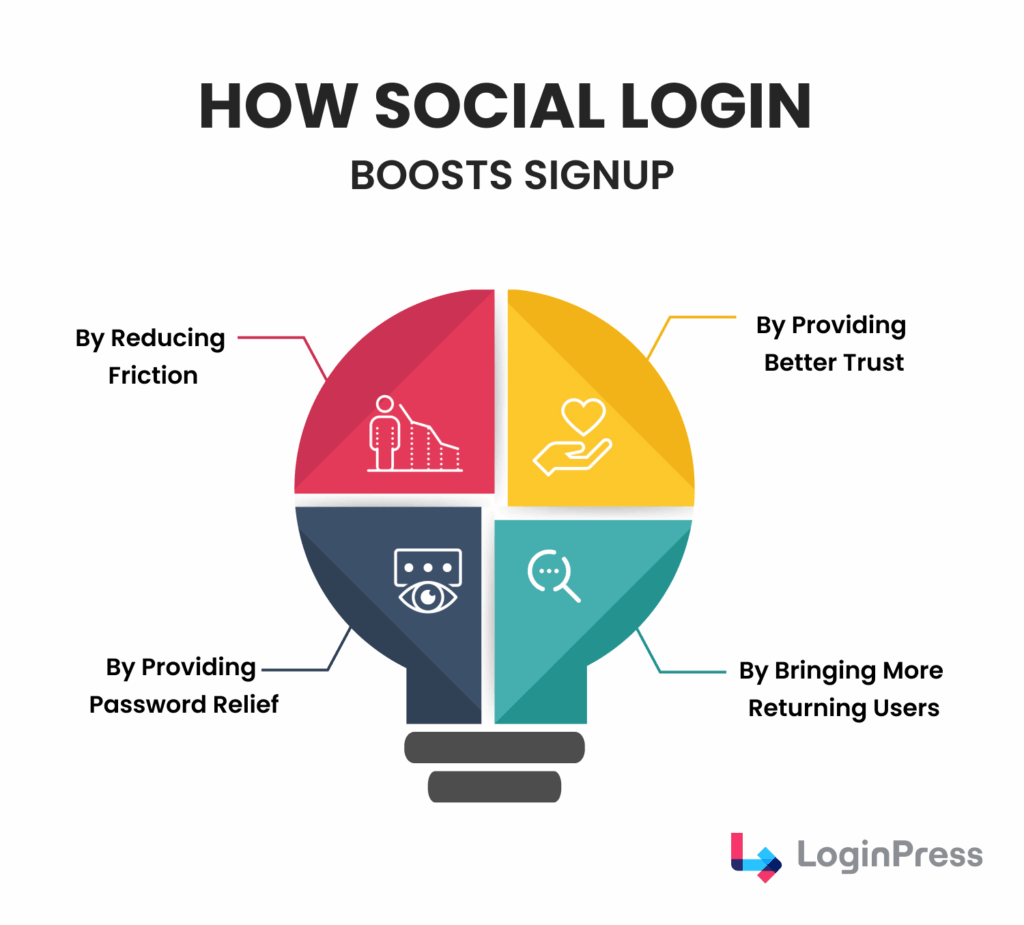
By Reducing Friction
The traditional sign-up process often acts as a barrier.
According to research, only 38% of users who interact with a contact form successfully submit their details.
That means more than half abandon the process halfway through.
Social login removes this obstacle entirely. With a single click, users can authenticate using an existing account.
You don’t need to verify emails, remember passwords, or fill in long fields.
The result is a smoother, faster experience that gets users to your content or product almost instantly.
By Providing Password Relief
Passwords are a source of frustration for users and a leading cause of account abandonment.
Research suggests that 13% of people reuse the same password across multiple platforms, while many forget or misplace them over time.
By enabling social login, you eliminate the need for users to create and remember yet another password.
They simply use their trusted social account credentials, reducing mental load and improving their overall experience.
This simplicity directly translates to higher sign-up and retention rates.
By Providing Better Trust
Trust plays a crucial role in whether someone decides to sign up. Users are far more comfortable sharing their information when authentication is handled by a platform they already trust, such as Google or Facebook.
In fact, Google leads the market with over 90.8% of all social authentications, giving websites that offer “Sign in with Google” an instant credibility boost.
Users recognize the security and reliability of these providers, which helps build confidence in your platform by association.
Users then feel safer sharing their information because large providers handle authentication securely.
By Bringing More Returning Users
One of the most significant advantages of social login is its ability to bring users back easily. Logging in again doesn’t require resetting passwords, checking emails, or remembering usernames. You just click and you’re in.
This convenience reduces login fatigue, keeping your audience active and engaged. Repeat visitors are more likely to engage with your content, make purchases, or participate in your community, ultimately contributing to long-term loyalty and higher conversion rates.
Benefits of Using Social Login on WordPress
The benefits of WordPress social login reach the whole user journey, from conversions to engagement and retention. These are the key benefits:
Faster Onboarding
Onboarding refers to the process of how quickly new users get started. With social login, onboarding takes seconds instead of minutes. Users skip form typing, email confirmations, and password creation. That smooth start on WordPress social login encourages more people to engage with your site immediately, reducing the likelihood of them dropping off halfway.
Higher Conversions
The most significant advantage of WordPress social login is its direct impact on conversion rates. Each additional step in a traditional sign-up form, from email verification to password creation, increases the likelihood of user drop-off.
By removing friction, social login enables users to complete the registration process in seconds, significantly boosting sign-up completion rates. When visitors don’t have to overthink or struggle through forms, they convert faster. This is why many businesses see a significant spike in registrations and onboarding success right after implementing WordPress social login.
Lower Password Fatigue
Password fatigue is one of the silent killers of user engagement. People are overwhelmed by the number of passwords they have to manage, to the point where many reuse simple, insecure ones or skip signing up altogether.
WordPress Social login instantly eliminates this burden. Users can access your site using credentials from trusted accounts they already use every day, such as Google or Facebook. This not only saves time but also reduces cognitive load, making users far more likely to return and log in regularly.
Better Personalization
Personalization is the basis of modern user experience, and social login makes it easier to deliver. When users sign in with their social accounts, your platform can access basic profile data, such as their name, profile picture, or even location.
This small amount of verified data enables you to tailor greetings, recommendations, or offers that feel personal and relevant from the very first interaction. A personalized experience keeps users engaged longer and increases the chances they’ll take desired actions. Better personalization means higher engagement and longer user sessions.
Fewer Login Issues
Forgotten passwords, incorrect usernames, and broken reset links are among the most common login-related frustrations for users and a major source of support tickets for website owners.
Social login effectively bypasses these problems. Since authentication happens securely through platforms like Google, Facebook, or Apple, users rarely encounter login failures. WordPress social login reduces technical support load and improves overall satisfaction. The fewer barriers users face, the smoother their return becomes.
Improved Mobile Experience
On mobile, convenience is everything. Typing long email addresses and complex passwords on a small touchscreen can be difficult and prone to errors. This is why it often leads users to abandon the process.
WordPress Social login transforms the mobile experience with one-tap authentication. Instead of struggling through multiple input fields, users can log in instantly using apps they’re already signed in to on their phones. Given that more than half of all internet traffic now comes from mobile devices, this feature alone can significantly enhance user retention and engagement on your site.
Higher Return Rates
The easier it is for users to return, the more likely they are to do so. WordPress Social login eliminates the biggest hurdles to re-entry, such as forgotten passwords, expired tokens, or lost verification emails.
With one-click access, returning users can jump right back into their account or community without delay. This simplicity keeps your user base active, improves retention metrics, and creates a habit loop. This allows users to easily get used to logging in, so they return more frequently.
Stronger User Engagement
When the sign-up process is smooth and frustration-free, users are far more likely to explore your platform, engage with your content, and interact with your brand.
WordPress Social login removes psychological barriers to participation, eliminating the need for long forms, security concerns, and delays in access. Whether it’s leaving a comment, making a purchase, or subscribing to updates, a frictionless start encourages users to take that next step. Over time, this leads to better engagement, better retention, and stronger community growth.
Learn more about the benefits of Social login in our detailed guide, 15+ Benefits of Social Login (2025).
How to Add Social Login to WordPress Using LoginPress (Step by Step)
You can add social login to WordPress with the LoginPress Social Login add-on in a few steps and without coding.
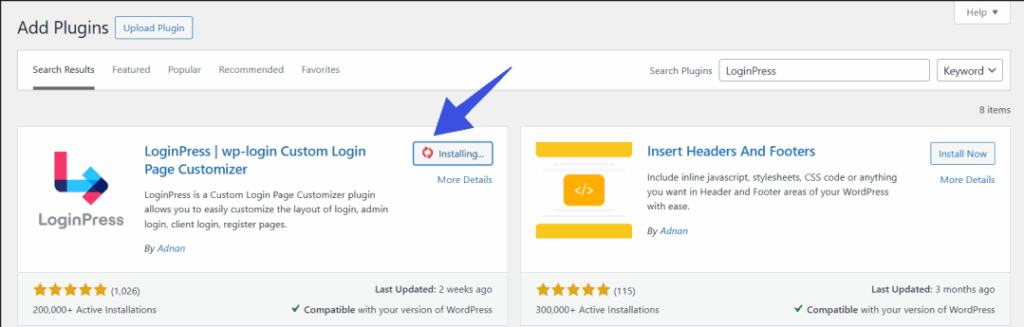
Step 1: Install and Activate LoginPress Pro
Search for LoginPress and install it. You can check out the detailed installation guide on LoginPress.
Step 2: Enable the Social Login Add-On
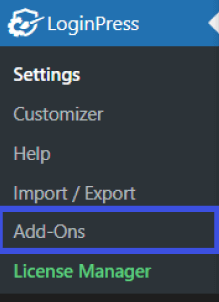
In the WordPress dashboard, head to LoginPress >> Add-Ons.
Locate the Social Login add-on settings. Then toggle the Enable Social Login On option to activate the social login feature.
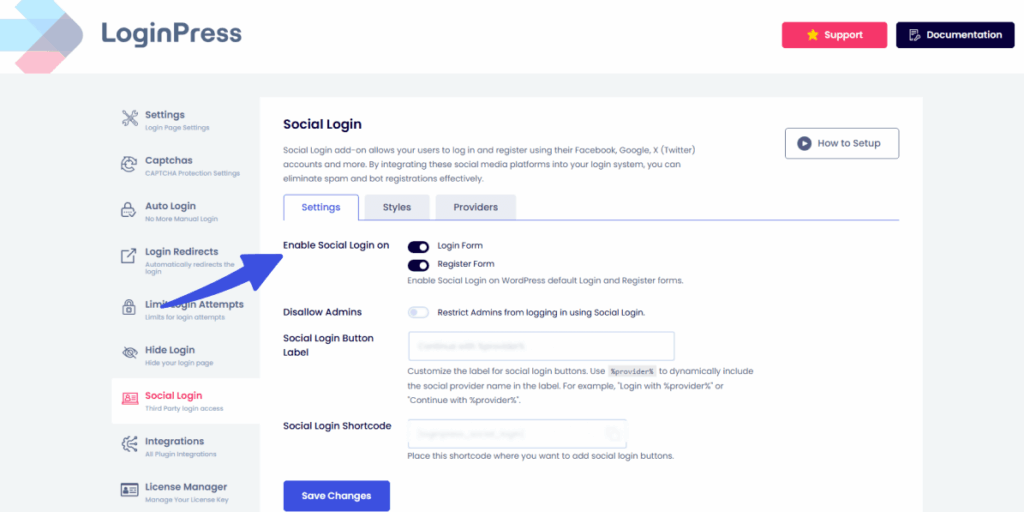
This unlocks the WordPress social login settings panel, allowing you to connect your social accounts. Enabling is crucial as it provides the core feature necessary for smooth one-click sign-ups.
Step 3: Connect Social Platforms
Next, go to the Providers tab. You’ll see a list of supported providers of WordPress social login, such as Google, Facebook, and Twitter.
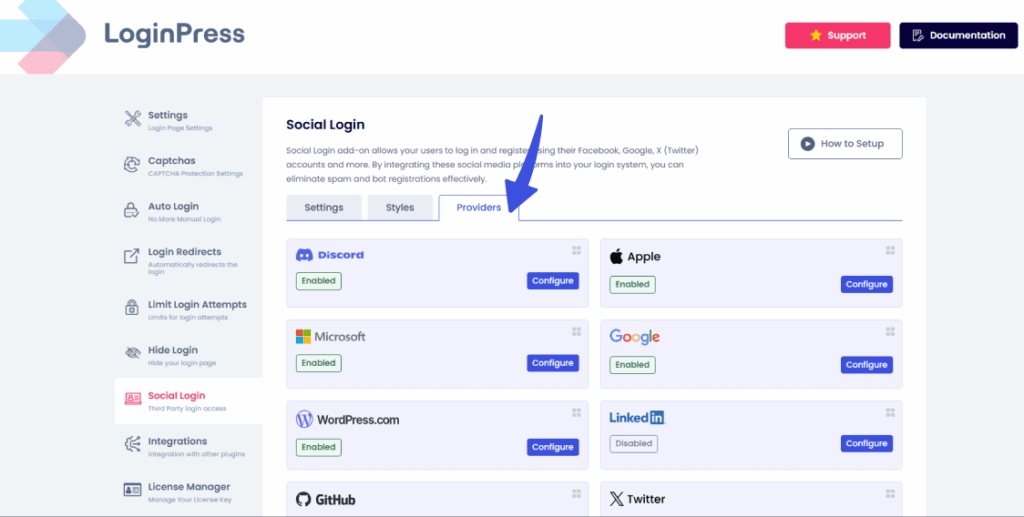
Click the Configure button for each provider that you want to add, then follow the on-screen instructions to create API credentials. For more instructions on each specific provider, explore our documentation section.
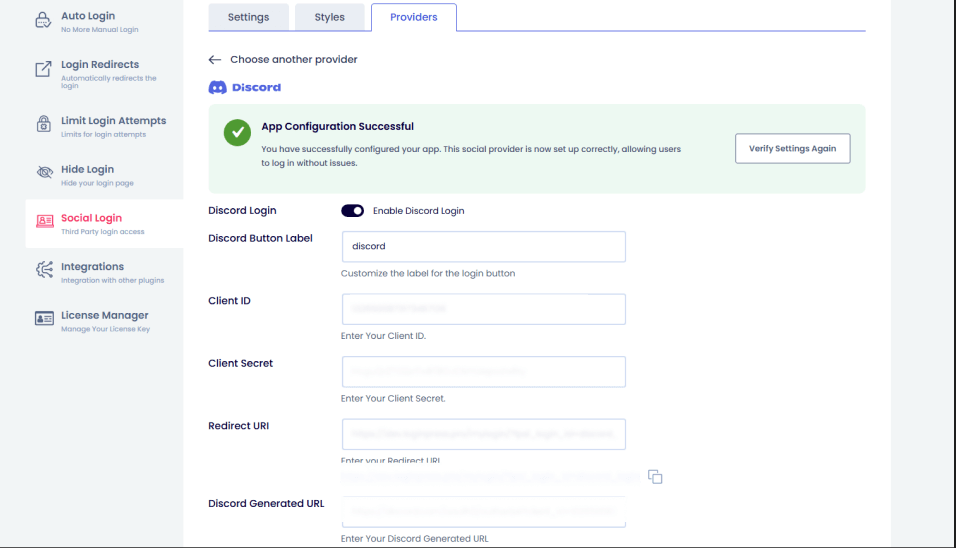
These credentials allow your site to communicate securely with the social platform. Although it may sound technical, LoginPress provides helpful links and guides to assist you in completing this process quickly.
Step 4: Customize Button Placement
Decide where your social login buttons will appear by navigating to the Styles tab.
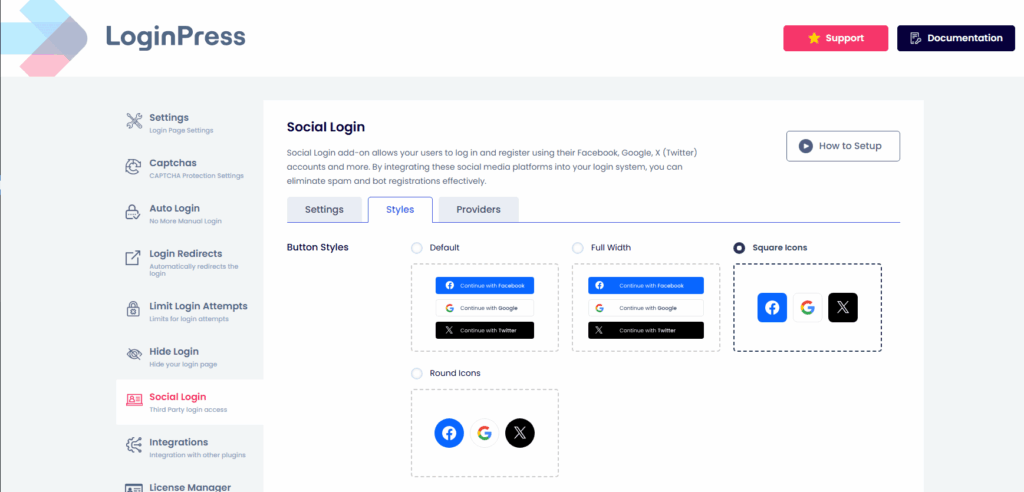
You can display them on the default login page and the registration page. Placing buttons where users naturally interact with the app boosts sign-ups and improves user onboarding. Activate the display settings that best fit your site’s user flow.
Step 5: Test the Login Experience
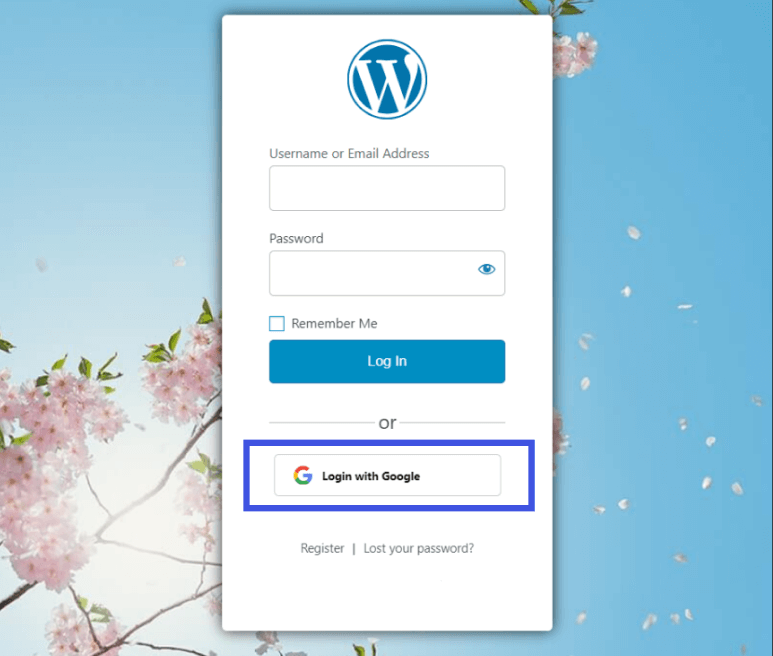
Once everything is set up, log out and try signing in using a social account. This ensures the WordPress social login connection works smoothly, allowing you to experience the new user journey firsthand. A quick test can prevent confusion and increase sign-up conversion.
Common Mistakes to Avoid When Using Social Login
The most common social login mistakes are setup errors that limit your results, and each has a simple fix:
Enabling Too Many Social Providers
Offering too many WordPress social login options (Google, Facebook, Twitter, LinkedIn, Apple, etc.) can confuse visitors and make your interface look cluttered. Users may take longer to decide which button to use, which increases friction.
Solution: Stick to the top two or three platforms your audience uses most, like Google and Facebook, which will help keep the login area clean and focused.
Placing Buttons Too Low or Out of Sight
Some websites hide their WordPress social login buttons below the form or in small text links. If users don’t see the option immediately, they’ll either move on or opt for the longer sign-up process.
Solution: Place buttons near the top of your login or registration form where they’re instantly visible. This small change can significantly improve WordPress sign-up conversion rates.
Not Testing the Mobile Experience
A large share of users now browse from mobile devices. Buttons that don’t resize properly or are too close together create a bad WordPress social login UX, leading to drop-offs.
Solution: Always preview and test your login page on mobile screens to ensure smooth one-tap access.
Forcing Social Login Only
Some site owners remove the traditional login option completely. Not all users want to connect their social accounts. Forcing them might cause them to leave.
Solution: Offer both options, such as traditional login and social login, to cater to all user preferences.
Ignoring Privacy and Permissions
WordPress Social login involves sharing user data, such as names and emails. Failing to disclose how data is used can break trust and may violate GDPR or privacy rules.
Solution: Add a short privacy notice and link to your policy near the social login buttons. Transparency builds trust and credibility.
Not Monitoring Performance
Many site owners enable WordPress social login once and never revisit the setup. This is why you can miss insights about which platforms perform best or where users drop off.
Solution: Use an analytics plugin like Analytify for smooth tracking of your results. Adjust placement, providers, or messages based on user behavior.
Avoiding these common mistakes ensures a smoother user experience, better usability, and higher conversions, all of which are key to growing your WordPress community successfully.
Advanced Growth Tips for Social Login Implementation
You can grow sign-ups further after launch with these practical tactics:
- Add Social Login at Checkout (for E-Commerce Sites)
Allow users to log in or sign up with just one click during checkout. It eliminates guest checkout friction, resulting in more completed sales.
- Offer a Small Incentive for First Social Login
Give users a welcome discount, bonus, or free resource when they first sign in with a social account. This small reward can greatly boost registrations through WordPress social login.
- Combine with Email Marketing
After login, ask permission to send updates or offers. Since WordPress social login provides verified emails, it’s an easy way to grow your email list with real users.
- Segment Users by Social Provider
Identify which users sign in via Google vs. Facebook, then tailor messages or offers to each group. For instance, you might promote Google Workspace-related tools to Google users.
- Pre-Fill User Profiles Automatically
Use the profile data (like name or profile photo) provided by social login to create a personalized experience. It saves time and makes users feel instantly welcomed.
- Show Social Proof Beside Login Buttons
Add a short message like “Join thousands who signed in with Google!” next to your buttons. This subtle touch builds trust and motivates others to register.
- A/B Test Button Design and Placement
Experiment with different button colors, sizes, and placements to optimize your social login funnel in WordPress. Even minor UX tweaks can lead to noticeable growth.
By combining these advanced tactics with a smooth login setup from LoginPress WordPress Social Login, you can turn a simple convenience feature into a powerful conversion tool that helps to boost sign-ups, engagement, and long-term user loyalty.
FAQs on WordPress Social Login
Do I need a social login plugin for WordPress?
Yes. If you want to offer one-click signups and avoid manual coding, a plugin is the best way. LoginPress social login add-on handles the technical setup, API credentials, and provider integrations for you.
Will WordPress social login replace the traditional WordPress login form?
Not necessarily. Removing the traditional form entirely may overlook users who prefer non-social options. Offering both social login and a standard form keeps flexibility and captures the most users.
Is social login secure and compliant with privacy regulations?
When implemented correctly, yes. Social login uses OAuth-type authorization, so users don’t share passwords directly. You must still reveal how you use their data and respect regulations like GDPR to avoid issues.
Does social login really improve registrations and user experience?
Absolutely. By reducing form length, password friction, and login hassle, you lower the barrier to entry. That leads to higher signup conversion, better user retention, and improved UX overall.
Conclusion: WordPress Social Login
WordPress social login gives you a larger user base, verified data and higher conversion rates by removing friction from registration.
Pick your plugin, enforce social login, track which platforms your visitors prefer, and test button placement.
That is all for this article. For more related articles, check:
- How to Customize WooCommerce Login and Registration Forms
- How to Boost Login UX with Custom Login User Interface Design
- 9+ Creative Social Login Examples to Inspire Your Next Design
- How to Add Social Login Developer Filters Using LoginPress Pro
Are you ready to boost your community with a WordPress social login plugin like LoginPress?