
To make the plugin extra easy and functional as per the requirements, here comes the detailed documentation regarding the plugin. All about educating the things related to the plugin.

Enabling Math CAPTCHA Security In LoginPress Pro
Traditional CAPTCHA text is increasingly ineffective against automated bots and headless browsers.
However, complex image-recognition CAPTCHAs frustrate users and slows down site performance.
The LoginPress Math CAPTCHA security is a balanced, high-security alternative that challenges the user’s cognitive ability without the bloat of third-party scripts.
Math Captcha Security (TOC):
How Math CAPTCHA Security Works: Server-Side Logic
The LoginPress Math CAPTCHA generates unique, non-repeating arithmetic problems on the fly. It requires the user to perform a mental calculation and input the result before the “Login” button becomes functional.
- Dynamic Generation: Problems are generated on the server, so bots cannot simply read a static image.
- Multi-Form Deployment: It can be injected into the Login, Registration, Lost Password, and even the Comment forms.
How to Enable Math CAPTCHA Security (Step-by-Step)
- Navigate to LoginPress >> CAPTCHA Settings >> Math CAPTCHA.
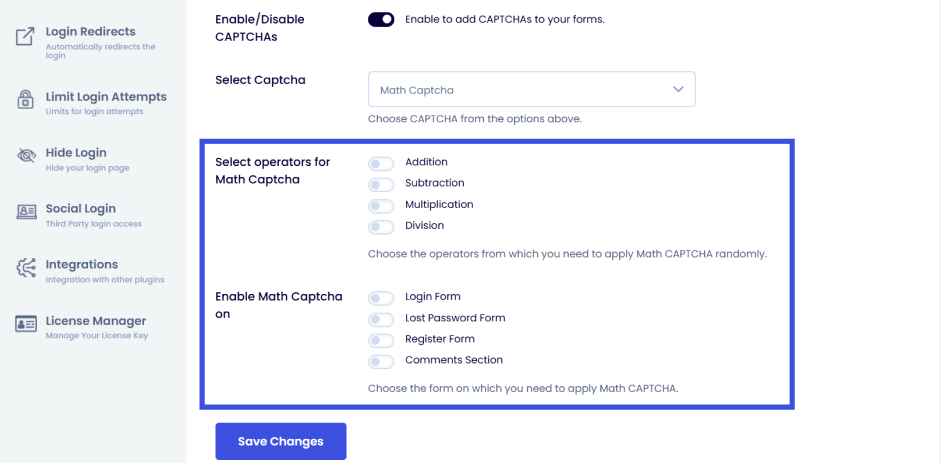
Operator Selection
You can choose the difficulty level by selecting mathematical operators:
- Basic: Addition and Subtraction.
- Advanced: Multiplication and Division.
- Tip: For most sites, Addition and Subtraction are sufficient to stop 99% of bots while maintaining a high conversion rate.
Placement Settings
Check the boxes for every form you wish to protect. We recommend a minimum for the Register Form, as this is the primary target for spam accounts.
Custom Styling (Optional)
Since the CAPTCHA is part of the LoginPress ecosystem, you can use the LoginPress Customizer to change the colors, fonts, and sizes of the math prompt to ensure it looks like a native part of your brand.
How CAPTCHA Helps Balance Privacy, Performance, and Defense
- User Friction vs. Security: Unlike Google’s reCAPTCHA, which sometimes forces users to solve 5+ puzzles, Math CAPTCHA is solved in seconds by humans but is extremely difficult for standard scripts to parse.
- Privacy (GDPR/CCPA): Many third-party CAPTCHA services track user data and drop cookies. Math CAPTCHA is self-contained within your WordPress site; no user data ever leaves your server.
- Lightweight Performance: No external JavaScript libraries are loaded, keeping your login page lightning-fast on mobile.
Strengthen your forms with MATH CAPTCHA security challenges that deter automated scripts while maintaining a friction-free experience for human users.
To enable other types of CAPTCHAs, check out our guides:
- How to Add hCAPTCHA on WordPress with LoginPress
- How to Add reCAPTCHA On WordPress with LoginPress (Easy Guide)
Ready to customize your CAPTCHA’s visual style to match your brand? Learn more about CAPTCHAs in LoginPress.
Feel free to reach out to our support team for any further assistance or questions.
Frequently Asked Questions (FAQs)
These FAQs answer the most common questions about our WordPress custom login page plugin.

Where can I get support for LoginPress?
If you need help with LoginPress, you can contact us here. We’ll be happy to answer any questions about the plugin.
Do you have an affiliate program?
Yes, we have an affiliate program that you can sign up for here. As an affiliate, you’ll earn a commission on every sale you refer to us.
Do you offer refunds?
Yes, we offer a 14-day money-back guarantee on all of our plans. If you’re unsatisfied with LoginPress, simply contact us within 14 days of your purchase, and we’ll process a refund.
Can I upgrade my license after my initial purchase?
Yes, you can upgrade your LoginPress license at any time. Simply log into your account and go to the My Downloads page. From here, you can upgrade your license and download the latest version of the plugin.
Will LoginPress slow down my website?
No, LoginPress will not slow down your website. The plugin is lightweight and only loads the necessary files when someone tries to access your login page.

If you Still have Questions?
Get In Touch