
To make the plugin extra easy and functional as per the requirements, here comes the detailed documentation regarding the plugin. All about educating the things related to the plugin.

Is LoginPress Compatible with WordPress.com?
If you are hosting your site at WordPress.com and intend to use LoginPress to beautify its login page. You are on the right page!
LoginPress is a WordPress login plugin that customizes the default login page of a WordPress website, i.e., wp-login.php.
It enhances the default WordPress login page by modifying its basic, boring look.
Being rich in customization options, it not only styles your WordPress login pages but also provides security features.
LoginPress & WordPress.com Compatibility
By default, LoginPress isn’t compatible with the WordPress.com hosting because LoginPress uses the WordPress default login page, i.e.,/wp-login.php.
On the other hand, WordPress.com has its own login page structure, which is different than the default one.
WordPress.com adds its own custom scripts to the WordPress login page.
The custom form asks the user to either log in with a conventional login by using their credentials, i.e., email/username and password, or by using a WordPress.com account.
The page is not controlled or managed by LoginPress as it has a totally different structure than the default login page of WordPress.
How Can I Use LoginPress with WordPress.com?
LoginPress can work with WordPress.com. As it styles the custom form on WordPress.com, the problem occurs in the LoginPress customizer.
It makes the form inaccessible, preventing real-time customizations from being shown.
Since the sites on WordPress.com enable the option of “Allow users to log in to this site using WordPress.com accounts” by default.
See the image below:
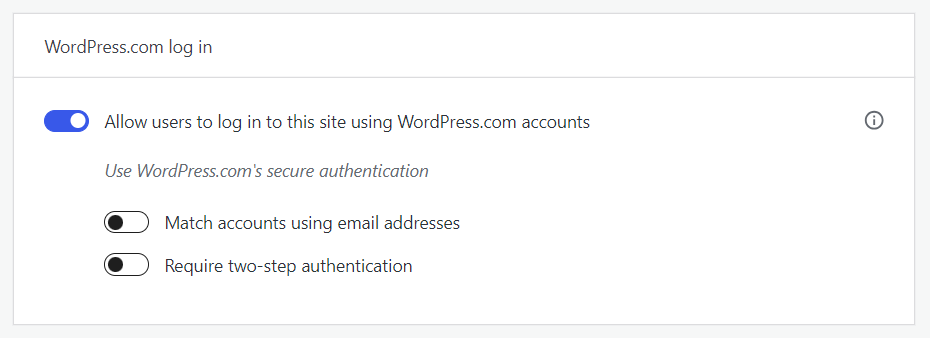
If you want to override the settings WordPress.com sets for the custom login form that appears on the front end, you need to disable it.
You can find these settings on My Site >> Settings >> Security
See the image below:
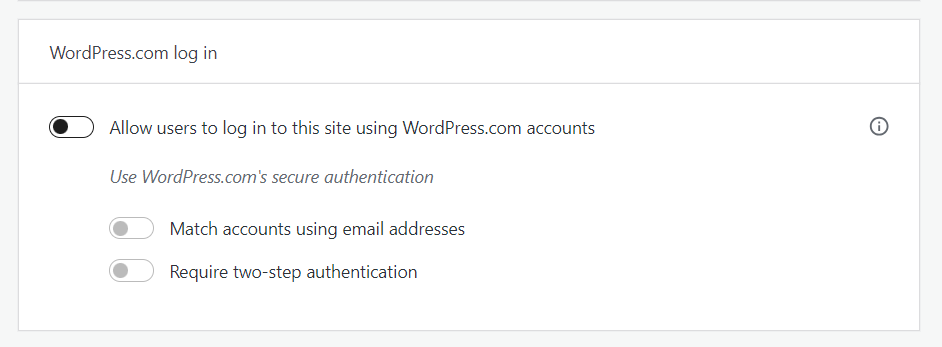
Note: Once the customization is done, you can enable the option of “Allow users to log in to this site using WordPress.com accounts”. It will not affect the customization changes LoginPress made to your login page.
That’s it!
LoginPress is compatible with WordPress.com. You are good to go to keep using LoginPress at your site hosted on WordPress.com
If you’re using WordPress.com, you may encounter compatibility issues with certain plugins.
This article provides specific guidance on how to make LoginPress work seamlessly with your WordPress.com site.
If you have any doubts or questions related to this matter, please don’t hesitate to contact our support team.
Frequently Asked Questions (FAQs)
These FAQs answer the most common questions about our WordPress custom login page plugin.

Where can I get support for LoginPress?
If you need help with LoginPress, you can contact us here. We’ll be happy to answer any questions about the plugin.
Do you have an affiliate program?
Yes, we have an affiliate program that you can sign up for here. As an affiliate, you’ll earn a commission on every sale you refer to us.
Do you offer refunds?
Yes, we offer a 14-day money-back guarantee on all of our plans. If you’re unsatisfied with LoginPress, simply contact us within 14 days of your purchase, and we’ll process a refund.
Can I upgrade my license after my initial purchase?
Yes, you can upgrade your LoginPress license at any time. Simply log into your account and go to the My Downloads page. From here, you can upgrade your license and download the latest version of the plugin.
Will LoginPress slow down my website?
No, LoginPress will not slow down your website. The plugin is lightweight and only loads the necessary files when someone tries to access your login page.

If you Still have Questions?
Get In Touch