
To make the plugin extra easy and functional as per the requirements, here comes the detailed documentation regarding the plugin. All about educating the things related to the plugin.

How to Get started with LoginPress?
LoginPress is a simple WordPress Login Plugin that lets you create a custom login page with advanced features for your website without any coding.
Note: Ensure LoginPress is installed and activated.
To get started with LoginPress - WordPress Login Plugin and create a custom login page for your website, you simply need to follow the given steps after the installation of the plugin.
1. Log in to your WordPress dashboard
2. Navigate to LoginPress >> Settings
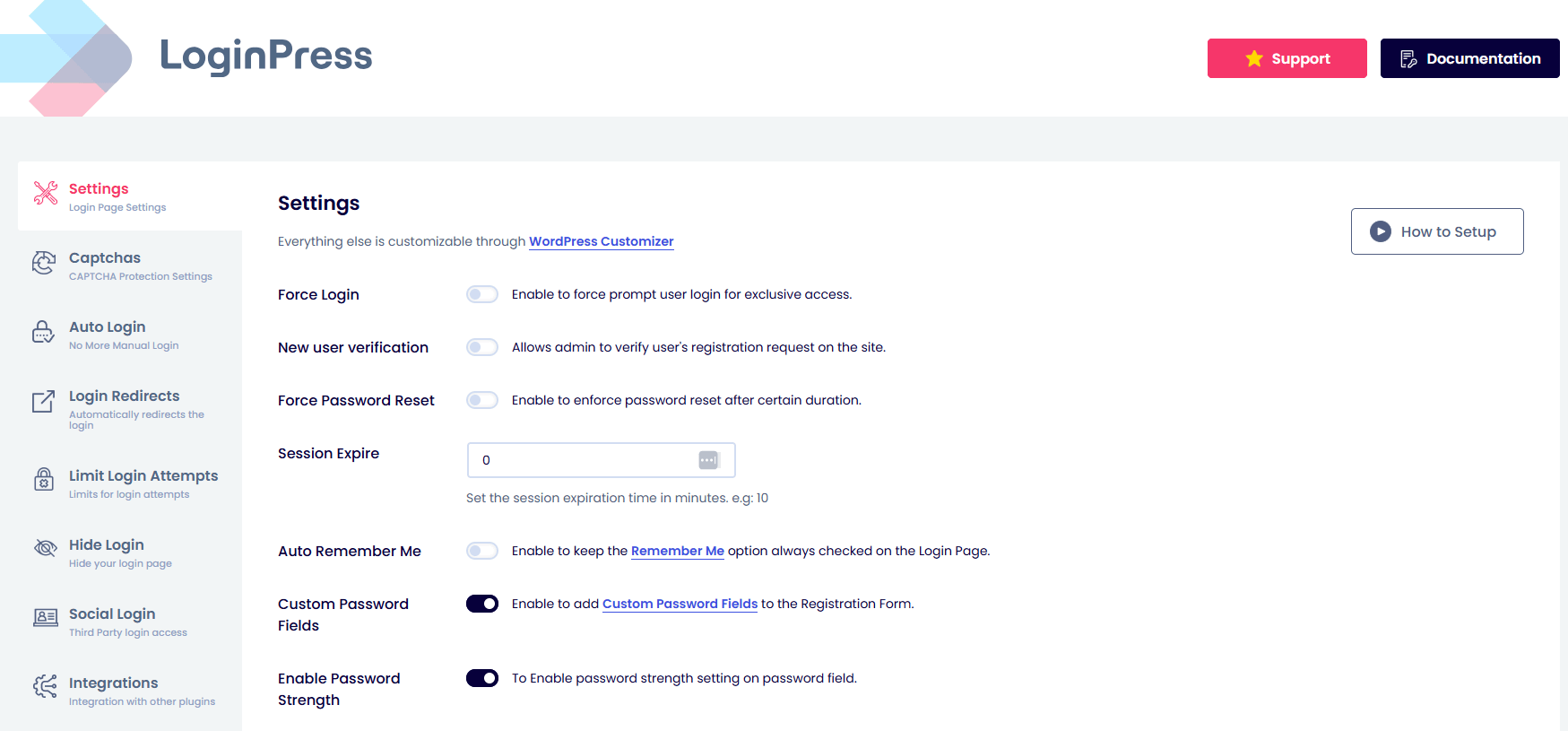
In the LoginPress Settings, you will find a range of free and premium features to enhance customization and security for your WordPress Login URL.
3. Navigate to LoginPress >> Customizer
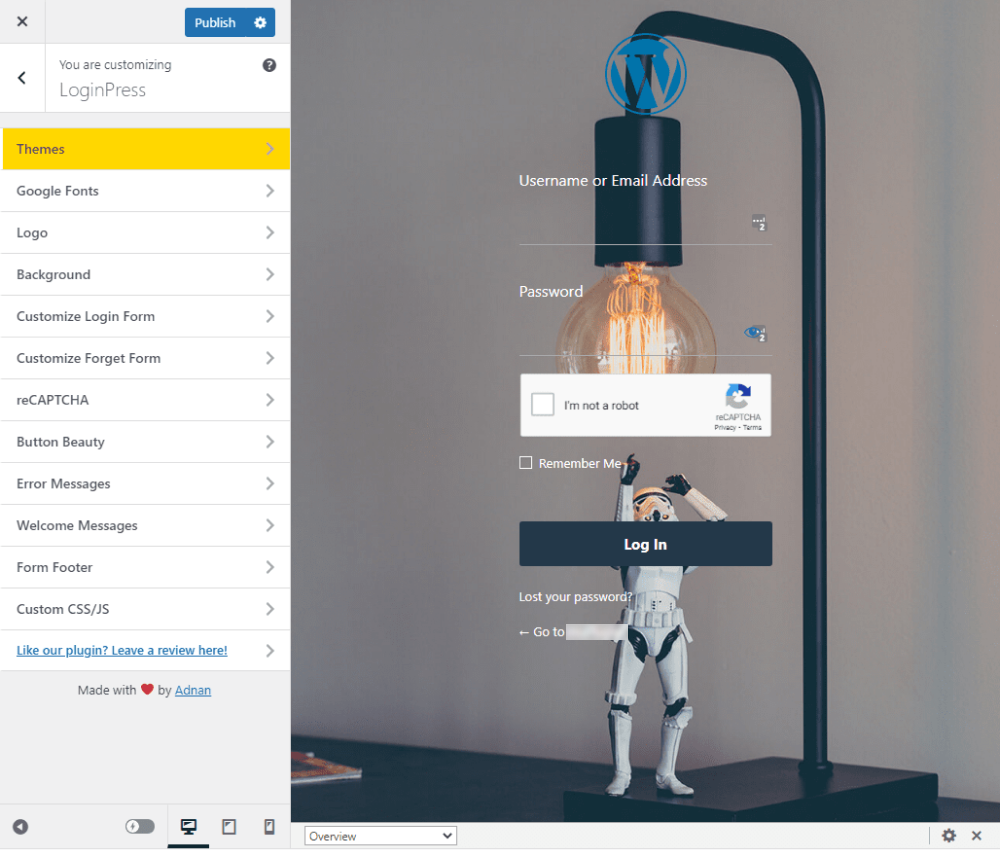
In the customizer, you can use free and premium features to create a custom login page for your site.
To understand the full functionality of each feature, please review the detailed Introduction to LoginPress.
For further information on customizing LoginPress, explore our comprehensive guide to the LoginPress FAQs directory.
Still stuck? How can we help?
Updated on April 2, 2026
Documentation
Integrations
Complete Guide to LoginPress Activation and Licensing
- Introduction to LoginPress – Custom Login Page Customizer
- Get Started with LoginPress – Installation and Activation Guide
- How to Install and Activate LoginPress Pro In WordPress?
- A Quick Guide to Activating Your LoginPress Pro License Key
- How to Customize Your First Login Form with LoginPress[2026 Full Guide]
- LoginPress Free vs Pro [Compared]
Settings
- Explore LoginPress Settings (Free and Pro Version)
- How to Customize the Session Expire Time in WordPress (Easy)
- How to Change Default WooCommerce Lost Password URL
- How to Add reCAPTCHA On WordPress with LoginPress (Easy Guide)
- What is Force Login? See How It Works In LoginPress Pro
- How to Add Custom Password Fields on the Registration Form?
- How to Make Your WordPress Login Page PCI Compliant?
- How to Enable the Auto Remember Me Checkbox on the Login Form
- How to Enable Force Password Reset for Newly Registered Users using LoginPress
- New User Verification Feature in LoginPress
- How to Integrate Discord Social Login on WordPress
- How to Add hCAPTCHA on WordPress with LoginPress
- How to Add Cloudflare Turnstile on WordPress with LoginPress? [2026 Guide]
- LoginPress + BuddyPress Integration
- LoginPress + LearnDash Integration
- LoginPress + WooCommerce Integration
- LoginPress + Easy Digital Downloads (EDD) Integration
- LoginPress + BuddyBoss Integration
- LoginPress + LifterLMS Integration
- How to Setup Twitch Social Login on WordPress
- How to Set Up Reddit Social Login on WordPress
- How to Integrate Amazon Social Login on WordPress
- How to Integrate Spotify Social Login on WordPress
- How to Integrate Pinterest Social Login on WordPress to Capture Creative Audiences?
- How to Add Disqus Social Login on WordPress
Customizer guides for a personalized login page
- A Comprehensive Guide to LoginPress Customizer (Free and Pro Versions)
- Customizing Login Page Theme with LoginPress
- Add Google Fonts To WordPress Login Page Using LoginPress Premium
- How to Customize WordPress Login Page Background with LoginPress (Simple)
- Customizing Login Form with LoginPress
- How to Easily Customize Forget Form with LoginPress
- How to Customize reCaptcha with LoginPress Pro Version?
- How to Customize Button Beauty with LoginPress (2026 Design Guide)
- How to Customize Error Messages with LoginPress
- LoginPress Welcome Messages: How to Customize WordPress Login Greetings?
- Customize the Footer Text with LoginPress
- Add CSS & JS To Your WordPress Login Page with LoginPress
- How to Customize Login Page Logo with LoginPress (Simple Guide)
- How to Enable the Register Link on the Login Page in WordPress
- Customize Passwords Don’t Match Error Message with LoginPress
- How To Easily Integrate a YouTube Video Background Login Page?
- Introducing the “User Avatar” Feature in the Login Logout Menu Plugin!
LoginPress Pro
- How to Easily Customize Forget Form with LoginPress
- How To Integrate Microsoft Social Login on WordPress Using LoginPress
- Fix Auto Login Issues on Rocket.net Hosting with LoginPress
- New User Verification Feature in LoginPress
- How to Integrate Discord Social Login on WordPress
- How to Integrate GitHub Social Login on WordPress
- How to Integrate Apple Social Login on WordPress
- How to Integrate WordPress.com Social Login using LoginPress
- LoginPress + BuddyPress Integration
- LoginPress + LearnDash Integration
- LoginPress + WooCommerce Integration
- LoginPress + Easy Digital Downloads (EDD) Integration
- LoginPress + BuddyBoss Integration
- LoginPress + LifterLMS Integration
- How to Setup Twitch Social Login on WordPress
- How to Set Up Reddit Social Login on WordPress
- How to Integrate Amazon Social Login on WordPress
- How to Integrate Spotify Social Login on WordPress
- How to Integrate Pinterest Social Login on WordPress to Capture Creative Audiences?
- How to Add Disqus Social Login on WordPress
Learn, Integrate, and Customize LoginPress Add-Ons
- Exploring LoginPress Add-Ons
- Enable Auto Login for WordPress Users Using LoginPress
- How to Hide Login with LoginPress (Easy Way)
- How to Limit Login Attempts with LoginPress (Easy)
- Add Login Widget to Your WordPress Login Page With LoginPress
- How to Create Login Redirects with LoginPress (Simple)
- Introduction to LoginPress Social Login Add-on
- How to Create Login Logout Menu with LoginPress (Free)
- How to Integrate Twitter Social Login on WordPress (Explained)
- How to Integrate Google Social Login on WordPress
- How to Integrate LinkedIn Social Login on WordPress
- How to Integrate Facebook Social Login on WordPress
- How to Add LoginPress Autologin Filters to Your WordPress Site?
- How To Integrate Microsoft Social Login on WordPress Using LoginPress
- Fix Auto Login Issues on Rocket.net Hosting with LoginPress
- How to Integrate Discord Social Login on WordPress
- How to Integrate GitHub Social Login on WordPress
- How to Integrate Apple Social Login on WordPress
- How to Integrate WordPress.com Social Login using LoginPress
- How to Setup Twitch Social Login on WordPress
- How to Set Up Reddit Social Login on WordPress
- How to Integrate Spotify Social Login on WordPress
- How to Integrate Pinterest Social Login on WordPress to Capture Creative Audiences?
- How to Add Disqus Social Login on WordPress
Frequently Asked Queries Covered In-Depth
- Who Should Use LoginPress Plugin?
- How to Get started with LoginPress?
- Do You Need Coding Skills to Use LoginPress? Here’s the Answer!
- Is LoginPress Translation-Ready? Yes It Is!
- Why Upgrade to LoginPress Pro?
- How to Upgrade to LoginPress Pro?
- LoginPress and WooCommerce Compatibility
- Ensuring Compatibility: LoginPress and EDD
- How to Add Social Login Shortcode in WooCommerce?
Customize LoginPress with Hooks & Custom Code
- Removing Remember Me Checkbox with Hook
- Removing Social Buttons from the Login Widget with Hook
- How to Customize Default Theme Background Image with Hook
- Remove LoginPress Default Error Messages with Hook
- How to Prevent LoginPress Login Redirects Using Hook?
- How To Prevent or Customize LoginPress Logout Redirects (Hook)
- How To Exclude Specific User Roles From The Session Expiration (Hook)
- How To Exclude The Pages/Posts From Force Login Feature (Hook)
- How To Redirect From wp-admin With LoginPress Hide Login Addon (Hook)
- LoginPress and WooCommerce Compatibility
- Ensuring Compatibility: LoginPress and EDD
- How To Prevent Password Email upon Register With LoginPress (Hook)
- How to Add Social Login Shortcode in WooCommerce?
- Use LoginPress for Customized Lost Password Link for LifterLMS
- Adding Login Logout Menu Filters to Your WordPress Website
- A Comprehensive Guide to Login Logout Menu Shortcodes
- How to Delete an IP Address from LoginPress Limit Login Attempts
- Add a Sortable Registration Date Column to the Users Page
Compatibility with Popular WordPress Tools
- Make LoginPress Work for WordPress Multisites: Compatibility Guide
- Use WPML and LoginPress to Create a Multilingual Login Experience
- LoginPress and WooCommerce Compatibility
- Ensuring Compatibility: LoginPress and EDD
- Is LoginPress Compatible with WordPress.com?
- LoginPress And Two-Factor Authentication Compatibility [2026 Guide]
- How to Remove the “Log in with WordPress.com” Button On The Login Page
- LoginPress and WP Rocket for Outstanding Website Experience
- LoginPress and Weglot: A Powerful Solution
- Exploring the Compatibility of LoginPress and bbPress (2026 Technical Guide)
- How to Fix WPEngine Hide Login Issue
- Compatibility Between BuddyBoss Platform Plugin and LoginPress
- How to Redirect the Default BuddyPress Register Page to LoginPress—2026 Guide
- Fix Auto Login Issues on Rocket.net Hosting with LoginPress
- Compatibility between LoginPress and WPS Hide Login
- LoginPress and ZeroBounce Compatibility
LoginPress Documentation
- LoginPress Support
- How To Integrate Microsoft Social Login on WordPress Using LoginPress
- Fix Auto Login Issues on Rocket.net Hosting with LoginPress
- New User Verification Feature in LoginPress
- How to Integrate Discord Social Login on WordPress
- How to Integrate GitHub Social Login on WordPress
- How to Integrate Apple Social Login on WordPress
- How to Integrate WordPress.com Social Login using LoginPress
- LoginPress + BuddyPress Integration
- LoginPress + LearnDash Integration
- LoginPress + WooCommerce Integration
- LoginPress + Easy Digital Downloads (EDD) Integration
- LoginPress + BuddyBoss Integration
- LoginPress + LifterLMS Integration
- How to Setup Twitch Social Login on WordPress
- How to Set Up Reddit Social Login on WordPress
- How to Integrate Amazon Social Login on WordPress
- How to Integrate Spotify Social Login on WordPress
- How to Integrate Pinterest Social Login on WordPress to Capture Creative Audiences?
- How to Add Disqus Social Login on WordPress
Frequently Asked Questions (FAQs)
These FAQs answer the most common questions about our WordPress custom login page plugin.

Where can I get support for LoginPress?
If you need help with LoginPress, you can contact us here. We’ll be happy to answer any questions about the plugin.
Do you have an affiliate program?
Yes, we have an affiliate program that you can sign up for here. As an affiliate, you’ll earn a commission on every sale you refer to us.
Do you offer refunds?
Yes, we offer a 14-day money-back guarantee on all of our plans. If you’re unsatisfied with LoginPress, simply contact us within 14 days of your purchase, and we’ll process a refund.
Can I upgrade my license after my initial purchase?
Yes, you can upgrade your LoginPress license at any time. Simply log into your account and go to the My Downloads page. From here, you can upgrade your license and download the latest version of the plugin.
Will LoginPress slow down my website?
No, LoginPress will not slow down your website. The plugin is lightweight and only loads the necessary files when someone tries to access your login page.

If you Still have Questions?
Get In Touch